Cycling through all six. Tap any point to stop.
Measured on six things
Convert, migrate, and recover OST files to PST and 13+ fo...
Growth
58Real, specific problem (orphaned OSTs after Exchange decommissioning) with named segments and a genuine wedge: Windows+Mac, 13+ formats, direct cloud migration. Category is mature and crowded.
Screenshots
1 / 1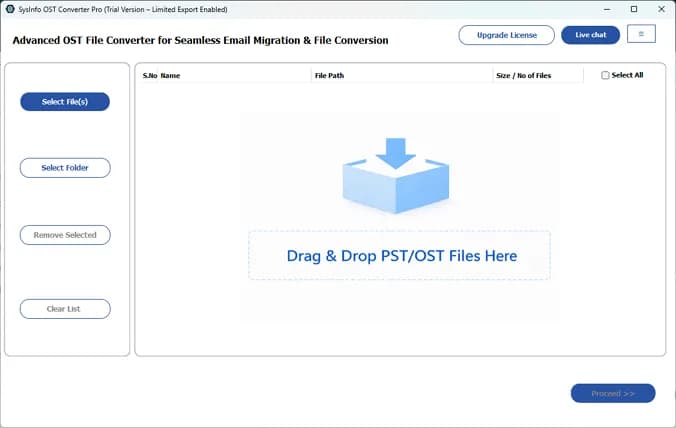
About this app
SysInfo OST to PST Converter is a powerful, standalone utility that lets you convert Outlook OST files to PST and 13+ other formats (EML, MSG, MBOX, PDF, CSV, DOCX, JSON, MD, ICS, VCF, etc.) without needing Outlook or an active Exchange connection. It handles healthy, orphaned, password-protected, and oversized OSTs, preserving folder hierarchy, metadata, and attachments. The tool also supports direct migration to Microsoft 365, Google Workspace, IMAP, and Outlook.com, with advanced features like date filtering, duplicate removal, and attachment management. Available for Windows and Mac, it's ideal for IT admins, forensic investigators, legal/compliance teams, and individuals recovering or migrating email data. With a 4.9-star rating from over 1,700 users and 15+ years of expertise, SysInfo delivers a reliable, secure, and user-friendly solution for all OST conversion needs.
Key features
- 1Converts healthy, orphaned, password-protected and oversized OST files without Outlook or an active Exchange connection.
- 2Exports to PST plus 13+ formats (EML, MSG, MBOX, PDF, CSV, DOCX, JSON, MD, ICS, VCF) and directly to Microsoft 365, Google Workspace, IMAP and Outlook.com.
- 3Advanced controls: date-range filtering, duplicate removal, attachment merge/exclude, PST/MBOX/PDF splitting, and resume-interrupted conversions.
Target customer profile
Drawn from the product itself, not from a survey.
Demographic
IT admins and enterprise teams managing Exchange decommissioning or employee offboarding.
Pain points
Inaccessible OST files after Exchange server shutdown; no Outlook or active profile; need bulk conversion without data loss.
Primary needs
Batch convert orphaned OSTs to PST or cloud; preserve metadata and hierarchy; ensure compliance and security.
Demographic
Forensic investigators and legal/compliance professionals requiring email evidence extraction.
Pain points
Need to access and analyze OST files without altering them; require export to PDF/CSV for legal review; maintain chain of custody.
Primary needs
Read-only preview across multiple tabs; export to forensic-friendly formats; date filtering and detailed logs.
Demographic
Individual users and small businesses recovering old email archives from backups or crashed systems.
Pain points
Cannot open OST files without original Outlook profile; risk of data loss; need to migrate to new email client or cloud.
Primary needs
User-friendly interface; convert to PST or other formats; preserve attachments and folder structure; affordable licensing.
Scout Review
Written by AI from measured evidence, scored out of 100.
SysInfo OST to PST Converter is a mature, competent utility from a vendor with a 16-year-old domain and a long track record. The measured evidence is genuinely good: a 99/100 mobile Lighthouse score, 98/100 accessibility, and 10/12 on security headers. The product itself covers the full job — healthy, orphaned, password-protected and oversized OSTs; 13+ output formats; direct cloud migration; date filtering; duplicate removal; attachment control; PST splitting. The free download capped at 50 emails per folder is a sensible way to prove it works on your own file before committing. Where it falls short of excellent: the marketing page looks dated, there's no published security audit despite enterprise and legal positioning, and the differentiators against Stellar and Kernel are real but incremental rather than structural.
Measure by measure
Usability
68Free download with a 50-email-per-folder cap, software guide, screenshots, video and a 30-day moneyback. Feature set is deep and clearly enumerated; onboarding docs exist but the page is dense.
Design
62Long-form, trust-badge-heavy marketing page with screenshots and video tabs. Functional and consistent but dated in style; the desktop tool's own UI is only visible via screenshots.
Speed
88Lighthouse mobile 99/100 (LCP 1.1s, CLS 0, TBT 147ms) and desktop 97/100. Genuinely fast marketing page with no layout shift.
Security
74HTTPS with HSTS, CSP, Referrer-Policy and Permissions-Policy; 10/12 header checklist. Missing X-Frame-Options and X-Content-Type-Options. Claims local-only processing and OAuth 2.0, but no published audit found.
Accessibility
80Lighthouse accessibility 98/100. Failing audits are minor: no main landmark, role=presentation conflicts, some visible labels without matching accessible names. No WCAG statement published.
Growth
58Real, specific problem (orphaned OSTs after Exchange decommissioning) with named segments and a genuine wedge: Windows+Mac, 13+ formats, direct cloud migration. Category is mature and crowded.
Improvement areas
- No published SOC 2, ISO 27001 or penetration test results despite enterprise, legal and forensic positioning.
- Missing X-Frame-Options and X-Content-Type-Options headers; three minor accessibility audit failures left unfixed.
- Dated, text-heavy landing page with screenshots and video buried behind tabs; no clear pricing table in the collected content.
Design & Usability
The marketing page is a wall of trust signals — 4.9 stars from 1,762 ratings, 1M+ downloads, 190+ countries, 15+ years — wrapped around a long feature list. It's consistent and complete, but it reads like a 2015 software vendor page: dense text, repeated CTA blocks, screenshots and video tucked behind tabs. The actual product is a Windows/Mac desktop utility, so the real interface is only visible through those screenshots. Usability is stronger: a free download capped at 50 emails per folder lets you verify the tool works on your own orphaned file before paying, and there's a software guide, video and 30-day moneyback behind it. The feature surface is genuinely deep — date filtering, duplicate removal, attachment merge/exclude, PST splitting, resume-interrupted-conversion — and it's enumerated clearly enough to compare against Stellar and Kernel line by line.
Speed & Security
Speed is the standout measured result: Lighthouse mobile 99/100 with LCP 1.1s, CLS 0 and TBT 147ms, desktop 97/100. Whatever this page is built on, it loads instantly and doesn't shift under your cursor — rare for a vendor site this content-heavy. Security is competent but not exceptional: HTTPS enforced with HSTS, CSP, Referrer-Policy and Permissions-Policy, scoring 10/12 on header checks, with X-Frame-Options and X-Content-Type-Options missing. The product's own security story is the more interesting one — read-only access to the original OST, no server uploads, OAuth 2.0 and app passwords for cloud exports — which is exactly the right posture for forensic and legal work. What's absent is third-party proof: no published SOC 2, ISO 27001 or penetration test results appear in the collected evidence, so enterprise buyers are trusting the vendor's word.
Accessibility & Growth
Accessibility scores 98/100 on Lighthouse, with only minor failures: no main landmark, some role=presentation conflicts, and a few visible labels without matching accessible names. Those are cheap fixes, and the absence of a published WCAG statement is normal for a desktop-utility vendor but still a gap for the government and legal buyers this tool courts. Growth is a judgement on the idea: orphaned OST recovery is a real, expensive, deadline-driven problem, and the product names its segments precisely — IT admins decommissioning Exchange, forensic investigators needing chain of custody, individuals with a dead Outlook profile. The wedge against Stellar and Kernel is cross-platform Windows+Mac support, 13+ output formats, and direct migration to Microsoft 365, Google Workspace and IMAP. That's a legitimate differentiator, but the category is mature, the incumbents are entrenched, and the buying decision is usually made once per migration project rather than recurring.
Conclusion
If you're an IT admin staring at a decommissioned Exchange server, a forensic analyst who needs OST contents in CSV without touching the original, or someone with a five-year-old backup and no Outlook profile, this does the job and the free tier lets you confirm it before paying. Buy it for the format breadth and the Mac support. Don't buy it expecting a modern SaaS experience or a compliance package you can hand to a security reviewer — you'll be quoting the vendor's own claims. Compare the licence price against Stellar and Kernel directly; all three solve the same problem, and the tiebreaker is which one opens your specific file cleanly.
Suggestions for improvement
- Publish a SOC 2 or ISO 27001 report — legal and forensic buyers need third-party proof, not vendor claims.
- Add X-Frame-Options and X-Content-Type-Options headers; two lines of config closes the 10/12 gap.
- Fix the three failing accessibility audits (main landmark, ARIA roles, label names) and publish a WCAG statement.
- Modernise the landing page: shorter copy blocks, above-the-fold product screenshots, and a clearer pricing table.
Alternatives comparison
Named competitors, point by point. Nobody paid to appear here or to be left out.
 SysInfo OST to PST Converter SysInfo OST to PST Converter |  Stellar Converter for OST Stellar Converter for OST |  Kernel for OST to PST Kernel for OST to PST | |
|---|---|---|---|
| Cross-platform support | Windows and Mac | Windows (Mac via separate product) | Windows |
| Handles orphaned / inaccessible OST | Yes, no Outlook or Exchange profile required | Yes | Yes |
| Output formats beyond PST | 13+ (EML, MSG, MBOX, PDF, CSV, DOCX, JSON, MD, ICS, VCF, PNG) | PST, EML, MSG, PDF, HTML, RTF, MBOX | PST, EML, MSG, MBOX, PDF, HTML |
| Direct cloud / mailbox migration | Microsoft 365, Google Workspace, IMAP, Outlook.com | Microsoft 365, Exchange, IMAP | Microsoft 365, Exchange, IMAP |
| Free trial / evaluation | Free download, saves up to 50 emails per folder | Free trial with save preview limit | Free trial with save limit |
| Batch conversion of multiple OSTs | Yes, manual or drag/drop, multiple files at once | Yes | Yes |
Stellar Converter for OST
Converts OST to PST and other formats, supports orphaned files, and offers preview and selective conversion.
Kernel for OST to PST
Converts inaccessible OST files to PST, supports batch conversion, and preserves data integrity.
Comparing options? See SysInfo OST to PST Converter alternatives, scored side by side
More Productivity apps
View all Productivity
The Stack Newsletter
92A weekly newsletter delivering curated tech jobs, intervi...

Qamarero
92An all-in-one hospitality software for restaurants and ba...

EmbedMyReviews
92White-label reputation management software for agencies s...

StoryPad
92Privacy-first open source journal app with a continuous t...

Notion
92All-in-one AI workspace for docs, projects, and knowledge...

Puzzly – B2B Lead Generation & Sales Intelligence Platform
92Puzzly is an all-in-one B2B lead generation platform that...

Vibe Coding Agent Skills
92A free, open-source platform offering 110 AI agent skills...

Gerty
91Private, local AI assistant for Mac that runs offline

CC Switch
91Open-source desktop app for switching AI coding providers...

username.md
90One verified handle for your online identity, readable by...

PitchWhip
90AI cold call scripts & direct dials from LinkedIn

What the GIF
89Frame-perfect video-to-GIF maker that runs entirely in yo...


A platform dedicated to providing unbiased reviews of newly launched applications, analyzing everything from their features to their full potential.
info@scoutforge.net© 2026 Scoutforge. All rights reserved.
