Cycling through all six. Tap any point to stop.
Measured on six things
Delete duplicate Outlook MSG emails without Outlook insta...
Design
52Dense, dated landing page built from repeated bullet lists and generic marketing copy. No product screenshots or UI previews of the actual Windows app, so the tool's interface is invisible to buyers.
Screenshots
1 / 4
About this app
TrustVare MSG Duplicate Remover Software is a reliable and simple to use solution that help users to delete duplicate emails from MSG files quickly. The program is fast and safe and does not lose any of the data quality. Key Features: Batch elimination of redundant MSG data Supports all Outlook 2021 and previous versions Fast intelligent duplicate file search Requires no installation of Outlook No file size limit Compatible with Windows 11, 10, 8.1, 8, 7 and other Windows OSes Demo version free This program is a wonderful option for pros and individual users that need to keep their MSG files organized and duplicate-free.
Key features
- 1Batch removal of duplicate emails, contacts, events, and tasks from single or multiple MSG files.
- 2Standalone operation — no Microsoft Outlook installation required to deduplicate MSG archives.
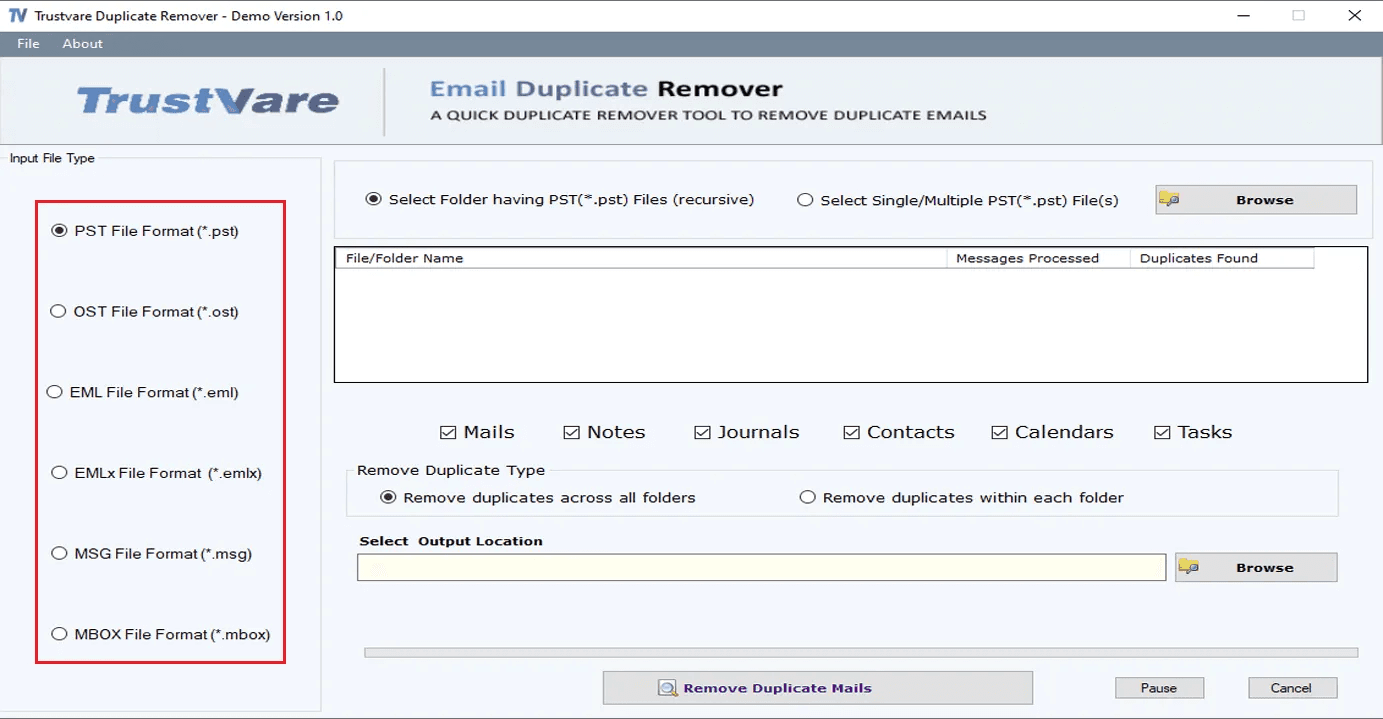
- 3Two dedup modes: remove duplicates across all folders or within each folder, with output to a chosen location.
Target customer profile
Drawn from the product itself, not from a survey.
Demographic
IT administrators in small to mid-sized businesses
Pain points
Managing multiple Outlook MSG files with duplicates, risking data bloat and inefficiency.
Primary needs
Batch removal of duplicates without Outlook, saving cleaned files to a local folder.
Demographic
Individual Outlook users with large email archives
Pain points
Cluttered inboxes and storage issues due to duplicate emails, contacts, and events.
Primary needs
Easy, fast duplicate removal within and across folders, preserving data integrity.
Demographic
Legal and compliance teams handling email evidence
Pain points
Duplicates in MSG files complicate review and increase storage costs.
Primary needs
Reliable deduplication with advanced filters and no data loss, for efficient case management.
Scout Review
Written by AI from measured evidence, scored out of 100.
TrustVare MSG Duplicate Remover is a competent, narrowly-scoped Windows utility for stripping duplicate emails, contacts, and events from MSG files without needing Outlook installed. The marketing site is fast (98/100 Lighthouse) but dated and repetitive, with no screenshots of the actual app. Docs are a bare three-step list. Security headers are half-configured and no compliance certifications are published. It's a solid pick if you specifically need Outlook-free MSG dedup in batch — and a hard pass if you need enterprise-grade assurances or a polished, demo-able experience.
Measure by measure
Usability
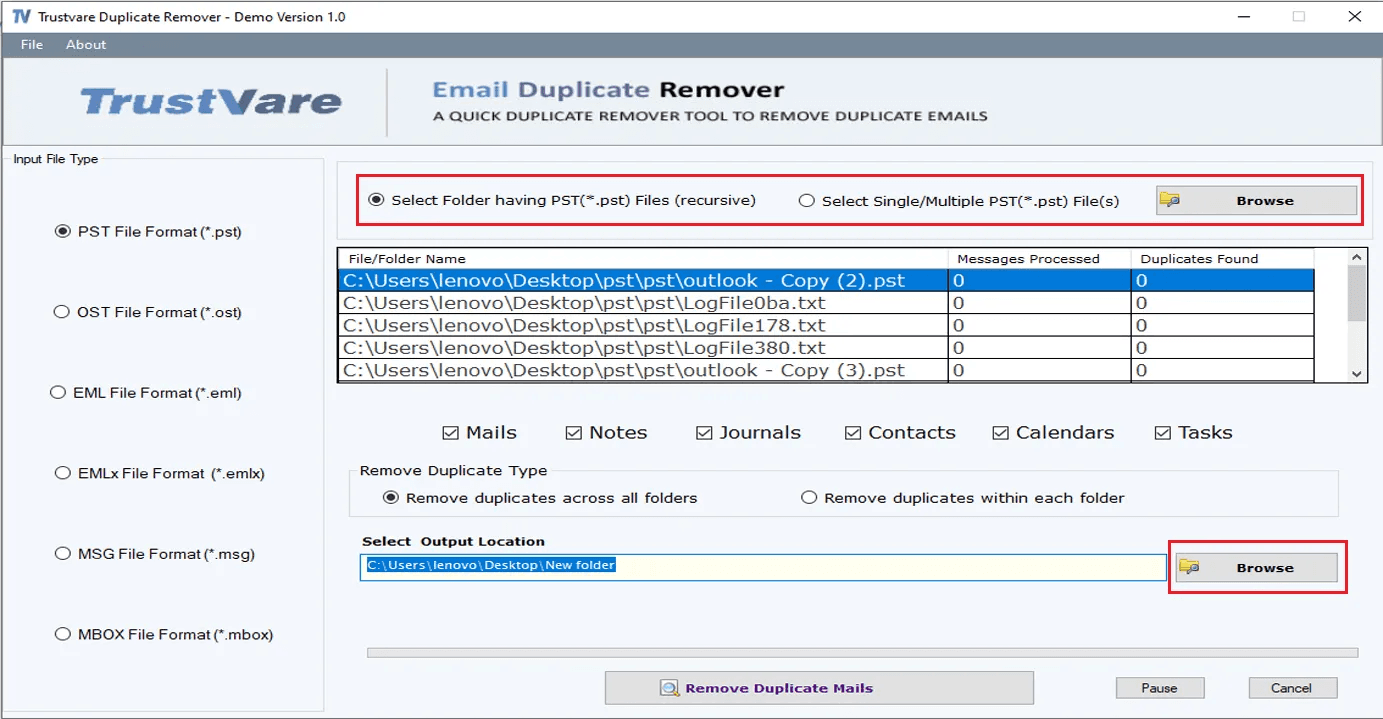
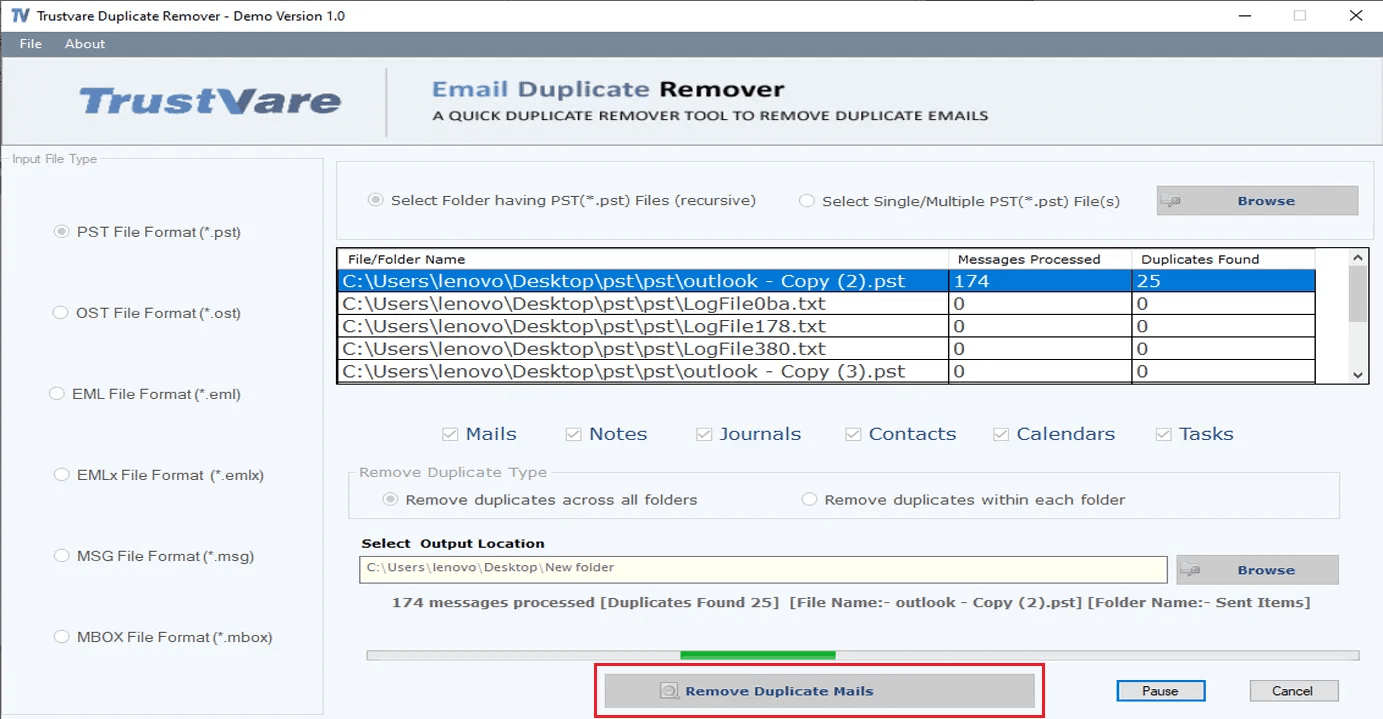
58Docs lay out a clear 3-step flow (select MSG, preview tree, choose output, remove) and a free trial exists. But there's no live demo, no video, and no searchable help center to fall back on.
Design
52Dense, dated landing page built from repeated bullet lists and generic marketing copy. No product screenshots or UI previews of the actual Windows app, so the tool's interface is invisible to buyers.
Speed
88Lighthouse mobile 98/100 with LCP 1.2s, CLS 0, TBT 164ms; desktop also 98/100. The marketing site is genuinely snappy, though app-level performance is unmeasured.
Security
52HTTPS enforced with CSP, SPF, and DMARC in place, but HSTS, frame protection, and several hardening headers are missing (6/12 checklist). No SOC 2, ISO, or pen-test claims published.
Accessibility
58Lighthouse a11y 86/100, but contrast failures, unlabeled form elements, and unnamed links remain. No accessibility statement or WCAG claim anywhere on the site.
Growth
54Real niche with a genuine wedge — MSG dedup without Outlook installed, batch-capable, aimed at IT admins and legal teams. But it's a narrow utility in a crowded converter-tool market with no visible moat.
Improvement areas
- No app screenshots, demo video, or live preview on the site — buyers evaluate blind.
- Security headers incomplete (6/12) and no SOC 2, ISO, or pen-test documentation published.
- Documentation is a bare three-step list with no FAQ, troubleshooting, or searchable help center.
Design & Usability
The site is a wall of repeated feature bullets with no screenshots of the actual Windows application, which is a real problem for a desktop utility where the UI is the product. Design craft is dated and generic. Usability is better: the docs give a clean three-step workflow (select MSG input, preview in tree view, pick output, remove), and a free trial lets you test before buying. But there's no live demo, no video, and no searchable help center — if the three steps don't cover your edge case, you're emailing support@trustvare.com and waiting.
Speed & Security
Speed is the standout: Lighthouse mobile and desktop both score 98/100, with LCP 1.2s, CLS 0, and TBT 164ms. The marketing site loads instantly. Security is middling: HTTPS is enforced with CSP, SPF, and DMARC, but HSTS, frame protection, X-Content-Type-Options, Referrer-Policy, and Permissions-Policy are all absent — 6/12 on the header checklist. For a tool pitched at legal and compliance teams handling email evidence, there's no SOC 2, ISO, or pen-test claim to point at. It's not broken, but it's not reassuring either.
Accessibility & Growth
Accessibility lands at 86/100 on Lighthouse, dragged down by insufficient color contrast, form elements without labels, and links without discernible names — the classic trio of an unpolished marketing site. No accessibility statement or WCAG claim exists. Growth is a judgment call: the idea is real (MSG deduplication without Outlook installed, batch-capable, aimed at IT admins and legal reviewers) and the 'no Outlook required' wedge is genuine. But it's a narrow Windows-only utility competing against Softaken and Outlook Duplicate Remover in a crowded converter-tool market, with no network effects and no visible moat beyond that one feature.
Conclusion
If your problem is literally 'I have thousands of MSG files with duplicates and no Outlook license,' this tool addresses it directly and cheaply, with a free trial to prove it. If you need SOC 2 paperwork, a live demo, or a UI you can evaluate before downloading, look elsewhere or budget time for a sales email. The product works; the presentation undersells it.
Suggestions for improvement
- Add real screenshots or a short video of the app UI to the landing page — buyers can't evaluate a desktop tool they can't see.
- Publish HSTS, X-Content-Type-Options, Referrer-Policy, and Permissions-Policy headers to close the 6/12 security gap.
- Expand the docs into a searchable help center with FAQs, error handling, and edge cases beyond the three-step happy path.
- Fix the Lighthouse a11y failures: color contrast, form labels, and discernible link names — quick wins for a better audit score.
Alternatives comparison
Named competitors, point by point. Nobody paid to appear here or to be left out.
 TrustVare MSG Duplicate Remover Tool TrustVare MSG Duplicate Remover Tool | Outlook Duplicate Remover |  MSG Duplicate Remover by Softaken MSG Duplicate Remover by Softaken | |
|---|---|---|---|
| Requires Outlook installed | No — standalone | Yes — requires Outlook | No — standalone |
| File format supported | MSG files | PST files | MSG files |
| Batch processing of multiple files | Yes — batch supported | Varies by edition | Yes — batch supported |
| Free trial / demo available | Yes — free trial download | Yes — trial available | Yes — demo available |
| Platform | Windows 7–11 | Windows | Windows |
Outlook Duplicate Remover
A tool that removes duplicates from Outlook PST files, but requires Outlook installation.
MSG Duplicate Remover by Softaken
Similar utility to remove duplicates from MSG files, but may have different licensing and features.
Comparing options? See TrustVare MSG Duplicate Remover Tool alternatives, scored side by side
More Productivity apps
View all Productivity
Qamarero
92An all-in-one hospitality software for restaurants and ba...

The Stack Newsletter
92A weekly newsletter delivering curated tech jobs, intervi...

EmbedMyReviews
92White-label reputation management software for agencies s...

StoryPad
92Privacy-first open source journal app with a continuous t...

Puzzly – B2B Lead Generation & Sales Intelligence Platform
92Puzzly is an all-in-one B2B lead generation platform that...

Notion
92All-in-one AI workspace for docs, projects, and knowledge...

Vibe Coding Agent Skills
92A free, open-source platform offering 110 AI agent skills...

CC Switch
91Open-source desktop app for switching AI coding providers...

username.md
90One verified handle for your online identity, readable by...

PitchWhip
90AI cold call scripts & direct dials from LinkedIn

What the GIF
89Frame-perfect video-to-GIF maker that runs entirely in yo...

AuditCloser
89White-label website audits that close deals for digital a...


A platform dedicated to providing unbiased reviews of newly launched applications, analyzing everything from their features to their full potential.
info@scoutforge.net© 2026 Scoutforge. All rights reserved.
