Cycling through all six. Tap any point to stop.
Measured on six things
Free AI checker for essays and academic drafts
Security
41HTTPS is enforced and SPF is set, but HSTS, CSP, frame protection, X-Content-Type-Options, Referrer-Policy and Permissions-Policy are all missing — 3/12 probe points. No security page, no SOC 2, no bug bounty, and DMARC is absent.
Screenshots
1 / 1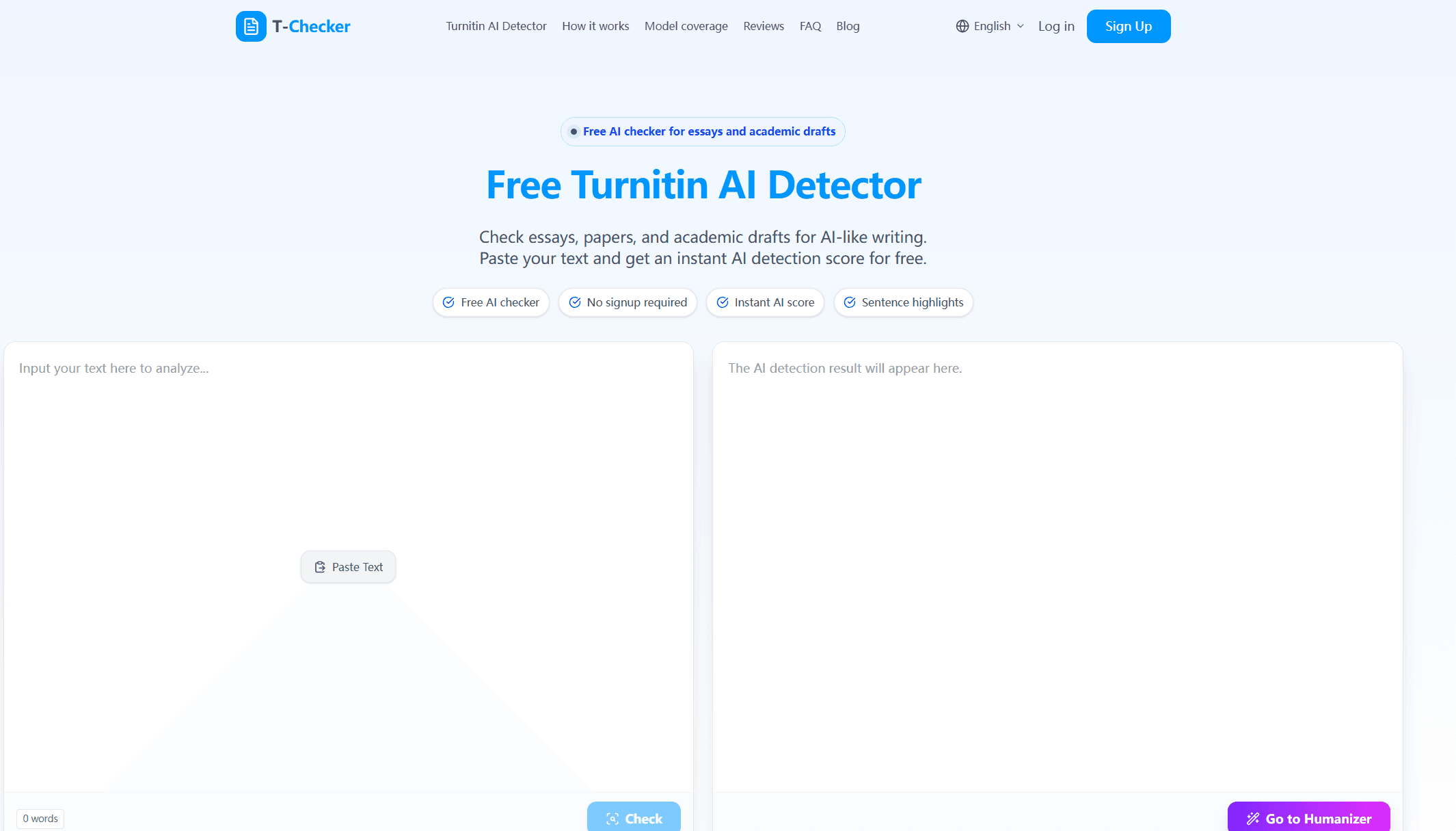
About this app
Turnitin AI Detector is a free online tool that helps students, educators, and academic writers check essays, research papers, and assignments for AI-generated content. With no signup required, users can paste their text and receive an instant AI detection score along with sentence-level highlights that pinpoint potentially AI-like writing patterns. The tool analyzes rhythm, phrasing, structure, and tone to flag text that may sound robotic or overly polished. It supports checking content from various AI models like ChatGPT, Claude, and Gemini. While it should be used as a reference rather than a definitive verdict, it offers a practical way to review drafts before submission and identify areas that may need more personal reasoning or variation. The interface is simple and fast, making it accessible for quick checks. Overall, it's a handy companion for anyone concerned about the authenticity of their academic writing.
Key features
- 1Free AI detection with no signup required — paste text and get an instant AI probability score.
- 2Sentence-level highlights that flag specific passages with AI-like patterns for targeted revision.
- 30-100% score-meaning table with suggested review actions for each risk band.
- 4Coverage claims for ChatGPT, GPT-4/GPT-5, Claude, Gemini, Perplexity, and other AI writing tools.
Target customer profile
Drawn from the product itself, not from a survey.
Demographic
High school and college students
Pain points
Fear of accidental AI flags, lack of confidence in original writing, tight submission deadlines.
Primary needs
Quick, free AI check to ensure essays are human-like before submitting.
Demographic
Educators and professors
Pain points
Difficulty detecting AI-generated student work, time-consuming manual review.
Primary needs
Fast, reliable AI detection with sentence-level insights for fair assessment.
Demographic
Academic researchers and writers
Pain points
Ensuring research papers and articles maintain a human voice, avoiding generic phrasing.
Primary needs
Tool to review drafts for AI-like patterns and improve writing quality.
Scout Review
Written by AI from measured evidence, scored out of 100.
Turnitin AI Detector is a free, no-signup paste-and-check tool that scores academic text for AI-like patterns and highlights suspect sentences. The core loop is genuinely fast to try, the score-meaning table is unusually practical, and the $0 price point is a real differentiator against GPTZero and Originality.ai. The weaknesses are equally clear: mobile performance is poor (LCP 5.6s), security headers are almost entirely absent (3/12), accessibility has four concrete failures despite a 93/100 automated score, and the site leans on stock testimonials and a Turnitin-adjacent name for credibility it has not otherwise earned. There is no published accuracy benchmark, no explanation of the underlying model, and no data-handling policy for pasted text — which matters a lot when the input is unpublished student work. It is a competent, useful free utility with a thin trust layer and a thin moat.
Measure by measure
Usability
62Zero-friction entry: no signup, paste text, instant score, plus a 0-100% score-meaning table with suggested review actions. Loses points for no help center, no docs, and a 'Go to Humanizer' upsell crowding the core tool.
Design
58Clean single-column paste-and-check layout with numbered workflow steps and icon benefit cards. Functional and on-brand for the category, but stock testimonials and a Turnitin-adjacent name do the heavy lifting instead of original visual identity.
Speed
57Desktop Lighthouse 98/100 but mobile only 67/100 with LCP 5.6s and TBT 221ms — mobile users wait over five seconds for the hero. The checker itself is a simple text box, so the weight is front-end bloat, not the tool.
Security
41HTTPS is enforced and SPF is set, but HSTS, CSP, frame protection, X-Content-Type-Options, Referrer-Policy and Permissions-Policy are all missing — 3/12 probe points. No security page, no SOC 2, no bug bounty, and DMARC is absent.
Accessibility
66Lighthouse a11y 93/100, but four real failures: insufficient color contrast, non-sequential headings, no main landmark, and visible-text/accessible-name mismatches. No WCAG statement, no keyboard docs, English-only.
Growth
58Real, named pain (fear of AI flags before submission) with a clear $0, no-signup wedge against GPTZero and Originality.ai. But the moat is thin — detection accuracy is the only thing that matters and nothing here proves it.
Improvement areas
- No published accuracy benchmark or false-positive rate — the core claim is unverified.
- No privacy or data-handling page explaining what happens to pasted text.
- Missing security headers (HSTS, CSP, X-Content-Type-Options, Referrer-Policy) and DMARC record.
- Mobile Lighthouse performance 67/100 with LCP 5.6s; accessibility failures on contrast, headings, and landmarks.
Design & Usability
The site is a single-purpose paste-and-check page and it commits to that: a text box, a word counter, a Check button, and a 0-100% score-meaning table that tells you what to do at each band. Numbered 01/02/03 steps and icon benefit cards make the flow obvious in under ten seconds, and 'no signup required' removes the biggest drop-off point in the category. Where it slips is depth: there is no help center, no FAQ beyond the homepage, no explanation of how the detection actually works beyond a list of writing signals, and a 'Go to Humanizer' link sits right next to the checker, nudging users toward a second product instead of building trust in the first. The stock testimonials from 'Dr. Michael Reed' and 'Emily Carter' with no profile links read as filler and undercut the credibility the rest of the page is trying to build. Usable, fast to try, thin to trust.
Speed & Security
Speed is a tale of two devices. Desktop Lighthouse lands at 98/100, but mobile drops to 67/100 with an LCP of 5.6s, TBT of 221ms, and FCP of 2.9s — mobile users wait more than five seconds for the hero to paint, which is well past the 2.5s 'good' threshold. For a tool whose entire value is 'instant,' that is a self-inflicted wound, and it is front-end weight rather than the checker itself, which is just a text box. Security is the weaker half: HTTPS is enforced and SPF is configured, but the probe found HSTS, CSP, frame protection, X-Content-Type-Options, Referrer-Policy and Permissions-Policy all absent — 3 of 12 checklist points — and DMARC is missing too. There is no security page, no SOC 2 or ISO claim, no bug bounty, and no data-handling detail about what happens to pasted text. For a tool that asks students to paste unpublished essays into a box, that silence is the real problem.
Accessibility & Growth
Accessibility scores 93/100 on the automated Lighthouse audit, but the four failing checks are not cosmetic: insufficient color contrast, headings that skip levels, no main landmark, and visible text labels that do not match accessible names. Those are exactly the issues that break screen-reader navigation, and there is no accessibility statement, no WCAG claim, and no keyboard documentation to offset them. The site is English-only. On growth, the idea is sound and specific: students and educators genuinely fear AI flags before submission, and a free, no-signup checker is a real wedge against GPTZero and Originality.ai, both of which gate value behind accounts or payment. The problem is that the wedge is price and friction, not accuracy — and in AI detection, accuracy is the only thing that earns repeat use. Nothing on the site publishes a benchmark, a false-positive rate, or a model-version comparison, so the differentiator is easy for a competitor to copy by adding a free tier. The domain is roughly 0.7 years old with no visible traction signals, which is context rather than a verdict, but it does mean the moat has not been tested yet.
Conclusion
If you are a student who wants a quick sanity check before submitting, this does the job and costs nothing. If you are an educator making decisions about a student's work, treat the score as a prompt to look closer, not as evidence — the site itself says as much, and nothing here demonstrates the accuracy needed for anything stronger. The honest next steps are unglamorous: publish a false-positive rate, add a privacy page explaining what happens to pasted text, fix the mobile LCP, and add the missing security headers. None of that is hard, and all of it would move this from 'handy free tool' to 'tool I would actually recommend to a department.' Until then, it is a useful first pass and a poor final word.
Suggestions for improvement
- Publish a false-positive rate and a benchmark against known human and AI-written corpora — accuracy is the only differentiator that matters here.
- Add a privacy page stating exactly what happens to pasted text: stored, logged, used for training, or discarded.
- Fix mobile LCP (5.6s): compress hero assets, defer non-critical scripts, and target sub-2.5s on 4G.
- Add the missing security headers (HSTS, CSP, X-Content-Type-Options, Referrer-Policy) and a DMARC record.
Alternatives comparison
Named competitors, point by point. Nobody paid to appear here or to be left out.
 Turnitin AI Detector Turnitin AI Detector |  GPTZero GPTZero |  Originality.ai Originality.ai | |
|---|---|---|---|
| Pricing model | Free, no signup required | Free tier with limits; paid plans for higher volume | Paid only; credit-based scanning |
| Sentence-level highlighting | Yes — highlights sentences with AI-like patterns | Yes — sentence-level highlighting is a core feature | Yes — sentence-level AI detection scoring |
| Plagiarism checking | No — AI detection only | Limited; primarily AI detection | Yes — combined AI and plagiarism scanning |
| Signup required | No — paste and check instantly | Account needed for most features | Account and payment required |
| Target audience | Students, educators, academic writers | Educators, students, and institutions | Content professionals, SEO teams, publishers |
| Published accuracy benchmark | None found on site | Publishes detection accuracy claims and studies | Publishes accuracy studies and false-positive data |
GPTZero
AI detection tool that analyzes text for AI-generated content, offering sentence-level highlights and a user-friendly interface.
Originality.ai
Paid AI and plagiarism checker designed for content professionals, providing detailed AI detection scores and scanning for duplicate content.
Comparing options? See Turnitin AI Detector alternatives, scored side by side
More Education apps
View all Education
The Stack Newsletter
92A weekly newsletter delivering curated tech jobs, intervi...

English Test Coach
89English Test Coach checks your IELTS essays and letters, gives an estimated band score across all four criteria, and tells you exactly what to revise next.

Tracé slides
89Interactive math & physics slides with live graphs and an...

TranscriptYou
88Free YouTube transcript generator with timestamps and AI ...

Startup Science
88A unified platform replacing 12-20 disconnected tools for...

CertWorthIt
87Data-driven tool revealing which certifications actually ...

RBQ Exam
87Online practice for the RBQ contractor licence exams in Québec: original questions, timed mock exams and lessons, in French or English.

Coloring Pages Pro
87A massive collection of free printable coloring pages for...

HireVue Practice
85AI-powered HireVue practice with timed mock interviews, role-specific questions, transcripts, scoring, and actionable feedback.

Case Cub
85AI-powered law school study platform with 20,000+ case br...

Ciroexam
84All-in-one CIRO exam prep for CIRE and 8 other exams, wit...

Aptitude Test Prep
84Free timed practice for SHL, numerical, and logical tests...


A platform dedicated to providing unbiased reviews of newly launched applications, analyzing everything from their features to their full potential.
info@scoutforge.net© 2026 Scoutforge. All rights reserved.
