Cycling through all six. Tap any point to stop.
Measured on six things
Every key you press lights up on an on-screen keyboard, and each shortcut is named as you press it. For screen recordings, demos and learning shortcuts.
Security
41HTTPS enforced but 3/12 on header checklist: no HSTS, CSP, frame protection or Referrer-Policy, and no DMARC. Privacy claims about password fields are unverified.
Screenshots
1 / 1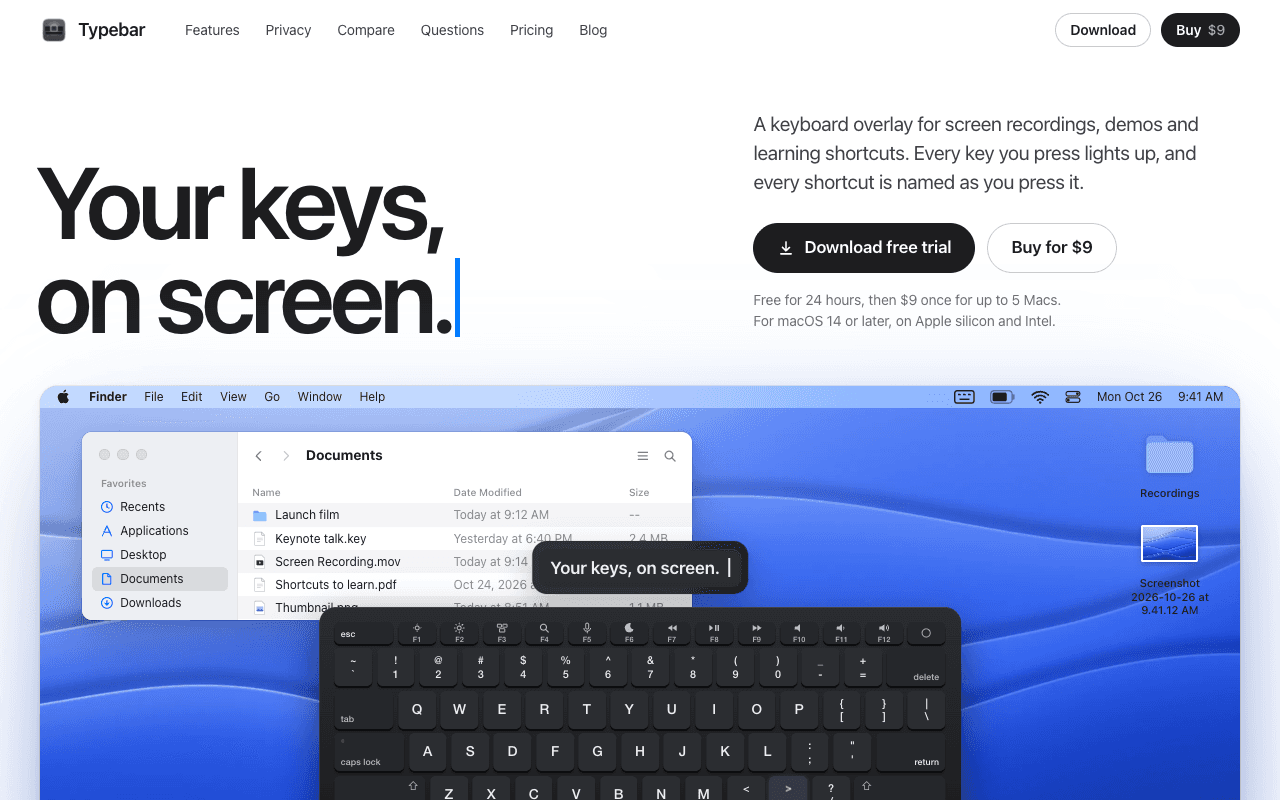
About this app
Typebar is a keyboard overlay for the Mac, made for screen recordings, demos and learning shortcuts. Every key you press lights up on an on-screen keyboard, and a pill names each shortcut from the app's own menus, like Screenshot Selection for Shift Command 4. Hold a modifier and the keys show what they do in the app in front. There are cheatsheets for every app, 20 hand-made packs and your own keybindings from 11 apps. Click ripples, a cursor halo, Spotlight, six switch sounds and 40 themes with a theme editor are built in. Password fields stay private, and nothing you type is saved or sent anywhere. Typebar can show itself when a recording starts and hide when it stops. Free for 24 hours, then $9 once for up to 5 Macs. macOS 14 or later, on Apple silicon and Intel.
Key features
- 1On-screen keyboard overlay that lights up every key press, with a pill naming each shortcut from the app's own menus
- 220 hand-made shortcut packs plus custom keybindings imported from 11 editors including VS Code, Cursor, Zed and JetBrains
- 340 themes with a Theme Studio editor, click ripples, cursor halo, Spotlight dimming and six switch sounds
Target customer profile
Drawn from the product itself, not from a survey.
Scout Review
Written by AI from measured evidence, scored out of 100.
Typebar is a well-crafted Mac utility with a clear job: put your keystrokes on screen for recordings, demos and shortcut learning. The design is the standout — a live keyboard demo, 40 themes and a Theme Studio editor — and the menu-derived shortcut naming is a genuinely smart differentiator. Speed is fine on desktop and mediocre on mobile. Security headers are thin. Accessibility is close but fails contrast, heading order and color-only links. Growth is limited by a narrow audience but the wedge is real. At $9 one-time for 5 Macs, it is easy to justify for anyone who records their screen regularly.
Measure by measure
Usability
71Clear value prop, 24-hour trial, one-time $9 for 5 Macs. Menu-derived shortcut names and 11 editor keybinding imports reduce setup friction. Docs depth unverified.
Design
74Polished, cohesive Mac-native aesthetic. The live keyboard demo, 40 named themes and Theme Studio show real design investment rather than a template landing page.
Speed
68Desktop Lighthouse 95, mobile 80. CLS 0.008 and TBT 81ms are clean; the 4.0s mobile LCP is the weak link on the animated homepage.
Security
41HTTPS enforced but 3/12 on header checklist: no HSTS, CSP, frame protection or Referrer-Policy, and no DMARC. Privacy claims about password fields are unverified.
Accessibility
66Lighthouse 92/100 but three real failures: insufficient color contrast, out-of-order headings, and links distinguishable only by color. No WCAG statement published.
Growth
58Real, specific niche — Mac screen recorders and shortcut learners — with a clear wedge: menu-derived shortcut names and per-app cheatsheets. Small ceiling, but defensible.
Improvement areas
- Security headers: add HSTS, CSP, X-Content-Type-Options, Referrer-Policy and a DMARC record
- Accessibility: fix contrast ratios, heading order and color-only link styling flagged by Lighthouse
- Trial length: 24 hours is too short to evaluate a utility; consider 7 days or a watermarked free tier
Design & Usability
Typebar's design is the strongest part of the product. The homepage runs a live keyboard demo with theme switching, a shortcut pill and click ripples, and the 40 named themes plus a Theme Studio editor signal genuine craft rather than a themed template. Usability is solid: a 24-hour trial, then a one-time $9 for up to 5 Macs, no subscription. Shortcut names come from each app's own menus, so labels match what viewers will actually see, and keybindings import from 11 editors including VS Code, Cursor, Zed and JetBrains. The 24-hour trial window is tight for evaluating a utility, and documentation depth beyond the marketing page is not evidenced.
Speed & Security
Speed is split: desktop Lighthouse 95/100 is genuinely fast, but mobile lands at 80 with a 4.0s LCP — the animated homepage demo is heavy on a phone. CLS 0.008 and TBT 81ms show the layout is stable and the main thread is not choked. Security is the weakest dimension. HTTPS is enforced, but the header probe found no HSTS, CSP, frame protection, X-Content-Type-Options, Referrer-Policy or Permissions-Policy, and no DMARC record — 3/12 on the checklist. The site claims password fields stay private and nothing typed is saved or sent, which is plausible for a local overlay but not independently verified.
Accessibility & Growth
Accessibility scores 92/100 on Lighthouse but fails three real audits: insufficient background/foreground contrast, non-sequential heading order, and links distinguishable only by color. No WCAG conformance statement or accessibility page was found, and the site is English-only. Growth is a judgement on the idea: Typebar targets a narrow but real audience — Mac screen recorders, demo presenters and shortcut learners — and its wedge is concrete. Menu-derived shortcut names, 20 hand-made packs and per-app cheatsheets are things a generic keyboard visualizer does not do. The ceiling is small because the audience is small, but the positioning is honest and the one-time $9 price removes subscription friction.
Conclusion
If you make Mac tutorials, record demos or teach shortcuts, Typebar solves a specific annoyance well and costs less than a coffee. If you need enterprise compliance paperwork or a broad cross-platform tool, look elsewhere. The 24-hour trial is short — block out an afternoon, record something real, and decide before the timer runs out.
Suggestions for improvement
- Extend the trial to 7 days or add a watermarked free tier — 24 hours is too short to evaluate a utility honestly.
- Add HSTS, CSP, X-Content-Type-Options and Referrer-Policy headers, and publish a DMARC record.
- Fix the three Lighthouse a11y failures: contrast ratios, heading order and color-only link styling.
- Reduce mobile LCP below 2.5s by deferring or simplifying the animated keyboard demo on small screens.
Alternatives comparison
Named competitors, point by point. Nobody paid to appear here or to be left out.
 Typebar Typebar | ||
|---|---|---|
| Price model | $9 one-time for up to 5 Macs after a 24-hour trial | Not provided in app details |
| Platform | macOS 14+ on Apple silicon and Intel | Not provided in app details |
| Shortcut naming from app menus | Yes — reads each app's own menus so labels match in-app names | Not provided in app details |
| Themes and customization | 40 themes plus Theme Studio editor with per-key coloring and shareable theme files | Not provided in app details |
| Click visualization | Click ripples, drag trail, cursor halo and Spotlight dimming | Not provided in app details |
| Privacy of typed input | Password fields hidden; site claims nothing typed is saved or sent | Not provided in app details |
Comparing options? See Typebar alternatives, scored side by side
More Productivity apps
View all Productivity
Qamarero
92An all-in-one hospitality software for restaurants and ba...

The Stack Newsletter
92A weekly newsletter delivering curated tech jobs, intervi...

EmbedMyReviews
92White-label reputation management software for agencies s...

StoryPad
92Privacy-first open source journal app with a continuous t...

Puzzly – B2B Lead Generation & Sales Intelligence Platform
92Puzzly is an all-in-one B2B lead generation platform that...

Notion
92All-in-one AI workspace for docs, projects, and knowledge...

Vibe Coding Agent Skills
92A free, open-source platform offering 110 AI agent skills...

CC Switch
91Open-source desktop app for switching AI coding providers...

username.md
90One verified handle for your online identity, readable by...

PitchWhip
90AI cold call scripts & direct dials from LinkedIn

What the GIF
89Frame-perfect video-to-GIF maker that runs entirely in yo...

AuditCloser
89White-label website audits that close deals for digital a...


A platform dedicated to providing unbiased reviews of newly launched applications, analyzing everything from their features to their full potential.
info@scoutforge.net© 2026 Scoutforge. All rights reserved.
