Cycling through all six. Tap any point to stop.
Measured on six things
Generate cinematic AI videos up to 30 seconds from text, ...
Design
58Dark cinematic theme with a consistent purple-to-blue CTA and a clear prompt UI, but the hero headline is obscured by the overlay and pixel-art references clash with the copy.
Screenshots
1 / 1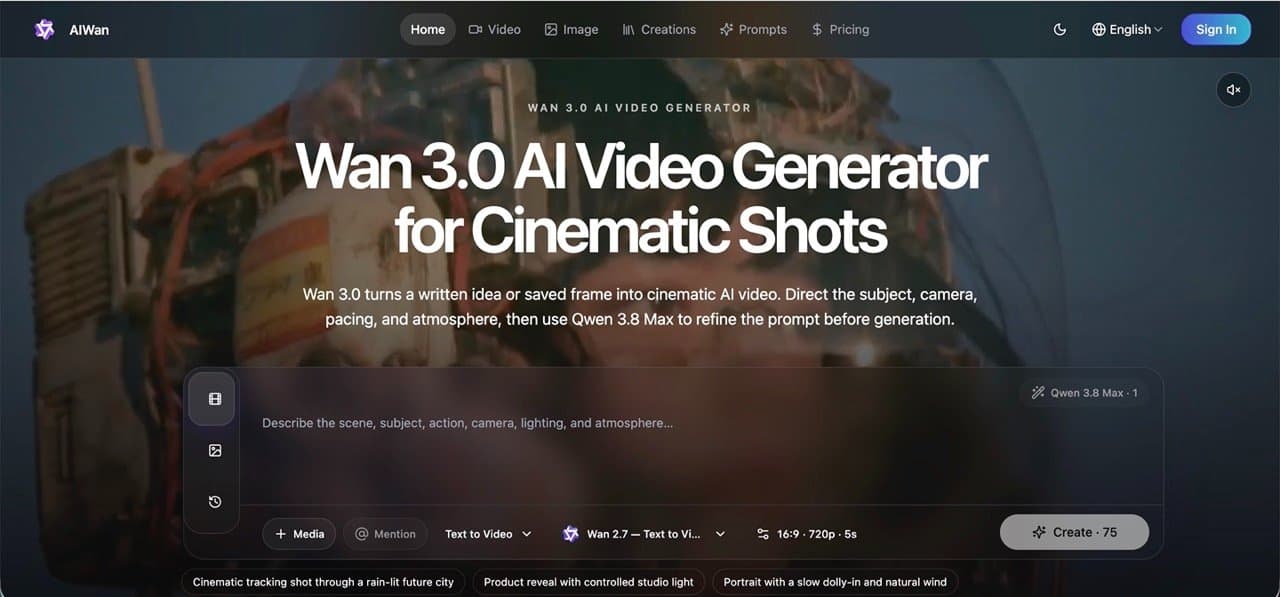
About this app
AIWan is a browser-based AI video generator powered by Wan 3.0, designed for creators who need to turn ideas into polished, cinematic clips quickly. It supports text-to-video, image-to-video, and even document/URL-to-video, with multi-reference guidance for consistent characters, sets, styles, and motion. You can refine prompts with Qwen 3.8 Max, see credit costs upfront, and rely on an automatic refund flow for failed generations. The platform also generates synchronized audio, offers a private creation library, and includes a prompt library with ready-to-use cinematic directions. Whether you're a marketer testing campaign hooks, a filmmaker previsualizing shots, or a social media creator iterating on shorts, AIWan streamlines the entire production pipeline from first idea to final export. Its standout features include omni-modal references, up to 30-second clips, and a workspace that keeps your best outputs ready for reuse. Compared to alternatives like Runway, Pika, or Sora, AIWa...
Key features
- 1Text-to-video, image-to-video and document/URL-to-video with automatic storyboarding and synchronized narration.
- 2Omni-modal references — character, background, style and motion inputs — for consistent characters and scenes across clips.
- 3Transparent credit pricing: 10 free credits with no card, non-expiring one-time packs, and Stripe-secured checkout.
Target customer profile
Drawn from the product itself, not from a survey.
Demographic
Content creators and social media managers
Pain points
Struggling to produce engaging video content quickly and consistently for multiple platforms.
Primary needs
Fast, easy-to-use tool for creating short-form videos with character consistency and trend adaptability.
Demographic
Marketing and advertising professionals
Pain points
High cost and time required for video production; difficulty testing multiple campaign concepts.
Primary needs
Rapid concept visualization, A/B testing of video ads, and brand-aligned video content without full production.
Demographic
Filmmakers and previsualization artists
Pain points
Challenges in communicating shot ideas to teams and clients before shooting; expensive reshoots.
Primary needs
Realistic previsualization with camera movement, lighting, and motion control to align stakeholders early.
Demographic
Educators and trainers
Pain points
Creating engaging educational videos from text-heavy content is time-consuming and requires technical skills.
Primary needs
Conversion of documents and URLs into structured video stories with narration and visuals.
Scout Review
Written by AI from measured evidence, scored out of 100.
AIWan is a browser-based AI video generator built on Wan 3.0, and it is a genuinely competent early-stage product rather than a landing page with a dream. The pitch is specific: text-to-video, image-to-video and document/URL-to-video, with omni-modal references for character, setting, style and motion consistency, clips up to 30 seconds, synchronized audio, and a private creation library. Pricing is transparent in a way this category usually isn't — 10 free credits with no card, one-time packs that never expire, and an FAQ that actually answers the credit questions. The measured evidence backs up the basics: a 100/100 accessibility audit, a full 12/12 security header checklist, and a 79/100 mobile performance score. The weaknesses are craft and differentiation. The hero headline is obscured by its own overlay, the reference art clashes with the cinematic copy, and the whole product sits on top of someone else's model while Runway, Pika and Sora sit on their own. Worth trying on the free credits; worth paying for only if the document-to-video workflow is the thing you actually need.
Measure by measure
Usability
63Clear workflow docs, 10 free credits with no card, and non-expiring credit packs. Undermined by a 500-char prompt cap and unexplained 50 vs 75 credit costs.
Design
58Dark cinematic theme with a consistent purple-to-blue CTA and a clear prompt UI, but the hero headline is obscured by the overlay and pixel-art references clash with the copy.
Speed
71Lighthouse mobile 79/100 with CLS 0.01 and FCP 1.4s — a stable, quick-painting page. The 4.0s LCP is the one metric holding it back from the top of the band.
Security
74Full 12/12 header checklist — HTTPS, HSTS, CSP, frame protection, SPF and DMARC — plus Stripe checkout that never stores card details. No published audits found.
Accessibility
80Lighthouse accessibility 100/100 with a language selector in the nav. No WCAG statement or published a11y docs, and automated checks only cover part of the picture.
Growth
58Real problem, real wedge: doc/URL-to-video and multi-reference consistency. But it's a feature on top of Wan 3.0 competing with Runway, Pika and Sora.
Improvement areas
- Hero headline is obscured by the prompt overlay and reference art clashes with the cinematic copy — fix first-load readability.
- Credit costs for generation are inconsistent across CTAs (50 vs 75) with no explanation of what drives the difference.
- No published security or accessibility documentation — no SOC 2 page, no WCAG statement, no keyboard-navigation notes.
Design & Usability
The design leans hard into cinematic dark-mode marketing and mostly lands it: a consistent purple-to-blue CTA, a well-structured prompt panel with tabs for Video, Image and History, and demo cards that show the before/after workflow with motion, audio and output layers. Where it slips is craft. The hero headline is partially obscured by the semi-transparent prompt overlay, the reference thumbnails are low-res pixel art sitting next to copy about 'organic lens bloom', and a separate MAKER MEDIA hero card uses a different headline and model name than the live homepage. Usability is the stronger half. The homepage documents three real workflows — text-to-video, image-to-video and document/URL-to-video — with example prompts and a four-input reference system covering character, background, motion and audio. Pricing is unusually honest: 10 free credits with no card, one-time packs that never expire, and an FAQ that explains credits vary by model, resolution and duration. The friction is in the details: a 500-character prompt cap with small helper text, and multiple 'Create' CTAs showing 50 versus 75 credits with no explanation of why.
Speed & Security
Speed is measured, not guessed. Lighthouse mobile performance lands at 79/100 with CLS 0.01 and FCP 1.4s — a stable layout that paints quickly — while LCP sits at 4.0s, the single metric dragging the score down. TBT of 333ms is acceptable. There are no published benchmarks for actual generation time, and no user complaints about lag in the collected evidence, so the render pipeline itself remains unverified. Security is the quiet overachiever here. The HTTP and DNS probe returned a full 12/12: HTTPS enforced, HSTS, CSP, frame protection, X-Content-Type-Options, Referrer-Policy, Permissions-Policy, plus SPF and DMARC records. Checkout runs through Stripe, and the pricing page states plainly that Wan Studio never stores full card details. What's missing is the paperwork layer — no SOC 2, ISO or HIPAA page, no security page, no bug bounty. For a product this young that's normal, but it caps how far the score can climb.
Accessibility & Growth
Accessibility is the standout measured result: a 100/100 Lighthouse audit, with a language selector in the top navigation signalling multi-language support. The caveat is that automated axe-core checks cover only part of WCAG — there is no accessibility statement, no WCAG conformance claim, and no published keyboard-navigation documentation, so the perfect score is a floor, not a ceiling. Growth is a judgement about the idea, not the traction. The problem is real: producing consistent, character-accurate short video is expensive and slow, and the target segments named on the homepage — advertising, education, storytelling, social — are specific and plausible. The wedge is genuine too: document/URL-to-video with automatic storyboarding and narration, plus multi-reference guidance for character, setting, style and motion. That's a workflow Runway, Pika and Sora don't foreground. The limit is structural. This is a wrapper around Wan 3.0, and the incumbents own their own models, their own distribution and their own pricing power. The domain is barely months old, so there is no traction to argue with either way.
Conclusion
The honest read: AIWan does the table-stakes things right and one or two things well. The security headers are complete, the accessibility audit is clean, the free tier is real, and the document/URL-to-video pipeline is a legitimately useful wedge for marketers and educators who already have a deck or a page and need it turned into motion. What it doesn't have is a moat. It runs on Wan 3.0, which means its ceiling is set by someone else's roadmap, and its competitors own their models outright. If you're a creator testing campaign hooks or a trainer converting text-heavy material into video, the 10 free credits cost you nothing to find out whether the workflow fits. If you need guaranteed character consistency across a long project, or you need to know your vendor will still be here in two years, the incumbents are the safer bet. Try it, judge it on the output, and don't buy an annual plan until you've burned through the free credits and a month of real work.
Suggestions for improvement
- Fix the hero: move the headline above the prompt overlay or reduce overlay opacity so the value proposition is readable on first load.
- Explain the credit costs. Two 'Create' buttons at 50 and 75 credits with no context is the fastest way to make users distrust your pricing.
- Publish an accessibility statement and keyboard-navigation notes to back up the 100/100 audit with something a human can read.
- Add a security or trust page — even a short one covering data handling, retention and Stripe checkout — to convert cautious buyers.
Alternatives comparison
Named competitors, point by point. Nobody paid to appear here or to be left out.
 Wan 3.0 AI Video Generator Wan 3.0 AI Video Generator |  Runway Runway |  Pika Pika |  Sora Sora | |
|---|---|---|---|---|
| Text-to-video generation | Yes — powered by Wan 3.0, clips up to 30 seconds | Yes — core Gen-series text-to-video | Yes — core text-to-video with creative effects | Yes — flagship text-to-video model |
| Document / URL to video | Yes — PDF, Word, PPTX, XLSX, MD, TXT and URLs with auto storyboard | Not a headline workflow | Not offered | Not offered |
| Multi-reference character/style consistency | Yes — character, background, style and motion references | Yes — via reference images and style tools | Partial — focused on effects rather than consistency | Limited — prompt-driven, no explicit reference system |
| Free tier / trial | 10 free credits, no credit card required | Free plan with limited one-time credits | Free tier with limited monthly credits | Limited access, tied to ChatGPT subscription tiers |
| Entry paid price | $13.9/mo annual (800 credits) or $19.9 monthly | Standard tier around $12-15/mo annual | Paid tiers start around $8-10/mo | Bundled with ChatGPT Plus/Pro subscriptions |
| Synchronized audio generation | Yes — synchronized audio and auto narration track | Yes — audio generation available | Limited — sound effects on some features | Yes — Sora generates audio with video |
Runway
AI-powered video creation suite with text-to-video, image-to-video, and advanced editing tools.
Pika
AI video platform for generating and editing videos from text and images, with a focus on creative effects.
Sora
OpenAI's text-to-video model known for high-quality, realistic video generation from textual descriptions.
Comparing options? See Wan 3.0 AI Video Generator alternatives, scored side by side
More Productivity apps
View all Productivity
The Stack Newsletter
92A weekly newsletter delivering curated tech jobs, intervi...

Qamarero
92An all-in-one hospitality software for restaurants and ba...

EmbedMyReviews
92White-label reputation management software for agencies s...

StoryPad
92Privacy-first open source journal app with a continuous t...

Notion
92All-in-one AI workspace for docs, projects, and knowledge...

Puzzly – B2B Lead Generation & Sales Intelligence Platform
92Puzzly is an all-in-one B2B lead generation platform that...

Vibe Coding Agent Skills
92A free, open-source platform offering 110 AI agent skills...

Gerty
91Private, local AI assistant for Mac that runs offline

CC Switch
91Open-source desktop app for switching AI coding providers...

username.md
90One verified handle for your online identity, readable by...

PitchWhip
90AI cold call scripts & direct dials from LinkedIn

What the GIF
89Frame-perfect video-to-GIF maker that runs entirely in yo...


A platform dedicated to providing unbiased reviews of newly launched applications, analyzing everything from their features to their full potential.
info@scoutforge.net© 2026 Scoutforge. All rights reserved.
