Cycling through all six. Tap any point to stop.
Measured on six things
Each app's power draw in watts, the minutes you'd get back by quitting it, and a measured result two minutes after you do. For Apple silicon Macs.
Growth
58Real, specific problem (unitless Energy Impact) with a demonstrated wedge: watts per app plus a post-quit receipt that refuses false credit. But macOS-only, Apple silicon-only, macOS 14+ caps the addressable market hard.
Screenshots
1 / 3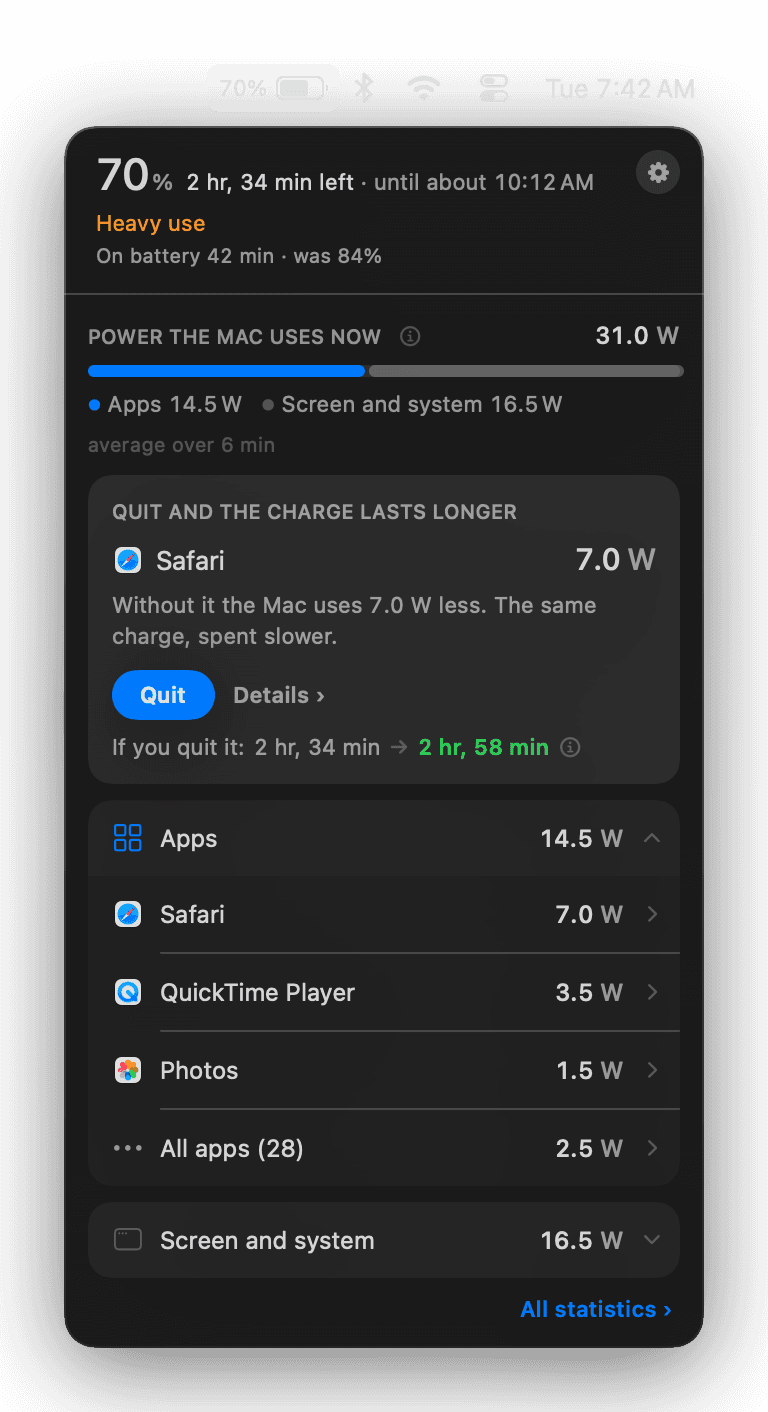
About this app
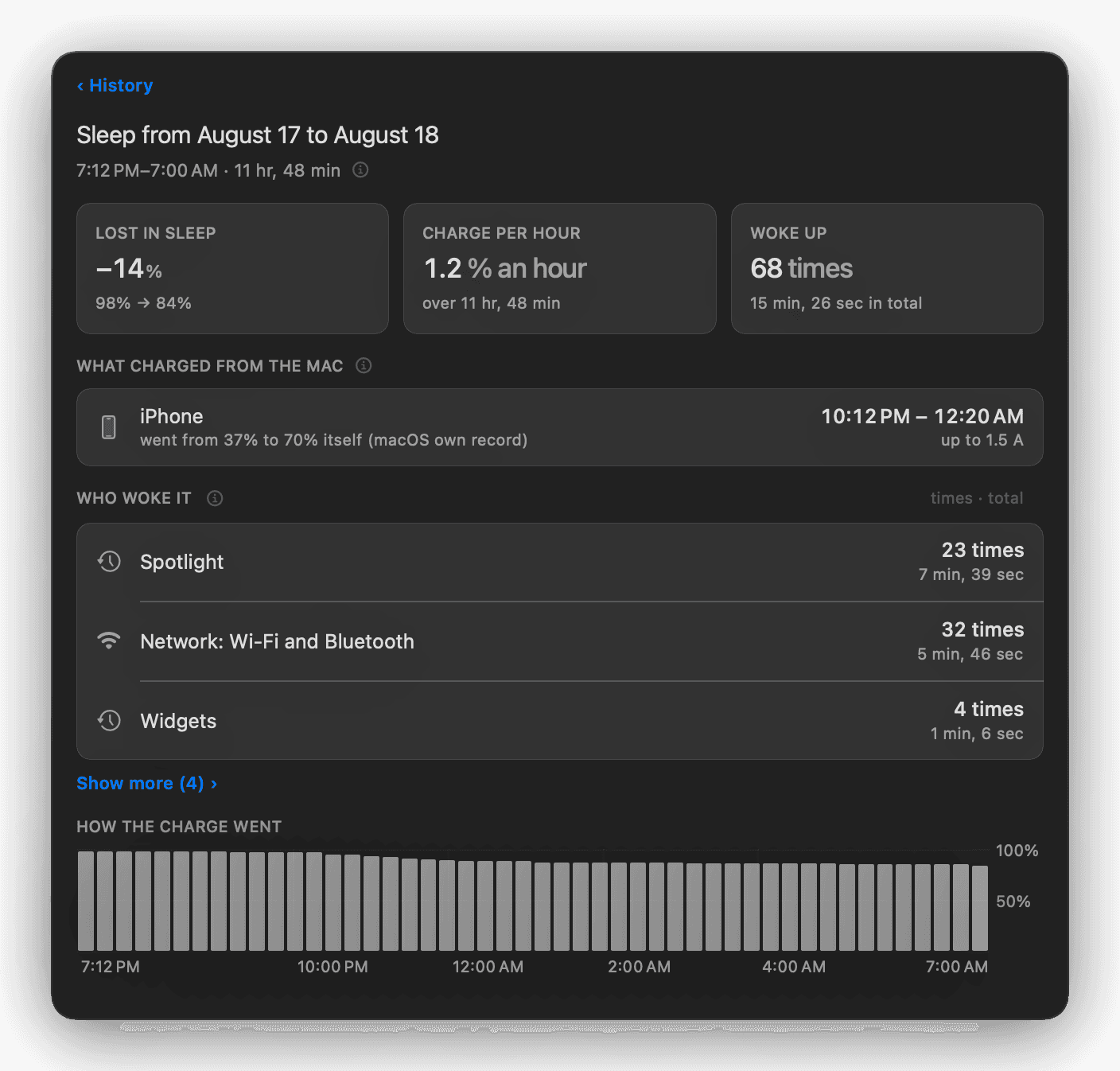
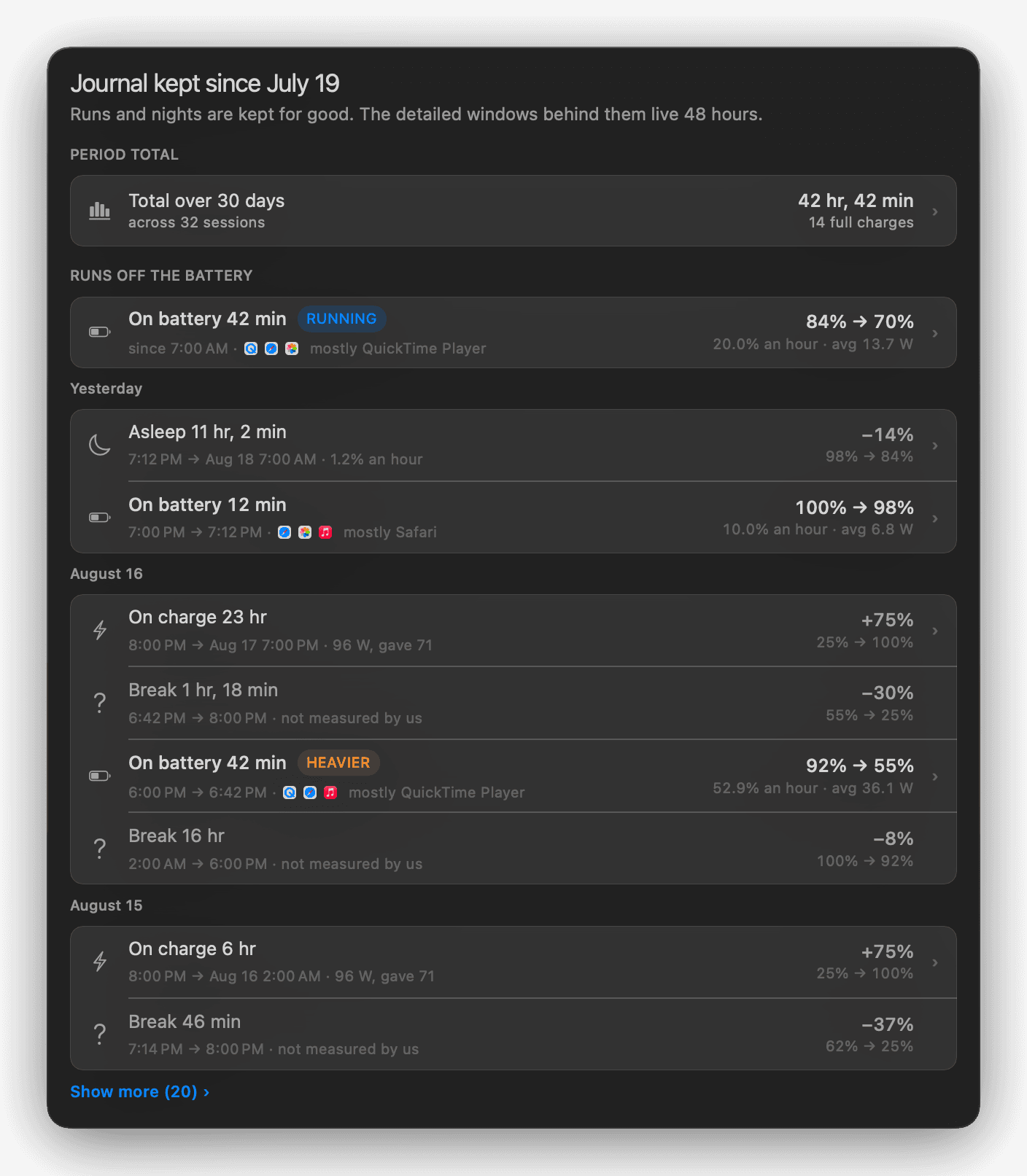
WattMate shows where your Mac's battery goes: watts per app, live, with helper processes counted under their app. Activity Monitor's "Energy Impact" has no unit; these numbers do. Before you quit an app, WattMate says how many minutes of battery that should buy. Two minutes after you quit, it measures again and shows what actually changed. If the effect can't be separated from everything else going on, it says so and takes no credit. It also reads the macOS power log to show which service woke the Mac overnight with the lid closed, and for how long. You also get history, battery health in the free version, and ranges where one number would be false precision. Everything is measured on your Mac and nothing is uploaded. Native Swift, notarized by Apple. Free tier, then $9.99/year or $29 one-time. 10-day trial, no card. macOS 14+, Apple silicon.
Key features
- 1Per-app watt readings with helper processes grouped under their parent app, measured from battery current/voltage and chip energy counters.
- 2Post-quit receipt: re-measures two minutes after you quit an app and reports what actually changed, refusing credit when the effect can't be isolated.
- 3Overnight wake log: reads the macOS power log to name which service woke the Mac with the lid closed and for how long.
Target customer profile
Drawn from the product itself, not from a survey.
Demographic
Remote professionals and digital nomads
Pain points
Battery dies quickly during work sessions; unsure which apps to close to extend battery life
Primary needs
Maximize battery life for all-day productivity; clear guidance on app energy impact
Demographic
Software developers and power users
Pain points
Running multiple heavy apps (IDEs, browsers, VMs) causes rapid battery drain; need to optimize performance
Primary needs
Detailed per-app energy breakdown; ability to identify and quit power-hungry processes
Demographic
Students and casual users
Pain points
MacBook battery doesn't last through classes; confused by Activity Monitor's energy metrics
Primary needs
A plain answer to which app is using the battery and what quitting it gives back
Scout Review
Written by AI from measured evidence, scored out of 100.
WattMate is a native macOS menu-bar app that answers a question Activity Monitor can't: not 'which app ranks highest' but 'how many minutes do I get back if I quit it'. It measures watts per app from the battery's own current and voltage plus the chip's energy counters, groups helper processes under their parent app, and — the standout feature — re-measures two minutes after you quit something and prints what actually changed, refusing to take credit when the load moved for other reasons. It also reads the macOS power log to name what woke your Mac overnight with the lid closed. Free tier covers battery health; $9.99/year or $29 one-time, 10-day trial, no card. The marketing site is fast (Lighthouse 100/100 mobile and desktop) and the /guides section is unusually rigorous, with measured articles per app and stated limits. Security hygiene is clean (12/12 headers, notarized, local-only) but unverified by any third party. The main gaps are onboarding (no demo or walkthrough) and reach (macOS 14+ Apple silicon only).
Measure by measure
Usability
6810-day trial with no card, Homebrew install, and a genuinely deep /guides section with measured articles per app. Changelog is published and mirrors in-app notes. No live demo or onboarding walkthrough on the site.
Design
74Dark, high-contrast marketing site with a clear hero and real product screenshots of the menu-bar popover. Native macOS app with deliberate pixel-grid icon craft per the changelog. Text-heavy long-scroll page, but consistent and on-brand.
Speed
88Lighthouse mobile 100/100 (LCP 1.4s, CLS 0, TBT 0ms, FCP 930ms) and desktop 100/100. Static content page, no heavy SPA. No lag complaints found. Sits at the top of the measured band.
Security
7612/12 security-header checklist: HTTPS enforced, HSTS, CSP, frame protection, Referrer-Policy, Permissions-Policy, SPF, DMARC. Local-only processing and Apple notarization claimed. No SOC 2, ISO, pen-test, or bug bounty published.
Accessibility
78Lighthouse accessibility 96/100 with one failing audit: insufficient color contrast. Responsive text-based site. No WCAG statement, no a11y docs, no multi-language support, macOS 14+ Apple silicon only.
Growth
58Real, specific problem (unitless Energy Impact) with a demonstrated wedge: watts per app plus a post-quit receipt that refuses false credit. But macOS-only, Apple silicon-only, macOS 14+ caps the addressable market hard.
Improvement areas
- No demo video or onboarding walkthrough — the menu-bar popover's value is visual and only described in text on the site.
- No third-party security validation (SOC 2, ISO, pen test, bug bounty) despite strong header hygiene and local-only processing claims.
- Single failing Lighthouse contrast audit on a dark-UI product, plus no WCAG statement or accessibility documentation.
Design & Usability
WattMate's design is the strongest part of the marketing: a dark, high-contrast page with a hero that actually shows the product — the menu-bar popover with per-app watt rows and a battery glyph. The changelog reveals real craft (the 1.3 note about redrawing the battery icon on the pixel grid with the terminal nub is the kind of detail most indie apps skip). Usability is carried by the trial terms (10 days, no card), a Homebrew cask, and a /guides section that is genuinely better than most paid products' docs — measured articles on Chrome, Slack, Telegram, Spotify and Xcode watt draw, with method and limits stated. The gap is onboarding: no demo video, no walkthrough, no live preview of the popover before you install. For a menu-bar utility that lives or dies on the first five minutes, that's a real miss.
Speed & Security
Speed is the cleanest dimension here. Lighthouse mobile 100/100 with LCP 1.4s, CLS 0, TBT 0ms and FCP 930ms; desktop also 100/100. The site is static content, no SPA weight, and no lag complaints surfaced in the collected evidence — this sits at the top of the measured band. Security is strong on the basics: the HTTP probe returned 12/12 checklist points (HTTPS enforced, HSTS, CSP, frame protection, X-Content-Type-Options, Referrer-Policy, Permissions-Policy, SPF, DMARC). The product claims all measurement is local and nothing is uploaded, and it's notarized by Apple. What's missing is third-party validation: no SOC 2, no ISO, no pen-test report, no bug bounty. For a local-only utility that's a defensible position, but it means the security story rests entirely on the maker's word plus Apple's notarization.
Accessibility & Growth
Accessibility scores 96/100 on Lighthouse with a single failing audit — insufficient background/foreground contrast. That's a fixable, specific issue, and it's ironic for a battery app whose whole aesthetic is dark menu-bar UI. Beyond the audit there's no WCAG statement, no a11y documentation, no multi-language support, and the product is macOS 14+ Apple silicon only, which is a platform limit rather than an a11y one. Growth is the interesting question. The problem is real and precisely named: Activity Monitor's Energy Impact has no unit, so it can never become minutes. The wedge is demonstrated, not asserted — watts per app with helper processes grouped under their parent, plus a two-minute post-quit receipt that explicitly refuses to take credit when the effect can't be isolated. That honesty is a genuine differentiator against iStat Menus and Battery Health 3, which show stats but not consequences. The ceiling is the platform: macOS-only, Apple silicon-only, macOS 14+ narrows the addressable market to a slice of a slice. The idea can grow, but only as far as Apple's install base lets it.
Conclusion
If you're a developer or remote worker on an Apple silicon Mac who has ever stared at Activity Monitor's Energy Impact number and wondered what it actually means, WattMate is the first tool that answers in a unit you can act on. The post-quit receipt is the feature that earns the price — it's the difference between a dashboard and a measurement. The $29 one-time option is the right call for a utility you'll keep in the menu bar for years. What would move this from good to excellent: a 60-second demo video on the homepage, a published privacy policy with the same rigor as the guides, and a contrast fix on the one failing Lighthouse audit. The idea is sound and the execution is honest. The only thing holding it back is how few Macs it runs on.
Suggestions for improvement
- Add a 60-second demo video or animated GIF of the menu-bar popover to the homepage — the product's value is visual and currently only described in text.
- Fix the single failing Lighthouse contrast audit; it's a small change and it's ironic for a dark-UI battery app to fail on contrast.
- Publish a proper privacy policy page with the same measured rigor as /guides — 'nothing is uploaded' deserves a real document, not a homepage line.
- Consider an Intel Mac or macOS 13 fallback path, even read-only, to widen the addressable market beyond Apple silicon on macOS 14+.
Alternatives comparison
Named competitors, point by point. Nobody paid to appear here or to be left out.
 WattMate WattMate |  Activity Monitor Activity Monitor |  Battery Health 3 Battery Health 3 |  iStat Menus iStat Menus | |
|---|---|---|---|---|
| Energy measurement unit | Watts per app, converted to minutes of battery gained if quit | Unitless 'Energy Impact' score | Battery health and charge statistics, no per-app watts | Battery stats in a menu bar system monitor, no per-app watt breakdown |
| Post-quit verification | Re-measures 2 minutes after quit and reports actual change, or declines credit | None | None | None |
| Overnight wake log | Reads macOS power log to name services that woke the Mac with lid closed | None | None | None |
| Pricing | Free tier, $9.99/year or $29 one-time, 10-day trial no card | Free (built into macOS) | Paid Mac app (Fiplab) | Paid menu bar monitor (Bjango) |
| Platform support | macOS 14+, Apple silicon only | All macOS versions | macOS (Intel and Apple silicon) | macOS (Intel and Apple silicon) |
Activity Monitor
Built-in macOS tool. Its Energy tab shows "Energy Impact", a score with no unit.
Battery Health 3
Mac app for battery health and charge statistics.
iStat Menus
Menu bar system monitor that includes battery stats.
Comparing options? See WattMate alternatives, scored side by side
More Productivity apps
View all Productivity
Qamarero
92An all-in-one hospitality software for restaurants and ba...

The Stack Newsletter
92A weekly newsletter delivering curated tech jobs, intervi...

EmbedMyReviews
92White-label reputation management software for agencies s...

StoryPad
92Privacy-first open source journal app with a continuous t...

Puzzly – B2B Lead Generation & Sales Intelligence Platform
92Puzzly is an all-in-one B2B lead generation platform that...

Notion
92All-in-one AI workspace for docs, projects, and knowledge...

Vibe Coding Agent Skills
92A free, open-source platform offering 110 AI agent skills...

CC Switch
91Open-source desktop app for switching AI coding providers...

username.md
90One verified handle for your online identity, readable by...

PitchWhip
90AI cold call scripts & direct dials from LinkedIn

What the GIF
89Frame-perfect video-to-GIF maker that runs entirely in yo...

AuditCloser
89White-label website audits that close deals for digital a...


A platform dedicated to providing unbiased reviews of newly launched applications, analyzing everything from their features to their full potential.
info@scoutforge.net© 2026 Scoutforge. All rights reserved.
