Cycling through all six. Tap any point to stop.
Measured on six things
Redesign any room with AI using just a single photo and e...
Security
40HTTPS is enforced, but HSTS, CSP, frame protection, and most hardening headers are missing (3/13 checklist points). No SOC 2, security page, or DMARC found.
Screenshots
1 / 1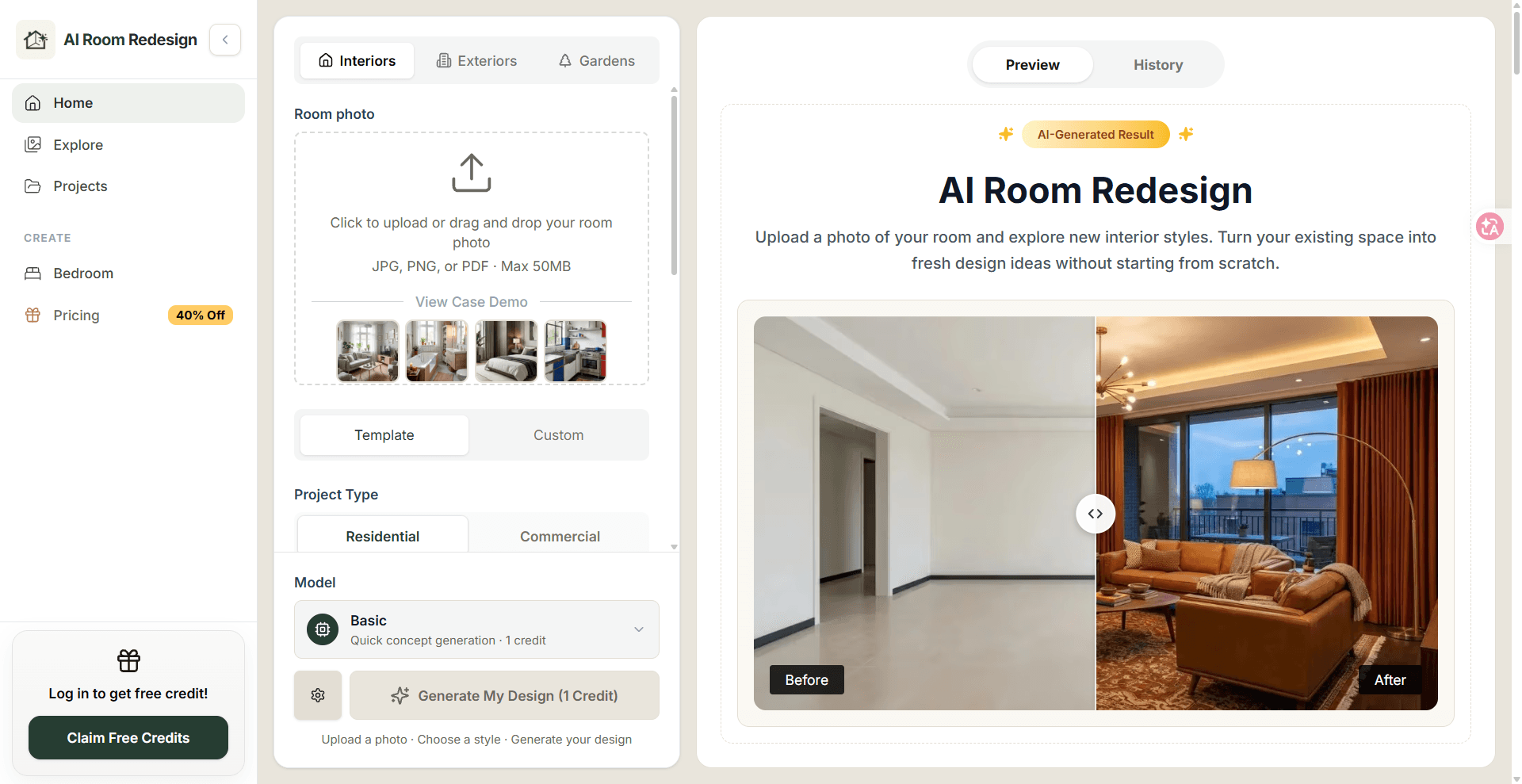
About this app
AI Room Redesign is a web-based tool that turns your room photos into fresh design concepts in seconds. I gave it a try with a photo of my cluttered living room, and it quickly generated several stylish alternatives—everything from modern minimal to cozy farmhouse. The process is straightforward: upload a photo, pick a style, and the AI reimagines your space. It's not just for interiors; you can also experiment with exterior and garden designs. While the results are visual concepts rather than precise construction plans, they're fantastic for brainstorming and getting a feel for different looks before committing to purchases or renovations. The tool offers free credits to start, and you can download and compare designs easily. Whether you're a homeowner, renter, or real estate agent, it's a handy way to visualize possibilities without hiring a designer.
Key features
- 1Upload a room photo and generate redesigned concepts in multiple interior styles.
- 2Exterior and garden workflows in the same studio as interior redesign.
- 3One-time credit packs ($9.99–$149) plus monthly/yearly subscription tiers.
- 4Download and compare Before/After results; free credits to start.
Target customer profile
Drawn from the product itself, not from a survey.
Demographic
Homeowners planning a renovation
Pain points
Struggling to visualize design ideas and afraid of costly mistakes
Primary needs
Explore different styles and see potential before committing to purchases
Demographic
Renters wanting to refresh their space
Pain points
Limited budget and can't make permanent changes
Primary needs
Test furniture layouts and colors without buying items first
Demographic
Real estate agents staging properties
Pain points
Vacant rooms look unappealing and hiring stagers is expensive
Primary needs
Quickly generate staged concepts for listings to attract buyers
Demographic
Interior designers seeking inspiration
Pain points
Time-consuming to create multiple concepts for client meetings
Primary needs
Generate diverse design directions from a single photo to present to clients
Scout Review
Written by AI from measured evidence, scored out of 100.
AI Room Redesign is a competent photo-to-concept tool with a genuinely fast site and a clear value proposition. The Before/After hero does its job, upload guidance is solid, and free credits lower the barrier. The cracks show in the studio form's density, the absence of a help center, and a security posture that stops at HTTPS. It's a reasonable pick for a homeowner brainstorming a refresh, less so for a professional who needs documented reliability. Against RoomGPT, REimagineHome, and Interior AI, it holds its own on speed and the exterior/garden wrinkle but doesn't clearly outclass them.
Measure by measure
Usability
63Upload box is prominent with clear file-type guidance and demo thumbnails, and free credits lower the entry barrier. But the long form delays first action and no help center or docs were found.
Design
70Calm cream palette, rounded panels, and a large labeled Before/After image sell the value instantly. The stacked form with repeated 'Choose' buttons feels dense, and an empty below-the-fold section breaks continuity.
Speed
82Lighthouse mobile 93/100 (LCP 3.0s, CLS 0, TBT 58ms) and desktop 97/100. Snappy, stable layout with no lag complaints in the collected evidence.
Security
40HTTPS is enforced, but HSTS, CSP, frame protection, and most hardening headers are missing (3/13 checklist points). No SOC 2, security page, or DMARC found.
Accessibility
80Lighthouse accessibility 96/100, but two real failures: insufficient color contrast and visible labels not matching accessible names. No WCAG statement or multi-language support found.
Growth
58Real problem, clear audience, and exterior/garden workflows as a wedge — but it's a crowded category against RoomGPT, REimagineHome, and Interior AI with little structural moat.
Improvement areas
- Missing security headers (HSTS, CSP, frame protection) and no DMARC or security page.
- Two Lighthouse accessibility failures: contrast and label/accessible-name mismatches.
- No visible help center or documentation; pricing FAQ answers not rendered.
- Dense studio form with repeated 'Choose' buttons delays first generation.
Design & Usability
The homepage does the one thing that matters: a big, labeled Before/After image that shows exactly what you get. The cream-and-rounded-panel aesthetic suits an interior tool and feels intentional rather than templated. Where it slips is the studio itself — a long vertical form with repeated 'Choose' buttons that turns a three-step promise into a scroll. Onboarding is helped by prominent upload guidance and demo thumbnails, and free credits mean you can try before paying. But there's no visible help center or documentation, and the pricing FAQ lists questions whose answers weren't rendered. Competent, not yet polished.
Speed & Security
Speed is the standout: Lighthouse mobile 93/100 with LCP 3.0s, CLS 0, and TBT 58ms, and desktop 97/100. That's a genuinely fast, stable page, and no lag complaints surfaced. Security is the weak flank. HTTPS is enforced and SPF is set, but HSTS, CSP, frame protection, X-Content-Type-Options, Referrer-Policy, and Permissions-Policy are all absent — 3 of 13 checklist points. DMARC is missing and there's no SOC 2, security page, or bug bounty in the site content. For a tool that asks users to upload photos of their homes, that's thin. It's not broken, but it's behind category norms on hardening.
Accessibility & Growth
Accessibility scores well on automation (96/100) but the failing audits are real: insufficient color contrast and visible text labels that don't match accessible names. No WCAG statement or multi-language support was found, so the score sits in the upper-middle of its band rather than at the top. Growth is a judgement on the idea: the problem — visualizing a room before spending money — is real and the audience (homeowners, renters, agents, designers) is specific. The exterior/garden workflow is a genuine differentiator. But the category is crowded with RoomGPT, REimagineHome, and Interior AI, and nothing here is structurally hard for them to copy. The domain is brand new, so traction is context, not a verdict.
Conclusion
If you're a homeowner or renter who wants to see three versions of your living room before buying a sofa, this does that quickly and cheaply. If you're an agent or designer who needs audit trails, documented security, or deep support, look at the more established players first. The foundation is fast and the idea is sound — the next step is hardening the edges.
Suggestions for improvement
- Add HSTS, CSP, and frame-protection headers; publish a security page and DMARC record.
- Fix the two Lighthouse a11y failures: contrast ratios and label/accessible-name mismatches.
- Collapse the studio form into steps or progressive disclosure to reduce decision fatigue.
- Publish a real help center or docs page and render the pricing FAQ answers.
Alternatives comparison
Named competitors, point by point. Nobody paid to appear here or to be left out.
 AI Room Redesign AI Room Redesign |  RoomGPT RoomGPT |  REimagineHome REimagineHome |  Interior AI Interior AI | |
|---|---|---|---|---|
| Photo-to-design generation | Yes — upload photo, pick style, generate | Yes — core feature | Yes — core feature | Yes — core feature |
| Exterior / garden workflows | Yes — claimed in same studio | Interior-focused | Exterior/landscape options offered | Interior-focused |
| Free credits to start | Yes — free credits advertised | Free tier available | Free trial credits | Free trial available |
| Pricing model | One-time credits $9.99–$149; subs $9.99–$49.99/mo | Subscription tiers | Subscription/credit plans | Subscription plans |
| Measured site speed (Lighthouse mobile) | 93/100 | Not measured | Not measured | Not measured |
RoomGPT
AI-powered tool that redesigns rooms from photos with various styles.
REimagineHome
AI interior design generator for virtual staging and remodeling ideas.
Interior AI
AI tool for interior design ideas and virtual staging from photos.
Comparing options? See AI Room Redesign alternatives, scored side by side
More Lifestyle & Entertainment apps
View all Lifestyle & Entertainment
RoomCreator
92An AI-powered interior and exterior design tool that tran...

Factory Direct Mattress Overland Park
92A locally-owned mattress store in Overland Park, KS offer...

TUNL - Cave Flyer
89A hold-to-thrust cave flyer with a new daily level, ghost races, and a global leaderboard.

Portrait Gift
88AI-powered personalized face swap art platform creating c...

TranscriptYou
88Free YouTube transcript generator with timestamps and AI ...

Roami eSIM
88A global travel eSIM app offering instant activation, no ...

FaceSwapAI
87AI face swap for photos, videos, GIFs with free trial.

youtubetomp3.ink
87Free online YouTube to MP3 converter with no signup or so...

InviteVia
87InviteVia is a digital invitation platform for creating beautiful online invitations for weddings, birthdays, engagements, parties, and special events. Choose a template, customize your invitation, collect RSVPs, and share it instantly through WhatsApp, Instagram, SMS, or a simple link. No guest accounts or app downloads required.

Coloring Pages Pro
87A massive collection of free printable coloring pages for...

TaroMind AI Tarot Birth Card Calculator
87Free, private tool to find your tarot birth cards instantly.

SeatCanvas
87Drag-and-drop seating charts for weddings, quinceañeras and events. Import your guest list from Excel, export print-ready PDFs. Free up to 40 guests, no signup.


A platform dedicated to providing unbiased reviews of newly launched applications, analyzing everything from their features to their full potential.
info@scoutforge.net© 2026 Scoutforge. All rights reserved.
