Cycling through all six. Tap any point to stop.
Measured on six things
AI form builder with conversion analytics and live visito...
Design
58Clean purple-accented system with disciplined spacing and a well-structured pricing card, but the homepage never shows the product UI and the hero splits attention between an AI prompt box and a signup form.
Screenshots
1 / 1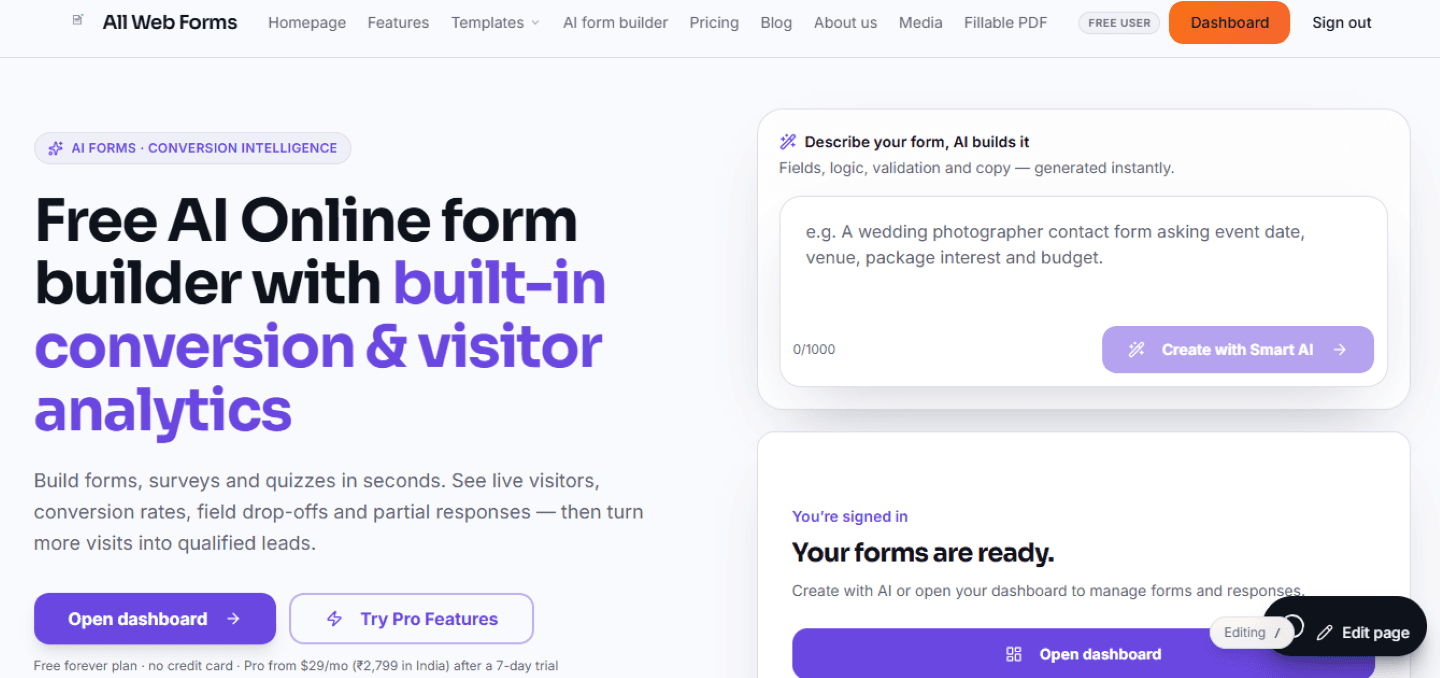
About this app
AllWebForms is an AI-powered online form builder for contact forms, lead funnels, surveys, quizzes, and order forms. Describe your form and the AI generates fields, validation, logic, and copy in seconds—or start from 2,000+ templates and customize with a drag-and-drop editor. Beyond basic form creation, it packs conversion intelligence: live visitor tracking shows who's on your form right now, field-level drop-off analytics reveal exactly where people quit, and partial submission capture turns half-filled forms into actionable leads. You also get live visitor email alerts, submission-started notifications, instant email alerts, autoresponders, conditional logic, calculations, e-signatures, fillable PDF export, multi-language forms, spam protection, and 300+ integrations including Slack, Google Sheets, Zapier, HubSpot, Mailchimp, Notion, and Airtable. Forms embed anywhere with a one-line snippet and are mobile-first. The free Starter plan includes 10 active forms and 100 submissions...
Key features
- 1AI form generation from a text prompt, plus 2,000+ templates and a drag-and-drop editor
- 2Conversion intelligence: live visitor tracking, field-level drop-off analytics, partial submission capture
- 3300+ integrations including Slack, Zapier, Google Sheets, HubSpot, Mailchimp, Notion and Airtable
- 4E-signatures, fillable PDF export, conditional logic, calculations and multi-language forms
- 5Free Starter plan: 10 active forms and 100 submissions/mo; Pro at $29/mo for unlimited forms and 10k submissions
Target customer profile
Drawn from the product itself, not from a survey.
Demographic
Solo founders and side-project builders
Pain points
Expensive form tools; no insight into visitor drop-off; slow setup
Primary needs
Free forever plan, AI generation, quick publishing, lead capture
Demographic
Growth leads and marketing teams
Pain points
Low form conversion; leads leaving before submit; poor analytics
Primary needs
Drop-off insights, partial capture, A/B testing, integrations
Demographic
Freelancers and small agencies
Pain points
Juggling client branding; repetitive form builds; costs per client
Primary needs
Branding removal, template cloning, multi-step forms, bulk PDF export
Scout Review
Written by AI from measured evidence, scored out of 100.
AllWebForms is an AI form builder that leads with conversion intelligence rather than form building — live visitor tracking, field-level drop-off and partial submission capture, wrapped around a competent drag-and-drop editor and 2,000+ templates. The free tier is genuinely generous next to Typeform's ~10 responses a month, and the $29/mo Pro plan is priced to undercut. Execution is solid but uneven: desktop speed is excellent, the design system is clean, and the signup path is short. Against that, the homepage never shows the product, the docs are thin, mobile layout shifts, and the security page advertises SOC 2 without a report to back it. It's a credible indie alternative with a real differentiator, held back by marketing that undersells its own best feature.
Measure by measure
Usability
61Signup-to-value path is short (Google login, describe-a-form prompt) and pricing compares cleanly, but docs are a single PDF plus a handful of how-tos and nine nav items crowd a small product.
Design
58Clean purple-accented system with disciplined spacing and a well-structured pricing card, but the homepage never shows the product UI and the hero splits attention between an AI prompt box and a signup form.
Speed
70Lighthouse desktop 98/100 and mobile 79/100 with a fast 1.7s LCP, held back by a 0.204 CLS that makes the mobile page visibly jump as it loads.
Security
63HTTPS enforced with HSTS, secure cookies, SPF and DMARC in place, but no CSP, no frame protection and no Permissions-Policy. SOC 2 and GDPR are claimed on the pricing table with no public report.
Accessibility
70Lighthouse 92/100 with multi-language forms claimed, but real failures remain: unnamed buttons, low-contrast text and mismatched accessible labels — and no published WCAG statement.
Growth
62A real problem (forms leak leads) with a specific wedge — live visitors, field-level drop-off and partial capture — aimed at founders and growth teams. Typeform's stingy free tier and Google Forms' blind analytics leave room.
Improvement areas
- Homepage shows no product UI — the analytics differentiator is described, never demonstrated
- Thin documentation: one PDF and a few how-tos instead of a searchable help center
- Mobile CLS of 0.204 causes visible layout shift; missing CSP and frame protection headers
- SOC 2 and GDPR claimed on pricing with no public audit report or trust page to verify
Design & Usability
The homepage is competently designed — a restrained purple system, consistent card radii, and a pricing page that's genuinely easy to compare with plain-language feature definitions. The problem is that it never shows the product. Live visitor tracking and drop-off analytics are the whole pitch, and they're communicated through grey body copy and icons rather than a single screenshot or demo. The hero compounds this by putting an AI prompt box and a signup form side by side, so there's no single obvious first action. Usability is better than design: Google sign-in, a short form, and a describe-your-form prompt get you to value fast. But the docs page is one PDF and a handful of how-tos, and the nav carries nine items for a product this size.
Speed & Security
Speed is a genuine strength on desktop — Lighthouse 98/100 — and mobile lands at 79/100 with a fast 1.7s LCP. The one real blemish is a 0.204 CLS, well past the 0.1 'good' threshold, meaning the mobile page visibly shifts as it settles. Security is mid-pack: HTTPS is enforced with HSTS, secure cookies, SPF and DMARC all present, but there's no Content-Security-Policy, no frame protection and no Permissions-Policy, landing at 9/13 on the header checklist. The pricing table advertises SOC 2, SSO, audit logs and a DPA, but no public audit report or trust page surfaced in the fetched content, so those remain claims rather than verified certifications.
Accessibility & Growth
Accessibility scores 92/100 on Lighthouse, which sounds better than it is — the failing audits are concrete: buttons without accessible names, insufficient color contrast, and visible text labels that don't match their accessible names. Multi-language forms are claimed, but there's no WCAG conformance statement. Growth is the more interesting story. The problem is real — forms leak leads and most builders give you no idea where — and the wedge is specific: live visitor tracking, field-level drop-off, partial submission capture. Against Typeform (roughly 10 free responses a month) and Google Forms (no partial capture, basic integrations), a free tier of 10 forms and 100 submissions plus real analytics is a defensible position for founders and small growth teams. The limit is that analytics is copyable and the category is crowded.
Conclusion
If you're a solo founder or small team bleeding leads at the form step and you want to see where people quit without paying Typeform prices, AllWebForms is worth a free account — the analytics wedge is the reason to try it, not the AI generation. Go in expecting to lean on email support rather than a deep help center, and treat the SOC 2 badge as a claim until you see the report. The product's biggest problem is that it hides its best feature behind body copy; the moment it puts a real dashboard screenshot in that hero, the pitch gets a lot easier to believe.
Suggestions for improvement
- Put a real product screenshot or 20-second demo of the live-visitor and drop-off dashboard in the hero — it's the whole pitch and it's invisible.
- Collapse the hero to one primary CTA; move the AI prompt box into the flow after signup or make it the sole action.
- Fix the 0.204 CLS on mobile by reserving space for late-loading elements above the fold.
- Publish a real help center with searchable articles and link the SOC 2 report (or remove the badge) to match the security claims.
Alternatives comparison
Named competitors, point by point. Nobody paid to appear here or to be left out.
 AllWebForms |  Typeform |  Google Forms | |
|---|---|---|---|
| Free plan limits | 10 active forms, 100 submissions/mo, 50 alert emails/day | ~10 responses per month, branding locked | Unlimited forms and responses, free with Google account |
| AI form generation | Yes — describe a form, AI generates fields, logic, validation and copy | AI-assisted form creation available on paid tiers | No AI generation |
| Partial submission / drop-off analytics | Yes on Pro — partial capture, field-level drop-off, live visitors | Drop-off insights on paid plans; no partial capture | No partial capture, basic response summary only |
| Integrations | 300+ including Slack, Zapier, Sheets, HubSpot, Mailchimp, Notion, Airtable | Large native integration library plus Zapier | Google Sheets, Drive and basic Zapier support |
| Branding removal | Pro plan ($29/mo) removes All Web Forms branding | Paid plans only | Limited customization; Google branding persists |
| E-signatures & PDF export | E-signature fields and fillable PDF export, bulk export on Pro | File upload and payments; e-signature via integrations | No native e-signature or fillable PDF export |
Typeform
Conversational form builder known for polished UX, but its free plan is limited to about 10 responses per month and locks branding and advanced features.
Google Forms
Free, simple form creation baked into Google Workspace, but with limited branding, no partial submission capture, and basic integrations.
Comparing options? See AllWebForms alternatives, scored side by side
More Marketing Automation apps
View all Marketing Automation
QRBliss
91Branded QR codes with AI Brand Sync, 15 free dynamic code...

WAButton
90WhatsApp website leads, forms and contact routing

NudgeWin
89Automated quote follow-up for trades and service businesses.

Opus Growth
89Opus Growth is a single MCP server for Google Ads, Meta Ads, TikTok Ads, LinkedIn Ads, Microsoft Ads and ChatGPT Ads. ChatGPT, Claude, Codex, Perplexity, Cursor and other assistants connect with the same address.

Indexaro
88AI visibility tracker for SEO, AEO, and GEO

Spotwise
88AI-powered radio ad monitoring platform that tracks compe...

TranscriptYou
88Free YouTube transcript generator with timestamps and AI ...

Spek
88Grow your app with self-learning ASO agents

Fenn
88AI visibility tracker that checks if ChatGPT recommends y...

Mygom SEO
87MygomSEO is an AI marketing agent that audits your site, writes SEO content, publishes to 12+ CMS platforms, posts to social, and monitors rankings 24/7.

CraftPilot
87AI tools for Etsy sellers — keyword research, listing optimization, and shop insights

The Salon Ads Studio
87Salon Ads Studio builds and runs your Google Ads. Right now, people a few streets from your door are on Google looking for exactly what you do.


A platform dedicated to providing unbiased reviews of newly launched applications, analyzing everything from their features to their full potential.
info@scoutforge.net© 2026 Scoutforge. All rights reserved.
