Cycling through all six. Tap any point to stop.
Measured on six things
WhatsApp website leads, forms and contact routing
Growth
62Real problem (WhatsApp API setup is a wall), specific wedge (no API, no per-message fees, one line of code), and an Agency tier aimed at a segment API tools ignore. Category has headroom; differentiation is real but copyable.
Screenshots
1 / 3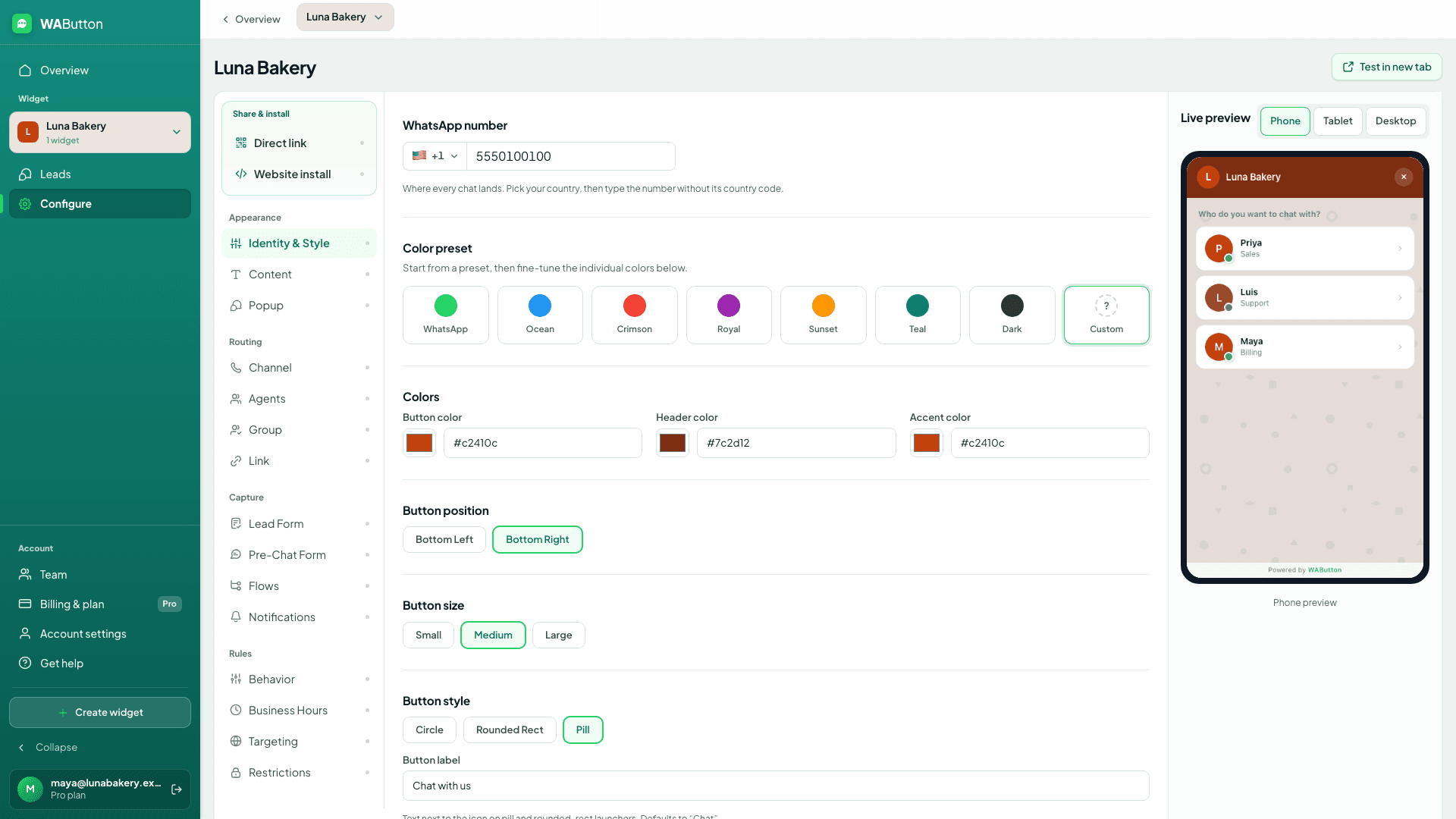
About this app
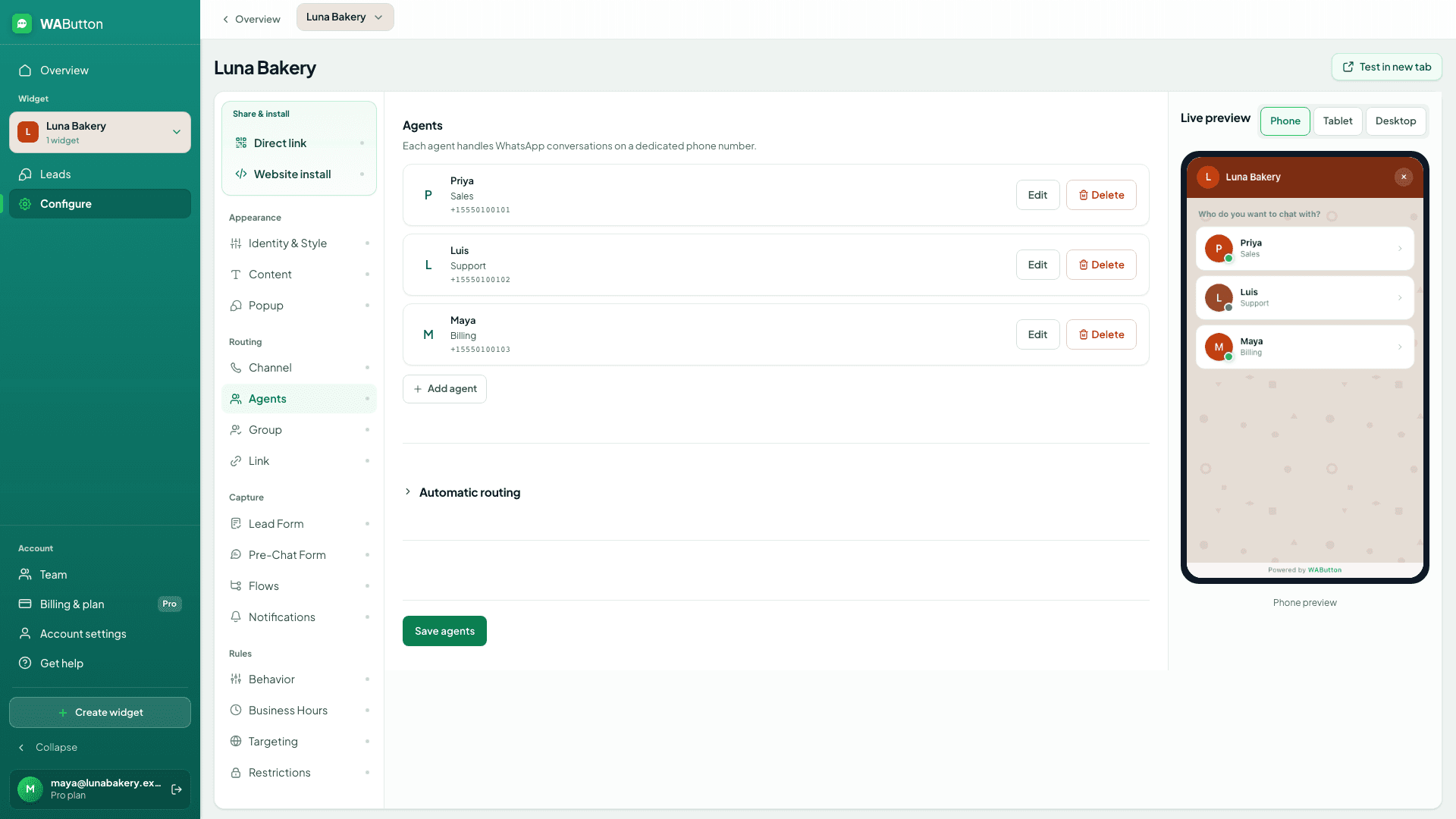
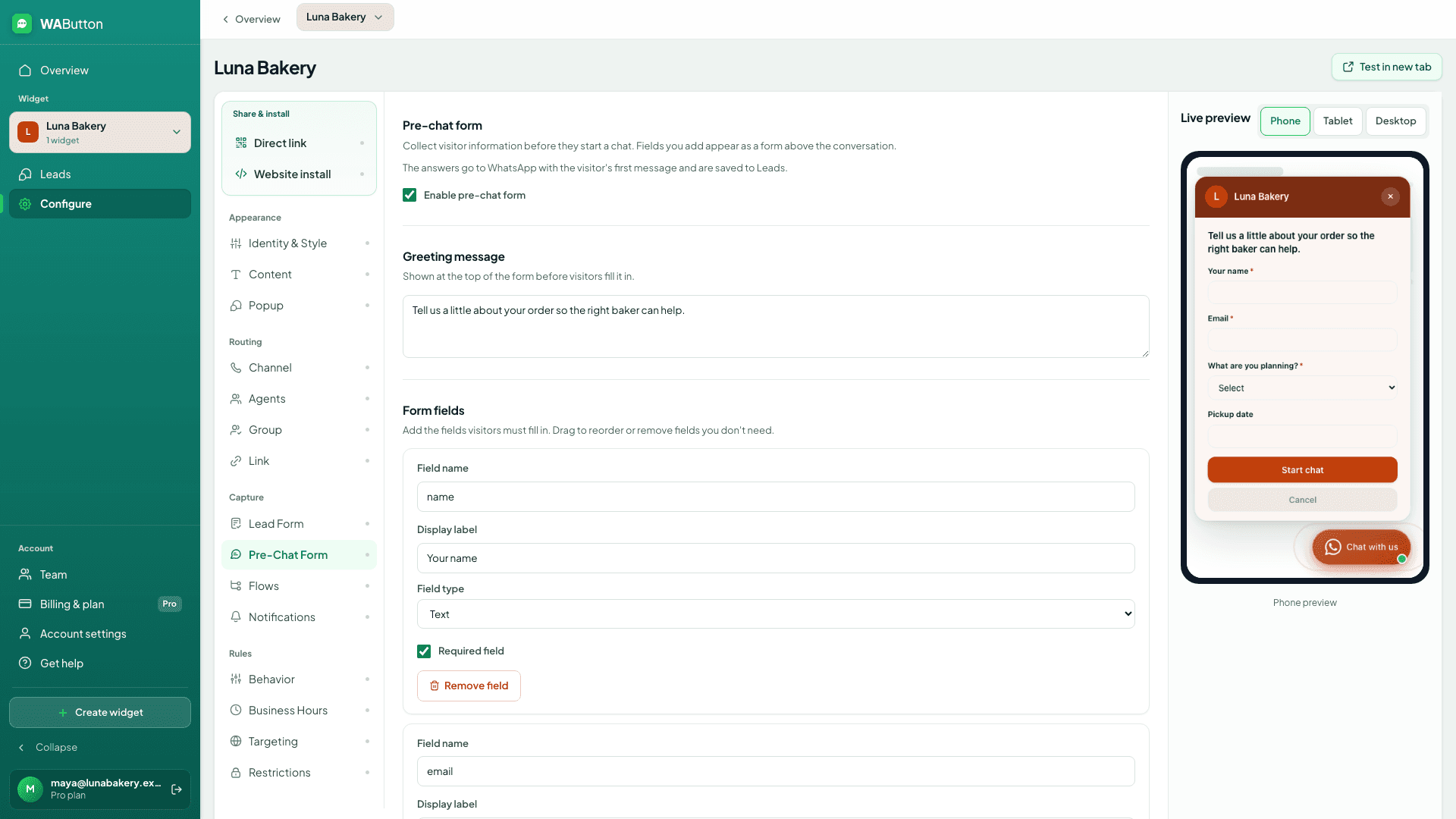
WAButton adds a WhatsApp chat button to your website. Visitors ask about stock, delivery, appointments or quotes; you reply from WhatsApp or WhatsApp Business. Conversations stay in WhatsApp after visitors leave. Customize colors, greetings and position in a live editor. Show business hours and away messages; trigger prompts by delay, scroll or exit intent. Team contacts let visitors choose Sales, Support or Billing. Pro adds lead forms with saved answers, page/country rules and webhooks for workflows such as n8n. Install one line of code on Shopify, WordPress, Wix, Webflow or a custom site. No WhatsApp Business API or per-message fees. Free forever: 1 button, 1 contact and 10,000 monthly visitors; no card. Monthly plans: Starter $9, Pro $19, Agency $59 (50 buttons and branding removal). Paid plans offer a 14-day trial. Prices exclude tax. Demo: https://www.youtube.com/watch?v=VZhy5g1F6To Free tools: https://wabutton.app/tools
Key features
- 1One-line install WhatsApp button for Shopify, WordPress, Wix, Webflow and custom sites — no Business API, no per-message fees.
- 2Live builder with label, greeting, position, style and device/page targeting; free plan with no card.
- 3Team routing (Sales/Support/Billing), business hours and away messages on Starter; lead forms, page/country rules and webhooks on Pro.
- 4Agency tier: 50 buttons, 50 contacts, branding removal and consolidated client billing for $59/mo.
Target customer profile
Drawn from the product itself, not from a survey.
Demographic
E-commerce store owners
Pain points
Customers hesitant to buy without quick answers on products or delivery
Primary needs
Let shoppers ask about stock, sizes and delivery on WhatsApp; collect enquiry details before opening the chat on Pro.
Demographic
Local service businesses (clinics, salons)
Pain points
Managing appointments and inquiries over phone/email is inefficient
Primary needs
Show business hours and an away message, then let visitors ask about appointments or request a quote on WhatsApp.
Demographic
Marketing agencies managing multiple clients
Pain points
Need a scalable, white-label solution to add WhatsApp chat to client sites
Primary needs
Manage separate buttons, contacts and designs for client websites from one dashboard; Agency includes 50 buttons and removes WAButton branding.
Scout Review
Written by AI from measured evidence, scored out of 100.
WAButton is a focused, well-executed WhatsApp button widget that does one thing and does it cleanly. The live builder, no-card free plan and eleven platform setup guides make it easy to try; the 100/100 Lighthouse scores and full security-header sweep show the engineering underneath is not an afterthought. The honest limits are stated on the site itself — no shared inbox, no booking confirmation — and the compliance layer (SOC 2, WCAG statement) hasn't been published yet. For a small store or local service business that wants WhatsApp enquiries without touching the Business API, it's a sensible pick at $9–$19/mo.
Measure by measure
Usability
74Try-before-signup builder, no-card free plan, and setup guides for eleven platforms. FAQ answers the trial and cancellation questions people actually ask. Onboarding path is short and honest.
Design
76Polished, coherent landing page with a genuinely interactive live builder, in-context mockups and a captioned product tour. Not a template dump — the preview actually updates as you click.
Speed
88Lighthouse 100/100 on both mobile and desktop, LCP 1.1s, CLS 0, TBT 41ms. The widget is explicitly deferred to load after page content, so it doesn't tax the host site either.
Security
72Full security-header sweep (HSTS, CSP, frame protection, Referrer-Policy, Permissions-Policy) plus SPF and DMARC — 12/12 on the probe. No SOC 2, ISO or pen-test report published, which is normal at this stage.
Accessibility
78Lighthouse 97/100 with captioned video and clear mobile/desktop coverage. Two real failures remain: contrast ratio and mismatched accessible names on labeled elements. No WCAG statement published.
Growth
62Real problem (WhatsApp API setup is a wall), specific wedge (no API, no per-message fees, one line of code), and an Agency tier aimed at a segment API tools ignore. Category has headroom; differentiation is real but copyable.
Improvement areas
- No WCAG conformance statement and two failing Lighthouse accessibility audits (contrast, accessible names).
- No SOC 2, ISO 27001 or pen-test report published — relevant for Pro's lead-form data collection.
- No shared inbox or booking confirmation; the site is honest about it, but it caps the use case.
- Wedge is copyable and depends on Meta not simplifying the WhatsApp Business API.
Design & Usability
WAButton's site does the thing most widget landing pages fail at: it lets you use the product before you sign up. The live builder updates label, greeting, position and style in real time, and the surrounding page uses in-context mockups (a fake 'northwind.store', an 'Acme Team' chat) instead of abstract illustrations. A 58-second captioned product tour covers styling, routing, hours and install. Usability follows the same logic — free plan with no card, setup guides for eleven platforms from Shopify to custom HTML, and an FAQ that answers the trial and cancellation questions directly. The one gap: the site is honest that WAButton doesn't provide a shared inbox or confirm bookings, which is refreshing but also a hard ceiling on what the tool does.
Speed & Security
Speed is the standout measured result: Lighthouse 100/100 on both mobile and desktop, LCP 1.1s, CLS 0, TBT 41ms. The widget is explicitly deferred to load after page content, so it doesn't drag down the host store — a detail most third-party scripts ignore. Security is solid on the fundamentals: HTTPS enforced, HSTS, CSP, frame protection, X-Content-Type-Options, Referrer-Policy and Permissions-Policy all present, plus SPF and DMARC on the domain — 12/12 on the header probe. What's missing is the compliance layer: no SOC 2, ISO 27001, pen-test report or bug bounty page. For a tool that collects lead form data on Pro, that's the next thing to publish, not a current failure.
Accessibility & Growth
Accessibility lands at 97/100 on Lighthouse with captions on the product tour and clear mobile/desktop coverage — but two real failures remain: insufficient color contrast and visible text labels without matching accessible names. Both are fixable in an afternoon and both are the kind of thing that bites screen-reader users on a checkout page. No WCAG conformance statement is published. Growth is the more interesting question: the wedge is genuinely sharp — no WhatsApp Business API, no per-message fees, one line of code — and it removes the two biggest setup blockers that keep small stores off WhatsApp chat. The Agency tier at $59 for 50 buttons with branding removal and consolidated client billing targets a segment the API-based tools underserve. The limit is that the wedge is copyable and depends on Meta not making the API easier; there's no network effect or data moat here, just a good position on a real problem.
Conclusion
If your customers ask 'is this in stock' or 'can I book today' and you'd rather answer in WhatsApp than build a chat stack, WAButton is the shortest path from a website visit to a real conversation. Start on the free plan, wire it to your business number, and only upgrade to Pro when you actually need lead forms or page/country rules. The Agency tier is the one to watch if you manage client sites — 50 buttons and branding removal for $59 is priced to make agencies the growth engine.
Suggestions for improvement
- Publish a WCAG 2.1 AA conformance statement and fix the two Lighthouse failures (contrast, accessible names) — cheap credibility.
- Add a SOC 2 Type I roadmap or a security page covering lead-form data handling; Pro collects customer details and buyers will ask.
- Ship a comparison page vs API-based WhatsApp tools (WaliChat, Twilio) that names the trade-off honestly — you already do this in copy.
- Consider a lightweight shared-inbox or booking-confirmation add-on; the site's own honesty about the gap is a roadmap hint.
Alternatives comparison
Named competitors, point by point. Nobody paid to appear here or to be left out.
 WAButton WAButton | WaliChat | |
|---|---|---|
| WhatsApp chat entry point on website | Floating button with customizable label, greeting, position and style; one line of code. | Shared WhatsApp inbox for teams; entry point is the inbox, not a website widget. |
| Requires WhatsApp Business API | No — works with regular WhatsApp / WhatsApp Business apps, no per-message fees. | Yes — shared inbox model typically relies on the WhatsApp Business API. |
| Team / multi-agent handling | Routes visitors to Sales/Support/Billing contacts; replies happen in each person's WhatsApp app. | Core feature — multiple agents manage one number from a shared inbox. |
| Lead capture forms | Pro plan: custom forms with saved answers before WhatsApp opens. | Not a stated feature; focus is inbox collaboration. |
| Free plan | Free forever: 1 button, 1 contact, 10,000 monthly visitors, no card. | Free tier available per site; details not verified in this review. |
| Pricing (entry paid tier) | Starter $9/mo, Pro $19/mo, Agency $59/mo; 14-day trial on paid plans. | Per-seat / per-number pricing typical of shared-inbox tools; not verified here. |
Comparing options? See WAButton alternatives, scored side by side
More Marketing & Sales apps
View all Marketing & Sales
EmbedMyReviews
92White-label reputation management software for agencies s...

Puzzly – B2B Lead Generation & Sales Intelligence Platform
92Puzzly is an all-in-one B2B lead generation platform that...

Geogrid
92A UULE-powered local rank tracker for SEO agencies, offer...

Vibe Coding Agent Skills
92A free, open-source platform offering 110 AI agent skills...

QRBliss
91Branded QR codes with AI Brand Sync, 15 free dynamic code...

ThumbnailMaker
90AI YouTube thumbnail maker: paste a video link, get the brief, the thumbnail, and a check at feed size.

PitchWhip
90AI cold call scripts & direct dials from LinkedIn

DemoVexa
90Turn your code into professional product demo videos with AI-generated scripts, animated UI, and natural voiceovers.

Opus Growth
89Opus Growth is a single MCP server for Google Ads, Meta Ads, TikTok Ads, LinkedIn Ads, Microsoft Ads and ChatGPT Ads. ChatGPT, Claude, Codex, Perplexity, Cursor and other assistants connect with the same address.

AuditCloser
89White-label website audits that close deals for digital a...

What the GIF
89Frame-perfect video-to-GIF maker that runs entirely in yo...

FontPlop
89Browser-based font viewer & tester for TTF, OTF, WOFF, WO...


A platform dedicated to providing unbiased reviews of newly launched applications, analyzing everything from their features to their full potential.
info@scoutforge.net© 2026 Scoutforge. All rights reserved.
