Cycling through all six. Tap any point to stop.
Measured on six things
AI dubbing for YouTube, free browser extension
Security
52HTTPS and HSTS are in place, but the header probe scores 4/12: no CSP, no frame protection, no Referrer-Policy, no SPF or DMARC. Privacy policy exists and explains server-side caption processing; no audits or compliance claims found.
Screenshots
1 / 1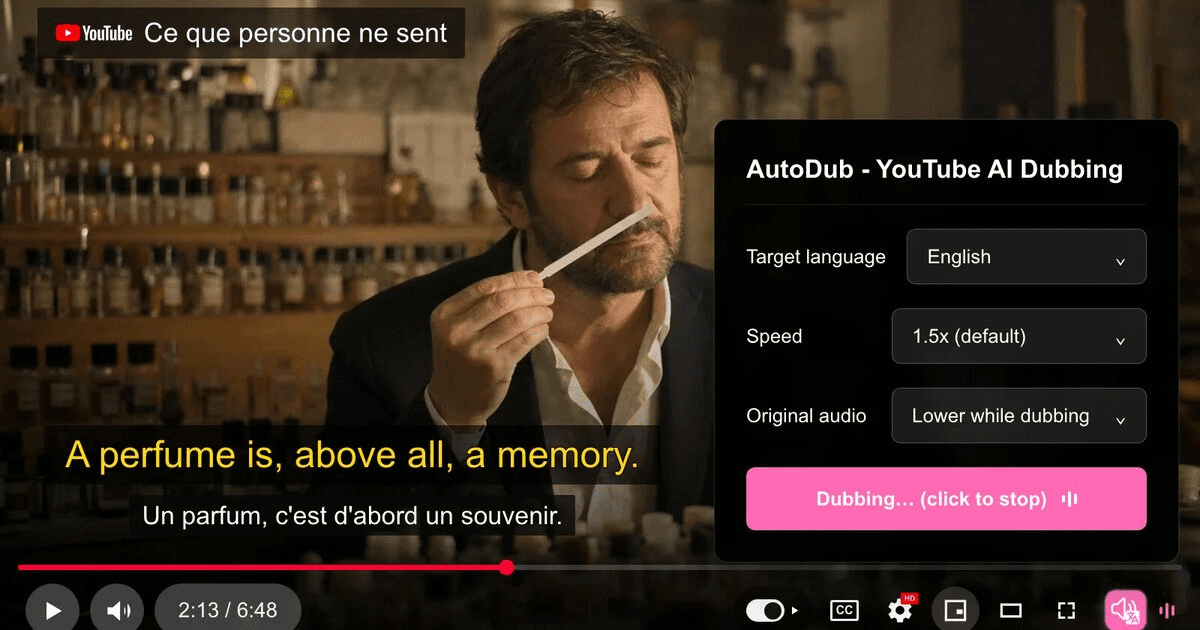
About this app
AutoDub is a free browser extension that turns any YouTube video into a dubbed video in your own language. It translates the speech and plays it back with a natural AI voice that stays in sync with the video, so you can watch lectures, tutorials, interviews and vlogs without reading subtitles the whole time. Key features: - AI dubbing for YouTube in 42 languages - Voice stays synced with the original video - Bilingual subtitles (original + translation) for language learners - Works in Chrome, Edge and Firefox - Free, no account and no daily limit Use cases: watching foreign-language tutorials and courses, following tech talks and interviews, learning a language with bilingual subtitles, and making YouTube accessible for people who prefer listening over reading.
Key features
- 1AI dubbing for YouTube in 42 languages with synced natural voice and automatic language detection.
- 2Bilingual subtitles (original + translation) for language learners, on top of the dubbed audio.
- 3Free with no account and no daily limit; works in Chrome, Edge, Brave and Firefox.
Target customer profile
Drawn from the product itself, not from a survey.
Demographic
Students and lifelong learners
Pain points
Language barriers in educational videos
Primary needs
Access to global educational content in native language
Demographic
Professionals and developers
Pain points
Missing technical tutorials due to language differences
Primary needs
Understand coding tutorials and industry talks without subtitles
Demographic
Travel and lifestyle enthusiasts
Pain points
Foreign vlogs and cooking shows are hard to follow
Primary needs
Enjoy international content with natural dubbing
Scout Review
Written by AI from measured evidence, scored out of 100.
AutoDub is a free browser extension that dubs YouTube videos into 42 languages with synced AI voice and bilingual subtitles. The pitch is sharp and the wedge is real: against subtitle-first tools like Language Reactor and Immersive Translate, audio dubbing is a genuine difference, and free with no daily limit is a price point competitors can't easily match. The landing page is polished and the install path is one click. But the execution has gaps: three demo video containers render empty, the security headers score 4/12 with no CSP or DMARC, mobile LCP is 4.7s, and the FAQ quietly admits dubbing only works on videos with a subtitle track. The site claims nearly 20,000 users and a 4.3 Chrome rating, which is credible early traction. For a free tool, the value proposition is strong; the polish and security posture are not yet at the level the pitch promises.
Measure by measure
Usability
68One-click install, a help center with install and user guides, a real contact email, and an FAQ that answers the awkward questions (subtitle track required, YouTube-only). Minimal nav suits a single-purpose tool.
Design
70Clean, consistent pink-accented landing page with a strong hero and clear step hierarchy. Three empty video containers and mixed-language testimonial cards keep it from feeling finished.
Speed
58Desktop Lighthouse 95/100 but mobile 73/100 with a 4.7s LCP and 4.2s FCP — the hero video and demo assets weigh the mobile page down. CLS 0 and TBT 68ms are genuinely good.
Security
52HTTPS and HSTS are in place, but the header probe scores 4/12: no CSP, no frame protection, no Referrer-Policy, no SPF or DMARC. Privacy policy exists and explains server-side caption processing; no audits or compliance claims found.
Accessibility
70Lighthouse accessibility 93/100 with only two failing audits (prohibited ARIA, contrast). Language switcher and 42-language support are real. No WCAG statement or a11y page published.
Growth
62Real problem (language barriers in video), specific audience (learners, devs, professionals), and a genuine wedge: audio dubbing vs. the subtitle-first alternatives. Early-stage domain, but the idea has room.
Improvement areas
- Three 'See It on Real Videos' demo containers render as empty white boxes on the live homepage.
- Security headers score 4/12: no CSP, frame protection, Referrer-Policy, SPF or DMARC.
- Mobile Lighthouse LCP is 4.7s — hero video and demo assets weigh the page down.
- Dubbing requires a subtitle track; no accessibility statement or WCAG claim published.
Design & Usability
The landing page is competently built: a bold hero with a YouTube player mockup, a consistent pink CTA repeated in the hero and the gradient promo card, and a three-step 'How It Works' with strong typographic hierarchy. The visual audit rated it 'good.' But three 'See It on Real Videos' containers render as empty white boxes, and the testimonial cards mix untranslated Portuguese, Arabic and Russian quotes with English without visual separation — a strange look for a translation product. Usability is stronger: one-click install from the Chrome Web Store, a manual .crx fallback, a help center with install and user guides, a real contact email, and an FAQ that answers the hard questions (free, 42 languages, subtitle track required, YouTube-only, no account). The minimal navigation is right for a single-purpose extension. The gap is proof: the site claims nearly 20,000 users and a 4.3 rating, but the demo section that should show the product working is the part that's broken.
Speed & Security
Speed is split down the middle: desktop Lighthouse 95/100, mobile 73/100 with a 4.7s LCP and 4.2s FCP. CLS 0 and TBT 68ms show the page is well-built once it loads, but the hero video and demo assets are heavy enough that phone users wait nearly five seconds for the pitch. The site claims dubbing has 'almost no impact on video playback,' which is plausible given background processing but unverified. Security is the weakest dimension: HTTPS and HSTS are present, but the header probe scores 4/12 — no CSP, no frame protection, no X-Content-Type-Options, no Referrer-Policy, no Permissions-Policy, and no SPF or DMARC records on the domain. The privacy policy is honest that captions are processed on servers and cached per video, and there's no account requirement, which limits exposure. But there are no published audits, no bug bounty, and no compliance claims. For a free extension handling video captions, that's a thin posture.
Accessibility & Growth
Accessibility scores 93/100 on Lighthouse with only two failing audits: prohibited ARIA attributes and insufficient color contrast. The site offers a language switcher and claims 42 dubbing languages, which is real multi-language support. But there's no accessibility statement, no WCAG conformance claim, and no evidence of screen-reader testing — for a product whose pitch is making content accessible, that's a missed opportunity. Growth is the most interesting dimension. The problem is real: language barriers in educational and professional video are a genuine pain, and the target customer is specific (students, developers, professionals watching foreign tutorials). The wedge against the listed alternatives is clear — Language Reactor and Immersive Translate are subtitle-first, while AutoDub is audio-first. 'Hear it' vs. 'read it' is a real difference, and free with no daily limit is a price point the paid competitors can't easily match. The limit is structural: dubbing requires a subtitle track, which shrinks the addressable market to videos that already have captions. The domain is 0.8 years old and the site claims nearly 20,000 users — early, but the idea has room to grow if the execution holds.
Conclusion
AutoDub is worth installing if you watch foreign-language YouTube and want to hear it rather than read it — the free, no-account, no-limit model removes the usual friction. The caveats are real: it's YouTube-only, it needs a subtitle track, and the security headers are thin. But for a free extension at this stage, the core idea is sound and the execution is competent. The next step is finishing the demo section and tightening the security posture — those are the two things standing between 'promising' and 'recommended without caveats.'
Suggestions for improvement
- Fix the three empty 'See It on Real Videos' containers — they're the demo section and they render blank.
- Add CSP, frame protection, Referrer-Policy and DMARC records; the header probe scores 4/12.
- Reduce mobile LCP from 4.7s by compressing or lazy-loading the hero video and demo assets.
- Publish an accessibility statement and fix the contrast and ARIA failures flagged by Lighthouse.
Alternatives comparison
Named competitors, point by point. Nobody paid to appear here or to be left out.
 AutoDub AutoDub |  Language Reactor Language Reactor |  Immersive Translate Immersive Translate | |
|---|---|---|---|
| Core approach | Audio dubbing with synced AI voice plus bilingual subtitles | Dual subtitles for language learners on YouTube and Netflix | Bilingual subtitle and web page translation extension |
| Pricing | Free, no account, no daily limit | Freemium with paid tiers | Freemium with paid Pro plan |
| Platform coverage | YouTube only; Chrome, Edge, Brave, Firefox | YouTube and Netflix; Chrome and Firefox | Web pages and video subtitles across browsers |
| Language learning support | Bilingual subtitles plus dubbed audio for immersion | Built for learners: dual subtitles, hover dictionary, playback controls | Bilingual reading and subtitle translation, less learner-focused |
| Account required | No account or sign-in required | Account for paid features | Account for Pro features |
Language Reactor
Browser extension for language learners with dual subtitles for YouTube and Netflix.
Immersive Translate
Bilingual web page and video subtitle translation extension.
Comparing options? See AutoDub alternatives, scored side by side
More EdTech (Educational Technology) apps
View all EdTech (Educational Technology)
CertWorthIt
87Data-driven tool revealing which certifications actually ...

「自听」MyListen
86Turn AI articles into natural audio, locally on your iPhone

How To Pronounce It
84How to Pronounce English Words using AI voice pronunciation and helpful text.

Aptitude Test Prep
84Free timed practice for SHL, numerical, and logical tests...

WellWired
84AI explained simply for older adults, with safety lessons...

Ciroexam
84All-in-one CIRO exam prep for CIRE and 8 other exams, wit...

Fake Receipt Maker
84Fake Receipt Maker is a free online receipt generator that lets you create realistic, fully customizable receipts in seconds.

AppyQ
83Turn your content into a branded mobile app with home, co...

yunit
83Browser extension that translates as you read, building v...

StepGrab
83AI-powered Mac app that captures your workflow and create...

MathIt
83MathIt turns math practice into a daily habit: a personalized plan, 29 mental-math lessons, 113 games, logic puzzles and live multiplayer.

Kiqo
82An AI-powered learning platform for K–5 that sparks curio...


A platform dedicated to providing unbiased reviews of newly launched applications, analyzing everything from their features to their full potential.
info@scoutforge.net© 2026 Scoutforge. All rights reserved.
