

A platform dedicated to providing unbiased reviews of newly launched applications, analyzing everything from their features to their full potential.
info@scoutforge.net© 2026 Scoutforge. All rights reserved.
A platform dedicated to providing unbiased reviews of newly launched applications, analyzing everything from their features to their full potential.
info@scoutforge.net© 2026 Scoutforge. All rights reserved.
A platform dedicated to providing unbiased reviews of newly launched applications, analyzing everything from their features to their full potential.
info@scoutforge.net© 2026 Scoutforge. All rights reserved.
Cycling through all six. Tap any point to stop.
Measured on six things
Browser extension that translates as you read, building v...
Real problem (reading authentic content without constant lookup), specific segment (intermediate-to-advanced learners), and a clear wedge against Google Translate and Toucan. Early stage, but the idea has room.

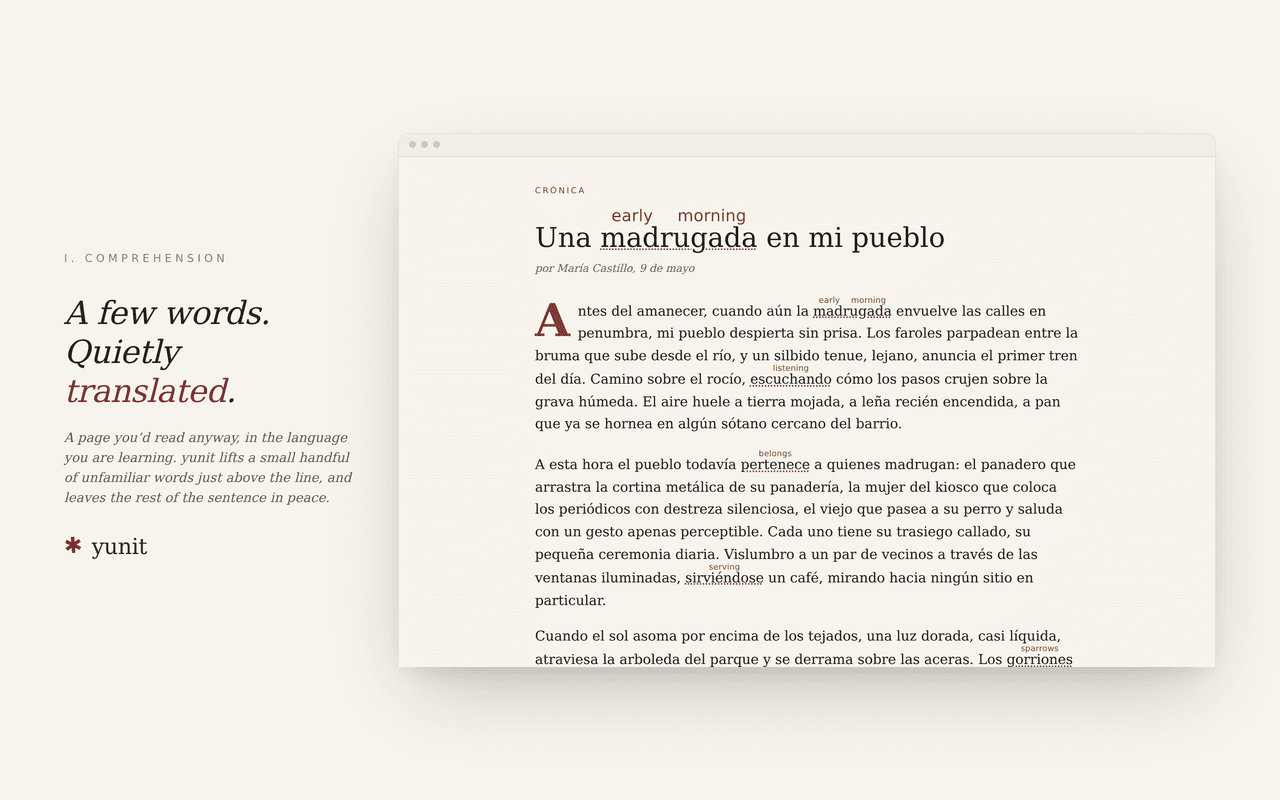
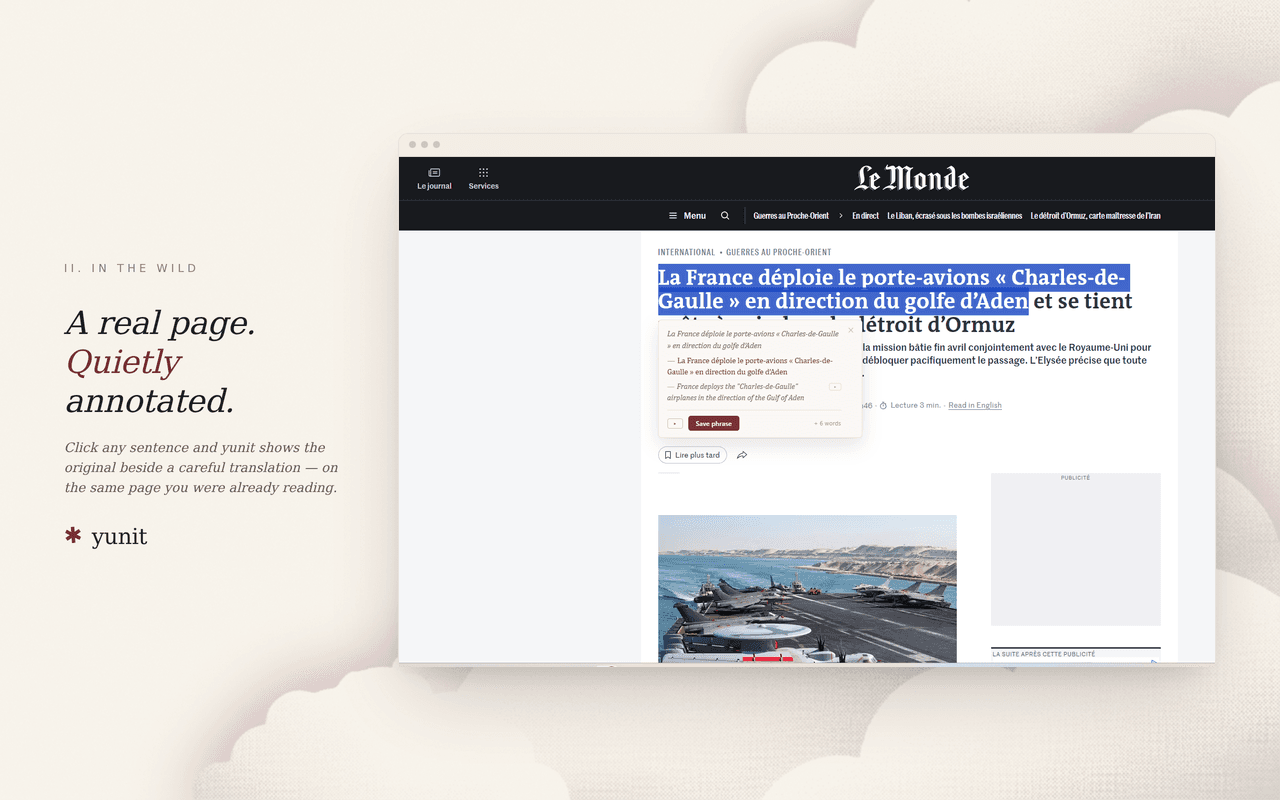
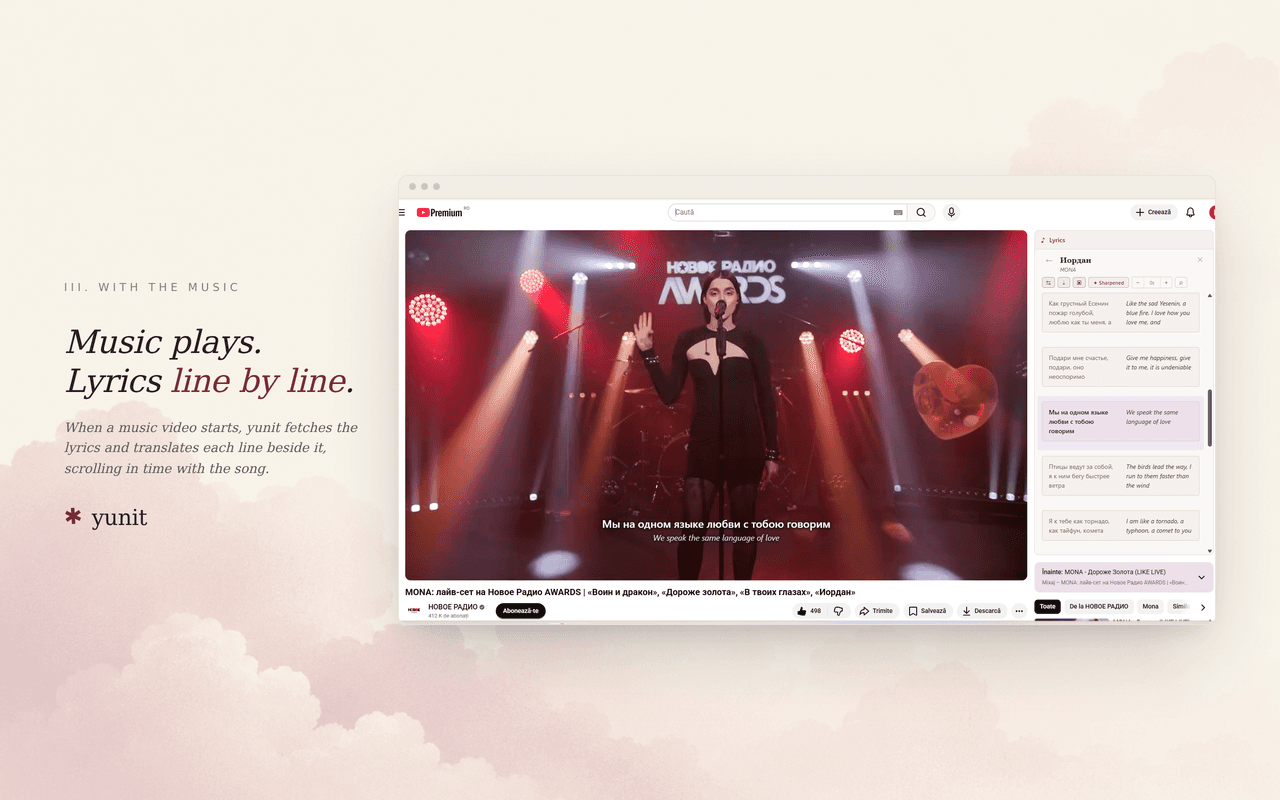
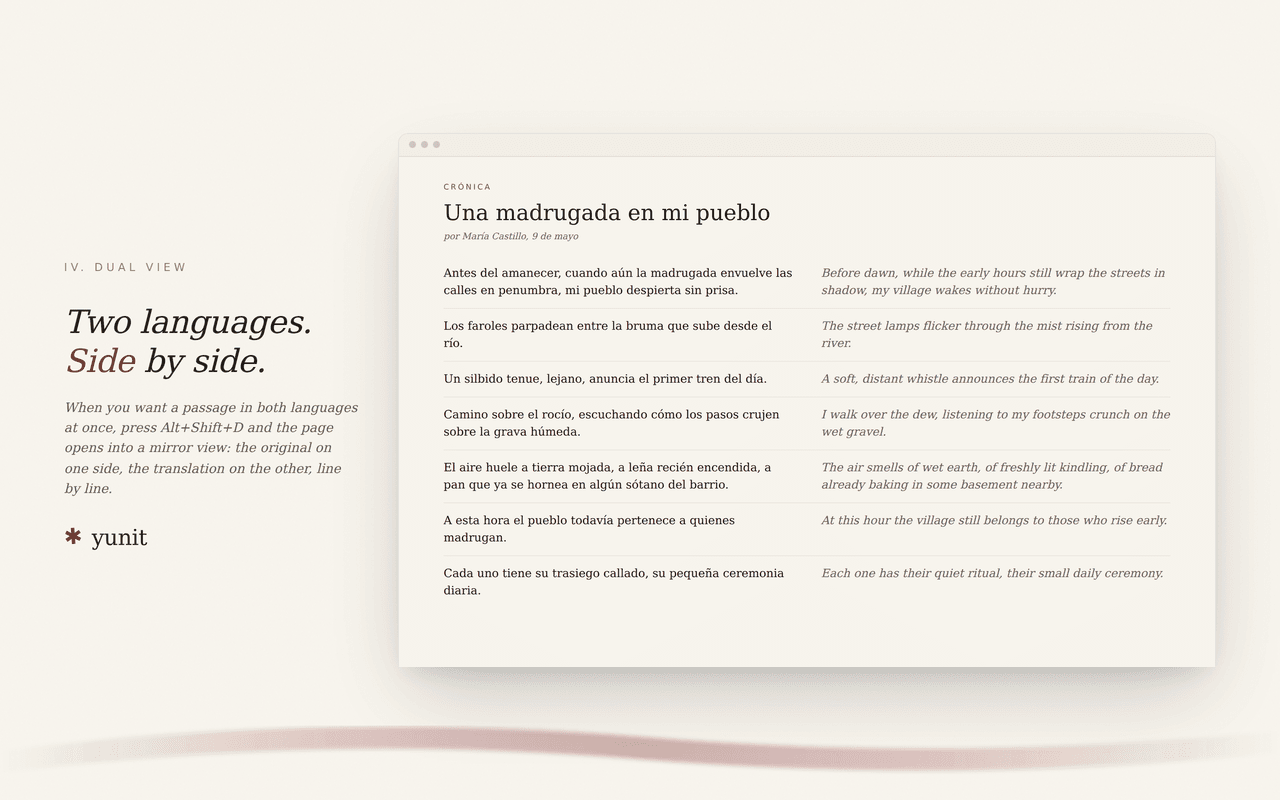
yunit is a browser extension that translates words and phrases as you read, helping you learn a new language naturally. Unlike traditional translation tools that convert entire pages, yunit picks a few words you might not know and pencils small translations above them, keeping the original sentence intact. This approach allows vocabulary to travel with you as you read articles, books, or even song lyrics on YouTube. The extension is free on Chrome, Edge, and Firefox, with no account required. Premium, at $9/month or $72/year, adds live translated captions on YouTube, sharper translations for idiomatic phrases, and multi-device sync. Your data stays on your device; only the exact text you click or select is sent for translation. With a focus on privacy and seamless integration, yunit is like having a personal reading companion that builds your lexicon one word at a time.
Drawn from the product itself, not from a survey.
Demographic
Language learners (intermediate to advanced)
Pain points
Struggling to read authentic content in target language without constant lookup
Primary needs
Seamless translation while reading, vocabulary retention
Demographic
Professionals working in multilingual environments
Pain points
Need to quickly understand foreign documents or communications
Primary needs
Efficient translation, context preservation, privacy
Demographic
Travelers and expats
Pain points
Encountering unfamiliar words in daily life, menus, signs
Primary needs
On-the-go translation, no account hassle, free access
Written by AI from measured evidence, scored out of 100.
yunit is a browser extension that translates words as you read, penciling small translations above unfamiliar words without altering the original text. It's free on Chrome, Edge, and Firefox with no account required, and Premium ($9/month or $72/year) adds live YouTube captions, multi-device sync, and sharper translations. The design is polished, the guide is thorough, and the privacy-first approach is credible. Speed is excellent on desktop but slow on mobile. Security is competent but lacks CSP and DMARC. Accessibility scores 100/100 on automated checks. Growth potential is moderate — the problem is real and the segment is specific, but the price point is high for a browser extension. Overall, yunit is a well-executed indie tool with a clear value proposition and room to grow.
No account required, free tier is genuinely usable, and the reading room lets you try before installing. Guide is thorough with 13 sections. Support is email-only, and onboarding relies on the user reading the guide.
Clean editorial aesthetic with a live interactive demo on the homepage. Guide uses numbered callouts on real screenshots. Polished for an early-stage extension, though no app store presence to judge native UI.
Desktop Lighthouse score 99/100, but mobile drops to 79 with a 5.4s LCP. CLS is 0 and TBT is low, so the site feels snappy once loaded. The mobile LCP is the weak point.
HTTPS enforced with HSTS, frame protection, and Referrer-Policy. No CSP, no Permissions-Policy, no SPF/DMARC. Privacy page is clear about on-device data. No third-party audits or SOC 2 claims.
Lighthouse accessibility score 100/100 with one failing audit on accessible names. No WCAG statement or a11y page. The product itself is inherently multilingual, but the marketing site is English-only.
Real problem (reading authentic content without constant lookup), specific segment (intermediate-to-advanced learners), and a clear wedge against Google Translate and Toucan. Early stage, but the idea has room.
yunit's design is its strongest asset. The homepage opens with a live demo — Spanish text with English translations penciled above words — that immediately communicates the product's value. The guide page is equally polished, using numbered callouts on real screenshots to walk through every feature. Usability is solid: no account required, free tier is genuinely usable, and the reading room lets you try before installing. The 13-section guide is thorough, though it doubles as a sign that onboarding relies on self-directed reading. Support is email-only, which is fine for an indie tool but limits hand-holding. The extension is available on Chrome, Edge, and Firefox, covering the major browsers. Overall, the design and usability work together to make a complex product feel simple — which is harder than it looks.
Speed is a tale of two platforms. Desktop Lighthouse performance is 99/100, but mobile drops to 79 with a 5.4-second LCP. CLS is 0 and TBT is low, so the site feels snappy once loaded, but the mobile first paint is slow enough to matter. Security is competent but not exceptional: HTTPS enforced with HSTS, frame protection, and Referrer-Policy headers present. However, there's no CSP, no Permissions-Policy, and no SPF or DMARC records. The privacy page is clear and honest — words stay on device, only clicked text is sent for translation — but there are no third-party audits, no SOC 2, and no bug bounty. For an early-stage extension handling text from arbitrary web pages, the lack of CSP is a real gap. The privacy-first positioning is credible, but the security posture is table stakes, not a differentiator.
Accessibility scores 100/100 on Lighthouse, with one failing audit about accessible names. There's no WCAG conformance statement or dedicated a11y page, but the automated checks pass cleanly. The product itself is inherently multilingual, though the marketing site is English-only. Growth potential is moderate. The problem yunit names is real: intermediate-to-advanced learners struggle to read authentic content without constant lookup. The target segment is specific, and the wedge against Google Translate (whole-page translation) and Toucan (replaces words) is clear — yunit pencils translations above without altering the original text. Premium adds live YouTube captions and multi-device sync, creating a clear upgrade path. The category has room, but the $9/month price point is steep for a browser extension, and the domain is only 0.4 years old. The idea is sound; execution and pricing will determine whether it grows.
Conclusion
yunit is the kind of product that makes you wonder why it didn't exist sooner. The core idea — pencil translations above words without disrupting the reading flow — is simple, elegant, and genuinely useful for anyone learning a language. The execution is polished, the privacy stance is credible, and the free tier is generous enough to be useful without paying. The weaknesses are real: mobile performance lags, security headers are incomplete, and the $9/month price point is steep for a browser extension. But for intermediate-to-advanced learners who want to read authentic content without constant lookup, yunit is a compelling option. It's early days, but the foundation is solid. If the team can tighten mobile performance and add a few security headers, this could become a category leader.
Named competitors, point by point. Nobody paid to appear here or to be left out.
 yunit yunit |  Google Translate Google Translate |  LingQ LingQ |  Toucan Toucan | Language Reactor | |
|---|---|---|---|---|---|
| Translation approach | Pencils translations above individual words without altering the original text | Translates entire pages, replacing the original text | Reading platform with saved words for review; no browser extension | Replaces words on web pages with translations, altering the original text | Toolbox for learning languages via films and series with dual subtitles |
| Vocabulary building | Kept words return in later reading with spaced repetition built from encountered sentences | No vocabulary building; translation only | Saves unknown words for review with spaced repetition | No dedicated vocabulary retention system | Saves words and phrases from subtitles for review |
| YouTube integration | Lyrics translated line by line; Premium adds live captions for videos without subtitles | No YouTube-specific integration | No YouTube integration | No YouTube integration | Dual subtitles for Netflix and YouTube with playback controls |
| Pricing | Free tier; Premium $9/month or $72/year with 30-day money-back | Free | Free tier; Premium from $12.99/month | Free tier; Premium from $4.99/month | Free tier; Premium from $5/month |
| Privacy | Words stay on device; only clicked/selected text sent for translation; lexicon exports to file | Data processed by Google; subject to Google's privacy policy | Data stored on LingQ servers; account required | Data processed by Toucan; account required for premium | Data stored on Language Reactor servers; account required |
Google Translate
Google Translate is a free multilingual translation service that can translate text, speech, images, and websites. It offers a browser extension that translates entire pages, but lacks the integrated vocabulary-building feature of yunit.
LingQ
LingQ is a language learning platform that allows users to read and listen to content in their target language, saving unknown words for review. It offers a web app and mobile apps, but no browser extension for seamless translation on any page.
Toucan
Toucan is a browser extension that replaces words on web pages with their translations to help you learn a new language as you browse. However, it alters the original text, which can be disruptive for reading comprehension.
Language Reactor
Language Reactor is a powerful toolbox for learning languages by watching films and series in your target language. It helps you to discover, understand, and learn from native materials. Studying will become more effective, interesting, and enjoyable! (formerly called 'Language Learning with Netflix')
Comparing options? See yunit alternatives, scored side by side

A weekly newsletter delivering curated tech jobs, intervi...

A unified platform replacing 12-20 disconnected tools for...

A massive collection of free printable coloring pages for...

AI-powered HireVue practice with timed mock interviews, role-specific questions, transcripts, scoring, and actionable feedback.

AI-powered law school study platform with 20,000+ case br...

All-in-one CIRO exam prep for CIRE and 8 other exams, wit...

Free timed practice for SHL, numerical, and logical tests...

Turn timers into powerful routines with automation, widge...

Custom illustrated children's books created around your c...

Turn your content into a branded mobile app with home, co...

Free 80-item RAADS-R autism self-assessment for adults, with instant total and domain scores, privacy-first access, and clear non-diagnostic guidance.

AI humanizer for natural text with best possible human-like result
A platform dedicated to providing unbiased reviews of newly launched applications, analyzing everything from their features to their full potential.
info@scoutforge.net© 2026 Scoutforge. All rights reserved.
