Cycling through all six. Tap any point to stop.
Measured on six things
Precision BPM detection for musicians and DJs.
Speed
46Play Store listing page loads slowly on mobile (LCP 5.9s, performance 48/100), though this reflects Google's page, not the app. In-app claims of 50ms debounce and low-latency C++ engine suggest responsive performance, but no independent benchmarks verified.
Screenshots
1 / 1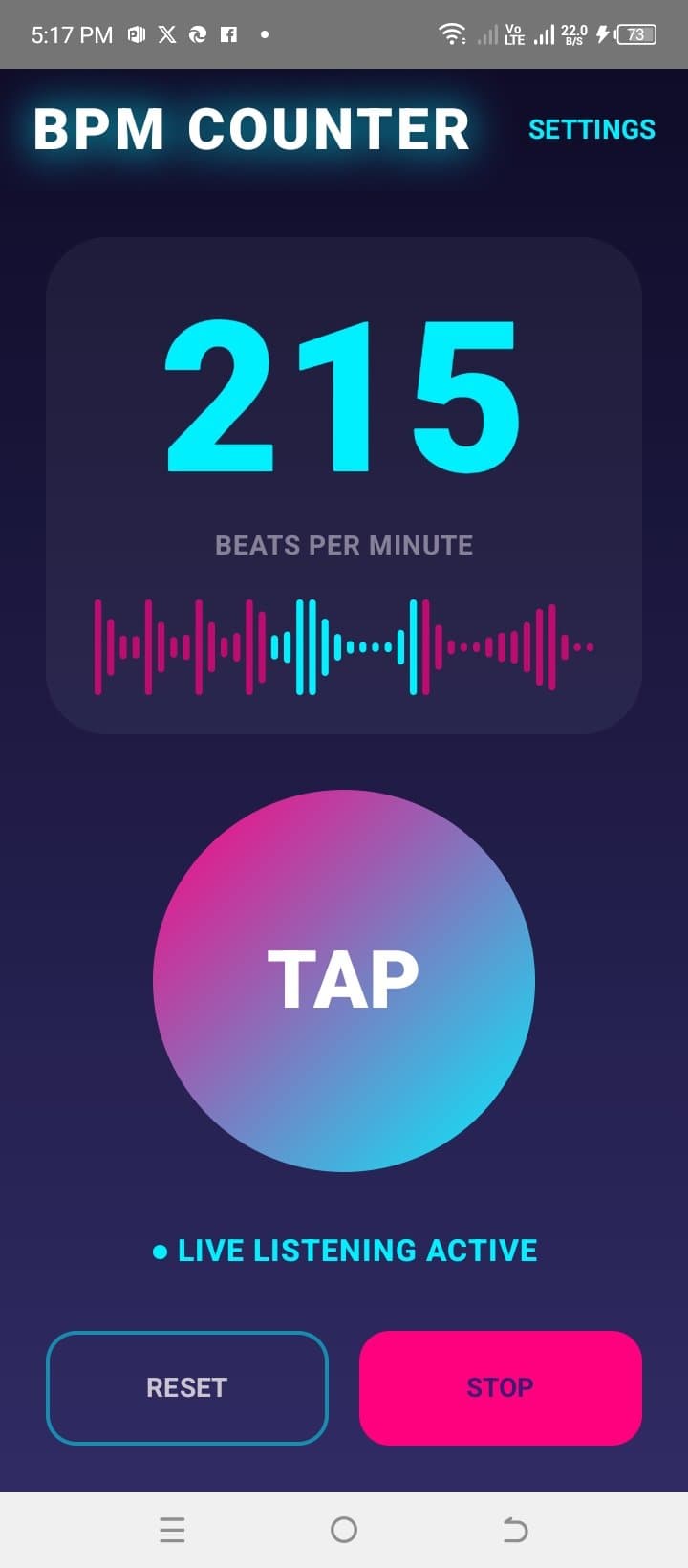
About this app
I've been testing BPM Counter on my Android phone and it's quickly become my go-to tool for figuring out the tempo of tracks. The standout feature is the pro-grade C++ audio engine that gives you lab-accurate BPM readings, not just a rough guess. You can tap along to the beat with the ultra-responsive tap pad, or use the live detect mode to listen to music in real-time and get the BPM on the spot. I love the deep analysis mode for complex songs with tricky rhythms—it does a 15-second dive that really gets to the heart of the track. The UI is sleek with a neon-inspired dark theme that looks great in a dim studio. There's also a dynamic visualizer that reacts to the audio, which is both useful and cool to watch. If you're a producer, DJ, or musician of any kind, this app is a reliable companion.
Key features
- 1Custom C++ audio engine with 15-second deep analysis mode for complex tracks with tricky rhythms
- 2Live Detect mode using real-time microphone listening with advanced percussion onset detection
- 3Manual tap-to-BPM with 50ms debounce and ultra-responsive interface for high-speed tempo marking
- 4Dynamic real-time amplitude visualizer with high-refresh display and neon-inspired dark UI
Target customer profile
Drawn from the product itself, not from a survey.
Demographic
Amateur and professional DJs
Pain points
Need accurate tempo detection for beatmatching and mixing, often in low-light club environments with complex rhythms.
Primary needs
Accurate, instant BPM detection; reliable performance with live audio; intuitive interface for on-the-fly adjustments.
Demographic
Musicians and music educators
Pain points
Struggle with manually calculating BPM of exercises or pieces, especially those with irregular time signatures.
Primary needs
Fast tap tempo for practice; ability to analyze recorded audio for form and speed; clear visual feedback.
Demographic
Music producers and audio engineers
Pain points
Need precise tempo analysis for aligning samples, loops, and remixes; existing apps might lack accuracy or advanced features.
Primary needs
Deep analysis mode for complex audio; precise BPM extraction; robust tool for studio use.
Scout Review
Written by AI from measured evidence, scored out of 100.
BPM Counter is a competent, well-focused tool that understands its audience. The core value proposition — lab-accurate BPM detection via a custom C++ engine — is clearly articulated and genuinely differentiated from the basic tap-tempo alternatives. The dark neon UI is appropriate for its studio/DJ context, and the large tap target shows thoughtful UX design. The app's strengths are its specificity: three distinct modes (tap, live detect, deep analysis) map cleanly to different user needs, and the 15-second deep analysis mode addresses a real gap for complex tracks. However, the polish is inconsistent — the app icon and screenshot layouts suggest the visual system wasn't fully unified — and the security posture has notable gaps (no enforced HTTPS, data can't be deleted, third-party data sharing). With 100+ downloads, it's early days, but the differentiated engine and clear target segments give it a plausible path to a solid niche position. For DJs and producers who need accurate tempo detection on complex tracks, it's worth a try — just don't expect the polish of a major studio tool yet.
Measure by measure
Usability
64Core interaction (tap-to-BPM) is thoughtfully designed with a massive target and 50ms debounce. Three clear modes serve distinct workflows. Minor friction: bottom buttons use inconsistent visual weights, and no onboarding walkthrough is evident for first-time users.
Design
58Dark neon UI with large gradient TAP button is functional and studio-appropriate, but inconsistent button styles across screens and a dated multicolored app icon undermine visual cohesion. Dynamic waveform visualizer adds polish. Judged on app UI from store screenshots.
Speed
46Play Store listing page loads slowly on mobile (LCP 5.9s, performance 48/100), though this reflects Google's page, not the app. In-app claims of 50ms debounce and low-latency C++ engine suggest responsive performance, but no independent benchmarks verified.
Security
58Solid baseline: HSTS, CSP, frame protection, X-Content-Type-Options all present. Concerns: HTTPS not enforced, no DMARC or Referrer-Policy, and data safety reveals sharing of Location and Financial info with third parties plus non-deletable data. No SOC 2 or audit claims found.
Accessibility
76Lighthouse accessibility 98/100 with only two minor failures (missing main landmark, accessible name mismatches). High-contrast dark theme and large tap target support low-light and motor accessibility. No multi-language support or explicit WCAG statement found.
Growth
62Real problem with a genuine differentiator (C++ deep analysis engine) targeting specific segments. Category has room, but 100+ downloads and crowded alternatives limit near-term upside.
Improvement areas
- Inconsistent visual system across screens; app icon design feels dated and unprofessional
- Security gaps: HTTPS not enforced, no DMARC, data deletion not supported, third-party data sharing
- No multi-language support limiting global market reach
- Limited traction (100+ downloads) with no independent benchmarks or user reviews to validate accuracy claims
Design & Usability
BPM Counter's design is a study in contrasts. The core interface — a massive gradient TAP button on a dark navy background with neon cyan accents — is genuinely well-executed for its intended low-light studio environment. The dynamic waveform visualizer adds both function and flair. However, the polish breaks down at the edges: the five Play Store screenshots show inconsistent button styles and layouts, suggesting the visual system wasn't fully thought through. The app icon, with its multicolored lettering and yellow badge, feels like a relic from an earlier design era. Usability is stronger: the tap-to-BPM interaction is thoughtfully designed with a 50ms debounce and a target that's nearly impossible to miss. Three distinct modes (tap, live detect, deep analysis) map cleanly to different user workflows. The main friction point is the bottom controls — RESET and STOP are equal width but use different visual weights (outline vs. solid), which could slow down split-second decisions during a live set. There's no visible onboarding, but the interface is simple enough that most target users (DJs, producers) will figure it out quickly.
Speed & Security
Speed is a mixed bag. The Play Store listing page itself performs poorly on mobile (LCP 5.9s, performance score 48/100), though that's largely Google's infrastructure rather than the app's fault. The app's own claims — 50ms tap debounce and a low-latency C++ audio engine — suggest responsive in-app performance, but no independent benchmarks or user reviews verify these numbers. Security presents a more concerning picture. The HTTP probe shows solid fundamentals: HSTS, CSP, frame protection, and X-Content-Type-Options are all in place. However, HTTPS isn't enforced, DMARC and Referrer-Policy are missing, and the data safety section reveals the app shares Location and Financial info with third parties while offering no data deletion option. For a tool that handles financial info (presumably for in-app purchases), the lack of enforced HTTPS and the inability to delete data are notable gaps. No SOC 2, ISO certification, or bug bounty program is mentioned, which is typical for a small developer but worth noting for professional users who might handle sensitive project data.
Accessibility & Growth
Accessibility is a genuine strength. The Lighthouse audit scored 98/100, with only two minor failures: a missing main landmark and some accessible name mismatches. The high-contrast dark theme (neon on navy) is well-suited for low-light environments, and the oversized tap target supports users with motor impairments. The main gaps are the lack of multi-language support and no explicit WCAG compliance statement. Growth potential is moderate. The problem BPM Counter solves is real — DJs and producers need accurate tempo detection, and the alternatives (Tempo SlowMo, BeatFind) are indeed basic. The custom C++ engine with 15-second deep analysis mode is a genuine differentiator that addresses a specific pain point: complex tracks with tricky rhythms. The target segments are clearly defined (DJs, producers, educators). However, the 100+ download count suggests early traction, and the category is crowded with free alternatives. The wedge — deep analysis for complex audio — is compelling but narrow. It could carry the app to a respectable niche position, but the path to mass adoption isn't clear from the current positioning.
Conclusion
BPM Counter is a promising tool with a genuine technical differentiator. The C++ engine and deep analysis mode address real pain points that basic tap-tempo apps don't solve. The dark neon UI is appropriate for its audience, and the core interaction is thoughtfully designed. The main areas for improvement are visual consistency (unify the button styles, redesign the app icon), security hardening (enforce HTTPS, add data deletion), and expanding language support. For its target users — DJs, producers, and musicians dealing with complex rhythms — it's worth downloading and testing against your most challenging tracks. If the engine delivers on its 'lab-accurate' promise, it could become a staple in the mobile music toolkit. Just keep an eye on the data-sharing practices and consider whether the lifetime premium upgrade is worth it at this early stage.
Suggestions for improvement
- Unify button styles and visual system across all screens; redesign the app icon with cleaner typography matching the in-app aesthetic
- Enforce HTTPS and add DMARC/Referrer-Policy headers; provide a data deletion option to address privacy concerns
- Add multi-language support (at minimum Spanish, German, Japanese) to expand beyond English-only market
- Publish independent benchmarks or a demo video showing the C++ engine's accuracy on complex tracks to build credibility
Alternatives comparison
Named competitors, point by point. Nobody paid to appear here or to be left out.
 BPM Counter BPM Counter | Tempo SlowMo | Moises - The Musician's App | BeatFind - BPM Counter | |
|---|---|---|---|---|
| Audio analysis engine | Custom C++ engine with 15-second deep analysis mode for complex audio | Basic tap tempo and audio speed control, no advanced analysis | AI stem separation focus, not dedicated BPM analysis | Simple audio detection with basic engine |
| Live BPM detection | Real-time microphone listening with percussion onset detection | Manual tap only, no live audio detection | Not a core feature; focuses on stem separation | Basic audio detection available |
| Tap tempo precision | 50ms debounce for high-speed manual tempo marking | Standard tap tempo, no debounce specification | No dedicated tap tempo feature | Manual tapping supported, precision not specified |
| Target user focus | DJs, producers, musicians needing lab-accurate tempo analysis | General users wanting tempo and speed adjustment | Musicians wanting stem separation and practice tools | Casual users needing basic BPM detection |
| UI theme | Neon-inspired dark theme designed for low-light studio environments | Pedal-style interface, standard light theme | Modern clean interface, not specialized for dark environments | Basic interface, no specialized theme |
Tempo SlowMo
A pedal-style app with tap tempo and audio file speed control, but lacks advanced audio analysis.
Moises - The Musician's App
Focuses on isolating stems and AI audio separation, not a dedicated BPM counter.
BeatFind - BPM Counter
Uses manual tapping and simple audio detection, but with a more basic engine compared to BPM Counter.
Comparing options? See BPM Counter alternatives, scored side by side
More Lifestyle & Entertainment apps
View all Lifestyle & Entertainment
RoomCreator
92An AI-powered interior and exterior design tool that tran...

Factory Direct Mattress Overland Park
92A locally-owned mattress store in Overland Park, KS offer...

TUNL - Cave Flyer
89A hold-to-thrust cave flyer with a new daily level, ghost races, and a global leaderboard.

Portrait Gift
88AI-powered personalized face swap art platform creating c...

TranscriptYou
88Free YouTube transcript generator with timestamps and AI ...

Roami eSIM
88A global travel eSIM app offering instant activation, no ...

FaceSwapAI
87AI face swap for photos, videos, GIFs with free trial.

youtubetomp3.ink
87Free online YouTube to MP3 converter with no signup or so...

InviteVia
87InviteVia is a digital invitation platform for creating beautiful online invitations for weddings, birthdays, engagements, parties, and special events. Choose a template, customize your invitation, collect RSVPs, and share it instantly through WhatsApp, Instagram, SMS, or a simple link. No guest accounts or app downloads required.

Coloring Pages Pro
87A massive collection of free printable coloring pages for...

TaroMind AI Tarot Birth Card Calculator
87Free, private tool to find your tarot birth cards instantly.

SeatCanvas
87Drag-and-drop seating charts for weddings, quinceañeras and events. Import your guest list from Excel, export print-ready PDFs. Free up to 40 guests, no signup.


A platform dedicated to providing unbiased reviews of newly launched applications, analyzing everything from their features to their full potential.
info@scoutforge.net© 2026 Scoutforge. All rights reserved.
