Cycling through all six. Tap any point to stop.
Measured on six things
A private family album for photos, videos, notes and voice. You choose who sees each moment, and family can view by link with no app or account.
Security
53HTTPS enforced with HSTS, SPF and DMARC in place, and the site makes clear EU-storage and no-AI-training promises. But the header probe found no CSP, frame protection or Referrer-Policy, and no SOC 2, ISO or pen-test disclosure appears.
Screenshots
1 / 1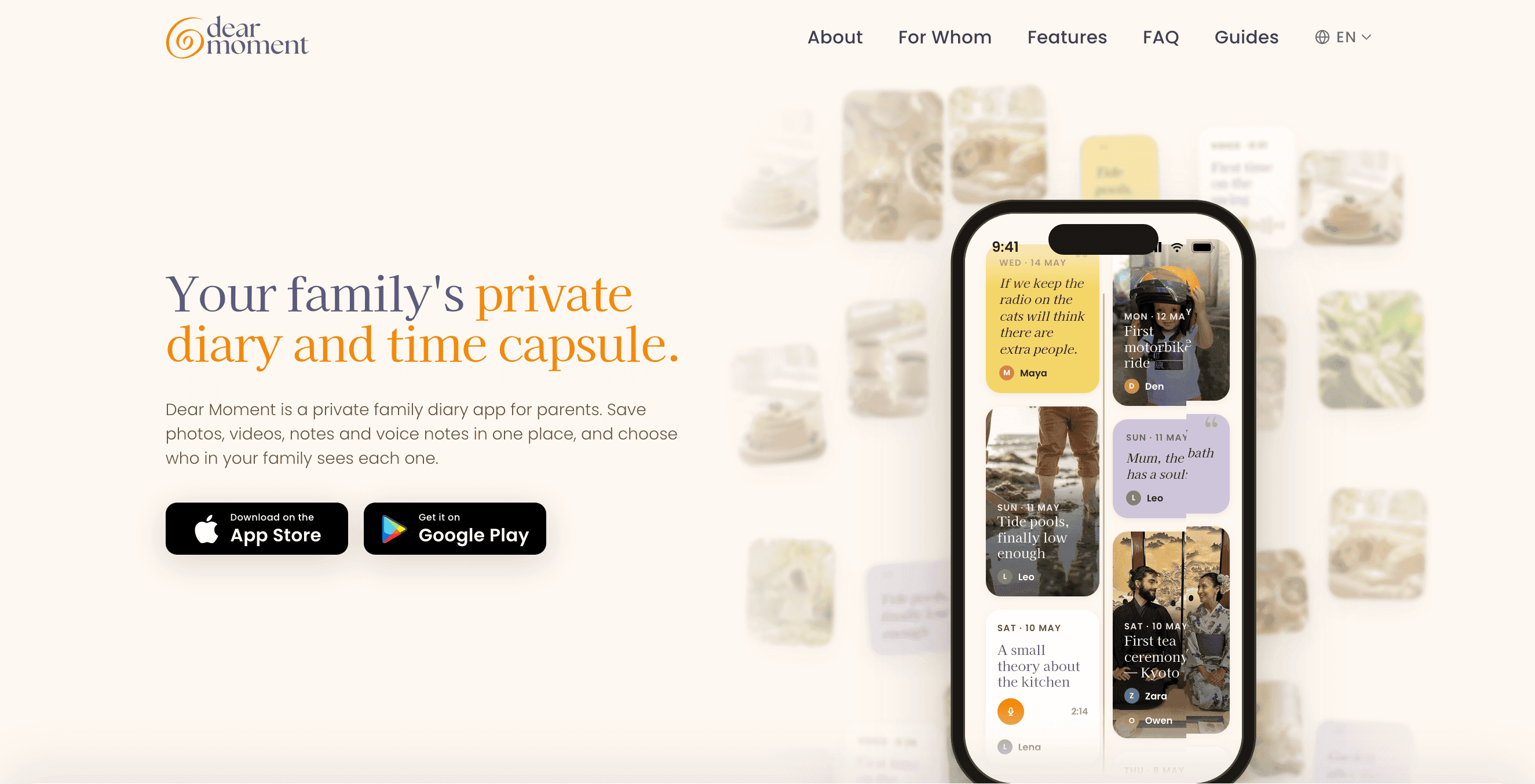
About this app
Dear Moment is a private family diary for iOS and Android. Save moments as photos, videos, written notes and voice notes on one timeline, sorted by date. A single moment can hold up to 10 photos, 3 videos, a note and a voice recording, and voice notes are transcribed automatically so they can be read as well as played. You choose who sees each moment. Grandparents and other family get a private link and can view on the web with no app and no account, plus an optional weekly email digest of new moments. Some moments can stay just for you. It’s for parents keeping a baby journal or digital baby book, families sharing updates with relatives abroad, and anyone who wants a calmer alternative to group chats, social media or a cluttered camera roll. What makes it different: no ads on any plan, unlimited storage, data stored in the EU, and memories are never sold or used to train AI. Every plan starts with a 14-day free trial, and you can export everything at any time.
Key features
- 1One date-sorted timeline for photos, videos, written notes and voice notes, with automatic voice transcription.
- 2Per-moment sharing: choose exactly which family members see each memory, or keep it private.
- 3Private web link for relatives with no app and no account, plus an optional weekly email digest.
Target customer profile
Drawn from the product itself, not from a survey.
Demographic
Parents of young children (millennials/Gen Z)
Pain points
Moments buried in camera rolls; forgetting cute mispronunciations and firsts
Primary needs
Quick capture of daily milestones; organized, shareable family timeline
Demographic
Adult children of aging parents/grandparents
Pain points
Never recorded grandma's voice or stories before she passed; scattered notes
Primary needs
Voice recording with transcription; a lasting legacy archive for elders
Demographic
Long-distance couples and dispersed families
Pain points
Photos lost across group chats; no simple way to keep far-away relatives updated
Primary needs
Private selective sharing; weekly digest for non-app-using relatives
Demographic
Privacy-conscious memory keepers (journalers, pet owners)
Pain points
Distrust of social networks monetizing data; existing apps too public or cluttered
Primary needs
No ads or AI training; EU storage; granular access control and export
Scout Review
Written by AI from measured evidence, scored out of 100.
Dear Moment is a private family diary for iOS and Android that puts photos, videos, notes and auto-transcribed voice recordings on one date-sorted timeline, then lets you decide moment by moment who in the family sees what. Relatives get a private link that works in a browser with no app and no account, plus an optional weekly digest. The pitch is aimed at parents building a baby book, families spread across countries, and adult children who want to capture an older relative's voice before it is gone. The differentiators are concrete: unlimited storage, EU data residency, no ads on any plan, no AI training on your memories, a 14-day trial and full export. The app UI is warm and well-crafted, the site is fast, and the sharing model is the best-executed part. The gaps are missing security headers, no published compliance certifications, a contrast issue in the type, and organizing features still marked coming soon.
Measure by measure
Usability
68Strong core loop: capture in seconds, then a sharing sheet with named relatives and per-person toggles. Recipients need no app or account, which removes the usual family-app friction. Collections and filters are still 'coming soon'.
Design
71Judging the app UI: store screenshots show a warm, coherent serif/sans system with real content, transcript cards and a legible sharing sheet. The live homepage capture rendered nearly blank, and one badge clips a label.
Speed
88Lighthouse mobile 97/100 with LCP 1.1s, CLS 0 and TBT 45ms; desktop 94/100. That is a genuinely fast marketing site with no layout shift. In-app performance was not measured.
Security
53HTTPS enforced with HSTS, SPF and DMARC in place, and the site makes clear EU-storage and no-AI-training promises. But the header probe found no CSP, frame protection or Referrer-Policy, and no SOC 2, ISO or pen-test disclosure appears.
Accessibility
79Lighthouse accessibility 96/100 with a single failing contrast audit, and the app ships in 11 languages. The one real ding is small, light grey body copy on cream, which the visual audit flagged as hard to read.
Growth
63Real problem, specific wedge: per-moment selective sharing plus a no-account web link for grandparents, backed by EU storage and no-AI-training promises. Category is crowded but the privacy angle is defensible.
Improvement areas
- Missing security headers (CSP, frame protection, X-Content-Type-Options, Referrer-Policy) and no published certifications.
- Contrast failure on light grey body copy and nav links against the cream background.
- Collections and filters are still marked 'coming soon', leaving the timeline chronological only.
Design & Usability
The app is the product here, and the app looks good: warm serif-and-sans typography, real content in every screenshot, transcript cards and waveforms instead of empty states, and a sharing sheet that names Grandma, Uncle and Auntie with individual toggles. That sharing sheet is the strongest design decision in the whole product because it makes the privacy model visible in one glance. Usability follows the same logic — capture is a few taps, recipients need no app or account, and a weekly digest covers relatives who will never install anything. The friction is on the organizing side: collections and filters are explicitly 'coming soon', so today the timeline is chronological only. The marketing site is the weak link, with a homepage capture that rendered as an empty cream canvas.
Speed & Security
Speed is the standout measured result: Lighthouse mobile 97/100 with a 1.1s LCP, zero cumulative layout shift and 45ms total blocking time, plus 94/100 on desktop. Whatever the site is built on, it is lean. Security is more mixed. The basics are correct — HTTPS enforced, HSTS, SPF and DMARC all present — and the product makes concrete promises about EU storage, no ads and never training AI on family memories. But the header probe found no Content-Security-Policy, no frame protection, no X-Content-Type-Options and no Referrer-Policy, landing at 6 of 12 checklist points. There is also no published SOC 2, ISO certification, penetration test or bug bounty in the material reviewed. For an app whose entire value proposition is private family data, that gap between the promise and the published proof is the thing to close next.
Accessibility & Growth
Accessibility scores well on automated checks at 96/100, with one failing audit for insufficient contrast — and the visual audit independently flagged small, light grey body copy on cream, so that is a real, fixable issue rather than a false positive. The app is localized in 11 languages, which is unusually broad for a product this young and matters for dispersed families. Growth is the interesting question. The category is crowded: Tinybeans and FamilyAlbum both do family photo sharing, and Day One does private journaling. Dear Moment's wedge is granularity — choosing who sees each individual moment, with a no-account web link for relatives who will never install an app — plus a privacy stance (EU storage, no ads, no AI training, export anytime) that the incumbents do not lead with. That is a genuine reason to switch, though it is a feature set the larger players could copy. Traction is early: the domain was registered in May 2026 and the iOS listing carries a 5/5 from six ratings.
Conclusion
If you are the kind of parent who has 40,000 photos and no way to find the one where your kid mispronounced 'spaghetti', this is aimed squarely at you, and the no-account link for grandparents is the feature that will actually get used. Go in knowing what you are buying: a young product from a small team, with a polished app and a fast site but no published security certifications and a few organizing features still on the roadmap. The 14-day trial and full export make that a low-risk experiment. Check the privacy policy yourself before uploading anything you would not want mishandled, and if you are the family's designated archivist, start with the voice notes — that is the part you cannot go back and capture later.
Suggestions for improvement
- Add Content-Security-Policy, X-Frame-Options, X-Content-Type-Options and Referrer-Policy headers to close the 6/12 gap.
- Publish a security page covering data handling, encryption at rest and in transit, and any third-party subprocessors.
- Fix the contrast failure: darken the light grey body copy and nav links on the cream background.
- Ship collections and filters, or soften the 'coming soon' labels so the timeline does not feel half-built.
Alternatives comparison
Named competitors, point by point. Nobody paid to appear here or to be left out.
 Dear Moment |  Tinybeans | FamilyAlbum |  Day One | |
|---|---|---|---|---|
| Sharing granularity | Per-moment control: pick exactly who sees each memory, or keep it private | Share to a defined circle of family and friends | Share to invited family members in a shared album | Private by default; sharing via shared journals |
| Recipient needs an account | No — private web link, no app or account required | Yes — recipients join the circle | Yes — recipients install the app and join | Yes — shared journals require an account |
| Voice notes with transcription | Yes — voice recording auto-transcribed and readable | No — photo and text entries | No — photo and video focused | Yes — audio entries supported |
| Data storage location | EU, per site claims | US-based service | Mixi-owned, Japan/US infrastructure | US-based, Automattic-owned |
| Ads and AI training on content | No ads on any plan; memories never used to train AI | Free tier ad-supported | Free with optional paid prints | Subscription, no ads |
| Full data export | Yes — export everything at any time | Yes — download journal | Yes — download photos | Yes — JSON, PDF and Markdown export |
Tinybeans
A shared family photo journal that lets parents privately share updates with a circle of family and friends.
FamilyAlbum
A Mixi-owned family photo sharing app for parents to organize and share children's photos with relatives.
Day One
A popular private journaling app for writing and photo entries with strong privacy and export options.
Comparing options? See Dear Moment alternatives, scored side by side
More Social & Community apps
View all Social & Community
username.md
90One verified handle for your online identity, readable by...

HackathonHost
88End-to-end hackathon and game jam event management software

NOSTRES
88Free step-by-step guides for moving to Berlin: documents,...

Creastor
88An all-in-one platform for creators to sell digital produ...

Ominglo
87Random video chat to talk to strangers and meet new people one-on-one. Free to start, no sign-up, with moderation that helps keep chats safe.

LaunchSpot
87A vibrant platform for discovering and launching new tech...

67ez
86Free viral 67 (Six Seven) browser games, world counter & ...

Omnitwine
85Professional networking without manual search. Powered by AI

Camera Wedding
84Collect every guest photo with one QR code. No app needed. One QR code collects every wedding guest's photos into a private shared album. No app or login for guests. One-time price from $49.

Recap Raven
83Discord bot for D&D session recordings, AI recaps, and se...

Dev Hunt
82A launchpad for discovering and voting on the best new de...

mhm
82Same thought, without words.


A platform dedicated to providing unbiased reviews of newly launched applications, analyzing everything from their features to their full potential.
info@scoutforge.net© 2026 Scoutforge. All rights reserved.
