Cycling through all six. Tap any point to stop.
Measured on six things
Free online digital clock with seconds, 12/24-hour format...
Security
52HTTPS with HSTS and DMARC are solid basics. No CSP or frame protection leaves room for improvement, but no account system means minimal attack surface and data exposure.
Screenshots
1 / 1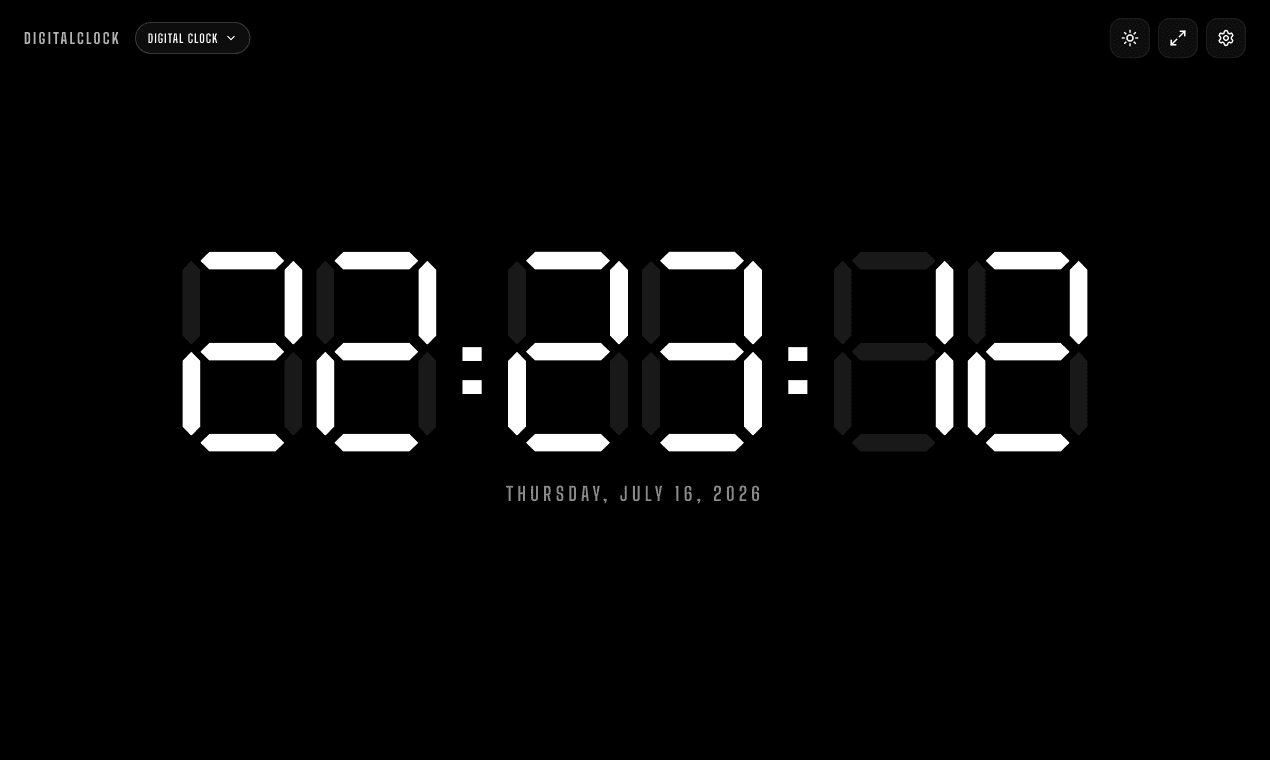
About this app
DigitalClock is a browser-based digital clock that fills your entire screen with large, high-contrast LED digits. It's free, requires no install or signup, and offers a range of features like 8 color options, seconds display, 12/24-hour format, fullscreen mode, and a keep-screen-on function. Perfect for work, streaming, cooking, bedtime, or classrooms, it works on any device with a browser. Additionally, it includes other clock styles like flip, pixel, neon, and binary, plus tools like timer, alarm, stopwatch, and world clock.
Key features
- 1Genuine 7-segment LED display with 8 color options (Red, Green, Blue, White, Amber, Purple, Pink, Cyan)
- 2Fullscreen mode with Keep Screen On via Wake Lock API, plus offline support via cached assets
- 3Multiple clock styles (Flip, Pixel, Neon, Binary) and tools (Timer, Alarm, Stopwatch, World Clock, Pomodoro)
Target customer profile
Drawn from the product itself, not from a survey.
Demographic
Remote workers and students
Pain points
Need to keep track of time without switching apps or losing focus; often work long hours at a desk.
Primary needs
A large, easy-to-read clock that can stay on screen during focus sessions.
Demographic
Streamers and content creators
Pain points
Need to display time to their audience during live streams without distracting overlays.
Primary needs
A minimal, fullscreen clock that can be integrated into streaming setups like OBS.
Demographic
Home cooks and kitchen enthusiasts
Pain points
Need a readable clock while cooking but often have messy hands or are across the room.
Primary needs
A high-contrast, fullscreen clock that works on a phone or tablet propped up on the counter.
Demographic
Elderly family members
Pain points
Have difficulty reading small or fancy clocks; need a simple, high-contrast display for time and medication reminders.
Primary needs
A plain, motionless LED display with large digits and optional dim colors for night use.
Scout Review
Written by AI from measured evidence, scored out of 100.
DigitalClock is a well-executed, free browser-based clock that delivers on its core promise: a large, high-contrast seven-segment display readable from across the room. The design is clean and focused, with a consistent dark theme and intuitive color presets. Usability is strong — zero-to-clock in under ten seconds, with clear toggles and a thorough FAQ. Desktop performance is excellent (99/100), though mobile load times are sluggish (LCP 7.1s). Security is basic but adequate for a no-account tool, with HTTPS and HSTS in place. Accessibility is decent (91/100) but has room for improvement in contrast and ARIA compliance. Growth potential is moderate: the differentiators are real, but the category is crowded with free alternatives. Overall, a solid, useful tool that does one thing well — just don't expect it to reinvent the clock.
Measure by measure
Usability
72Zero-to-clock in 10 seconds with clear toggles and color buttons. Settings trigger is hidden, but FAQ and intuitive controls make it easy to master. Works across devices with responsive design.
Design
70Clean, focused dark theme with genuine 7-segment LED digits. Color presets and minimal UI are well-executed, but settings sidebar overlap and unreadable footer text hold it back.
Speed
58Desktop performance is stellar (99/100), but mobile LCP at 7.1s is sluggish. CLS of 0 and low TBT show good execution; the heavy initial load on mobile is the main drag.
Security
52HTTPS with HSTS and DMARC are solid basics. No CSP or frame protection leaves room for improvement, but no account system means minimal attack surface and data exposure.
Accessibility
68Lighthouse 91/100 with high-contrast digits and keyboard navigation. Failing ARIA and contrast audits are real issues, but dim color options and readable-from-across-room design help real-world use.
Growth
58Real problem, clear differentiators (7-segment, Wake Lock, offline), but crowded category with free defaults. Needs sharper positioning to win users from Fliqlo and Time.is.
Improvement areas
- Mobile performance: LCP 7.1s needs optimization (lazy-load, preload critical assets)
- Settings panel overlaps clock when open; footer text contrast is too low
- Security headers: add CSP, frame protection, and X-Content-Type-Options
Design & Usability
DigitalClock nails the core promise: a clean, high-contrast seven-segment clock that's readable from across the room. The dark theme is consistent, and the 8-color preset grid is a thoughtful touch that doesn't clutter the main display. However, the settings sidebar overlaps the clock when open, and the footer disclaimer text is nearly illegible — small but noticeable polish issues. Usability is strong: the clock goes from zero to fullscreen in under ten seconds, with intuitive toggles for 12/24-hour format, seconds, and date. The settings trigger is slightly hidden, but the FAQ covers common questions thoroughly, and the responsive design works across devices. The lack of a visible onboarding hint for first-time users is a minor stumble, but the learning curve is essentially flat.
Speed & Security
Performance is a tale of two devices: desktop scores a near-perfect 99/100 on Lighthouse, while mobile lags at 69/100 with a 7.1s LCP — sluggish for a page whose entire job is showing the time. The CLS of 0 and low TBT (43ms) show solid execution once loaded, and offline support via cached assets is a nice bonus. Security is basic but adequate for a no-account tool: HTTPS with HSTS, SPF, and DMARC are in place, but the absence of CSP, frame protection, and other headers leaves room for hardening. The lack of a signup or data collection minimizes the attack surface, which is a genuine advantage for a utility like this. Overall, it's secure enough for what it does, but not a model of security hygiene.
Accessibility & Growth
Accessibility is a mixed bag: Lighthouse scores 91/100, and the high-contrast LED digits are genuinely readable from across a room — a real win for elderly users or classroom settings. However, the audit flags prohibited ARIA attributes and insufficient color contrast in the settings panel, and there's no WCAG statement or multi-language support. The dim color options for night use are a thoughtful touch. Growth potential is moderate: the problem is real (readable time display for focus, streaming, kitchen, bedside), and differentiators like the genuine 7-segment display, Wake Lock API, and offline support are concrete. But the category is crowded with free defaults like Fliqlo and Time.is, and the domain is only 0.1 years old. The wedge is real but narrow — it needs sharper positioning to stand out.
Conclusion
DigitalClock is the kind of tool you don't think you need until you're squinting at your phone timer while your hands are covered in flour. It's free, fast on desktop, and genuinely readable from across the room. The mobile load time is a blemish, and the settings panel could use a polish pass, but for a no-signup, no-install utility, it's hard to complain. If you're a streamer, a teacher, or just someone who likes a clean clock on a second monitor, this is worth a bookmark. It won't change your life, but it might just save you from burning the cookies.
Suggestions for improvement
- Optimize mobile initial load: lazy-load non-critical assets to cut LCP from 7.1s
- Add a subtle first-visit hint pointing to the settings trigger
- Fix settings panel overlap and increase footer text contrast
- Add a WCAG statement and address ARIA/contrast audit failures
Alternatives comparison
Named competitors, point by point. Nobody paid to appear here or to be left out.
 DigitalClock DigitalClock |  Fliqlo Fliqlo |  Time.is Time.is | |
|---|---|---|---|
| Installation required | No install — runs in any browser | Requires download and install as screensaver | No install — web-based |
| Display style | Genuine 7-segment LED with 8 colors | Split-flap flip clock style | Standard digital font with timezone info |
| Keep screen on | Yes — Wake Lock API | N/A — screensaver keeps screen on by design | No |
| Offline support | Yes — cached assets work offline | Yes — installed locally | No — requires internet for time sync |
| Additional tools | Timer, Alarm, Stopwatch, World Clock, Pomodoro, 5 clock styles | Clock only | Timezone converter, world clock, calendar |
Fliqlo
A flip clock screensaver for desktops and mobile devices that displays time in a split-flap style.
Time.is
A web-based clock displaying precise time, time zone information, and synchronized time across devices.
Comparing options? See DigitalClock alternatives, scored side by side
More Lifestyle & Entertainment apps
View all Lifestyle & Entertainment
Factory Direct Mattress Overland Park
92A locally-owned mattress store in Overland Park, KS offer...

RoomCreator
92An AI-powered interior and exterior design tool that tran...

SheetScroll
90> You play; SheetScroll turns the page. It listens through the microphone or a MIDI piano and holds the page until it's sure where you are.

Hireci
89Save every recipe. Plan every meal.

TUNL - Cave Flyer
89A hold-to-thrust cave flyer with a new daily level, ghost races, and a global leaderboard.

Portrait Gift
88AI-powered personalized face swap art platform creating c...

TranscriptYou
88Free YouTube transcript generator with timestamps and AI ...

Roami eSIM
88A global travel eSIM app offering instant activation, no ...

FaceSwapAI
87AI face swap for photos, videos, GIFs with free trial.

youtubetomp3.ink
87Free online YouTube to MP3 converter with no signup or so...

InviteVia
87InviteVia is a digital invitation platform for creating beautiful online invitations for weddings, birthdays, engagements, parties, and special events. Choose a template, customize your invitation, collect RSVPs, and share it instantly through WhatsApp, Instagram, SMS, or a simple link. No guest accounts or app downloads required.

Coloring Pages Pro
87A massive collection of free printable coloring pages for...


A platform dedicated to providing unbiased reviews of newly launched applications, analyzing everything from their features to their full potential.
info@scoutforge.net© 2026 Scoutforge. All rights reserved.
