Cycling through all six. Tap any point to stop.
Measured on six things
Dola AI video & image generator online, no watermark
Security
41HTTPS is enforced and DMARC is set, but HSTS, CSP, frame protection, SPF and every other hardening header are missing — 3/12 checklist points and no published security page or audit.
Screenshots
1 / 1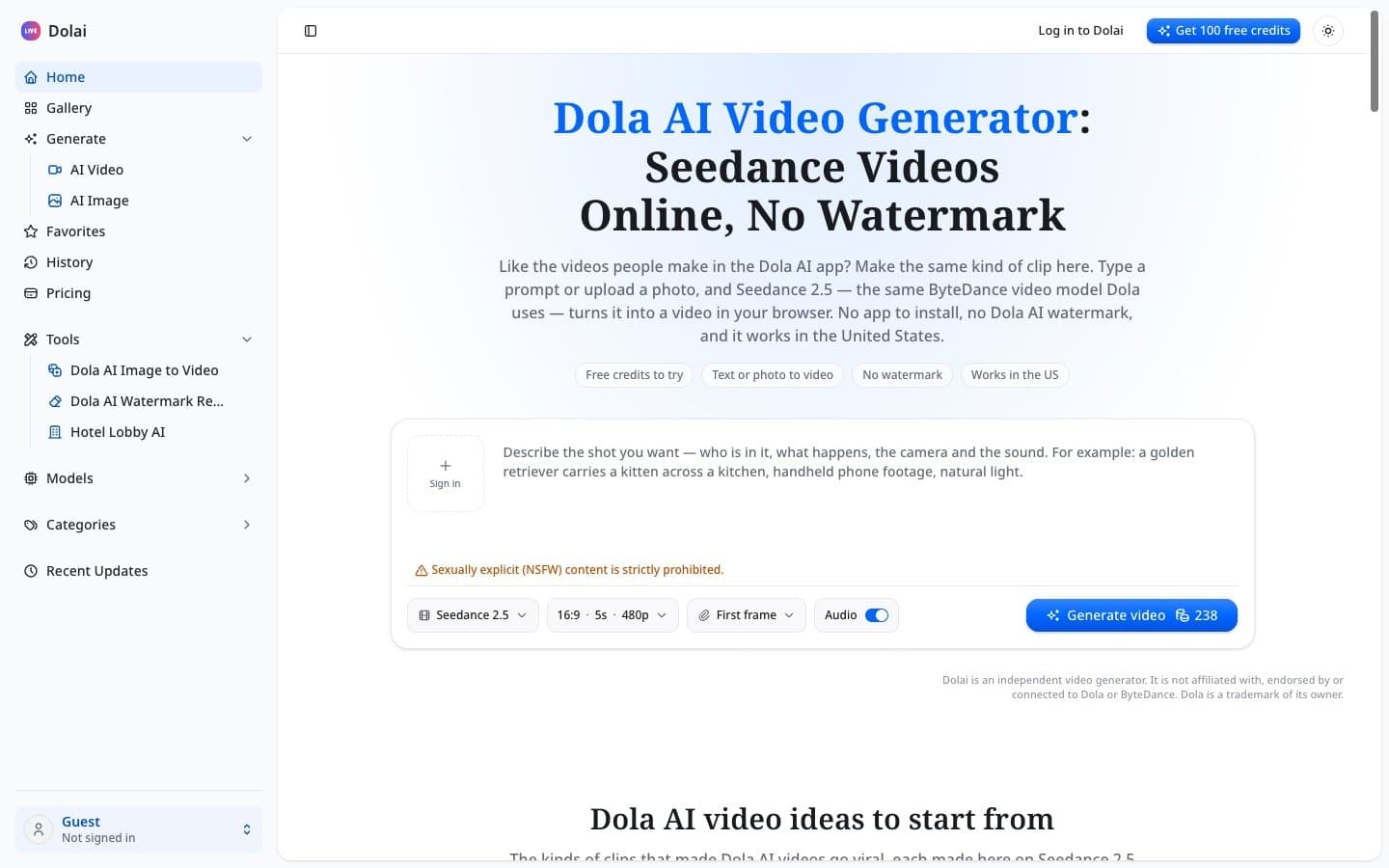
About this app
Dola AI (dolai.pro) is an online AI video and image generator built around Seedance 2.5, ByteDance's video model, without the app, the region lock or the watermark. Key features: - Text to video: describe the scene and camera, get a 5–30 second clip with its own sound. - Image to video: a photo becomes the first frame; faces and outfits stay consistent. - AI image generator in the same workspace. - No watermark: clean MP4 downloads. - Works in any browser, including in the US. - 9:16 for TikTok, Reels and Shorts or 16:9 for YouTube, with the credit cost shown up front. Use cases: product commercials, food close-ups, photo animation and social media clips. Pricing: 100 free credits on signup; plans from $19.50/month ($9.90/month billed yearly), plus a lifetime plan. Dolai is an independent tool and is not affiliated with Dola or ByteDance.
Key features
- 1Text-to-video and image-to-video generation powered by Seedance 2.5, with 5–30 second clips and native audio
- 2No watermark on downloads and browser-based access that works in the US, unlike the region-locked Dola AI app
- 3AI image generator in the same workspace, plus 9:16 and 16:9 aspect ratios with credit costs shown up front
Target customer profile
Drawn from the product itself, not from a survey.
Demographic
Content creators and social media influencers
Pain points
Limited access to Dola AI due to region blocks, watermarked videos, and daily generation caps
Primary needs
High-quality, watermark-free videos for TikTok, Reels, and Shorts with easy browser access
Demographic
Small business owners and marketers
Pain points
Expensive video production, lack of in-house editing skills, and need for quick, professional-looking ads
Primary needs
Cost-effective, fast video creation from text or photos with commercial usage rights
Demographic
Individuals and hobbyists
Pain points
Desire to create fun videos but hindered by complex software or app limitations
Primary needs
Simple, free-to-start tool to animate photos and generate creative clips without technical hassle
Scout Review
Written by AI from measured evidence, scored out of 100.
Dolai is a competent, clearly positioned AI video generator that solves a real problem: Dola AI's region lock and watermark. The browser-based approach is smart, the Seedance 2.5 integration is the right model choice, and the pricing is transparent with a free tier to try. The design is functional but cluttered, the mobile performance needs work, and the security posture is thin for a product handling user photos. Accessibility scores well on automated checks but lacks documentation. The growth story is real but fragile — the entire value prop rests on ByteDance not fixing its own distribution. For creators who've been locked out of Dola AI, this is a useful workaround today. Whether it's a durable product depends on how fast the moat fills in.
Measure by measure
Usability
62Six ready-made prompt cards and a clear pricing page with FAQ make starting easy, but there's no docs or help center and the changelog has exactly one entry.
Design
58Clean dark UI with a prominent Generate button and grouped model controls, but the sidebar crams 15+ items with truncated labels and a Sign in button awkwardly sits inside the prompt box.
Speed
58Desktop Lighthouse score of 97 is excellent, but mobile drops to 72 with a 5.1s LCP — the page is heavy enough to feel sluggish on phones where most creators actually work.
Security
41HTTPS is enforced and DMARC is set, but HSTS, CSP, frame protection, SPF and every other hardening header are missing — 3/12 checklist points and no published security page or audit.
Accessibility
80Lighthouse accessibility score of 100/100 is a strong automated result, though one failing audit on accessible names and no a11y statement or multi-language support keep it from the top.
Growth
58A real wedge: browser-based, US-accessible, watermark-free Seedance 2.5 against a region-locked app and a steeper Runway. Specific and defensible, but the moat is thin.
Improvement areas
- Sidebar navigation is overcrowded with 15+ items and truncated labels — needs grouping and hierarchy
- Mobile performance lags desktop significantly (LCP 5.1s vs. 97 desktop score) — optimize for phone users
- Security headers are largely absent (3/12 checklist points) and no security or privacy page exists despite photo uploads
Design & Usability
Dolai's interface is functional and dark-themed, with a prominent Generate button that shows the credit cost up front and model controls grouped into a single bar for quick iteration. The headline does its job, stating the value prop plainly. But the sidebar is a mess — 15+ navigation items with labels truncated mid-word, inconsistent indentation, and a Sign in button inexplicably placed inside the prompt textarea. On usability, the six ready-made prompt cards with one-click 'Use this prompt' buttons are a genuinely good onboarding move, and the pricing page is clear with a useful FAQ. The gap is documentation: there's no help center, no tutorials, and the changelog has exactly one entry. For a tool this new, that's understandable, but it means users are largely on their own once they move past the starter prompts.
Speed & Security
Speed is a tale of two devices. Desktop Lighthouse performance hits 97/100, which is excellent, but mobile drops to 72 with a 5.1-second LCP and 3.6-second FCP. Since the target audience is creators working from phones, that mobile gap matters — the page is heavy enough to feel sluggish on the device most users will actually reach for. CLS is near-perfect at 0.002 and TBT is a reasonable 117ms, so the layout is stable once it loads. Security is the weakest dimension. HTTPS is enforced and DMARC is configured, but that's where the hardening stops: no HSTS, no CSP, no frame protection, no X-Content-Type-Options, no Referrer-Policy, no Permissions-Policy, and no SPF record. The probe scored 3/12 checklist points. There's no security page, no SOC 2 or ISO claim, no bug bounty, and no data-handling transparency. For a tool that asks users to upload personal photos for image-to-video, that's a meaningful gap — not necessarily malicious, but under-built for the trust the product is asking for.
Accessibility & Growth
Accessibility is a bright spot: Lighthouse scored 100/100 on the automated axe-core audit, which covers a meaningful slice of WCAG. The one failing audit — elements with visible text labels lacking matching accessible names — is a real but narrow issue. What's missing is everything automated tools can't check: no accessibility statement, no WCAG conformance claim, no keyboard-navigation documentation, and no multi-language support despite the product targeting a global audience. The 100/100 is a strong signal, but it's a starting point, not a finish line. On growth, the idea holds up. Dolai names a specific, real problem — Dola AI is region-locked, watermarks clips, and caps free usage — and offers a concrete alternative: the same Seedance 2.5 model, in any browser, no watermark, no app. The target customer is clear (creators and small businesses who want quick social clips), and the pricing spans a reasonable range from $19.50/month to one-time packs. The honest limit is the moat: Dolai's differentiation is entirely dependent on ByteDance's distribution decisions. If Dola AI opens up or drops its watermark, Dolai's core pitch evaporates. That's a real business, but a fragile one.
Conclusion
If you're a creator who's been blocked from Dola AI or tired of watermarked clips, Dolai is worth the free credits to test. The Seedance 2.5 model is the real deal, the prompt cards get you to a first video fast, and the no-watermark promise is the headline feature done right. Go in with clear expectations: this is an early product with one changelog entry, no documentation, and a security setup that needs hardening before you upload anything personal. Use the free tier, test the output quality against your actual use case, and decide from there. The tool works. The question is whether it'll still be here — and still differentiated — in a year.
Suggestions for improvement
- Fix the sidebar: 15+ items with truncated labels is a navigation failure. Group them, shorten them, or move secondary links into a dropdown.
- Move the Sign in button out of the prompt textarea — it creates visual conflict and confuses first-time users about where to type.
- Add security headers (HSTS, CSP, X-Content-Type-Options, Referrer-Policy) and publish a basic security/privacy page, especially since users upload personal photos.
- Improve mobile performance: a 5.1s LCP on mobile is too slow for a creator tool. Optimize images, defer non-critical JS, and consider a CDN.
Alternatives comparison
Named competitors, point by point. Nobody paid to appear here or to be left out.
 Dola AI | Dola AI |  Runway ML | |
|---|---|---|---|
| Watermark on output | No watermark — clean MP4 downloads | Adds a 'Dola AI' watermark to generated clips | No watermark on paid plans |
| Region availability | Browser-based, works in the US and any country | Region-locked; blocked in the US and many countries | Available globally |
| Video model | Seedance 2.5 (ByteDance), plus Dolai 1.0, H3 Max, Nano Banana and GPT Image models | Seedance (ByteDance) integrated into a chat assistant app | Runway's own Gen-series models with editing suite |
| Pricing model | Free credits on signup; subscriptions from $19.50/mo; one-time credit packs from $49 | Free with daily generation caps; app-based | Subscription-based; free tier with limited credits |
| Learning curve | Low — prompt cards and grouped controls; no editing suite | Low — chat-based interface | Steeper — full editing platform with more controls |
Dola AI
ByteDance's AI assistant app that includes video generation with Seedance, but is region-locked and adds watermarks.
Runway ML
A comprehensive AI video editing platform with text-to-video capabilities, but requires subscription and has a steeper learning curve.
Comparing options? See Dola AI alternatives, scored side by side
More AI Generations apps
View all AI Generations
Uni-1 by Luma AI
92Uni-1 is an advanced multimodal text-to-image AI model th...

Gerty
91Private, local AI assistant for Mac that runs offline

LTX 2.3 AI Video Generator
91Fast, open-source AI video generator with 4K support, mul...

DemoVexa
90Turn your code into professional product demo videos with AI-generated scripts, animated UI, and natural voiceovers.

All of Us
89Add deceased loved ones to photos with AI and see free pr...

AI Vocals Generator
89Add AI singers or rappers to your own beat, get two takes...

Voqusa
89Transcribe social media video and audio links into text (free signup, 5 free credits, then pay-as-you-go)

PodRescale
89Every episode becomes two weeks of posts. In your voice. Posted for you.

HeyVid AI
88HeyVid AI is a free all-in-one AI video and image generat...

IraVoice
88Private on-device dictation for Apple-silicon Macs.

Pixelimg
88A free online AI-powered tool that instantly converts ima...

Cantoro
88Custom AI songs with a name, heard free before paying $4....


A platform dedicated to providing unbiased reviews of newly launched applications, analyzing everything from their features to their full potential.
info@scoutforge.net© 2026 Scoutforge. All rights reserved.
