Cycling through all six. Tap any point to stop.
Measured on six things
Add deceased loved ones to photos with AI and see free pr...
Growth
62Sharp, specific niche — deceased loved ones in milestone photos — with a real wedge over Photoshop (skill), Canva (no compositing), and MyHeritage (no insertion). Early stage (domain 2026, one social profile) but the idea has room.
Screenshots
1 / 1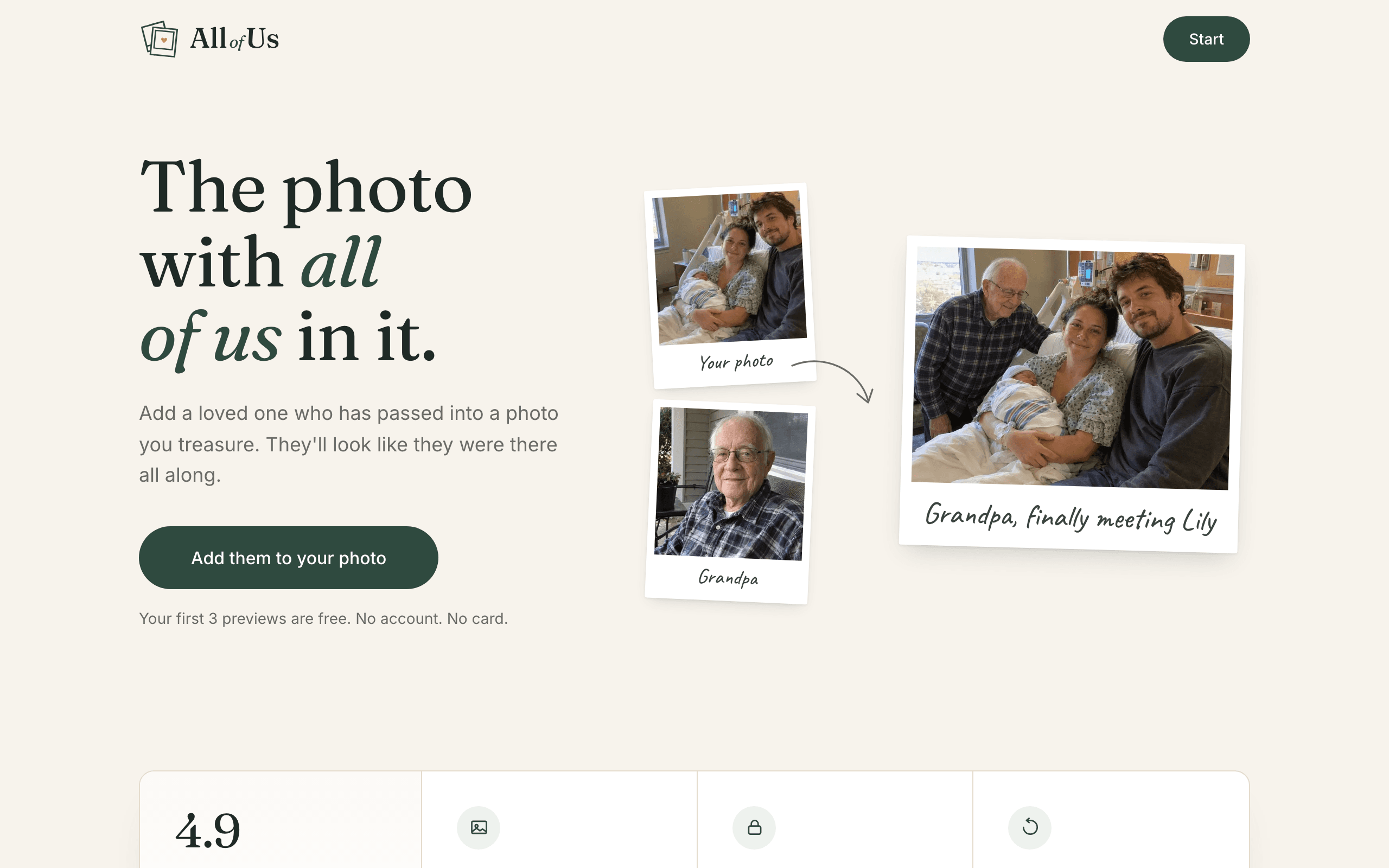
About this app
All of Us is a compassionate AI-powered photo editing service that seamlessly adds a deceased loved one into a treasured family photo, making it appear as if they were there all along. The process is remarkably simple: upload the original photo and a separate picture of the person you've lost, and within minutes, you'll receive three free previews to review. The AI carefully integrates the person into the scene while leaving everyone else untouched. You only pay after you're satisfied, with plans starting at $29 for a single high-resolution image. Premium packages include additional versions, memorial portraits, and the option to add a second loved one. All photos are kept private; and if you don't purchase, they're automatically deleted after 30 days. The service handles old, faded, or damaged photos with impressive results, making it a deeply personal and accessible tool for healing and remembrance.
Key features
- 1AI inserts a deceased loved one into an existing family photo while leaving everyone else untouched.
- 2Three free previews before any payment; pay only if you keep one, with a 7-day refund window.
- 3One-time pricing at $29 / $49 / $79 — no subscription; higher tiers add memorial portraits and a second person.
- 4Handles old, faded, scratched, or phone-photographed prints; matches light and tone to the original.
- 5Privacy-first: photos never used for AI training, deleted after 30 days if unpurchased, 365-day album retention if bought.
Target customer profile
Drawn from the product itself, not from a survey.
Demographic
Grieving families who lost a loved one before a major milestone (wedding, birth, graduation)
Pain points
The pain of not having the deceased in important family photos; longing for a complete family picture.
Primary needs
A realistic and respectful way to include the lost loved one in a cherished memory; emotional closure.
Demographic
Adults who have lost a parent or grandparent and want to create a memorial keepsake
Pain points
Existing photos are old, faded, or don't show the deceased in a family setting; desire for a tangible memory.
Primary needs
A high-quality, printable image that can be framed or shared; easy process with no technical skills required.
Demographic
Older individuals who have lost a spouse or sibling and want to reunite them in a photo
Pain points
Limited digital skills; fear of complicated apps; privacy concerns; cost uncertainty.
Primary needs
A simple, guided process with free previews; assurance that photos are private and will be deleted; affordable one-time pricing.
Scout Review
Written by AI from measured evidence, scored out of 100.
All of Us is a well-crafted, emotionally intelligent take on AI photo compositing for grieving families. The design is warm and specific, the three-step flow is genuinely low-friction, and the speed is excellent (97 mobile Lighthouse, 911ms LCP). Security is strong on headers (11/12) but missing DMARC and any published audit. Accessibility has real, fixable gaps — contrast, heading order, label mismatches — that matter for an older audience. Growth is the strongest strategic signal: a clear niche, a real wedge over Photoshop, Canva, and MyHeritage, and a pay-after-preview model that fits the emotional stakes. The main risks are trust and support: no visible help channel, no third-party validation of the '1,200+ families' claim, and a very young domain. For a product asking people to hand over photos of the dead, those gaps are worth closing fast.
Measure by measure
Usability
74Three-step flow, no account or card for previews, and a five-question FAQ that preempts the real objections. Missing a visible help center or support link, which matters for a grieving, non-technical audience.
Design
82Warm, restrained memorial aesthetic with serif type, muted palette, and real before/after composite demos. Pricing cards and portrait gallery are clean and purposeful. Clearly ahead of generic AI tool peers on emotional craft.
Speed
88Lighthouse mobile 97/100 with 911ms LCP and zero CLS; desktop 95/100. The marketing site is genuinely fast and stable — no measured weakness to flag.
Security
71Full header stack (HSTS, CSP, frame protection, Permissions-Policy) at 11/12 checklist points, with clear privacy claims about deletion and no AI training. DMARC missing and no SOC 2 or third-party audit published.
Accessibility
68Lighthouse 94/100 but three real failures: insufficient color contrast, non-sequential headings, and mismatched accessible names. No WCAG statement or multi-language support found. Solid but with fixable gaps.
Growth
62Sharp, specific niche — deceased loved ones in milestone photos — with a real wedge over Photoshop (skill), Canva (no compositing), and MyHeritage (no insertion). Early stage (domain 2026, one social profile) but the idea has room.
Improvement areas
- No DMARC record — domain is open to email spoofing, a real risk for a trust-sensitive service.
- Three Lighthouse accessibility failures (contrast, heading order, accessible names) affect an older audience.
- No visible help center, docs, or support contact on the homepage for non-technical users.
- No third-party validation (SOC 2, Trustpilot, G2) for the '1,200+ families' and 4.9 rating claims.
Design & Usability
The design is the strongest part of this product. Warm serif headlines, a muted palette, and real before/after composite demos ('Grandma', 'Dad', 'Aunt Rosa') sell the emotional promise without stock-photo cheese. The pricing cards are clean, the memorial portrait gallery shows seven distinct styles, and the whole thing reads as considered rather than templated. Usability is close behind: three clearly labeled steps, no account or card required for the three free previews, and an FAQ that actually answers the hard questions (will you change anyone else, what if it doesn't look like them, is my photo private). The gap is support — there's no visible help center, docs link, or contact channel surfaced on the homepage, which is a real problem for a grieving, often non-technical audience who may hit a snag mid-upload.
Speed & Security
Speed is the cleanest win here: Lighthouse mobile 97/100 with a 911ms LCP, zero CLS, and 109ms TBT; desktop 95/100. The marketing site is lightweight and stable, and no user complaints about lag appear in the collected evidence. Security is solid but not airtight. The header probe found HTTPS enforced with HSTS, CSP, frame protection, X-Content-Type-Options, Referrer-Policy, and Permissions-Policy — 11 of 12 checklist items. The missing piece is DMARC, which leaves the domain open to email spoofing, a meaningful risk for a service handling sensitive family photos and payment. The privacy posture is well-articulated on the page (no AI training, 30-day deletion if unpurchased, 365-day album retention with email warning), but no SOC 2, ISO, or third-party audit is published, so the claims rest on trust rather than verification.
Accessibility & Growth
Accessibility lands at 68: the automated Lighthouse score is 94/100, but three real failures remain — insufficient color contrast, non-sequential heading order, and visible labels that don't match accessible names. For an audience that skews older and may include low-vision users, contrast is not a nitpick. There's no WCAG conformance statement and no multi-language support in the fetched content. Growth is the more interesting story. The niche is specific and emotionally real: deceased loved ones inserted into milestone photos (weddings, births, graduations). The wedge over the listed alternatives is genuine — Photoshop requires skill, Canva can't do realistic compositing, and MyHeritage enhances and animates but doesn't insert. The free-preview, pay-after model removes the biggest objection in a grief purchase. The limits are stage and proof: the domain is brand new, only Twitter is listed as a social profile, and the '1,200+ families' claim is unverified. The idea has room; the execution needs time and third-party validation to earn the trust the category demands.
Conclusion
If you're considering All of Us for a real memorial project, the free-preview model means the downside is low — you see three results before paying anything, and the 7-day refund backs it up. Do read the privacy policy yourself before uploading anything sensitive, and test the flow on a low-stakes photo first. The product is doing something genuinely difficult with real craft; the next 12 months of trust-building (audits, support, verified testimonials) will decide whether it becomes the default for this category or a beautiful one-off.
Suggestions for improvement
- Publish a DMARC record — one DNS entry closes the most obvious spoofing gap for a trust-sensitive service.
- Fix the three Lighthouse a11y failures: raise contrast, correct heading order, align visible labels with accessible names.
- Surface a visible help/support link and a short 'what to expect' doc for non-technical, grieving users.
- Add third-party validation for the '1,200+ families' claim — Trustpilot, G2, or a verifiable testimonial wall.
Alternatives comparison
Named competitors, point by point. Nobody paid to appear here or to be left out.
 All of Us All of Us |  Adobe Photoshop Adobe Photoshop |  Canva Canva |  MyHeritage MyHeritage | |
|---|---|---|---|---|
| Adds a deceased person into an existing family photo | Yes — core purpose, AI-driven, no skill required | Yes, but manual compositing requiring advanced skill and hours of work | No — basic editing only, no realistic person insertion | No — enhances and animates existing photos, does not insert a person |
| Free preview before payment | Yes — 3 free previews, no account or card required | No — paid software, no preview model | Free tier available but no AI person-insertion preview | Limited free tier; no insertion preview |
| Pricing model | One-time $29 / $49 / $79, no subscription, 7-day refund | Subscription (~$22.99/mo Photoshop single app) | Freemium; Pro ~$15/mo or $120/yr | Freemium; paid plans from ~$9/mo to ~$299/yr |
| Skill level required | None — upload two photos, receive previews | High — professional compositing, masking, color matching | Low for design, but no path to realistic person insertion | Low — but the feature needed isn't offered |
| Handles old, faded, or damaged photos | Yes — explicitly supported, including phone photos of prints | Yes, with manual restoration work | Limited — basic filters, no restoration | Yes — core strength (enhancement, colorization) |
| Privacy and data deletion policy | No AI training; 30-day deletion if unpurchased; 365-day album retention if bought | Local files; cloud sync optional; enterprise-grade policies | Cloud-stored; standard privacy policy; no special grief-data handling | Cloud-stored; genealogy data policies; no special deletion window |
Adobe Photoshop
Professional photo editing software with advanced compositing tools; requires skill and time to manually add a person.
Canva
Graphic design platform with basic photo editing; not specialized for realistic person insertion and lacks AI-driven compositing.
MyHeritage
Genealogy platform with AI tools for photo enhancement and animation; does not offer adding a person into an existing photo.
Comparing options? See All of Us alternatives, scored side by side
More AI Generations apps
View all AI Generations
Uni-1 by Luma AI
92Uni-1 is an advanced multimodal text-to-image AI model th...

Gerty
91Private, local AI assistant for Mac that runs offline

LTX 2.3 AI Video Generator
91Fast, open-source AI video generator with 4K support, mul...

DemoVexa
90Turn your code into professional product demo videos with AI-generated scripts, animated UI, and natural voiceovers.

Pixelimg
88A free online AI-powered tool that instantly converts ima...

OBVELO
88Privacy gateway that masks personal data in LLM traffic

HeyVid AI
88HeyVid AI is a free all-in-one AI video and image generat...

RestorePhotosApp
88An AI-powered photo restoration app that brings old, blur...

IraVoice
88Private on-device dictation for Apple-silicon Macs.

tradutor de mangá com IA
88O tradutor de mangá com IA traduz capítulos em lote, personaliza textos e oferece edição visual para estúdios.

Mygom SEO
87MygomSEO is an AI marketing agent that audits your site, writes SEO content, publishes to 12+ CMS platforms, posts to social, and monitors rankings 24/7.

pause.do
87A privacy-first browser extension that inserts gentle pau...


A platform dedicated to providing unbiased reviews of newly launched applications, analyzing everything from their features to their full potential.
info@scoutforge.net© 2026 Scoutforge. All rights reserved.
