Cycling through all six. Tap any point to stop.
Measured on six things
Learn Morse code by keying it on a machine you can press. Write messages, turn Morse into text and back, and key Morse in any app on your Mac.
Security
44HTTPS enforced and SPF present, but no HSTS, CSP, frame protection, Referrer-Policy or DMARC — 3/12 checklist points. No SOC 2, ISO or pen-test claims. No-account, offline-first design limits exposure.
Screenshots
1 / 1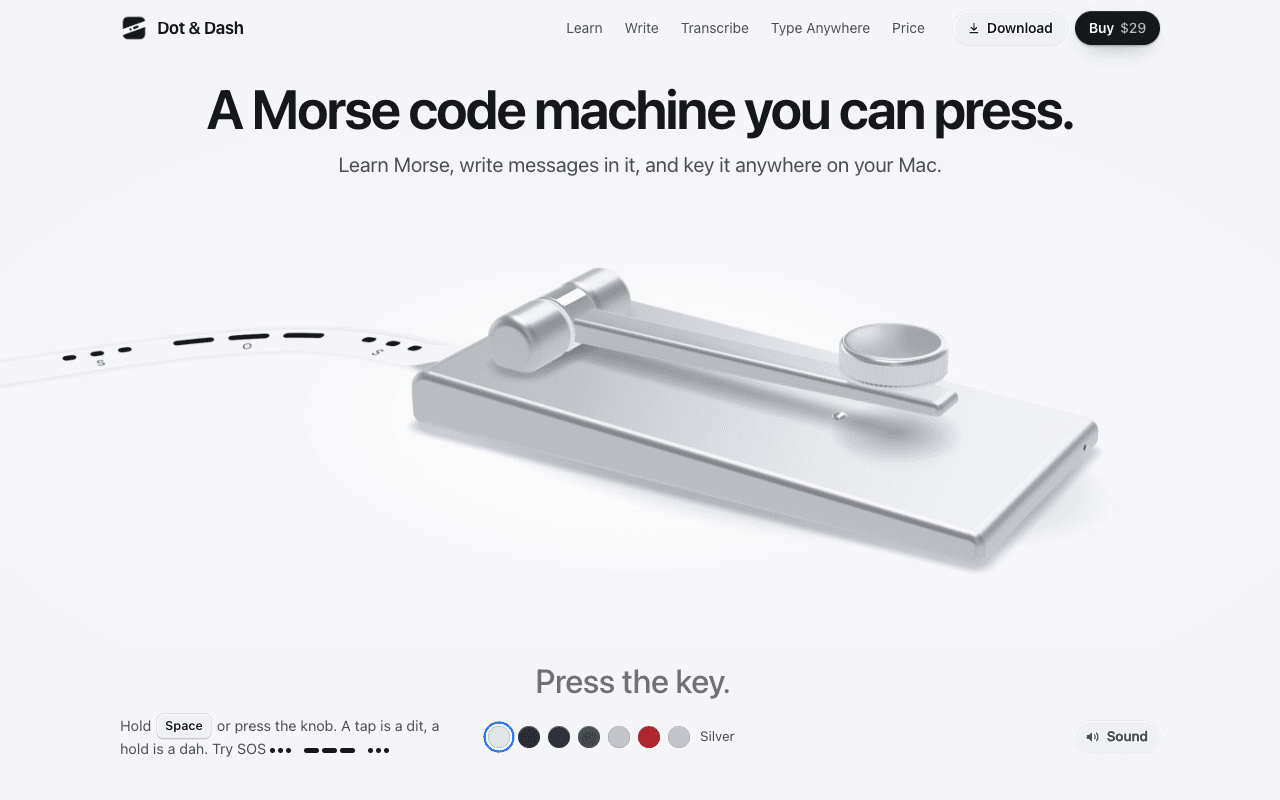
About this app
Dot & Dash is a Morse code machine for the Mac. Hold Space or press the knob: a tap is a dit, a hold is a dah, and the tape prints as you key. Twenty short chapters take you from E and T to the whole alphabet, the figures, punctuation and the common prosigns, two or three characters a chapter. A five-minute daily review brings back what needs it most. Type a message and the machine sends it, or key it yourself and watch it decode. Paste dots and dashes to get text, or text to get Morse. Type Anywhere keys Morse into any app from the menu bar. Share a message as a tape image, audio or video. Free for 24 hours, then $29 once for up to 3 Macs. Seven finishes, works offline, no account. macOS 14 or later, Apple silicon and Intel.Edu
Key features
- 1Twenty-chapter Morse course with a five-minute daily review and progress map.
- 2Type Anywhere: key Morse into any app from the menu bar using Right Option as the key.
- 3Straight key or iambic paddles (mode A or B), 5-40 WPM with Farnsworth spacing.
- 4Morse-to-text and text-to-Morse conversion, plus a Library to save and replay messages.
- 5Share messages as tape images, audio, or square/vertical video.
- 6Seven finishes, works offline, no account, macOS 14+ on Apple silicon and Intel.
Target customer profile
Drawn from the product itself, not from a survey.
Scout Review
Written by AI from measured evidence, scored out of 100.
Dot & Dash is a native macOS Morse machine with a strong visual identity, a well-structured 20-chapter course, a full 24-hour trial and a one-time $29 price for up to 3 Macs. The printed-tape motif and seven finishes give it a physical-object charm that most indie Mac apps lack, and Type Anywhere — keying Morse into any app from the menu bar — is a genuinely clever hook. Speed is good on mobile (84/100) but weaker on desktop (64/100). Security is the clear weak spot: 3/12 header checklist points, no DMARC, no CSP, no compliance claims. Accessibility is strong at 96/100 with one color-contrast link failure. Growth is capped by the niche, but the wedge is real and the pricing is refreshingly honest. A well-made tool for a specific audience, with room to tighten its web security posture.
Measure by measure
Usability
72Full 24-hour trial with nothing held back, a 20-chapter course at 2-3 minutes each, and a five-minute daily review. FAQ pre-empts the big questions. Type Anywhere's Accessibility prompt is explained honestly.
Design
74Distinctive printed-tape motif, disciplined typography and a clear section flow. Seven finish swatches and an interactive SOS demo show real craft. Judged from site material; native app UI not directly visible.
Speed
70Lighthouse mobile 84/100 with CLS 0 and TBT 21ms; desktop 64/100 is the weak spot. The 5.5 MB native app and offline-first design keep the product itself light.
Security
44HTTPS enforced and SPF present, but no HSTS, CSP, frame protection, Referrer-Policy or DMARC — 3/12 checklist points. No SOC 2, ISO or pen-test claims. No-account, offline-first design limits exposure.
Accessibility
80Lighthouse accessibility 96/100 with one failing audit: links rely on color alone. Keyboard-first design (Space, Right Option, paddles) and a clear Accessibility-permission explanation. No WCAG statement or multi-language support found.
Growth
58A real, specific problem with a clear wedge: Type Anywhere, tape sharing, iambic paddles and a one-time $29 price. Niche audience caps the ceiling, but the positioning is honest and differentiated.
Improvement areas
- Web security headers: 3/12 checklist points, no HSTS, CSP, frame protection, Referrer-Policy or DMARC.
- Desktop Lighthouse performance (64/100) lags mobile (84/100); trim the desktop payload.
- No accessibility statement or WCAG conformance claim despite a strong 96/100 audit.
- Native app UI is not shown on the site; buyers judge the product from the tape motif alone.
Design & Usability
Dot & Dash has a visual identity most indie Mac apps would kill for: the printed-tape motif runs from the hero to the share formats, and the seven finish swatches give it a physical-object feel that suits a machine you press. Typography and section flow are disciplined, and the embedded SOS demo earns its place. Usability is nearly as strong — a full 24-hour trial with nothing held back, a 20-chapter course sized at 2-3 minutes each, and a five-minute daily review that targets weak characters. The FAQ pre-empts the obvious objections, including an honest explanation of why Type Anywhere needs macOS Accessibility permission. The gaps are small but real: no visible onboarding walkthrough beyond the FAQ, and the native app UI itself isn't shown on the site, so buyers are trusting the tape motif to represent the product.
Speed & Security
Speed is a mixed bag. Mobile Lighthouse lands at 84/100 with CLS 0 and TBT 21ms — genuinely snappy — but desktop drops to 64/100, which suggests the desktop payload is heavier than it needs to be for a marketing page. The app itself is a 5.5 MB native binary that works offline, so the product's own performance is not in question; the site's desktop score is the outlier. Security is the weakest dimension. HTTPS is enforced and SPF is present, but there is no HSTS, no CSP, no frame protection, no Referrer-Policy, no Permissions-Policy and no DMARC — 3 of 12 checklist points. No SOC 2, ISO 27001 or pen-test claims appear anywhere. The no-account, offline-first design genuinely limits exposure, and the licence check is the only online touchpoint, but the site's header posture is thin even by indie-Mac-app standards.
Accessibility & Growth
Accessibility scores well: Lighthouse 96/100 with a single failing audit — links rely on color alone to be distinguishable. The product is keyboard-first by design (Space, Right Option, paddles), which is unusual and welcome, and the Accessibility-permission explanation is candid. What's missing is a WCAG conformance statement and any multi-language support; the site is English-only. Growth is a judgement on the idea, not the traction. Morse code is a niche, but it is a real niche with a specific customer: people who want to learn or key Morse on a Mac. The differentiators are concrete — Type Anywhere menu-bar keying, tape image/audio/video sharing, iambic paddles in mode A or B, Farnsworth spacing, and a one-time $29 price for up to 3 Macs. That is a coherent wedge against generic Morse trainers and against subscription learning apps. The ceiling is real: this is a hobbyist tool, not a platform, and the domain is only months old. But the positioning is honest and the price is a genuine differentiator.
Conclusion
If you want to learn Morse or key it on a Mac, Dot & Dash is a credible, well-priced option with a trial that actually lets you try everything. The course structure, the daily review and Type Anywhere are the reasons to pick it over a generic trainer. The reasons to hesitate are the thin web-security headers and the absence of any compliance documentation — neither is unusual for an indie Mac app, but both are worth knowing before you buy. The 24-hour trial is the right way to decide: key SOS, run a chapter, try Type Anywhere, and see whether the machine's rhythm clicks for you.
Suggestions for improvement
- Add HSTS, CSP, frame protection, Referrer-Policy and DMARC to the site — 3/12 header points is the weakest signal in the review.
- Publish a short accessibility statement noting the keyboard-first design and the one known color-contrast link issue.
- Show the native app UI on the site — buyers currently judge the product from the tape motif alone.
- Investigate the desktop Lighthouse gap (64 vs 84 mobile) and trim the desktop payload.
Alternatives comparison
Named competitors, point by point. Nobody paid to appear here or to be left out.
 Dot & Dash Dot & Dash |  | |
|---|---|---|
| Pricing model | $29 one-time for up to 3 Macs; 24-hour full trial | Not provided in app details |
| Platform | Native macOS 14+ (Apple silicon and Intel), offline, no account | Not provided in app details |
| Morse learning course | 20 short chapters, 2-3 min each, five-minute daily review, progress map | Not provided in app details |
| Keying hardware support | Space bar, iambic paddles (mode A/B), USB key/keyer that types a key, 5-40 WPM, Farnsworth | Not provided in app details |
| Type Morse into other apps | Type Anywhere: menu-bar toggle, Right Option as key, types into front app | Not provided in app details |
| Sharing and export | Tape image, audio, square or vertical video; Library to save and replay | Not provided in app details |
Comparing options? See Dot & Dash alternatives, scored side by side
More EdTech (Educational Technology) apps
View all EdTech (Educational Technology)
English Test Coach
89English Test Coach checks your IELTS essays and letters, gives an estimated band score across all four criteria, and tells you exactly what to revise next.

CertWorthIt
87Data-driven tool revealing which certifications actually ...

「自听」MyListen
86Turn AI articles into natural audio, locally on your iPhone

Ciroexam
84All-in-one CIRO exam prep for CIRE and 8 other exams, wit...

How To Pronounce It
84How to Pronounce English Words using AI voice pronunciation and helpful text.

WellWired
84AI explained simply for older adults, with safety lessons...

Fake Receipt Maker
84Fake Receipt Maker is a free online receipt generator that lets you create realistic, fully customizable receipts in seconds.

Aptitude Test Prep
84Free timed practice for SHL, numerical, and logical tests...

AppyQ
83Turn your content into a branded mobile app with home, co...

yunit
83Browser extension that translates as you read, building v...

StepGrab
83AI-powered Mac app that captures your workflow and create...

MathIt
83MathIt turns math practice into a daily habit: a personalized plan, 29 mental-math lessons, 113 games, logic puzzles and live multiplayer.


A platform dedicated to providing unbiased reviews of newly launched applications, analyzing everything from their features to their full potential.
info@scoutforge.net© 2026 Scoutforge. All rights reserved.
