Cycling through all six. Tap any point to stop.
Measured on six things
Convert Outlook PST files to MSG format with ease and acc...
Design
58Long-form marketing page with feature blocks, screenshots and specs tabs. Functional and information-dense but visually dated and cluttered versus modern SaaS peers; the app UI itself is only shown via screenshots.
Screenshots
1 / 1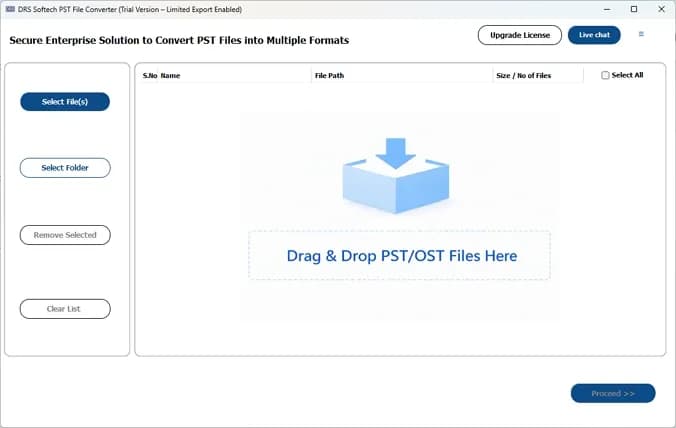
About this app
DRS Softech PST to MSG File Converter is a comprehensive utility designed to export Outlook PST files to MSG format while preserving data integrity. The tool supports batch conversion, allowing users to convert multiple PST files at once, and includes features like previewing PST content, filtering emails by date, removing duplicates, and handling attachments. It also enables direct migration to various email clients such as Gmail, Office 365, and Yahoo Mail. Compatible with all Windows versions, it offers a user-friendly interface suitable for both technical and non-technical users. The software is available in both free (limited) and full versions, with 24/7 technical support.
Key features
- 1Batch convert single or multiple PST files to MSG and 15+ other formats (EML, MBOX, CSV, PDF, HTML).
- 2Preview PST content and convert without Microsoft Outlook installed.
- 3Direct migration of PST data into Gmail, Office 365, Yahoo, IMAP and other cloud clients.
- 4Date Mail Filter and Remove Duplicate options for selective, clean conversions.
- 5Convert with or without attachments while preserving folder hierarchy.
Target customer profile
Drawn from the product itself, not from a survey.
Demographic
IT professionals and system administrators
Pain points
Need to migrate large volumes of PST files without data loss or downtime.
Primary needs
Batch conversion, data integrity, and support for various output formats.
Demographic
Small to medium business owners
Pain points
Lack of technical expertise and budget for complex migration tools.
Primary needs
User-friendly interface, affordable pricing, and reliable email migration.
Demographic
Individual users with archived PST files
Pain points
Difficulty accessing old PST files without Outlook installed.
Primary needs
Ability to view and convert PST files without Outlook, and selective conversion.
Scout Review
Written by AI from measured evidence, scored out of 100.
DRS Softech PST to MSG File Converter is a competent, narrowly-scoped desktop utility with a fast marketing site and a clear feature story. The measured numbers back the speed claim (91 mobile / 98 desktop Lighthouse) and the security headers are in place, but there's no published audit, no SPF/DMARC, and the accessibility audit surfaces real gaps. Design is dated and the growth story is a real need in a crowded field. A solid mid-pack tool rather than a category leader.
Measure by measure
Usability
62Clear feature breakdown, a User Manual tab, specs, free demo and 24/7 support claim. Onboarding path is straightforward for a desktop utility, though the page buries the demo-vs-full limits.
Design
58Long-form marketing page with feature blocks, screenshots and specs tabs. Functional and information-dense but visually dated and cluttered versus modern SaaS peers; the app UI itself is only shown via screenshots.
Speed
78Lighthouse mobile 91/100 (LCP 3.3s, CLS 0.013, TBT 24ms) and desktop 98/100. Fast, stable page; LCP is the only soft spot on mobile.
Security
72HTTPS enforced with HSTS, CSP, frame protection and full header set (10/12 checks). No SPF/DMARC on the domain and no published SOC 2, ISO or pen-test — normal for a small desktop-tool vendor.
Accessibility
58Lighthouse a11y 86/100, but failing audits include missing alt text, unnamed links, small touch targets and no main landmark. No WCAG statement published.
Growth
58Real, specific problem — PST-to-MSG conversion and migration without Outlook — with concrete differentiators (batch, dedupe, date filter, direct cloud migration). Crowded category with entrenched peers.
Improvement areas
- No published security assurance (SOC 2, ISO, pen-test) despite handling full email archives.
- Missing SPF and DMARC records on the domain.
- Accessibility gaps: missing alt text, unnamed links, small touch targets, no main landmark.
- Dated visual design and unclear demo-vs-full feature limits on the page.
Design & Usability
The product page is a classic long-scroll converter landing page: feature blocks, a screenshots tab, specs, and a user manual, plus badges for 30K+ downloads, a 4.7 rating from 1456 reviews and 45+ awards. It's information-dense and gets the job done, but the visual language is dated next to modern SaaS peers, and the actual app UI only appears in screenshots. Usability is the stronger half: a free demo, a manual tab, and a clearly enumerated feature set (batch conversion, date filter, duplicate removal, attachment handling, direct migration to Gmail/Office 365/Yahoo) make the value proposition legible. The weak spot is that demo-vs-full limits aren't surfaced clearly on the page.
Speed & Security
Speed is the standout measured dimension: Lighthouse mobile 91/100 with LCP 3.3s, CLS 0.013 and TBT 24ms, and desktop 98/100 — a genuinely snappy marketing site. Security is competent but unremarkable: HTTPS enforced with HSTS, CSP, frame protection and the full header set (10/12 probe checks), but the domain has no SPF or DMARC records and the product page publishes no SOC 2, ISO, pen-test or bug bounty information. For a desktop utility that handles entire email archives, the absence of any published security assurance is a gap, though it's typical for a small vendor at this stage.
Accessibility & Growth
Accessibility lands at 86/100 on Lighthouse, but the failing audits are the telling part: images without alt attributes, links with no discernible name, touch targets too small, no main landmark, and role=presentation conflicts. There's no WCAG statement or accessibility page. Growth is a judgement on the idea: PST-to-MSG conversion without Outlook is a real, narrow, paying problem, and the tool differentiates with batch conversion, duplicate removal, a date filter and direct migration to Gmail/Office 365/Yahoo. But the category is crowded — SysTools and Aid4Mail are the named peers and both are established — so the wedge is real but shallow. Domain age (2021) and claimed downloads are context, not the score.
Conclusion
If you need to get PST files into MSG or straight into Gmail/Office 365 without Outlook installed, this does the job and the free demo lets you check before paying. Just don't expect modern polish, published compliance, or a moat — and compare against SysTools and Aid4Mail on price and batch limits before committing.
Suggestions for improvement
- Publish a clear comparison of demo vs. full version limits directly on the product page.
- Add SPF and DMARC records to the domain to complete email authentication.
- Fix the failing accessibility audits: alt text, link names, touch targets, main landmark.
- Publish a security/trust page covering data handling for converted email archives.
Alternatives comparison
Named competitors, point by point. Nobody paid to appear here or to be left out.
 DRS Softech PST to MSG File Converter DRS Softech PST to MSG File Converter |  SysTools PST to MSG Converter SysTools PST to MSG Converter |  Aid4Mail Aid4Mail | |
|---|---|---|---|
| Batch PST to MSG conversion | Yes — single or multiple PST files at once | Yes — batch conversion supported | Yes — batch and scripted conversion |
| Convert without Outlook installed | Yes — explicitly supported | Yes | Yes |
| Direct migration to Gmail / Office 365 / Yahoo | Yes — Gmail, Office 365, Yahoo, IMAP and more | Focused on PST-to-MSG conversion; migration via separate tools | Yes — broad email migration support |
| Duplicate removal and date filtering | Yes — Remove Duplicate and Date Mail Filter | Yes — advanced filters | Yes — filtering and dedupe options |
| Free demo / trial version | Yes — limited free demo | Yes — free trial available | Yes — trial version |
| Platform support | Windows (site also lists Mac/Linux download buttons) | Windows | Windows and macOS |
SysTools PST to MSG Converter
A popular tool for converting PST files to MSG with support for batch conversion and advanced filters.
Aid4Mail
A versatile email conversion tool that supports PST to MSG conversion along with many other formats.
Comparing options? See DRS Softech PST to MSG File Converter alternatives, scored side by side
More E-Mail apps
View all E-Mail
youtubetomp3.ink
87Free online YouTube to MP3 converter with no signup or so...

PCDOTS PST Converter
85Convert Outlook PST files to 16 formats and clouds withou...

EmailFig
85Email marketing that gets out of your way, with all featu...

Mailwell
83A calm, fast Mac mail app for all your accounts. Your mail stays on your Mac, with no servers in between.

CaptainVerify
82.5CaptainVerify is a powerful email and mobile number verif...

VerifiedEmail
82A specialized tool for real-time email verification and list cleaning, boosting deliverability and compliance.

Mailmodo
82Mailmodo revolutionizes email marketing with AMP-powered interactive emails, AI tools, and automation to boost engagement and ROI.

Harmony AI Email Voice Assistant
81A voice-controlled email assistant for hands-free inbox management, ideal for multitaskers and privacy-conscious users.

Leadsgram
81All-in-one business growth platform with AI landing pages...

Mailto Live
81AI-driven email management tool for Gmail that automates tasks like unsubscribing and organizing emails to boost productivity.

PromptLy
81An AI-powered email assistant that automates drafting, personalizes replies, and streamlines inbox management for professionals and teams.

Gblock
81A Chrome extension that blocks hidden email trackers in Gmail, ensuring privacy by detecting spy pixels and anonymizing links.


A platform dedicated to providing unbiased reviews of newly launched applications, analyzing everything from their features to their full potential.
info@scoutforge.net© 2026 Scoutforge. All rights reserved.
