Is this your app?
Claim EasePop to manage its page, add your badge and see your traffic — free, and it stays free.
Cycling through all six. Tap any point to stop.
Measured on six things
No-code platform for creating customizable website popups to boost engagement and conversions with ease.
Accessibility
60Limited accessibility features with no mentioned screen reader support or keyboard navigation enhancements for disabled users.
Screenshots
1 / 4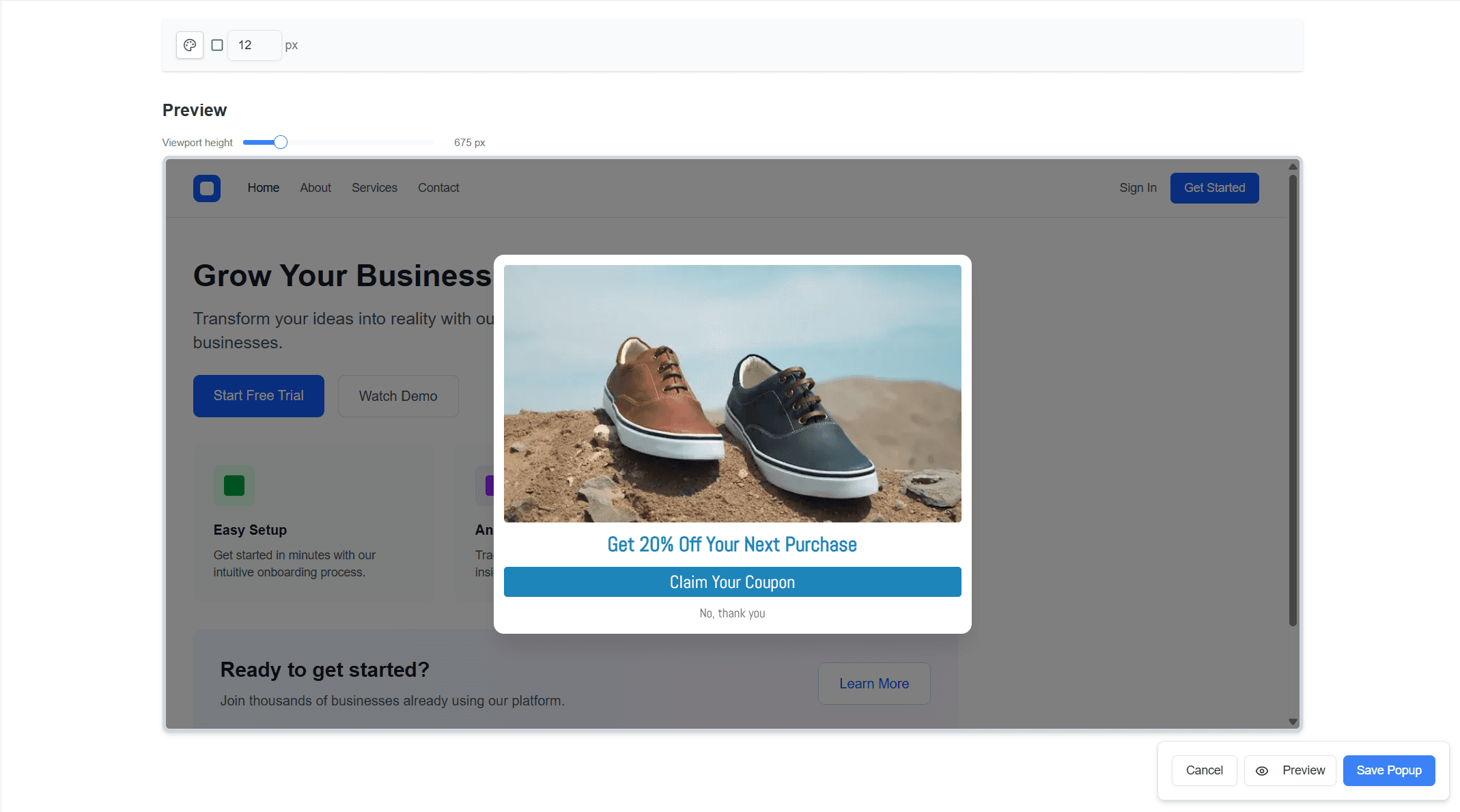
About this app
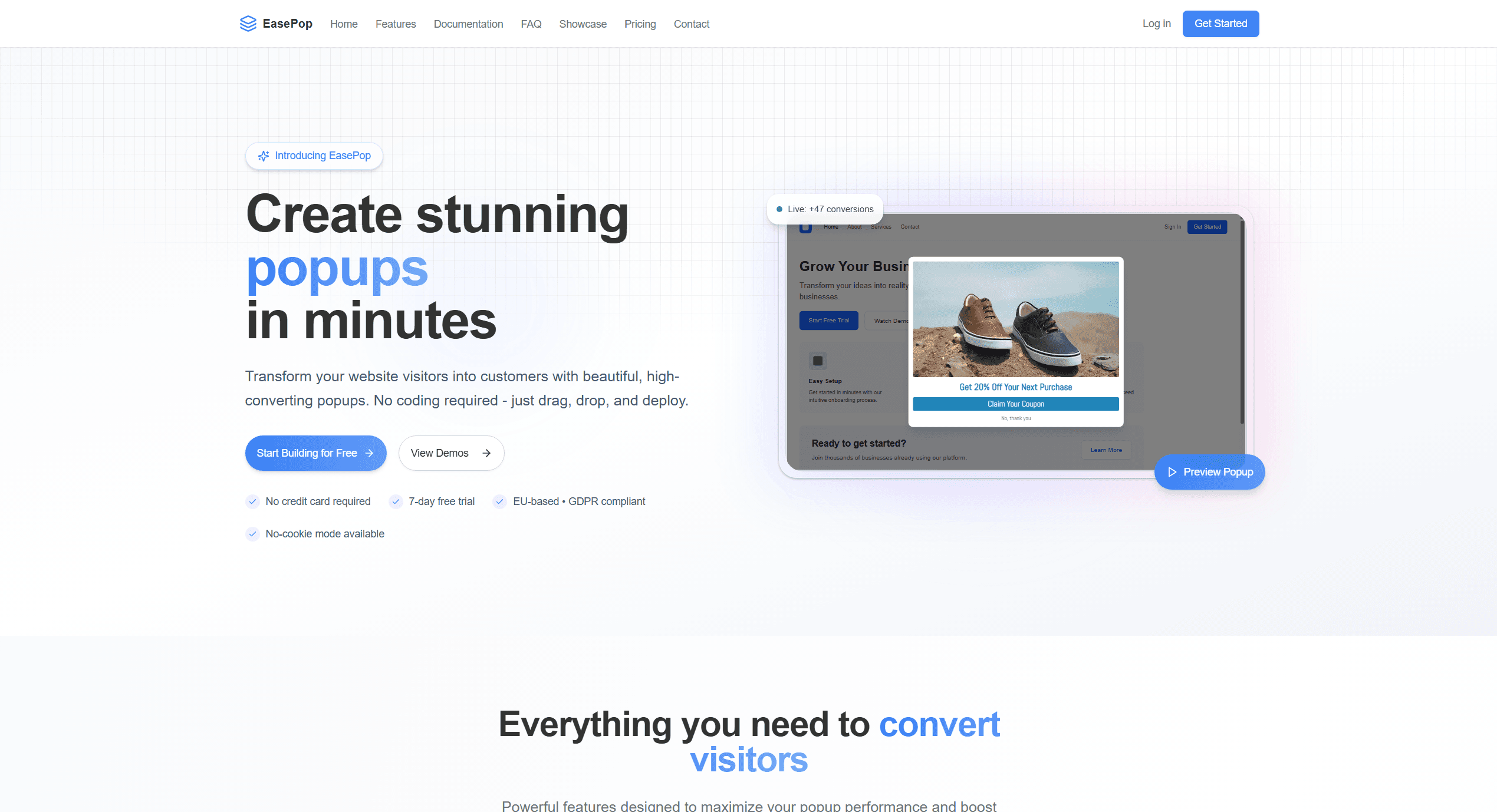
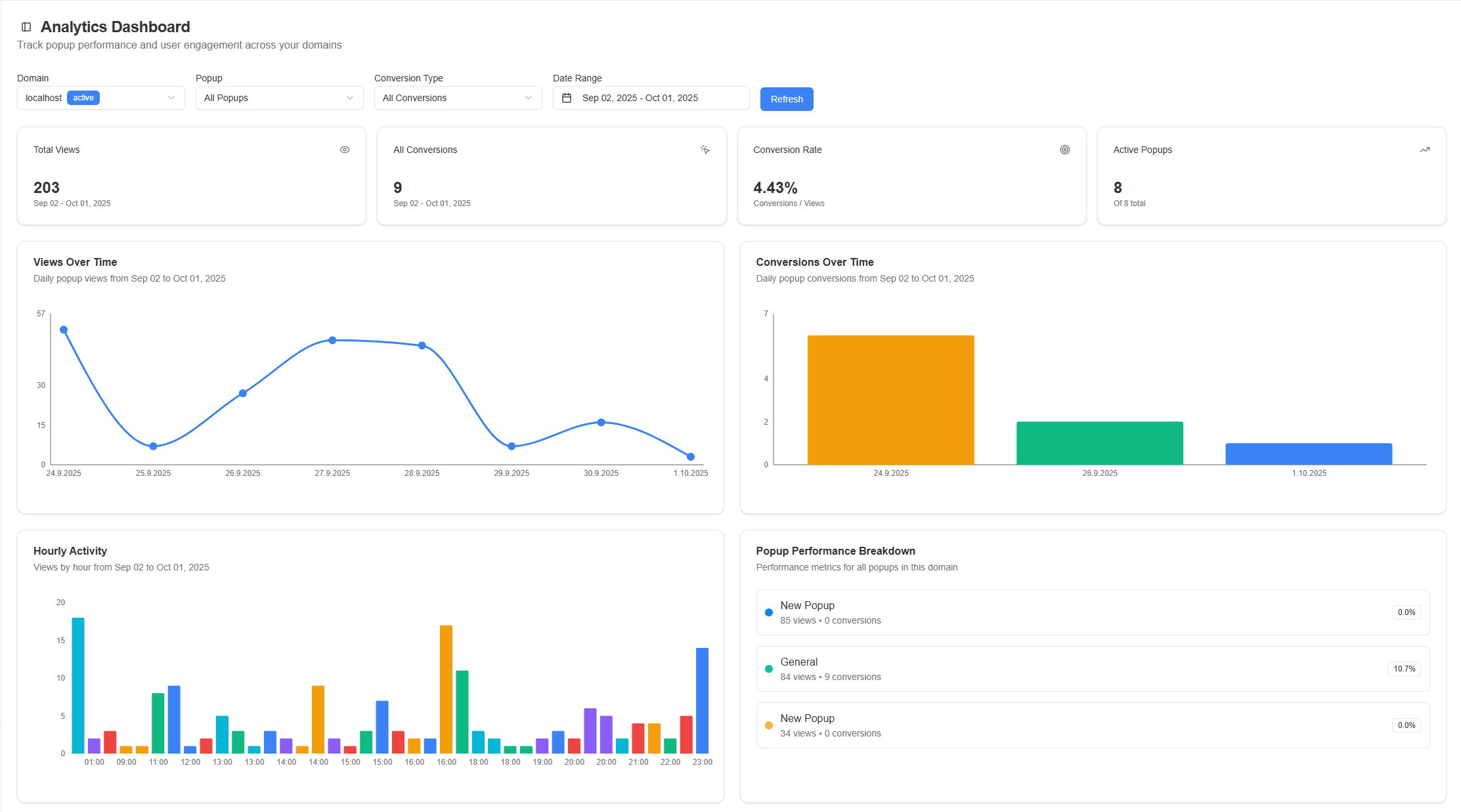
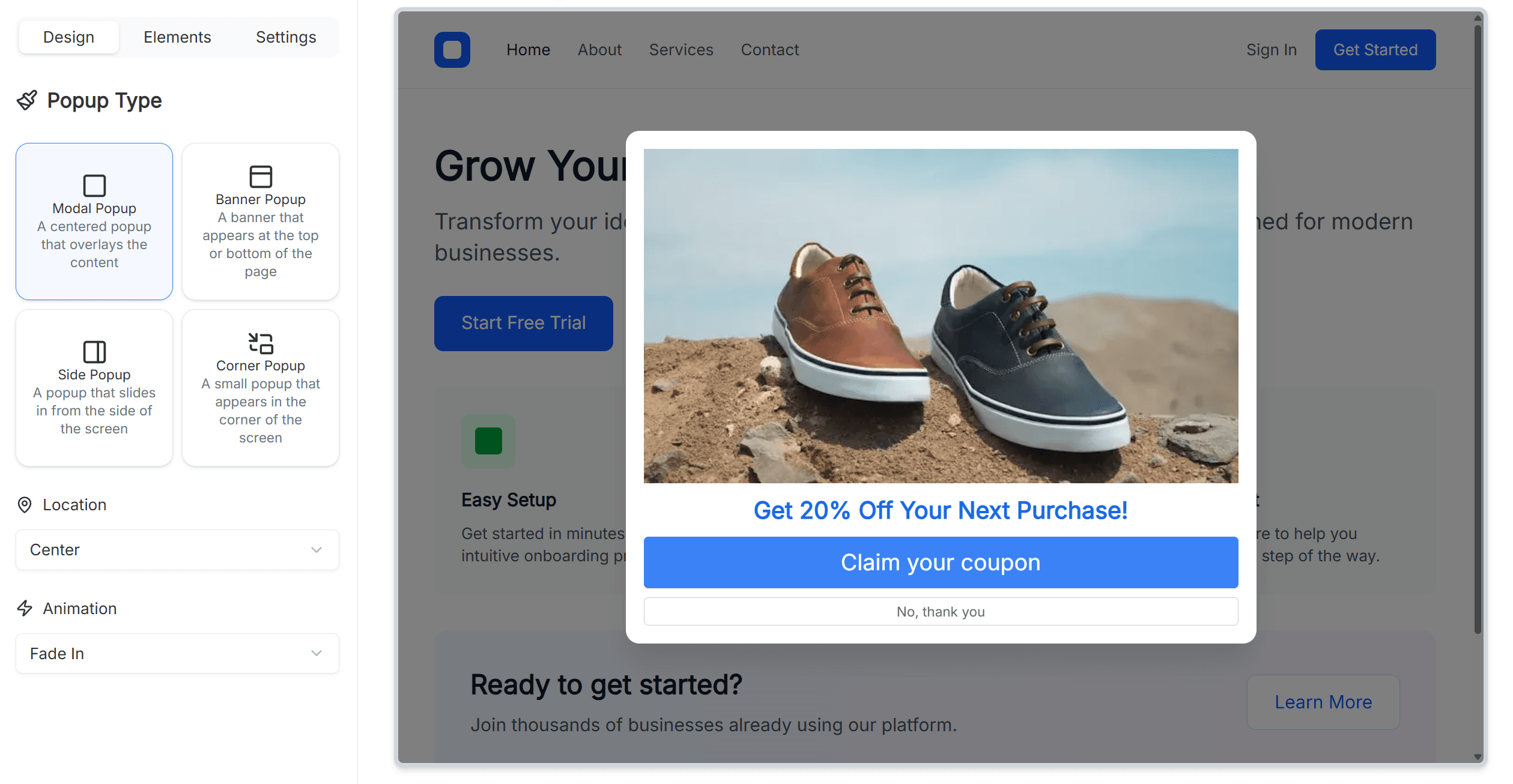
EasePop is a standout no-code platform that lets users design and deploy website popups effortlessly through an intuitive drag-and-drop visual builder. I've found it particularly useful for marketers, small business owners, and website admins who need to implement popups without coding skills. Key features include real-time previews, one-line integration for quick setup, and smart triggers like exit-intent and scroll-based actions. It also supports A/B testing, advanced analytics, and custom styling, all while emphasizing GDPR compliance and lightweight performance. With pricing starting at €9/month and a free trial, it's a solid choice for EU-based users or anyone prioritizing data privacy. While it excels in usability and security, it could improve with more templates and better accessibility features.
Key features
- 1Drag-and-drop visual builder with real-time preview
- 2GDPR compliance with EU-based data hosting
- 3Smart triggers including exit-intent and scroll-based actions
- 4One-line integration for quick deployment
Target customer profile
Drawn from the product itself, not from a survey.
Demographic
Small to medium business owners
Pain points
Limited technical skills, budget constraints for developer hires, time-consuming popup setup
Primary needs
Easy no-code solution, cost-effectiveness, compliance with data regulations
Demographic
Digital marketers and agencies
Pain points
Managing multiple tools, ensuring GDPR adherence, need for rapid campaign deployment
Primary needs
Advanced targeting options, integrated analytics, scalable pricing plans
Demographic
Website administrators in EU regions
Pain points
Navigating strict data privacy laws, avoiding legal penalties, maintaining site performance
Primary needs
GDPR-compliant features, EU-based hosting, lightweight integration
Scout Review
Written by AI from measured evidence, scored out of 100.
EasePop delivers exactly what it promises: a straightforward, compliant popup solution that doesn't require coding skills. The security features are top-notch, the usability is excellent, and the pricing is reasonable for the value provided. It's particularly well-suited for EU-based businesses or anyone prioritizing data privacy in their marketing tools.
Measure by measure
Usability
90One-line integration and smart triggers make popup deployment accessible for non-technical users with minimal learning curve.
Design
90Clean drag-and-drop interface with real-time previews and custom styling options, though template variety could be expanded.
Speed
80Lightweight architecture promises good performance, though specific load-time benchmarks aren't detailed in documentation.
Security
100Excellent GDPR compliance with EU-based hosting and robust data protection measures for privacy-conscious businesses.
Accessibility
60Limited accessibility features with no mentioned screen reader support or keyboard navigation enhancements for disabled users.
Growth
80Strong compliance focus positions it well in EU markets, but expansion depends on adding more templates and accessibility features.
Improvement areas
- Limited template variety compared to competitors
- Minimal accessibility features for disabled users
- Lacks detailed performance metrics and benchmarks
- Limited multi-language and localization support
Design & Usability
EasePop's visual builder hits the sweet spot for no-code popup creation. The drag-and-drop interface feels intuitive from the first click, with real-time previews that eliminate the guesswork of how your popups will actually look. Custom styling options let you match your brand's aesthetic perfectly, while smart triggers like exit-intent and scroll-based actions work seamlessly. The one-line integration is genuinely impressive - just paste the code and you're done. My only gripe is the template library feels a bit limited compared to competitors, forcing more custom work than necessary for common use cases.
Speed & Security
Where EasePop truly excels is in its security posture. The GDPR compliance isn't just a checkbox - it's baked into the platform with EU-based hosting and proper data protection measures. For businesses operating in Europe or anyone serious about privacy, this is a significant advantage. Performance-wise, the lightweight architecture keeps things snappy, though I'd love to see specific load-time metrics to quantify the speed claims. The platform doesn't bog down your site, which is crucial since slow popups can hurt conversions more than they help.
Accessibility & Growth
Accessibility is EasePop's Achilles' heel. There's no mention of screen reader compatibility, keyboard navigation enhancements, or high-contrast modes, making it challenging for users with disabilities. Language support also appears limited to English, which restricts global appeal. However, the growth potential is solid - the EU compliance focus gives it a unique market position, and the no-code approach aligns perfectly with current marketing trends. With some feature expansion, particularly in templates and analytics, it could become a market leader.
Conclusion
If you're tired of complex popup builders that require developer intervention or worry about GDPR compliance, EasePop is worth your attention. The free trial lets you test the waters without commitment, and the €9/month starting price makes it accessible for small businesses. Give it a spin if you need popups that convert without the compliance headaches.
Suggestions for improvement
- Add screen reader compatibility and keyboard navigation for better accessibility
- Expand template library with industry-specific designs to speed up setup
- Include multi-language support and localization options for global users
- Provide detailed performance metrics and load-time optimization guidance
Alternatives comparison
Named competitors, point by point. Nobody paid to appear here or to be left out.
 EasePop EasePop |  Popupsmart Popupsmart |  Popup Maker Popup Maker |  Elementor Popup Builder Elementor Popup Builder | |
|---|---|---|---|---|
| GDPR Compliance Focus | Strong emphasis with EU hosting | Limited specific focus | WordPress plugin, moderate emphasis | Integrated, limited GDPR focus |
| Platform Independence | Works with any website | Works with any website | WordPress only | WordPress + Elementor only |
| Free Plan Availability | Free trial only | Yes, with limitations | Freemium model | Part of Elementor ecosystem |
Popupsmart
Offers a free plan with AI-powered design and numerous templates, but lacks specific EU compliance focus.
Popup Maker
A WordPress-centric plugin with high user ratings, though it requires WordPress and may not emphasize GDPR as strongly.
Elementor Popup Builder
Integrated within the Elementor ecosystem, ideal for existing Elementor users but limited to WordPress sites.
Comparing options? See EasePop alternatives, scored side by side
More Marketing Automation apps
View all Marketing Automation
QRBliss
91Branded QR codes with AI Brand Sync, 15 free dynamic code...

WAButton
90WhatsApp website leads, forms and contact routing

NudgeWin
89Automated quote follow-up for trades and service businesses.

Opus Growth
89Opus Growth is a single MCP server for Google Ads, Meta Ads, TikTok Ads, LinkedIn Ads, Microsoft Ads and ChatGPT Ads. ChatGPT, Claude, Codex, Perplexity, Cursor and other assistants connect with the same address.

Fenn
88AI visibility tracker that checks if ChatGPT recommends y...

Spotwise
88AI-powered radio ad monitoring platform that tracks compe...

TranscriptYou
88Free YouTube transcript generator with timestamps and AI ...

Spek
88Grow your app with self-learning ASO agents

Indexaro
88AI visibility tracker for SEO, AEO, and GEO

Mygom SEO
87MygomSEO is an AI marketing agent that audits your site, writes SEO content, publishes to 12+ CMS platforms, posts to social, and monitors rankings 24/7.

CraftPilot
87AI tools for Etsy sellers — keyword research, listing optimization, and shop insights

The Salon Ads Studio
87Salon Ads Studio builds and runs your Google Ads. Right now, people a few streets from your door are on Google looking for exactly what you do.


A platform dedicated to providing unbiased reviews of newly launched applications, analyzing everything from their features to their full potential.
info@scoutforge.net© 2026 Scoutforge. All rights reserved.
