Cycling through all six. Tap any point to stop.
Measured on six things
Free eBay fee calculator for US sellers: enter sold price and buyer-paid shipping, pick a category rate, and see estimated marketplace fees and take-home. Also includes eBay profit, PayPal fee, Whatnot fee, and markup calculators. Estimates only; not affiliated with eBay. Rates last updated 2026-10-29.
Security
40HTTPS is enforced, but there's no HSTS, CSP, frame protection, or any of the standard hardening headers, and no SPF/DMARC. No security page, no compliance claims — fine for a free calculator, thin for anything more.
Screenshots
1 / 1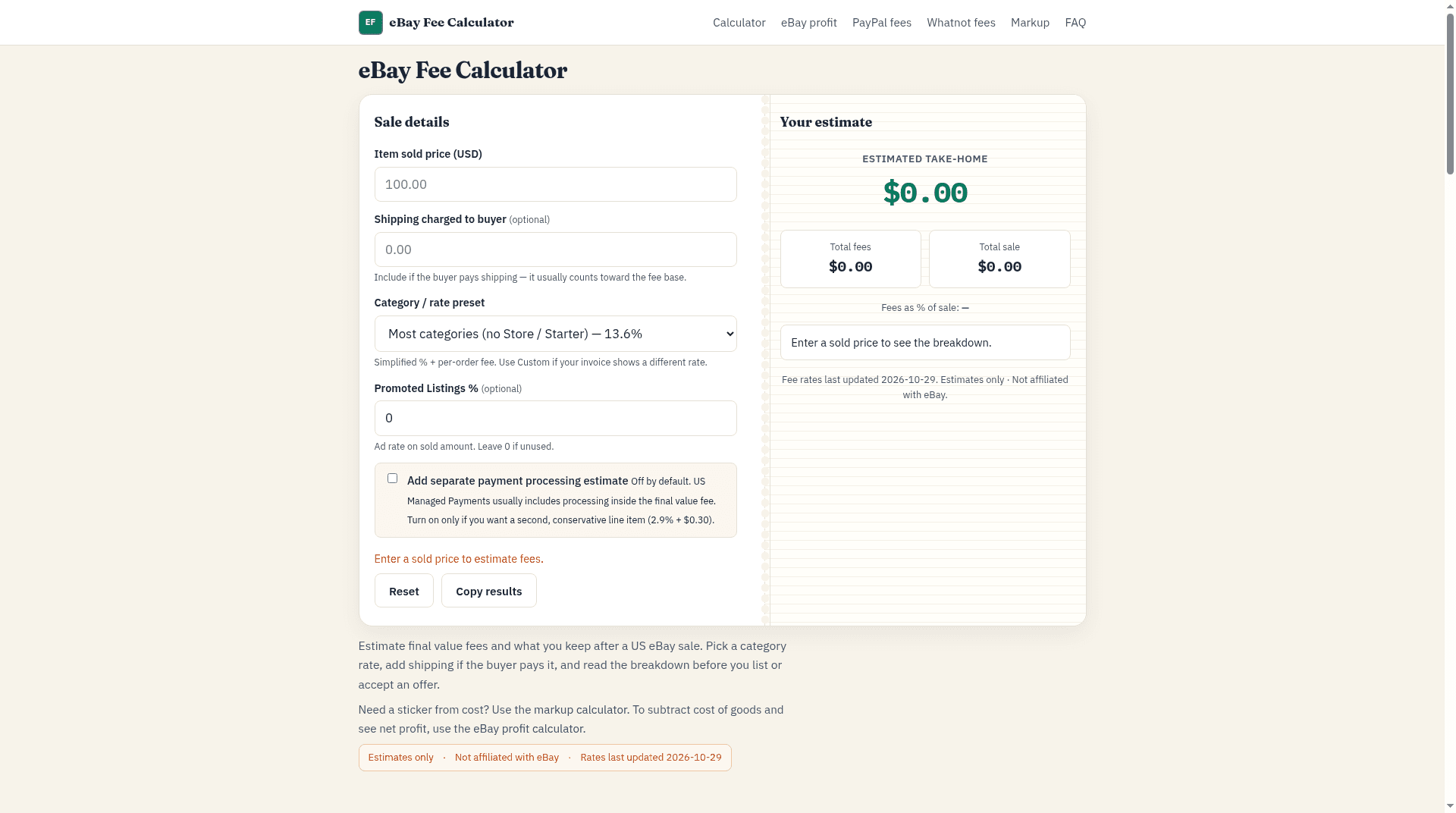
About this app
The eBay Fee Calculator is a free web tool for US sellers to estimate marketplace fees and take-home after a sale. Enter the item sold price and optional buyer-paid shipping, then pick a category rate preset or a custom percentage. Optional Promoted Listings % and a separate payment-processing estimate (off by default) can be included. The tool shows estimated total fees, take-home, and a line-item breakdown. Presets include Most categories (no Store / Starter) at 13.6%, Basic Store+ at 12.7%, and other category rates for media, trading cards, guitars, and jewelry. Per-order fee is $0.30 when the total sale is $10 or less, $0.40 above that. The site also includes eBay profit, PayPal fee, Whatnot fee, and markup calculators. Estimates only; not affiliated with eBay. Rates last updated 2026-10-29.
Key features
- 1Live-updating eBay fee estimate with take-home, total fees, and line-item breakdown
- 2Category rate presets for most categories, media, trading cards, guitars, and jewelry
- 3Optional Promoted Listings % and off-by-default payment processing estimate
- 4Companion eBay profit, PayPal fee, Whatnot fee, and markup calculators
Target customer profile
Drawn from the product itself, not from a survey.
Demographic
Casual/occasional eBay sellers (US)
Pain points
Unsure how much fees eat into a sale; surprised by final invoice totals
Primary needs
Quick, free fee estimate before listing or accepting an offer
Demographic
Full-time eBay resellers and store owners
Pain points
Complex fee tiers, store-level rates, and Promoted Listings cutting margins
Primary needs
Accurate take-home planning across categories and ad rates
Demographic
Collectibles, trading card, and media sellers
Pain points
Category-specific rates (cards, books, music) are higher and confusing
Primary needs
Category presets that reflect real collectible and media fee rates
Demographic
New side-hustle sellers testing pricing
Pain points
Not knowing net profit before sourcing or pricing items
Primary needs
Simple profit and markup context alongside fee estimates
Scout Review
Written by AI from measured evidence, scored out of 100.
eBay Fee Calculator is a fast, well-designed single-purpose tool that does one thing cleanly: estimate eBay fees and take-home for US sellers. The category presets, inline rate disclosure, and optional Promoted Listings field are genuinely thoughtful touches that beat eBay's own fee tables for quick planning. Speed is excellent (97 mobile / 100 desktop Lighthouse), design is above-average, and usability is solid once you're past the placeholder trap. The weak spots are security hardening (2/12 header checklist) and the absence of any moat — it's free, unaffiliated, and one bookmark away from being forgotten. A good utility, not yet a business.
Measure by measure
Usability
68Live-updating results, inline rate disclosure in the dropdown, and a clear empty state make the core task fast. The wall of explanatory copy under the tool buries the FAQ and examples for anyone who wants to read further.
Design
71A calm, editorial calculator: cream-and-teal palette, serif/sans/mono type pairing, and a split panel that puts take-home front and center. Repeated cross-links and a clashing view-counter pill are the only real blemishes.
Speed
88Lighthouse mobile 97/100 with a 1.5s LCP and zero layout shift; desktop hits a perfect 100. This is a fast, lean utility page with no bloat to speak of.
Security
40HTTPS is enforced, but there's no HSTS, CSP, frame protection, or any of the standard hardening headers, and no SPF/DMARC. No security page, no compliance claims — fine for a free calculator, thin for anything more.
Accessibility
79Lighthouse a11y scores 97/100 with one failing audit: links distinguished only by color. No WCAG statement or a11y page, and the tool is English/US-only, but the automated baseline is strong.
Growth
58A real, specific pain — eBay sellers genuinely don't know their take-home — with category presets and Promoted Listings as a concrete wedge. But it's a free calculator with no moat and eBay's own tables are one tab away.
Improvement areas
- Security hardening: no HSTS, CSP, frame protection, Referrer-Policy, SPF, or DMARC (2/12 checklist)
- High-value sales over $7,500 use a flat percent instead of modeling the lower tier
- Long explanatory copy under the tool buries the FAQ and examples
- No accessibility statement or WCAG claim despite a strong 97/100 audit
Design & Usability
The design is the strongest part of this product: a disciplined cream-and-teal palette, a serif/sans/mono type system that actually holds together, and a split-panel calculator that makes the take-home figure the loudest thing on the page. Usability follows the same logic — results update live, the category dropdown shows its rate inline, and the empty state tells you what to do. The friction is in the copy: a long explanatory block sits directly under the tool and shoves the FAQ and examples way down, and the '100.00' placeholder can read as a real value. Fix the placeholder and collapse the prose, and this is a genuinely pleasant utility.
Speed & Security
Speed is the standout: Lighthouse mobile 97/100 with a 1.5s LCP, zero layout shift, and a perfect 100 on desktop. There's no heavy framework tax here — it's a lean, single-purpose page that loads instantly. Security is the weak flank. HTTPS is enforced, but HSTS, CSP, frame protection, X-Content-Type-Options, Referrer-Policy, and Permissions-Policy are all absent, and there's no SPF or DMARC on the domain. For a free calculator with no accounts or payments, that's not catastrophic, but it's a thin posture and there's no security or privacy page to explain data handling.
Accessibility & Growth
Accessibility scores 97/100 on the Lighthouse audit, with a single failing item: links distinguished only by color. There's no WCAG statement or accessibility page, and the tool is English-only and US-focused, but the automated baseline is solid and the layout is keyboard-friendly by default. Growth is the honest question mark. The problem is real — eBay sellers routinely get surprised by final value fees, per-order fees, and Promoted Listings — and the category presets (media, cards, guitars, jewelry) plus the Promoted Listings field are a specific, useful wedge over eBay's own dense fee tables. But it's a free calculator with no account, no data, and no moat, competing against eBay's official page and a dozen similar tools. The five-calculator suite is a sensible play for cross-linking, but nothing here compounds.
Conclusion
If you sell on eBay and want a fast sanity check before you list or accept an offer, this is a better experience than eBay's own fee page and it loads instantly. The category presets and Promoted Listings field are the reasons to bookmark it over a generic percentage calculator. Just don't expect it to replace your invoice — it's a flat-percent MVP that flags the $7,500 threshold rather than modeling it, and the optional payment-processing line is off by default for good reason. A clean, honest tool with room to grow into something stickier.
Suggestions for improvement
- Add HSTS, CSP, X-Content-Type-Options, Referrer-Policy, and DMARC — the header checklist is 2/12 and it's cheap to fix.
- Replace the '100.00' placeholder with a true empty state or a dimmed example so it can't be mistaken for an entered value.
- Collapse the long explanatory block under the tool behind a 'How fees work' toggle so the FAQ and examples aren't buried.
- Model the $7,500 high-value tier instead of flagging it — that's the one case where the flat-percent MVP visibly breaks.
Alternatives comparison
Named competitors, point by point. Nobody paid to appear here or to be left out.
 eBay Fee Calculator |  eBay's Official Selling Fees Help | eBay Profit Calculator (same site) | PayPal Fee Calculator | |
|---|---|---|---|---|
| Price | Free | Free | Free | Free |
| Primary purpose | Estimate eBay fees and take-home | Authoritative eBay fee tables | Net profit after fees and COGS | Estimate PayPal processing fees |
| Category rate presets | Yes — media, cards, guitars, jewelry, store tiers | Yes — full official tables | Inherits fee presets for profit math | No — PayPal rates only |
| Promoted Listings support | Yes — optional % field | Explained, not calculated | Yes — via fee inputs | No |
| Cost of goods / net profit | No — fees only | No | Yes — COGS and other costs | No |
| Live-updating results | Yes — updates as you type | No — static tables | Yes | Yes |
eBay's Official Selling Fees Help
eBay's own fee tables and help pages for exact, authoritative rates, though less convenient for quick take-home estimates.
eBay Profit Calculator (same site)
Companion tool that subtracts fees, cost of goods, and other costs to show net profit.
PayPal Fee Calculator
Estimates PayPal payment processing fees for sellers who want a separate processing line item.
Comparing options? See eBay Fee Calculator alternatives, scored side by side
More E-commerce apps
View all E-commerce
Qamarero
92An all-in-one hospitality software for restaurants and ba...

Portrait Gift
88AI-powered personalized face swap art platform creating c...

Creastor
88An all-in-one platform for creators to sell digital produ...

StoreToAds
87AI ad generator that turns real product photos into multi...

CraftPilot
87AI tools for Etsy sellers — keyword research, listing optimization, and shop insights

Stripdo
87Stripdo is a smart invoicing tool that automatically gene...

Nano Banana 2.1 AI Image Generator
86Create and edit 4K images with AI, fuse up to 14 referenc...

BlueVetaUpright
86API that detects product photo rotation and tells you how...

Scale Ova
86AI agent that builds & runs your Shopify

Kaniva
85Your business is hard enough. Your software shouldn’t be.

EchoWi
83Track and optimize your brand's visibility in AI answers.

Avenum
82Avenum is a self-checkout app that streamlines retail shopping with QR code scanning and payments.


A platform dedicated to providing unbiased reviews of newly launched applications, analyzing everything from their features to their full potential.
info@scoutforge.net© 2026 Scoutforge. All rights reserved.
