Cycling through all six. Tap any point to stop.
Measured on six things
GPTinf: Detect AI-generated content and humanize AI text in seconds
Speed
57Lighthouse mobile 67/100 and desktop 74/100. LCP 1.7s and CLS 0 are fine, but a 1.3s mobile TBT points to heavy main-thread JS on a page that mostly shows text.
Screenshots
1 / 1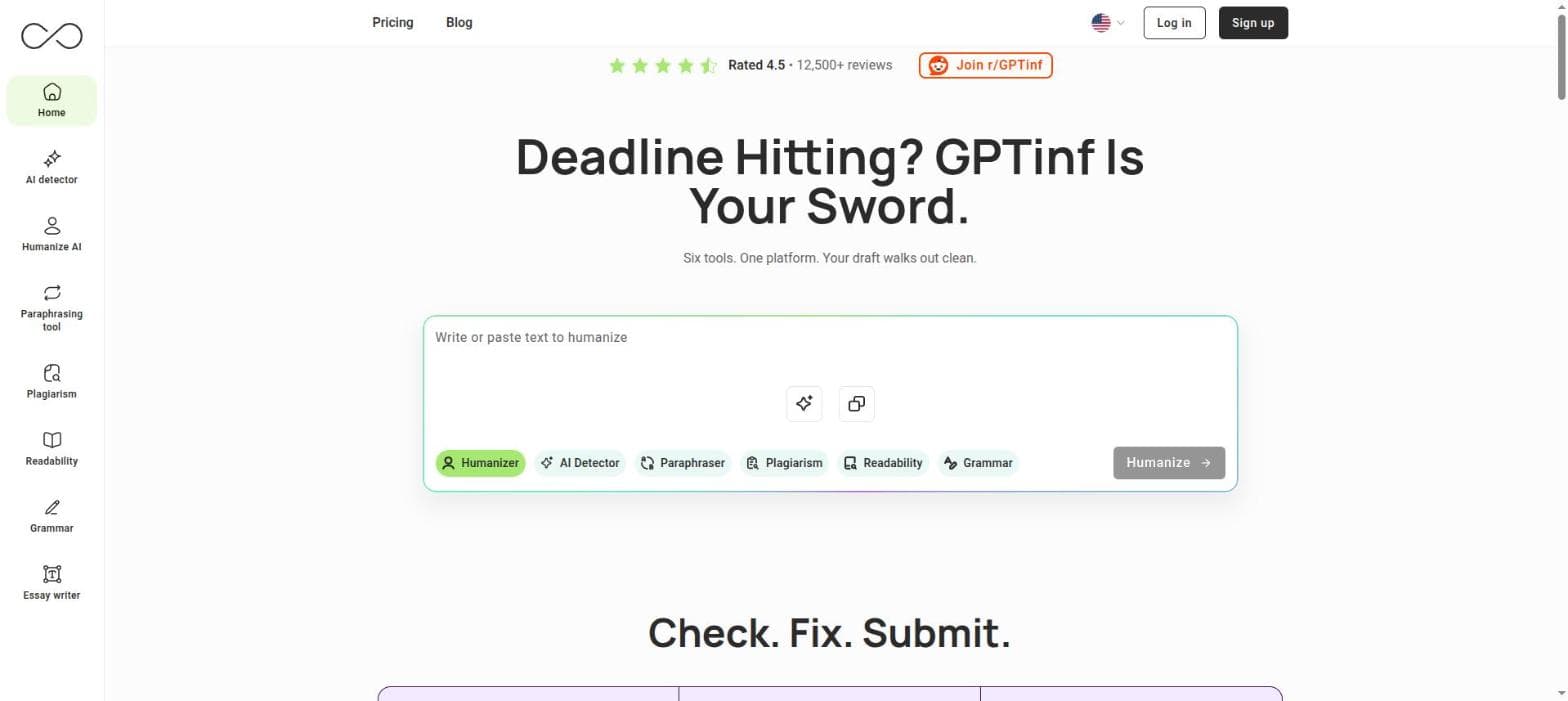
About this app
GPTinf is an online AI writing toolkit for writers, students, marketers, content creators, and professionals. It lets you check text for signs of AI generation, turn AI-assisted drafts into more natural-sounding writing, paraphrase sentences, identify potential plagiarism, correct grammar issues, and improve readability. With these tools in one accessible platform, GPTinf supports everything from blog posts and marketing materials to academic assignments and business documents.
Key features
- 1AI Humanizer with 8 writing modes, term freezing and selective re-humanizing to make AI drafts read naturally.
- 2AI Detector cross-checking 8 systems with segment-level color coding and per-system results.
- 3Plagiarism checker with a percentage score, flagged sentences and source URLs for each match.
- 4Paraphraser with word locking and multiple rewriting modes; readability checker with Flesch-Kincaid scoring.
- 5Grammar checker with contextual error detection and one-click fixes; file-to-file humanizer on paid plans.
Target customer profile
Drawn from the product itself, not from a survey.
Demographic
Content creators, bloggers and freelance writers
Pain points
Drafts from AI writing tools that read unnaturally
Primary needs
Humanize AI text, improve readability, paraphrase content
Demographic
Marketers, SEO specialists and content marketing teams
Pain points
Checking AI-assisted content for quality before publishing
Primary needs
Detect AI-generated content, check grammar and plagiarism
Demographic
Students, educators and professionals
Pain points
Needing several separate tools to review a piece of writing
Primary needs
AI detection, plagiarism and grammar checks in one platform
Scout Review
Written by AI from measured evidence, scored out of 100.
GPTinf is a six-tool AI writing suite — humanizer, AI detector, paraphraser, plagiarism checker, readability and grammar — aimed at students, marketers and freelancers who currently juggle separate subscriptions. The consolidation pitch is real and the price undercuts both listed alternatives. Execution is uneven: security headers are excellent (12/13 probe points), accessibility scores 95/100 with two real naming failures, and the landing page is coherent but ships a disabled-looking primary CTA and decorative graphics that overlap their own bullet copy. Speed is the soft spot at 67/100 mobile with 1.3s of blocking JS. The bigger caveat is verification: the 4.5 rating, 12,500+ reviews and 15B+ words humanized are self-reported, and no third-party audit backs the 'we don't store your text' claim.
Measure by measure
Usability
63Six mode chips in the hero make the core action obvious, and a no-signup free tier lowers the entry cost. Pricing accordions and a cramped left rail add friction to scanning.
Design
58Coherent lime/lavender palette and clear section rhythm, with mock-UI cards that show outputs at a glance. Undercut by shield graphics overlapping bullet copy and a greyed-out primary CTA.
Speed
57Lighthouse mobile 67/100 and desktop 74/100. LCP 1.7s and CLS 0 are fine, but a 1.3s mobile TBT points to heavy main-thread JS on a page that mostly shows text.
Security
72Strong header hygiene: HSTS, CSP, frame protection, Referrer-Policy, Permissions-Policy, SPF and DMARC — 12/13 probe points. No published audit, SOC 2 or bug bounty to back the 'not stored' claim.
Accessibility
79Lighthouse accessibility 95/100 with zero contrast failures flagged, but two real failures remain: buttons without accessible names and visible labels that don't match their accessible names.
Growth
62Real consolidation wedge — six writing tools in one flow at $4.99–$29.99, well under Grammarly and QuillBot's paid tiers. Differentiated, but the category is crowded and the moat is thin.
Improvement areas
- Mobile performance: 1.3s TBT and 67/100 Lighthouse score need script deferral and third-party tag trimming.
- Accessibility: unnamed buttons and mismatched visible/accessible labels fail two Lighthouse audits.
- Trust and verification: no published audit, SOC 2 or bug bounty behind the no-storage and detection-accuracy claims.
- Design polish: shield graphics overlap bullet copy and the primary hero CTA renders in a disabled-looking grey state.
Design & Usability
GPTinf's homepage is a competent, conventional SaaS tool page: a lime-and-lavender palette applied consistently, a hero input card that exposes all six tools as mode chips, and mock-UI cards that show what each tool returns. That chip row is the best decision on the page — it tells a visitor in one glance that this is a suite, not a single tool. The execution slips in places: decorative shield graphics in the 'GPTinf Steel' and 'LLM Feather' cards overlap and truncate the bullet copy beneath them, and the primary 'Humanize →' button renders in a washed-out grey disabled state that reads as unavailable. Usability is solid where it counts — no-signup free tier, obvious paste-and-pick flow, trust band above the fold — but pricing hides plan differences behind 'What's included' accordions, which is friction on the exact page where you want zero.
Speed & Security
Speed is the weakest measured dimension. Lighthouse puts mobile at 67/100 and desktop at 74/100; LCP of 1.7s and CLS of 0 are respectable, but a 1.3s mobile Total Blocking Time means the main thread is busy for over a second on a page whose primary content is text and cards. That is fixable with script deferral and trimming third-party tags, and it should be fixed — this is a tool people open mid-deadline. Security is the strongest measured dimension: the HTTP probe found HTTPS enforced with HSTS, CSP, frame protection, X-Content-Type-Options, Referrer-Policy and Permissions-Policy all present, plus SPF and DMARC configured — 12 of 13 checklist points. The one gap is the secure-cookie flag. What's missing is proof rather than posture: no SOC 2, ISO, pen-test summary or bug bounty is published, so the FAQ's claim that submitted text isn't stored or used for training rests on the maker's word alone.
Accessibility & Growth
Accessibility scores 95/100 on Lighthouse, which is genuinely above average, but the two failing audits matter: buttons without accessible names and visible labels that don't match their accessible names. Those are the kind of defect that makes a screen-reader user hear 'button' six times in a row on your tool chips. No accessibility statement or WCAG conformance claim is published, so there's nothing to hold the product to beyond the automated run. Growth is a judgement on the idea, not the traction: GPTinf's wedge is consolidation — humanizer, detector, paraphraser, plagiarism, readability and grammar in one flow — sold at $4.99–$29.99/month, comfortably under Grammarly Premium and QuillBot's paid tiers. That's a real, specific reason to pick it over the two alternatives listed. The limit is that consolidation is copyable and the category is crowded; nothing here compounds with adoption the way a data or network moat would.
Conclusion
If you need one dashboard instead of three subscriptions and you're price-sensitive, GPTinf is a reasonable bet — the free tier with no signup means you can test the humanizer against your own detector before paying anything. Go in with calibrated expectations: 'passes AI detection tools' is a marketing claim, not a guarantee, and detection is an arms race that no vendor wins permanently. Treat the humanizer as a drafting aid you still edit, not a submit-and-forget button. Before you paste anything sensitive, note that the no-storage promise lives in an FAQ rather than an audit report. Fix the blocking JS, name your buttons, and un-collide the shield graphics, and this moves from competent to genuinely good.
Suggestions for improvement
- Publish a security or trust page with a third-party audit, pen-test summary or bug bounty to back the 'text is not stored' claim.
- Cut the 1.3s mobile TBT by deferring non-critical scripts and trimming third-party tags on the landing page.
- Add accessible names to all buttons and align visible labels with their accessible names to clear the two failing Lighthouse audits.
- Replace the 'What's included' accordions with a visible feature comparison table so plan differences are scannable at a glance.
Alternatives comparison
Named competitors, point by point. Nobody paid to appear here or to be left out.
 GPTinf |  QuillBot |  Grammarly | |
|---|---|---|---|
| Core writing tools included | Six: humanizer, AI detector, paraphraser, plagiarism, readability, grammar | Paraphraser, humanizer, grammar checker, summarizer, citation generator | Grammar, tone, clarity, plagiarism detection, generative AI writing |
| AI detection capability | Yes — 8-system cross-check with segment-level results | AI detector available as a separate tool | AI detection not a core offering; focuses on authorship and plagiarism |
| Plagiarism checking | Yes — percentage score, flagged sentences, source URLs | Yes — plagiarism checker included | Yes — on Premium plans |
| Free tier without account | Yes — all tools usable with no registration | Free tier available; account required for most features | Free tier available; account required |
| Entry paid price | $4.99/month (Lite); $29.99 Unlimited | Premium tier billed monthly or annually | Premium tier billed monthly or annually |
QuillBot
Paraphrasing tool with humanizer and grammar checker features.
Grammarly
AI-powered writing assistant for grammar, tone, and clarity.
Comparing options? See GPTinf alternatives, scored side by side
More Writing Assistants apps
View all Writing Assistants
Gerty
91Private, local AI assistant for Mac that runs offline

English Test Coach
89English Test Coach checks your IELTS essays and letters, gives an estimated band score across all four criteria, and tells you exactly what to revise next.

Voqusa
89Transcribe social media video and audio links into text (free signup, 5 free credits, then pay-as-you-go)

eety.ai — AI Patent Drafting Assistant
87An AI-powered patent drafting assistant that acts like a ...

ContentIQ
87AI writer that fact-checks before writing, with real sour...

Voice Memo Exporter
87Export all your Apple Voice Memos to one text file.

Book Cover Generator
87AI book cover generator for indie authors—turn your story...

Boost My Resume
85Build and export a base resume for free, then use AI to tailor it and a matching cover letter to each job from your real experience.

Coda One
84Free AI detector with no daily limit, plus an AI humanizer, rewriter and grammar checker. Start free in your browser — no signup.

Voq
83Free text to speech for Chrome: listen to any webpage in a natural AI voice.

PopTranslate
82AI-powered macOS translation app with OCR, multi-engine comparisons, and keyboard-friendly design for professionals and learners.

Hold Your Voice
82An AI-powered writing assistant that analyzes and fixes v...


A platform dedicated to providing unbiased reviews of newly launched applications, analyzing everything from their features to their full potential.
info@scoutforge.net© 2026 Scoutforge. All rights reserved.
