Cycling through all six. Tap any point to stop.
Measured on six things
Feel iOS haptic patterns on a real iPhone, copy the code
Security
27HTTP probe scores 1/12: HTTPS not enforced, no HSTS, no CSP, no frame protection, no Referrer-Policy, no Permissions-Policy, DMARC missing. Privacy policy is honest about AdMob and analytics, but the transport and header hygiene is close to absent.
Screenshots
1 / 1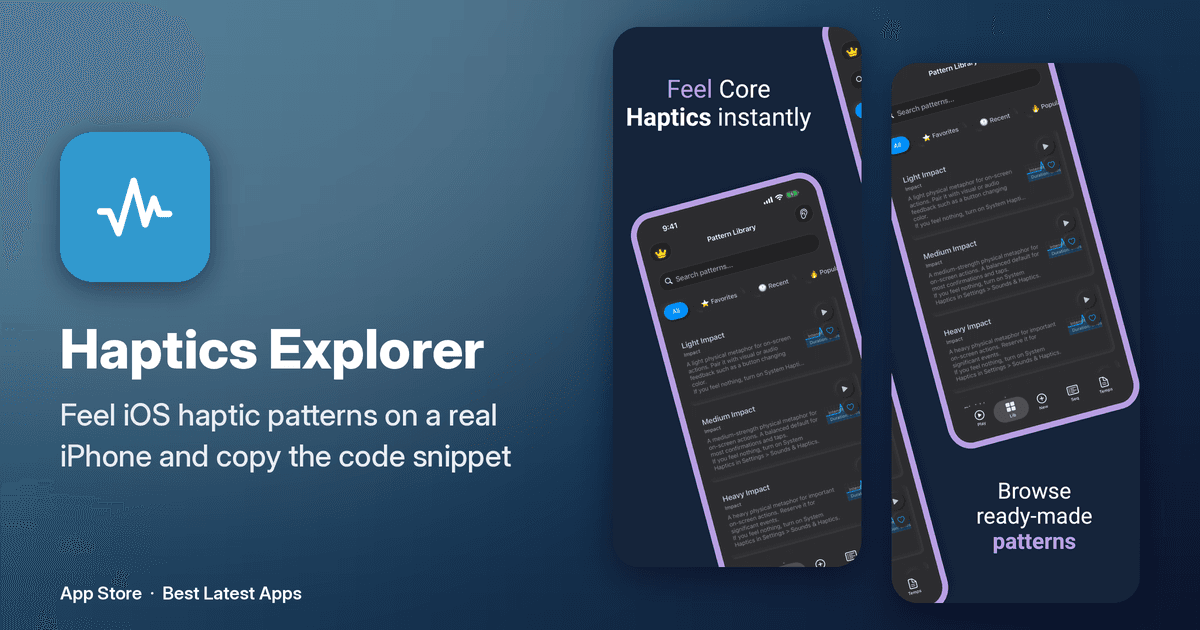
About this app
Haptics Explorer is a free iPhone/iPad app for iOS developers and designers to browse, test, and implement haptic feedback. It packs 8 categories of patterns — Impact (light/heavy/rigid/soft), Notifications (success/error/warning), Rhythm (heartbeat, tick-tock), Gesture (swipe, pinch, long press), Game (explosion, power-up, collision), and Accessibility patterns — plus a Custom Pattern Creator with intensity, sharpness, duration, and timing controls. A Sequence Editor lets you chain patterns, and Code Generation outputs ready-to-use UIKit, SwiftUI, Combine, and async/await snippets. Extras include intensity sliders, sharpness adjustment, and 0.5x/1x/2x speed controls. Requires iOS 15.6+ and runs on iPhone and iPad.
Key features
- 1Eight haptic pattern categories: Impact, Notifications, Rhythm, Gesture, Game, Accessibility and more, each playable in-app.
- 2Custom Pattern Creator with intensity, sharpness, duration and timing controls, plus a Sequence Editor for chaining patterns.
- 3Code generation for UIKit, SwiftUI, Combine and async/await, with 0.5x/1x/2x speed controls and intensity/sharpness sliders.
Target customer profile
Drawn from the product itself, not from a survey.
Demographic
iOS developers building production apps
Pain points
Guessing haptic values and rewriting boilerplate to preview them
Primary needs
Ready-made patterns and copy-paste Swift code
Demographic
UI/UX designers prototyping touch feedback
Pain points
No quick way to feel how a haptic choice actually lands
Primary needs
A tactile playground to compare and tune patterns
Demographic
Indie devs and students learning Core Haptics
Pain points
The framework's curve-based API is hard to grasp from docs
Primary needs
Hands-on exploration with tunable intensity and sharpness
Scout Review
Written by AI from measured evidence, scored out of 100.
Haptics Explorer is a free iPhone/iPad tool for iOS developers and designers to browse, feel, and ship haptic feedback. The app is the good part: a dark-mode pattern library across eight categories with per-row play buttons, favorites, search and filter tabs, a custom pattern creator with intensity/sharpness/duration/timing controls, a sequence editor, and code generation for UIKit, SwiftUI, Combine and async/await. It solves a real annoyance — guessing Core Haptics curve values and rewriting boilerplate just to preview a tap. The website is the weak part: a polished hero undermined by twelve mismatched launch badges, a template-looking metadata sidebar, and a nearly invisible 'Developer guide' link. Security is the standout failure at 1/12 header checklist points with HTTPS not enforced. Accessibility (93/100, one contrast failure) and desktop speed (97/100) are genuinely good; mobile speed suffers from a 3.2s LCP and 0.268 CLS. Worth downloading if you write iOS haptics. Worth hardening if you run the site.
Measure by measure
Usability
68Play buttons and favorite hearts on every pattern row, plus All/Favorites/Recent/Popular filters, make exploration low-friction. Code generation for UIKit, SwiftUI, Combine and async/await kills the boilerplate loop. The tiny 'Developer guide' link is the weak spot.
Design
71Judging the app UI: dark-mode pattern library with purple bezels, per-row play buttons and intensity chips is cohesive and purposeful. The marketing site is weaker — 12+ mismatched launch badges and a template-looking metadata sidebar drag it down.
Speed
68Lighthouse desktop 97/100 and mobile 79/100 with TBT at 0ms and FCP 906ms — genuinely snappy. But mobile LCP of 3.2s and CLS of 0.268 mean the page visibly jumps while loading on a phone.
Security
27HTTP probe scores 1/12: HTTPS not enforced, no HSTS, no CSP, no frame protection, no Referrer-Policy, no Permissions-Policy, DMARC missing. Privacy policy is honest about AdMob and analytics, but the transport and header hygiene is close to absent.
Accessibility
70Lighthouse a11y 93/100 with a single failing audit on color contrast. App localized in 95 languages and runs on iPhone and iPad. No published WCAG statement, but the automated baseline is strong and the only real defect is contrast.
Growth
58Real, specific pain (guessing Core Haptics curves, rewriting boilerplate) with a concrete wedge: 8 pattern categories, custom creator, sequence editor, multi-framework codegen, free. Thin store traction (4 ratings) is context, not the score.
Improvement areas
- Security headers: HTTPS not enforced, no HSTS, CSP, frame protection or Referrer-Policy — 1/12 checklist points.
- Mobile performance: 3.2s LCP and 0.268 CLS cause visible layout shift on phones.
- Homepage design: 12 mismatched launch badges crowd out app previews; metadata sidebar reads as a template artifact.
- Accessibility: one failing Lighthouse contrast audit and no published WCAG conformance statement.
Design & Usability
The app itself is the strong half here. Store screenshots show a dark-mode pattern library with purple bezels, per-row play buttons, intensity and duration chips, and a search bar with All/Favorites/Recent/Popular filters — that's a tool built by someone who actually uses it. Code generation across UIKit, SwiftUI, Combine and async/await closes the loop from 'feel it' to 'ship it.' The marketing site is where it slips: the hero is fine, but twelve mismatched launch badges crowd out the app previews, a raw metadata sidebar reads like a template artifact, and the 'Developer guide' link is small blue text hiding next to a giant black App Store button. Fix the site to match the app's discipline and this jumps.
Speed & Security
Speed is a split verdict. Desktop Lighthouse lands at 97/100 with 0ms total blocking time and 906ms first contentful paint — the site is light and doesn't make you wait. Mobile drops to 79/100 with a 3.2s LCP and a 0.268 CLS, meaning the layout visibly shifts while loading on a phone, which is exactly where the App Store button lives. Security is the real problem: the HTTP probe returns 1/12 checklist points. HTTPS is not enforced, there's no HSTS, no CSP, no frame protection, no X-Content-Type-Options, no Referrer-Policy, no Permissions-Policy, and DMARC is missing. The privacy policy is refreshingly honest — it names Google AdMob and anonymous analytics and says data isn't sold — but honest copy doesn't compensate for a site that won't force TLS. For a free developer tool this isn't catastrophic, but it's the cheapest set of fixes on this list.
Accessibility & Growth
Accessibility is above average for the category: Lighthouse scores 93/100 with a single failing audit for insufficient color contrast, and the app ships localized in 95 languages across iPhone and iPad. There's no published WCAG conformance statement, and the contrast failure is a real, fixable defect rather than a rounding error — but the automated baseline is solid. Growth is a judgement on the idea, and the idea holds up. The problem is specific and real: Core Haptics' curve-based API is hard to learn from docs, and devs burn time guessing intensity and sharpness values and rewriting preview boilerplate. The wedge is concrete — eight pattern categories, a custom pattern creator with intensity/sharpness/duration/timing, a sequence editor, and code generation for four frameworks, all free. Against Apple's own Core Haptics sample code and playground, this is a faster path to a felt result. The honest limit: it's a free utility with no network effects and no obvious monetization, so growth depends on word of mouth among iOS devs. Store traction is thin (5/5 from 4 ratings, first released December 2022) — that's context, not a verdict.
Conclusion
The verdict splits cleanly: download the app, fix the site. The app earns its place on an iOS developer's home screen — free, focused, and built around the actual workflow of feeling a pattern and then copying working code. The site is marketing for that app and it's currently the weakest link: no enforced HTTPS, one security header out of twelve, a mobile layout that shifts under your thumb, and a homepage that hides its own best screenshots behind a wall of launch badges. None of these are hard problems. Enforce TLS and add HSTS, CSP and the standard header set. Fix the contrast failure flagged by Lighthouse. Give the app previews room to breathe and move the launch badges below the fold. Then the site would finally match the quality of the thing it's selling.
Suggestions for improvement
- Enforce HTTPS and add HSTS, CSP, X-Content-Type-Options, Referrer-Policy and Permissions-Policy — the probe scores 1/12.
- Fix the mobile CLS of 0.268 and the 3.2s LCP by reserving space for images and badges above the fold.
- Resolve the Lighthouse contrast failure flagged on background/foreground color pairs.
- Move the 12 launch badges below the fold and give the app screenshots the hero space they deserve.
Alternatives comparison
Named competitors, point by point. Nobody paid to appear here or to be left out.
 Haptics Explorer Haptics Explorer |  Core Haptics Playground Core Haptics Playground | Apple Haptic Sample Code | |
|---|---|---|---|
| Price | Free | Free (Apple documentation) | Free (Apple sample code) |
| Ready-made pattern library | 8 categories: Impact, Notifications, Rhythm, Gesture, Game, Accessibility | No — framework docs only, no curated patterns | No — one sample pattern from a file |
| Custom pattern tuning (intensity/sharpness/duration) | Yes — sliders for intensity, sharpness, duration, timing | Only via writing code against the API | Only via editing the sample code |
| Sequence editor for chaining patterns | Yes — chain multiple patterns into sequences | No — requires manual CHHapticPattern construction | No — single pattern playback sample |
| Code generation | UIKit, SwiftUI, Combine, async/await snippets | No — docs show snippets but no generator | No — fixed sample project code |
| On-device preview / feel the haptic | Yes — tap play on any pattern to feel it immediately | No — must build and run your own code | Yes, but only the one sample pattern |
Core Haptics Playground
A hands-on sample app for experimenting with the Core Haptics framework on device.
Apple Haptic Sample Code
Official Apple sample projects demonstrating haptic event and pattern playback in UIKit and SwiftUI.
Comparing options? See Haptics Explorer alternatives, scored side by side
More Development & Engineering apps
View all Development & Engineering
CreateMyCoin
92A no-code Solana token creator that deploys SPL tokens in...

Vibe Coding Agent Skills
92A free, open-source platform offering 110 AI agent skills...

CC Switch
91Open-source desktop app for switching AI coding providers...

TaxID
90Fast EU VAT validation API for developers, covering 27 EU...

BeartIMAGE
88BeartIMAGE is a free, web-based image processing platform engineered for fast, bulk photo editing and conversion directly in your browser.

Claw Messenger
88Claw Messenger is an iMessage API service that gives AI a...

DataHabibi
88AI-powered Dubai real estate data platform with 12M+ DLD ...

ButterKit
82macOS app for App Store screenshots: 3D mockups, auto-tra...

PERM Processing Time: Current DOL Queue & History
88PERM Processing Time is an independent data analysis platform that helps users navigate the U.S. Department of Labor’s permanent labor certification process.

StockFit API
87A developer-first financial data API providing structured...

ProcessSpy
87A native macOS process explorer and advanced monitor that...

Credyt
87Real-time monetization infrastructure for AI products tha...


A platform dedicated to providing unbiased reviews of newly launched applications, analyzing everything from their features to their full potential.
info@scoutforge.net© 2026 Scoutforge. All rights reserved.
