

A platform dedicated to providing unbiased reviews of newly launched applications, analyzing everything from their features to their full potential.
info@scoutforge.net© 2026 Scoutforge. All rights reserved.
A platform dedicated to providing unbiased reviews of newly launched applications, analyzing everything from their features to their full potential.
info@scoutforge.net© 2026 Scoutforge. All rights reserved.
A platform dedicated to providing unbiased reviews of newly launched applications, analyzing everything from their features to their full potential.
info@scoutforge.net© 2026 Scoutforge. All rights reserved.
Cycling through all six. Tap any point to stop.
Measured on six things
BeartIMAGE is a free, web-based image processing platform engineered for fast, bulk photo editing and conversion directly in your browser.
Tool grid with clear categories and descriptions makes discovery easy. In-studio controls are comprehensive but potentially overwhelming for first-time users. No visible onboarding or demo on homepage; Help & Guides section exists but requires navigation.
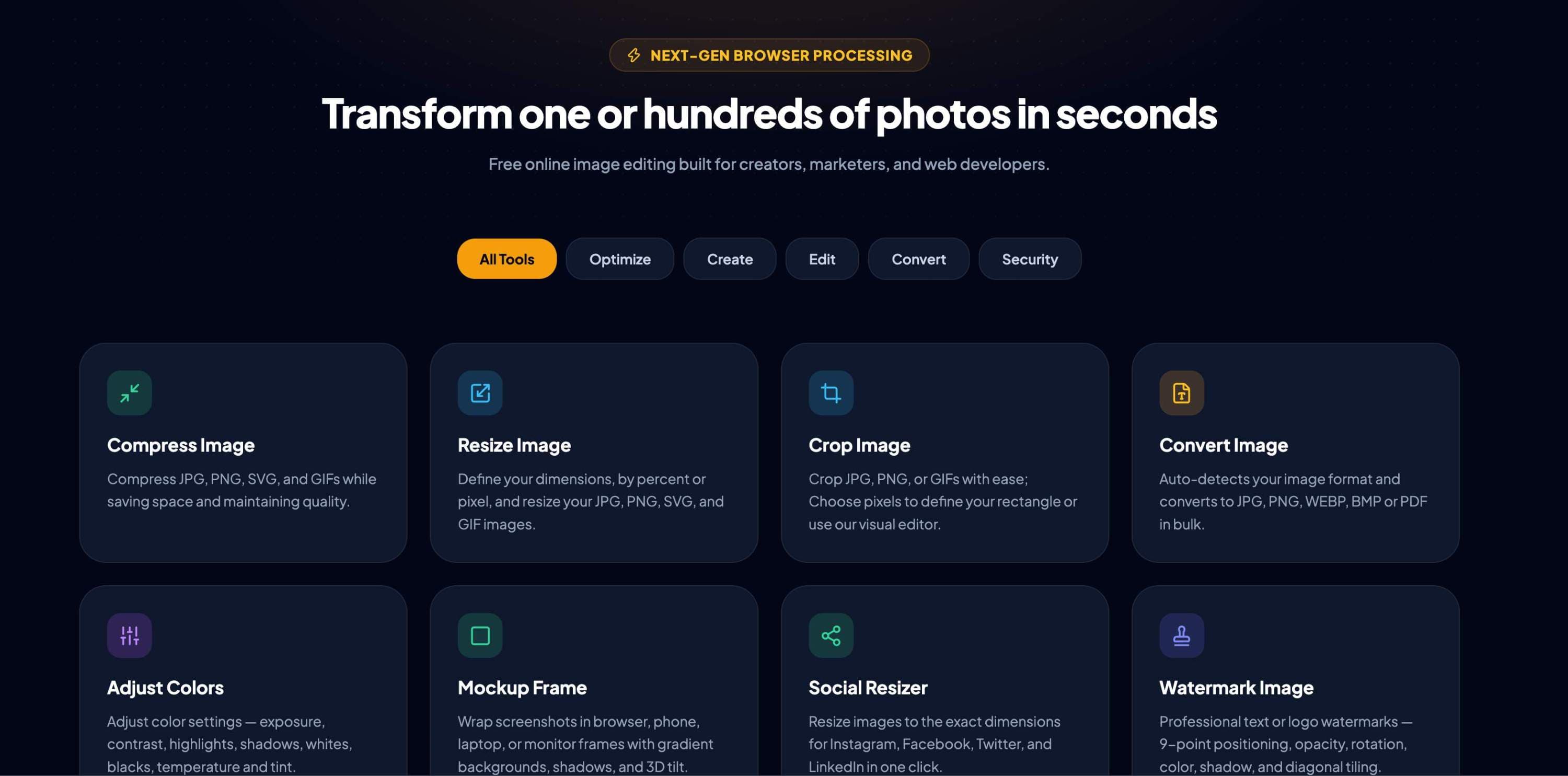
BeartIMAGE is a browser-based image processing platform engineered for multi-file media workflows. Designed as an alternative to desktop software and server-side online converters, it provides tools for bulk image optimization, formatting, and transformation without subscription fees, registration screens, or server uploads. The platform processes files using client-side technologies like WebAssembly, WebGL, and HTML5 Canvas, performing all image computations directly within the local web browser. By utilizing the user's processor and RAM, images are processed locally without being transmitted, logged, or cached on external servers. This local processing model eliminates network upload and download bottlenecks and allows for unrestricted batch processing without daily limits, watermarks, or paywalls. The core toolset includes high-ratio image compression algorithms that reduce file size while maintaining visual quality by optimizing color profiles and stripping unnecessary metadata.
Drawn from the product itself, not from a survey.
Demographic
Social media managers and content creators
Pain points
Need to resize and crop images for multiple platforms, want quick batch editing, and are concerned about privacy when using online tools
Primary needs
Fast, free bulk resizing, presets for different social media sizes, and no-photo-upload guarantee
Demographic
Small business owners and entrepreneurs
Pain points
Limited budget for paid tools, need to create professional-looking marketing materials, and want to save time on repetitive image tasks
Primary needs
Affordable (free) image editing, watermarking for brand protection, and simple tools for product photos and mockups
Demographic
Web developers and designers
Pain points
Need to optimize images for web performance, want to convert formats efficiently, and require a privacy-friendly tool for client work
Primary needs
Bulk conversion, compression without quality loss, and a reliable tool that works offline
Demographic
Photography enthusiasts and hobbyists
Pain points
Want to edit personal photos without complex software, value privacy, and may need to remove backgrounds or create albums
Primary needs
Basic edits like crop, rotate, and color adjustments, plus advanced features like background removal and album creation
Written by AI from measured evidence, scored out of 100.
BeartIMAGE is a promising browser-based image processing platform that differentiates itself through 100% local processing — no uploads, no accounts, no watermarks, free forever. The design is polished with a cohesive dark theme and well-organized tool grid covering compression, resizing, cropping, conversion, background removal, watermarking, and more. Performance is excellent (Lighthouse 90/100 desktop), and the security posture is strong by design with perfect HTTP headers and a zero-upload architecture. Accessibility is above average at 95/100 with minor contrast and label issues. The main concerns are its newness (domain registered July 2026), lack of third-party security certifications, and the complexity of the studio interface for casual users. For privacy-conscious users who need bulk image editing without server uploads, this is a compelling free alternative to TinyPNG, Canva, and remove.bg. The 'free forever' promise is ambitious and sustainability remains a question, but the core value proposition is genuinely differentiated and addresses a real market gap.
Tool grid with clear categories and descriptions makes discovery easy. In-studio controls are comprehensive but potentially overwhelming for first-time users. No visible onboarding or demo on homepage; Help & Guides section exists but requires navigation.
Polished dark theme with consistent yellow/orange accents, clean tool card grid, and professional typography. Hero image lacks contrast and cookie banner interrupts layout, but overall visual identity is cohesive and modern.
Lighthouse desktop 90/100 with LCP 793ms and CLS 0.001 — exceptionally fast. Client-side WebAssembly processing eliminates network bottlenecks for batch operations. Site itself loads snappy with minimal overhead.
Perfect 12/12 on HTTP security headers including HSTS, CSP, and DMARC. Privacy-by-design with zero server uploads — images never leave the device. No SOC 2 or pen-test reports yet, but the local-processing model eliminates most attack surface.
Lighthouse a11y 95/100 with only two contrast/label issues. Skip link, theme toggle, and language selector present. No WCAG statement or dedicated accessibility page, but core structure is solid and keyboard-navigable.
Strong wedge: 100% local processing with zero uploads directly counters privacy fears in a crowded market. Multiple target segments with tailored tools give clear expansion paths.
BeartIMAGE presents a cohesive dark-themed interface with yellow/orange accents that gives it a distinctive, modern identity. The tool card grid with icons and short descriptions makes feature discovery straightforward, and the category pills (Optimize, Create, Edit, Convert, Security) help organize the 12+ tools logically. However, the hero background image is so dark it's nearly invisible, and the full-width cookie banner disrupts the tool grid view. The studio itself is feature-rich — resize presets for social platforms, watermark positioning, batch conditions — but this depth means a steeper learning curve for casual users. There's no visible onboarding or demo on the homepage; users must click into the studio to figure things out. The Help & Guides section exists but isn't prominently surfaced. For a tool targeting social media managers and small business owners who want quick results, the lack of a 'try it now' affordance on the landing page is a missed opportunity. Navigation is clear, and the 'Open BeartIMAGE Studio' CTA is prominent, but it competes with the category pills below it for attention. Overall, the design is polished and the usability is solid for a free tool, but it could benefit from more guided onboarding and a lighter hero section.
Performance is a clear strength. Lighthouse desktop scores 90/100 with LCP at 793ms and CLS at 0.001 — the site loads nearly instantly. The client-side processing model using WebAssembly, WebGL, and Canvas means all image operations happen locally, eliminating upload/download bottlenecks entirely. Batch processing hundreds of images happens at the speed of the user's hardware, not the network. Security is equally impressive from a design perspective: the 12/12 HTTP header checklist includes HSTS, CSP, frame protection, and DMARC, and the zero-upload architecture means images never leave the device. This is a meaningful differentiator against competitors like TinyPNG or remove.bg that require server uploads. However, there's no SOC 2 report, no published pen-test results, and no bug bounty program — for a product that markets privacy as its core value, these certifications would strengthen trust. The domain is brand new (registered July 2026), so there's no track record to assess. The privacy-by-design approach is genuinely innovative for this category, but the lack of third-party verification leaves some questions open for enterprise or privacy-sensitive users.
Accessibility is above average with a Lighthouse audit score of 95/100, though two issues remain: insufficient color contrast on some elements and visible text labels without matching accessible names. The site includes a skip-to-content link, theme toggle, and language selector, which are good baseline features. No WCAG statement or dedicated accessibility page exists, which is common for early-stage products but worth adding. Growth potential is the most interesting dimension. The core idea — fully local, private, free image processing — directly addresses a real pain point: users who need bulk editing but don't want to upload sensitive images to servers. The target segments are well-defined (social media managers, small businesses, web developers, photographers) with tailored tools for each. The category has clear headroom: TinyPNG lacks editing features, Canva requires accounts and has premium paywalls, remove.bg is single-purpose and paid, and IrfanView is Windows-only desktop software. BeartIMAGE's wedge is the privacy angle plus the 'free forever' promise, which is compelling. The risk is sustainability — maintaining a free, no-signup tool requires funding, and the 'Donate' link in the nav suggests they're aware of this. If they can build a loyal user base and potentially introduce premium features without breaking the core promise, there's significant room to grow. The multi-segment approach also spreads the risk across different user types.
Conclusion
BeartIMAGE has the right idea at the right time. As privacy concerns grow and users become more wary of uploading personal photos to random servers, a tool that processes everything locally is not just convenient — it's necessary. The execution is solid: fast, clean, and genuinely free. The challenges ahead are building trust through third-party verification, simplifying the studio for non-technical users, and figuring out a sustainable business model that doesn't betray the 'free forever' promise. If they can navigate those hurdles, this could become a go-to tool for anyone who values privacy and efficiency in image processing. For now, it's a strong early-stage product worth bookmarking — and worth watching.
Named competitors, point by point. Nobody paid to appear here or to be left out.
 BeartIMAGE BeartIMAGE |  TinyPNG / TinyJPG TinyPNG / TinyJPG |  Canva Canva |  remove.bg remove.bg |  IrfanView IrfanView | |
|---|---|---|---|---|---|
| Processing model | 100% client-side via WebAssembly/WebGL/Canvas — no uploads, no servers | Server-side compression — requires uploading images to their servers | Cloud-based — images uploaded to Canva's servers for editing | Server-side AI processing — requires uploading images | Desktop software — processes locally on Windows only |
| Pricing model | Free forever, no sign-up, no watermarks, no limits | Free tier with limits; paid plans for higher volume | Freemium — free tier with limits; Pro subscription for full features | Free previews; paid credits for full-resolution downloads | Free for personal use; paid license for commercial use |
| Batch processing | Unlimited batch with live preview and ZIP export | Batch upload supported but limited by file size and count on free tier | Batch resize available on premium plans only | No batch processing — single image at a time | Batch conversion supported in desktop app |
| Privacy guarantee | Images never leave device — zero uploads by design | Images uploaded to servers; deleted after processing but not guaranteed | Images stored on servers; privacy depends on account settings | Images uploaded to servers for AI processing | Fully local — no uploads, but Windows-only |
| Editing tools breadth | 12+ tools: compress, resize, crop, convert, background removal, watermark, mockups, albums, draw, EXIF | Compression only — no editing, resizing, or conversion features | Full design suite with editing, templates, and collaboration | Background removal only — no other editing tools | Viewer/editor with batch conversion, but limited creative tools |
TinyPNG / TinyJPG
Comprehensive online image compression tool, but lacks other editing features and may require uploads.
Canva
Full-featured design platform with image editing and batch resize (premium), but less private and more complex for simple tasks.
remove.bg
Specialized in AI background removal with impressive results, but often requires payment and offers less editing tools.
IrfanView
Lightweight desktop image viewer/editor with batch conversion, but lacks the convenience of a browser-based tool and works on Windows only.
Comparing options? See BeartIMAGE alternatives, scored side by side

An AI-powered interior and exterior design tool that tran...

Frame-perfect video-to-GIF maker that runs entirely in yo...

AI-powered personalized face swap art platform creating c...

macOS app for App Store screenshots: 3D mockups, auto-tra...

An AI-powered photo restoration app that brings old, blur...

A free online AI-powered tool that instantly converts ima...

AI face swap for photos, videos, GIFs with free trial.

A massive collection of free printable coloring pages for...

Design And Animate QR Codes People Want to Scan

Private, local-first image texture workbench.

Try on a tattoo on your own body photo before you book.

Free, private Open Graph image generator with no signup o...
A platform dedicated to providing unbiased reviews of newly launched applications, analyzing everything from their features to their full potential.
info@scoutforge.net© 2026 Scoutforge. All rights reserved.
