Cycling through all six. Tap any point to stop.
Measured on six things
A native macOS process explorer and advanced monitor that...
Accessibility
78Available via direct DMG or Homebrew. Native UI should work with VoiceOver. Tree view and search help power users, but no specific accessibility features or contrast guarantees mentioned.
Screenshots
1 / 1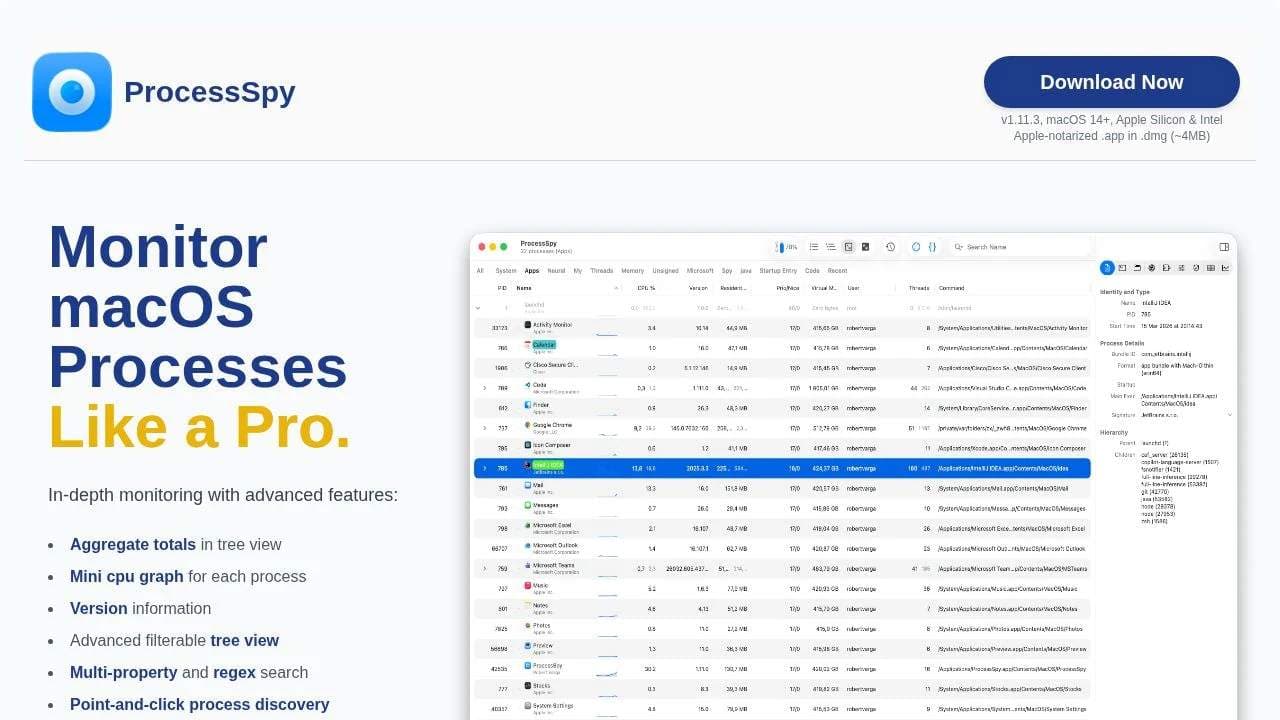
About this app
ProcessSpy is a powerful macOS utility that acts as a native alternative to Sysinternals Process Explorer for Windows. It's designed for users who need deeper insights into their system's operations than what Apple's built-in Activity Monitor provides. As a tech-savvy reviewer, I've found it incredibly useful for diagnosing performance issues, managing resource-hungry applications, and understanding the underlying processes that keep macOS running smoothly. The app excels at visualizing process hierarchies in a clear tree structure, allowing you to see parent-child relationships at a glance. It also lets you inspect open files, view environment variables, and force-quit unresponsive apps with precision. For developers and power users, this level of transparency is a game-changer, especially when debugging or optimizing system performance. The interface is intuitive yet packed with advanced features, making it accessible for intermediate users while still offering the depth professio...
Key features
- 1Advanced tree view with aggregate CPU/memory/thread totals and per-process mini CPU graphs
- 2Powerful multi-property regex search, advanced JavaScript filters, and real-time point-and-click discovery
- 3Deep process inspection (entitlements, env vars, signatures, launched-by, history recording) in paid version + Shortcuts automation
Target customer profile
Drawn from the product itself, not from a survey.
Demographic
macOS developers and software engineers
Pain points
Difficulty debugging application performance issues, lack of detailed process information in Activity Monitor, challenges in identifying memory leaks or CPU bottlenecks
Primary needs
Deep process inspection, real-time system monitoring, advanced troubleshooting capabilities for development workflows
Demographic
IT professionals and system administrators
Pain points
Limited visibility into macOS system processes, inefficient troubleshooting of unresponsive applications, need for better process management tools
Primary needs
Comprehensive process monitoring, ability to kill stubborn processes, system optimization and maintenance tools
Demographic
Power users and tech enthusiasts
Pain points
Frustration with macOS's limited built-in monitoring tools, desire for more control over system resources, need to understand what's running in the background
Primary needs
Enhanced system transparency, better resource management, educational insights into macOS operations
Scout Review
Written by AI from measured evidence, scored out of 100.
ProcessSpy is the deep process inspection tool macOS has needed. It fills the gap between Activity Monitor's simplicity and the power user demands for full visibility into hierarchies, command lines, env vars, entitlements, and history. Native, fast, powerful search and filters, plus thoughtful automation via Shortcuts. The free core is generous; the paid upgrade is reasonably priced with lifetime updates. Ideal for macOS developers, SREs, and power users tired of guessing what's eating resources.
Measure by measure
Usability
90Intuitive filterable tree view, multi-property/regex search, point-and-click discovery, JS filters, context menus for files/connections/Dylibs. Free tier is fully functional for core monitoring and killing processes.
Design
88Native macOS UI with clean tree view, mini CPU graphs per process, aggregate totals, version info, and color highlighting. Feels tight and Mac-first without Electron bloat.
Speed
92Lightweight (~4-9MB), uses native APIs, minimal CPU/memory footprint. Fast real-time updates, responsive even with advanced filtering. Supports macOS 14+ (including Tahoe).
Security
85Apple-notarized and signed .app. Shows deep process details including signatures, entitlements, dylibs, and launched-by info (paid). Useful for spotting suspicious processes. No telemetry mentioned.
Accessibility
78Available via direct DMG or Homebrew. Native UI should work with VoiceOver. Tree view and search help power users, but no specific accessibility features or contrast guarantees mentioned.
Growth
82Actively updated (v1.11.3, recent history recording, CSV export, Shortcuts integration). Trusted by 4574 users. Indie developer iterating based on feedback. Lifetime license for $25.
Improvement areas
- More saved views, filter presets, and column customization for heavy daily users
- Better in-app guidance or templates for powerful JS filters
- Optional menu bar quick-search or widget for at-a-glance process monitoring
Design & Usability
ProcessSpy delivers exactly what the description promises: a native, polished alternative to Windows' Process Explorer that embarrasses Apple's Activity Monitor. The tree view with aggregate CPU/memory/thread totals is excellent for understanding hierarchies and resource hogs at a glance. Mini CPU graphs, full command lines, version info, and powerful regex/multi-property search make it a joy for developers debugging Java processes or tracking down memory leaks. Usability shines with point-and-click actions, context menus, and advanced JavaScript filters that let you build complex queries. The free version covers most daily needs, while the $24.99 lifetime unlock adds serious depth like environment variables, entitlements, process history, and Shortcuts automation. It's the tool power users and engineers have been missing on macOS.
Speed & Security
Performance is a highlight — native Swift (or whatever it's built in) keeps it extremely lightweight with almost zero impact on system resources. Real-time updates feel instant, and it handles complex filters without lag. On the security side, being able to quickly inspect signatures, dylibs, launch agents, and 'launched by' relationships makes it valuable for threat hunting or just understanding what your apps are actually doing. The ability to remember finished processes and export history to CSV is perfect for forensic-style troubleshooting. Compared to htop, it's more visual and Mac-native; compared to iStat Menus, it's deeper on individual process relationships rather than pretty graphs.
Accessibility & Growth
While not marketed for accessibility, the clear hierarchy, search, and native controls should work reasonably well with standard macOS tools. The growth story is solid for an indie app: consistent updates adding exactly the features users request (history recording, more JS context, better highlighting). With 4500+ users and positive Reddit reception, it's gaining traction in the developer and IT admin communities. The developer built it out of real frustration with Activity Monitor — that authenticity shows. It's not perfect, but it's focused and keeps improving without feature creep.
Conclusion
If you're constantly switching to the terminal or frustrated by Activity Monitor's limitations, download ProcessSpy. It's one of those tools that quietly becomes essential once you start using the advanced filters and history features. Solid 87/100 — would recommend to fellow nerds.
Suggestions for improvement
- Add more visual customization like column reordering and saved filter presets
- Consider a menu bar companion for quick process search without opening the full window
- Improve free vs paid clarity with a feature comparison table in-app
- Add optional dark mode themes or better contrast options for long sessions
Alternatives comparison
Named competitors, point by point. Nobody paid to appear here or to be left out.
 ProcessSpy ProcessSpy |  Activity Monitor Activity Monitor |  iStat Menus iStat Menus |  htop htop | |
|---|---|---|---|---|
| Process Tree with Aggregate Totals | Yes - Full hierarchy + aggregates for CPU/Memory/Threads | Limited - Basic hierarchy, no true aggregates | No - Menu bar graphs, no deep process tree | Partial - Tree view available but no macOS-native aggregates |
| Advanced Search & Filtering | Excellent - Regex, multi-property, full JS scripting | Basic name search only | Limited to menu bar filters | Strong interactive filtering but CLI-only |
| Environment Variables & Entitlements | Yes (paid) - Deep inspection including Info.plist, signatures | No | No | Limited via command line tools |
| Process History Recording | Yes (paid) - CPU/Memory history with CSV export | Very limited graphs | Strong historical graphs in menu bar | Real-time only |
| Native macOS Experience | Excellent - Native APIs, notarized, Apple Silicon optimized | Yes - Built-in | Yes - Polished menu bar app | No - Terminal-based |
Activity Monitor
Apple's built-in system monitoring tool included with macOS, offering basic process management and system resource tracking.
iStat Menus
A comprehensive system monitoring menu bar app that provides detailed statistics on CPU, memory, network, and disk usage.
htop
A command-line process viewer for Unix-like systems, available on macOS via package managers, offering interactive process management.
Comparing options? See ProcessSpy alternatives, scored side by side
Sources
What the review was written against. A verdict with no sources is an opinion.
More Development & Engineering apps
View all Development & Engineering
CreateMyCoin
92A no-code Solana token creator that deploys SPL tokens in...

Vibe Coding Agent Skills
92A free, open-source platform offering 110 AI agent skills...

CC Switch
91Open-source desktop app for switching AI coding providers...

TaxID
90Fast EU VAT validation API for developers, covering 27 EU...

BeartIMAGE
88BeartIMAGE is a free, web-based image processing platform engineered for fast, bulk photo editing and conversion directly in your browser.

ButterKit
82macOS app for App Store screenshots: 3D mockups, auto-tra...

Claw Messenger
88Claw Messenger is an iMessage API service that gives AI a...

PERM Processing Time: Current DOL Queue & History
88PERM Processing Time is an independent data analysis platform that helps users navigate the U.S. Department of Labor’s permanent labor certification process.

DataHabibi
88AI-powered Dubai real estate data platform with 12M+ DLD ...

Credyt
87Real-time monetization infrastructure for AI products tha...

StockFit API
87A developer-first financial data API providing structured...

Plori
87Cloud AI agents with persistent disk, memory, and real CL...


A platform dedicated to providing unbiased reviews of newly launched applications, analyzing everything from their features to their full potential.
info@scoutforge.net© 2026 Scoutforge. All rights reserved.
