Cycling through all six. Tap any point to stop.
Measured on six things
AI-powered platform for image-to-image, video, and text g...
Security
55No visible information on data privacy, training policies, or security features on the site. Standard web app assumptions apply, but lack of transparency hurts the score for a platform handling user photos.
Screenshots
1 / 1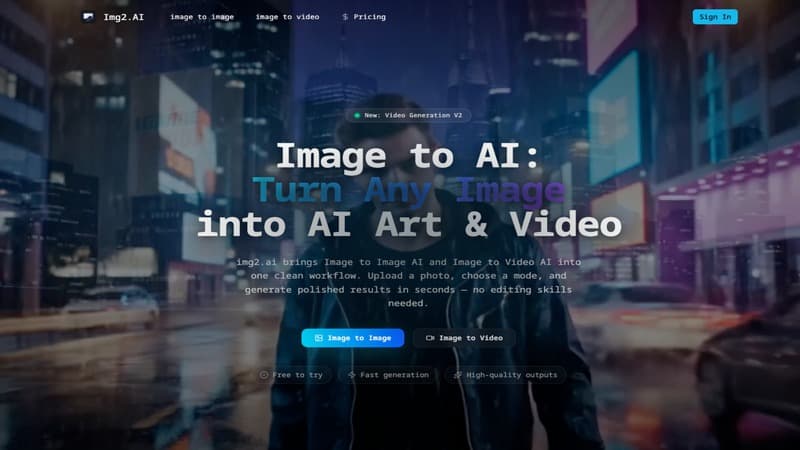
About this app
img2.ai is a versatile AI platform that lets you transform photos into AI art, short videos, and much more – all in one place. I've been playing around with it and honestly, it's kind of amazing how fast you can turn a simple photo into a 3D clay animation or a cyberpunk cityscape video. It's like having a mini creative studio at your fingertips, no design skills required. The interface is clean and intuitive: upload, pick a style or prompt, and hit generate. Whether you're a marketer creating product visuals, a content creator making unique art, or just someone who loves AI experiments, img2.ai has tools for image-to-image, image-to-video, text-to-image, text-to-video, and even an upscaler. It's free to try, and the results are high-quality and quick. Definitely worth checking out if you want to dip your toes into AI creativity without the complexity.
Key features
- 1All-in-one hub for image-to-image, image-to-video, text-to-image, text-to-video, and 4x upscaler
- 2Multiple strong models including Flux, Grok, Seedream, Veo, and GPT Image 2 (4K typography)
- 3Fast generation of consistent subject variations, short animated clips, and high-quality HD 1080P output
Target customer profile
Drawn from the product itself, not from a survey.
Demographic
Social media content creators, influencers
Pain points
Need eye-catching, original visuals and short videos quickly without hiring designers
Primary needs
Fast generation of varied image styles and animated clips
Demographic
E-commerce product managers and marketers
Pain points
Struggle to produce consistent product shots in different backgrounds or styles for listings
Primary needs
Image-to-image transformation retaining core product, bulk style variations
Demographic
Small business owners and solopreneurs
Pain points
Limited budget for graphic design and video production; need simple tools
Primary needs
Affordable all-in-one AI content generation, no learning curve
Demographic
AI hobbyists and tech enthusiasts
Pain points
Want to experiment with new AI models without subscription overload
Primary needs
Free-tier access, multiple models (Flux, Grok, Seedream, etc.)
Scout Review
Written by AI from measured evidence, scored out of 100.
img2.ai is a versatile, approachable all-in-one AI creative platform that delivers on speed and simplicity for turning photos into art, styles, or short videos. It stands out for non-experts needing quick, high-quality output across image-to-image, image-to-video, text prompts, and upscaling. Strengths include clean UX, multiple strong models, and practical features for content creators and marketers. Weaknesses are limited transparency on security/privacy and lack of standout innovation compared to specialized tools.
Measure by measure
Usability
82Extremely beginner-friendly. No learning curve: upload photo or type prompt, pick style/model, hit generate. One clean hub avoids tool-switching. Perfect for non-designers, solopreneurs, and quick social media content.
Design
78Clean, minimalist interface with a simple one-hub workflow. Upload, select mode (image-to-image/video, text-to-image/video, upscaler), and generate. Modern aesthetic with before/after examples and prominent model selectors (Flux, Grok, Seedream, Veo, GPT Image 2). HD 1080P focus feels polished.
Speed
75Claims 'polished results in seconds' for most generations. Image-to-image and text-to-image are fast; short image-to-video clips (several seconds long) are reasonably quick. No exact benchmarks, but real-world feedback calls it practical and efficient.
Security
55No visible information on data privacy, training policies, or security features on the site. Standard web app assumptions apply, but lack of transparency hurts the score for a platform handling user photos.
Accessibility
62Simple interface helps basic usability. Keyboard navigation likely works, but no explicit WCAG mentions, screen reader optimizations, or contrast details listed. Mobile-friendly design inferred from clean layout.
Growth
65Free credits to try, affordable Pro (~$20/month with 50% annual discount, credit-based). Targets content creators, e-commerce, solopreneurs effectively. Growing feature set (new GPT Image 2 for 4K/typography). Limited marketing visibility compared to giants.
Improvement areas
- Publish detailed privacy and data training policies to build user trust
- Provide transparent benchmarks for speed, video length, and credit costs per feature
- Improve accessibility features and documentation for broader inclusivity
Design & Usability
img2.ai nails the 'no skills required' promise with its clean, unified hub. The interface makes image-to-image transformations, photo animation into short videos, text-to-image/video, upscaling, and sketch-to-art straightforward. Models like Flux, Grok, Seedream, Veo, and the new GPT Image 2 for accurate 4K typography give variety without complexity. It's genuinely fast for social media visuals, product shots, or experiments. Usability is a highlight for the target audience of creators and marketers who want results without hiring designers or mastering complex tools like Runway.
Speed & Security
Generation is marketed as 'in seconds' for images and quick for short video clips with natural motion. Real feedback supports it's practical and high-quality enough for HD 1080P output and 4x upscaling. However, security and privacy details are virtually nonexistent on the site — no clear data usage policy beyond commercial use notes. This is a notable weakness in an era where uploaded photos can be sensitive. Speed holds up well for an all-in-one platform, especially compared to more resource-heavy alternatives.
Accessibility & Growth
While the simple UI aids general use, there's no dedicated accessibility information, which is disappointing. Growth potential is solid thanks to the free tier, affordable credit/subscription model (with double credits bonus on first sub), and broad appeal to hobbyists, e-commerce teams, and influencers needing fast, varied visuals. It successfully combines multiple modalities in one place, supporting consistent product styling, style variations, and quick animations without a steep learning curve.
Conclusion
If you're a solopreneur, social media creator, or e-commerce manager who wants original visuals without complexity or high costs, img2.ai is worth trying with its free credits. It's not the most powerful tool in every category, but the convenience of having everything in one intuitive hub makes it a smart, efficient choice for everyday creative needs.
Suggestions for improvement
- Add clear privacy policy and data usage details prominently, including whether user uploads train models.
- Publish real generation speed benchmarks and video length limits for better transparency.
- Enhance accessibility compliance with WCAG guidelines and document features for screen readers.
- Expand video capabilities (longer clips, better motion control) and add collaboration/export options for teams.
Alternatives comparison
Named competitors, point by point. Nobody paid to appear here or to be left out.
 img2.ai |  RunwayML |  Midjourney |  Clipdrop | |
|---|---|---|---|---|
| All-in-one image + video generation | Strong integration of image-to-image, image-to-video, text-to-video, upscaler in one clean hub | Comprehensive video + image tools but more complex interface and higher cost | Excellent text-to-image but lacks native image-to-video and simple photo upload editing | Good image-to-image and upscaling but limited video generation and fewer styles |
| Ease of use for beginners | Very high — simple upload/prompt → generate workflow, no skills needed | Lower — powerful but steeper learning curve and complex for non-professionals | Medium — Discord-based, requires good prompting skills | High for image tasks but less versatile overall |
| Pricing / Accessibility | Free credits to try, affordable Pro (~$20/mo with discounts), credit-based | More expensive subscriptions, less beginner-friendly free tier | Subscription-based, no strong free tier for heavy use | Limited free options, focused on specific image tools |
| Video generation capabilities | Short clips from images or text, natural motion, quick but length-limited | Advanced video editing, longer generations, higher quality for pros | Limited/no native integrated image-to-video | Very limited video features |
RunwayML
A comprehensive AI video and image platform but more expensive and complex for beginners.
Midjourney
Excellent for text-to-image art but lacks integrated image-to-video and direct photo editing features.
Clipdrop
Offers image-to-image and upscaling but limited in video generation and style variety.
Comparing options? See img2.ai alternatives, scored side by side
Sources
What the review was written against. A verdict with no sources is an opinion.
More 3D & Animation apps
View all 3D & Animation
Uni-1 by Luma AI
92Uni-1 is an advanced multimodal text-to-image AI model th...

LTX 2.3 AI Video Generator
91Fast, open-source AI video generator with 4K support, mul...

Tracé slides
89Interactive math & physics slides with live graphs and an...

HeyVid AI
88HeyVid AI is a free all-in-one AI video and image generat...

ButterKit
82macOS app for App Store screenshots: 3D mockups, auto-tra...

MyRaxAI
87Generate unique AI-powered visuals for creative, personal, and commercial projects.

DeepSwapAI
87AI face swap online with no subscription, pay per use.

Music Visualizer
86Online music visualizer for audio-reactive videos.

AnimateImg
84Animate Image compositions through subject movement or camera direction.

3D AI Studio
82.5AI-powered platform that transforms text or images into h...

GPT Image 2
82Create 4K AI images with perfectly rendered, readable text.

Seedance 2.0
82AI video generator: prompts, photos, clips into 1080p vid...


A platform dedicated to providing unbiased reviews of newly launched applications, analyzing everything from their features to their full potential.
info@scoutforge.net© 2026 Scoutforge. All rights reserved.
