Cycling through all six. Tap any point to stop.
Measured on six things
Browser-based font viewer & tester for TTF, OTF, WOFF, WO...
Growth
62Real problem, specific segments, and a privacy-first wedge that Font Squirrel and Google Fonts don't cover. The generator bundle widens the funnel. Early-stage, but the idea has room.
Screenshots
1 / 1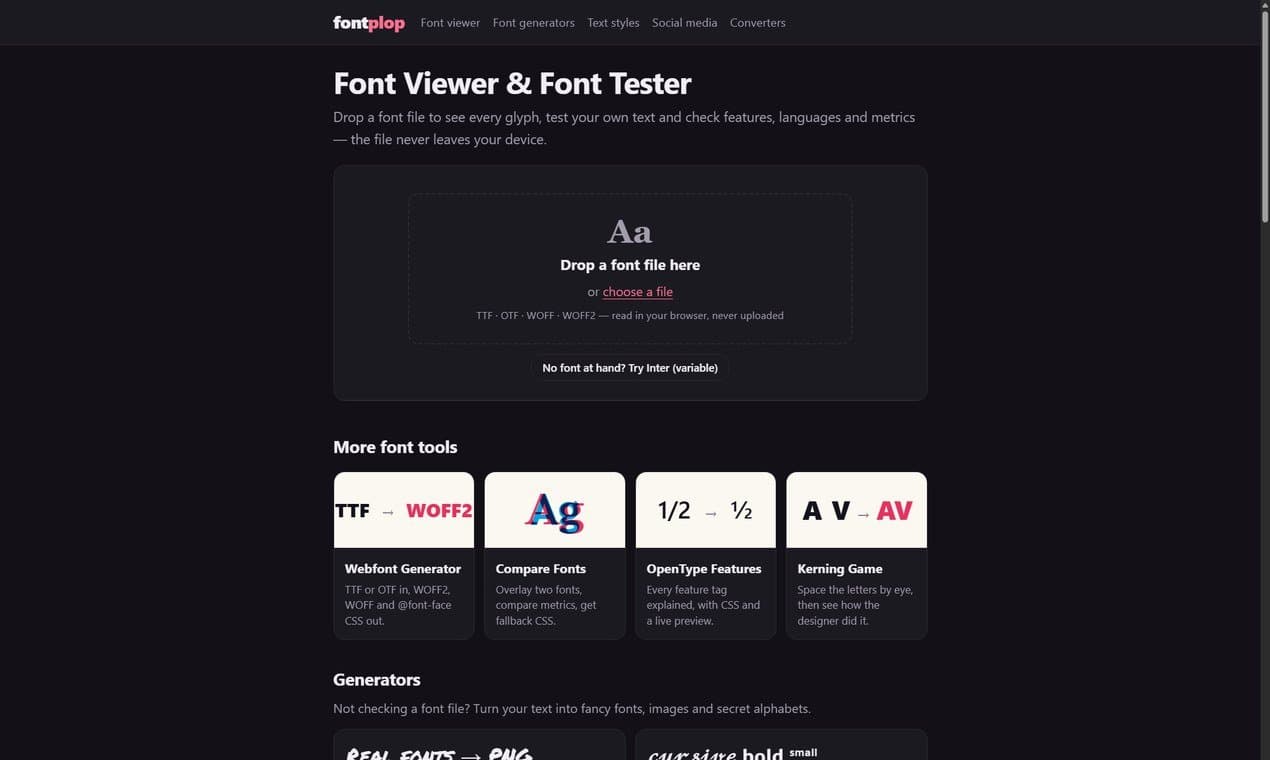
About this app
FontPlop is a free, private font viewer and tester that runs entirely in your browser. Drop in TTF, OTF, WOFF or WOFF2 files to see every glyph, test your own text, and check OpenType features, languages and metrics. Files never leave your device. It also includes a webfont generator, font comparison, a kerning game, and text-style generators. No sign-up required.
Key features
- 1Local font viewer: drop TTF, OTF, WOFF, or WOFF2 to inspect every glyph, metrics, OpenType features, variable axes, and language coverage — files never leave the device.
- 2Webfont generator: convert TTF/OTF to WOFF2 and WOFF with @font-face CSS output.
- 3Font comparison and kerning game: overlay two fonts, compare metrics, get fallback CSS, and test your eye against the designer's spacing.
Target customer profile
Drawn from the product itself, not from a survey.
Demographic
Graphic & Type Designers
Pain points
Need to inspect fonts quickly without installing software; worry about uploading confidential client fonts.
Primary needs
Detailed glyph view, OpenType feature testing, variable font preview, and privacy assurance.
Demographic
Web Developers & Front-End Engineers
Pain points
Struggle to test webfonts across browsers; need to check font metrics and language coverage before deployment.
Primary needs
Quick font QA, CSS generation for OpenType features, and fallback font comparison.
Demographic
Social Media Managers & Content Creators
Pain points
Limited access to diverse fonts for posts; want unique text styles without design skills.
Primary needs
Easy-to-use font generators for Instagram, TikTok, Discord, and copy-paste text styles.
Scout Review
Written by AI from measured evidence, scored out of 100.
FontPlop is a free, browser-based font viewer and tester that does exactly what it says with no sign-up and no upload. The design is clean and typographic, usability is near-frictionless, and speed is genuinely exceptional (100/100 Lighthouse). Security is solid but missing a few headers, and accessibility is strong save for a contrast issue. Growth potential is real thanks to a privacy-first wedge and a broad tool bundle. It's a competent, well-built tool that punches above its weight for an indie project.
Measure by measure
Usability
78Zero-friction onboarding: drop a file or click 'Try Inter' and you're inspecting glyphs in seconds. The five-step walkthrough, FAQ, and clear tool taxonomy make it genuinely easy to learn without docs.
Design
74Clean, typographic-first layout that practices what it preaches. The drop zone is the hero, tool cards are consistently styled, and the monospace accents fit the subject. Not flashy, but confident and coherent.
Speed
88Lighthouse 100/100 on both mobile and desktop, LCP 902ms, CLS 0, TBT 0ms. Client-side font parsing keeps the server light. This is about as fast as a web tool gets.
Security
64HTTPS with HSTS, SPF, DMARC, and sensible headers. The privacy model is architectural — fonts never leave the browser. Missing CSP, frame protection, and Permissions-Policy keep it out of the top band.
Accessibility
80Lighthouse 96/100 with one failing audit: insufficient color contrast. Semantic structure and a JS fallback message are present. No published WCAG statement, but the automated baseline is strong.
Growth
62Real problem, specific segments, and a privacy-first wedge that Font Squirrel and Google Fonts don't cover. The generator bundle widens the funnel. Early-stage, but the idea has room.
Improvement areas
- Security headers: missing CSP, frame protection, and Permissions-Policy leave 4 of 12 checklist points on the table.
- Accessibility: one failing Lighthouse audit (color contrast) undercuts an otherwise strong 96/100 score.
- No published WCAG statement or accessibility page to back up the automated score.
Design & Usability
FontPlop's design is restrained and purposeful: the drop zone is the hero, tool cards are consistently styled, and the monospace accents fit the subject matter. Usability is where it shines — no sign-up, no gate, just drop a file or click 'Try Inter' and you're inspecting glyphs in seconds. The five-step walkthrough and FAQ preempt common errors, and the tool taxonomy (viewer, webfont generator, compare, OpenType, kerning game) is clear enough that you never wonder where to go next. It's not a flashy product, but it's a confident one that respects your time.
Speed & Security
Speed is exceptional: Lighthouse 100/100 on both mobile and desktop, LCP 902ms, CLS 0, TBT 0ms. Client-side font parsing keeps the server payload minimal, and the site loads faster than most competitors' landing pages. Security is solid but not airtight — HTTPS with HSTS, SPF, DMARC, and sensible headers are all present, and the privacy model is architectural: fonts are read locally and never uploaded. But missing CSP, frame protection, and Permissions-Policy leave 4 of 12 checklist points on the table. For a tool handling confidential client fonts, those headers are worth tightening.
Accessibility & Growth
Accessibility scores 96/100 on Lighthouse with a single failing audit: insufficient color contrast — ironic for a font tool, and worth fixing. Semantic structure and a JS fallback message are present, though there's no published WCAG statement. Growth potential is real: FontPlop targets three distinct segments (type designers, front-end devs, social content creators) with a privacy-first wedge that Font Squirrel and Google Fonts don't cover. The generator bundle widens the funnel, and the domain age (~1.9 years) suggests early-stage but active development. The idea has room; execution will decide how far it goes.
Conclusion
If you inspect fonts regularly — or just want to check a client's font before you ship it — FontPlop is the fastest, least annoying way to do it in a browser. It's not trying to be FontForge or Google Fonts; it's trying to be the tool you reach for when you need to look at a font right now. On that, it delivers.
Suggestions for improvement
- Add a Content-Security-Policy and frame-ancestors directive to close the remaining header gaps.
- Fix the color contrast failure flagged by Lighthouse — ironic for a font tool and easy to resolve.
- Publish a short accessibility statement or WCAG conformance note to back up the 96/100 score.
- Consider a lightweight changelog or 'what's new' page to signal active development to returning users.
Alternatives comparison
Named competitors, point by point. Nobody paid to appear here or to be left out.
 FontPlop FontPlop |  FontForge FontForge | Font Squirrel Webfont Generator |  Google Fonts Google Fonts | |
|---|---|---|---|---|
| Runs in browser without installation | Yes — fully browser-based, no install | No — desktop application requiring installation | Yes — web-based | Yes — web-based |
| Inspects local font files (not just hosted fonts) | Yes — drop any local TTF/OTF/WOFF/WOFF2 | Yes — full font editor and viewer | Partial — uploads for conversion, not deep inspection | No — Google-hosted fonts only |
| Privacy: fonts never uploaded to a server | Yes — client-side parsing, files stay on device | Yes — local desktop app | No — files uploaded to server for conversion | N/A — no local file upload |
| OpenType feature testing with CSS output | Yes — every feature tag with live preview and CSS | Yes — advanced OpenType editing | No — focused on webfont conversion | Limited — preview only, no CSS export |
| Free to use | Yes — free, no sign-up | Yes — open source | Yes — free | Yes — free |
FontForge
Open-source font editor that also includes a font viewer, but requires installation and has a steeper learning curve.
Font Squirrel Webfont Generator
Web-based tool for converting and testing fonts, but focuses on webfont generation rather than detailed inspection.
Google Fonts
Offers a preview of Google-hosted fonts, but lacks deep inspection of local font files and advanced OpenType features.
Comparing options? See FontPlop alternatives, scored side by side
More Design & Creativity apps
View all Design & Creativity
RoomCreator
92An AI-powered interior and exterior design tool that tran...

QRBliss
91Branded QR codes with AI Brand Sync, 15 free dynamic code...

ThumbnailMaker
90AI YouTube thumbnail maker: paste a video link, get the brief, the thumbnail, and a check at feed size.

English Test Coach
89English Test Coach checks your IELTS essays and letters, gives an estimated band score across all four criteria, and tells you exactly what to revise next.

All of Us
89Add deceased loved ones to photos with AI and see free pr...

What the GIF
89Frame-perfect video-to-GIF maker that runs entirely in yo...

Tracé slides
89Interactive math & physics slides with live graphs and an...

Portrait Gift
88AI-powered personalized face swap art platform creating c...

TranscriptYou
88Free YouTube transcript generator with timestamps and AI ...

RestorePhotosApp
88An AI-powered photo restoration app that brings old, blur...

BeartIMAGE
88BeartIMAGE is a free, web-based image processing platform engineered for fast, bulk photo editing and conversion directly in your browser.

Pixelimg
88A free online AI-powered tool that instantly converts ima...


A platform dedicated to providing unbiased reviews of newly launched applications, analyzing everything from their features to their full potential.
info@scoutforge.net© 2026 Scoutforge. All rights reserved.
