

A platform dedicated to providing unbiased reviews of newly launched applications, analyzing everything from their features to their full potential.
info@scoutforge.net© 2026 Scoutforge. All rights reserved.
A platform dedicated to providing unbiased reviews of newly launched applications, analyzing everything from their features to their full potential.
info@scoutforge.net© 2026 Scoutforge. All rights reserved.
A platform dedicated to providing unbiased reviews of newly launched applications, analyzing everything from their features to their full potential.
info@scoutforge.net© 2026 Scoutforge. All rights reserved.
Cycling through all six. Tap any point to stop.
Measured on six things
Create AI videos from text and images, animate references, and build visual content in your browser.
HTTPS and HSTS are in place and Stripe handles payments, but only 5/13 security headers are set — no CSP, no frame protection, no DMARC. No published audits or security page.
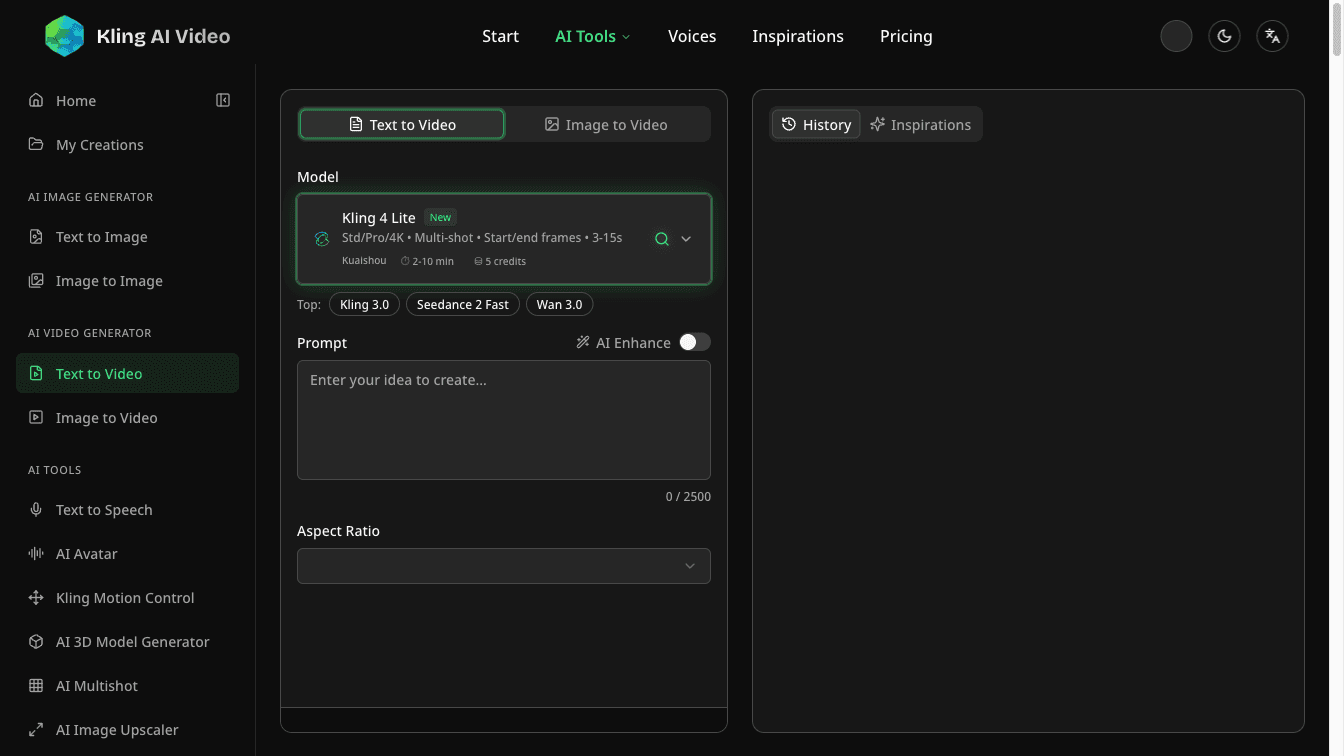
Kling AI Video is a browser-based creative tool platform for turning text ideas and still images into video clips. Creators can start with a prompt or an image, explore reference-guided motion, and refine visual concepts for social content, campaign drafts, and storytelling. The platform also provides image generation and editing, talking-avatar tools, and text-to-speech workflows. It is designed for content creators, designers, and small marketing teams who want to explore ideas without starting from a blank production project. Users review generated outputs and incorporate selected assets into their editing and publishing workflows. Kling AI Video is an independent tool website, not the developer of the underlying AI models. Paid subscriptions are available with a limited free trial.
Drawn from the product itself, not from a survey.
Demographic
Content creators
Pain points
Producing original visual ideas for short-form content takes time.
Primary needs
Text-to-video and image-to-video tools for exploring social clip concepts.
Demographic
Designers and creative teams
Pain points
Visual concepts are difficult to communicate with static notes alone.
Primary needs
Image generation, image editing, and reference-guided animation for visual drafts.
Demographic
Small marketing teams
Pain points
Teams need a practical way to explore campaign visuals before production.
Primary needs
Browser-based video and image creation for campaign concepts and storytelling drafts.
Written by AI from measured evidence, scored out of 100.
Kling AI Video is a browser workspace that wraps a stack of third-party video and image models — Kling, Veo, Wan, Seedance, GPT Image, Flux, Nano Banana, Seedream — behind one prompt box and one subscription. The app UI is the strongest part: a dark, tool-dense sidebar with a clean prompt area, model selector, and aspect-ratio controls. Pricing is transparent ($6.99/$18.99/$35 monthly, Stripe checkout), though credits don't roll over and refunds are effectively off the table. The marketing homepage is the weak link — a blurred gradient hero with weak contrast that undersells the product. Speed is desktop-strong (95) and mobile-weak (73, 5.4s LCP). Security headers are thin (5/13) with no published audits. Accessibility is 92 on Lighthouse but has real unnamed-button and contrast failures. Growth rests on an aggregator wedge that's convenient but copyable.
Prompt box, model selector, and two clear CTAs make the homepage immediately usable; pricing is transparent with Stripe checkout. But 15+ flat sidebar tools and a no-refund policy add friction.
Dark, tool-dense app UI is clean and scannable, but the marketing homepage hero is a blurred brown-blue gradient with no subject and weak text contrast — the landing page undersells the product.
Desktop Lighthouse 95/100 is strong, but mobile 73/100 with a 5.4s LCP drags the experience down on phones — where most short-form creators actually browse.
HTTPS and HSTS are in place and Stripe handles payments, but only 5/13 security headers are set — no CSP, no frame protection, no DMARC. No published audits or security page.
Lighthouse a11y 92/100 is solid, but unnamed buttons and failing contrast ratios are real WCAG gaps, and there's no accessibility statement or multi-language support on the site.
Real problem (fast concept iteration for creators) and a clear aggregator wedge — many models, one subscription. But the wedge is copyable and the 'Kling' name borrows someone else's brand.
The app itself is the better half of this product. The dark workspace with a green-accented active state, a 2500-character prompt box, model selector, and aspect-ratio dropdown reads as a real tool, not a demo. The homepage, though, is where it stumbles: the hero sits on a heavily blurred brown-to-blue gradient with no discernible subject, and white text over the muddy lower portion loses contrast. Usability is decent — two obvious CTAs, a working prompt on the landing page, transparent pricing at $6.99/$18.99/$35 with Stripe checkout and an FAQ covering credits and cancellation. The friction is the flat 15-item sidebar and a 'all sales are final' refund policy that makes trying before committing feel risky.
Speed is a split verdict. Desktop Lighthouse lands at 95/100, which is genuinely good, but mobile drops to 73/100 with a 5.4s LCP and 2.1s FCP — and mobile is where most short-form creators actually browse. CLS is a clean 0 and TBT is a reasonable 163ms, so the layout is stable; it's the paint time that hurts. Security is thin: HTTPS and HSTS are enforced and Stripe handles payments, but the header probe found only 5 of 13 checklist items — no CSP, no frame protection, no X-Content-Type-Options, no Referrer-Policy, no Permissions-Policy, no secure cookies, and no DMARC. There's no published SOC 2, ISO, pen-test, or bug bounty page in the site content, so compliance claims can't be verified.
Accessibility scores 92/100 on Lighthouse, which is a solid automated result, but two real failures remain: buttons without accessible names and insufficient color contrast. There's no accessibility statement, no WCAG mention, and no multi-language support visible on the site — so keyboard and screen-reader users are working with an unverified experience. Growth is a judgement on the idea: the problem is real (creators need fast concept iteration without a blank timeline), and the wedge is an aggregator workspace bundling Kling, Veo, Wan, Seedance, GPT Image, Flux, Nano Banana, and Seedream under one subscription. That's a legitimate convenience play, but it's copyable — any of those model vendors could ship the same wrapper, and the domain name leans on Kuaishou's 'Kling' brand while the site disclaims being the model developer. The category has headroom, but the moat is shallow.
Conclusion
If you're a creator who wants to A/B Kling against Veo against Wan without juggling four subscriptions, this is a reasonable convenience buy — the workspace is genuinely usable and the pricing is honest about what you get. If you care about compliance paperwork, published audits, or a refund if the credits don't stretch, look elsewhere or wait for the security posture to mature. The idea is sound; the execution on the marketing site and the security headers is where it needs another pass.
Named competitors, point by point. Nobody paid to appear here or to be left out.
 Kling AI Video Kling AI Video |  | |
|---|---|---|
| Pricing model | Subscription: $6.99 / $18.99 / $35 per month (yearly), credits do not roll over, all sales final | Not provided in App Details |
| Model coverage | Aggregates Kling, Veo, Wan, Seedance, GPT Image, Flux Pro, Nano Banana, Seedream | Not provided in App Details |
| Free trial | Limited free trial / free credits; paid plans required for meaningful volume | Not provided in App Details |
| Security & compliance signals | HTTPS + HSTS, Stripe payments; 5/13 headers; no SOC 2 / ISO / pen-test published | Not provided in App Details |
| Accessibility | Lighthouse a11y 92/100; unnamed buttons and contrast failures; no a11y statement | Not provided in App Details |
Comparing options? See Kling AI Video alternatives, scored side by side

Uni-1 is an advanced multimodal text-to-image AI model th...

Fast, open-source AI video generator with 4K support, mul...

A free online AI-powered tool that instantly converts ima...

O tradutor de mangá com IA traduz capítulos em lote, personaliza textos e oferece edição visual para estúdios.

HeyVid AI is a free all-in-one AI video and image generat...

An AI-powered photo restoration app that brings old, blur...

Private on-device dictation for Apple-silicon Macs.

Privacy gateway that masks personal data in LLM traffic

An AI-powered patent drafting assistant that acts like a ...

AI face swap online with no subscription, pay per use.

Export all your Apple Voice Memos to one text file.

AI writer that fact-checks before writing, with real sour...
A platform dedicated to providing unbiased reviews of newly launched applications, analyzing everything from their features to their full potential.
info@scoutforge.net© 2026 Scoutforge. All rights reserved.
