Cycling through all six. Tap any point to stop.
Measured on six things
Free IRMAA, Medicare premium and retirement tax calculators.
Security
52HTTPS enforced with X-Content-Type-Options, Referrer-Policy and Permissions-Policy, and tools are browser-only. But no HSTS, CSP, frame protection, SPF or DMARC — 5/12 checklist points. No published audits. Fine for a no-account static site, thin on hardening.
Screenshots
1 / 1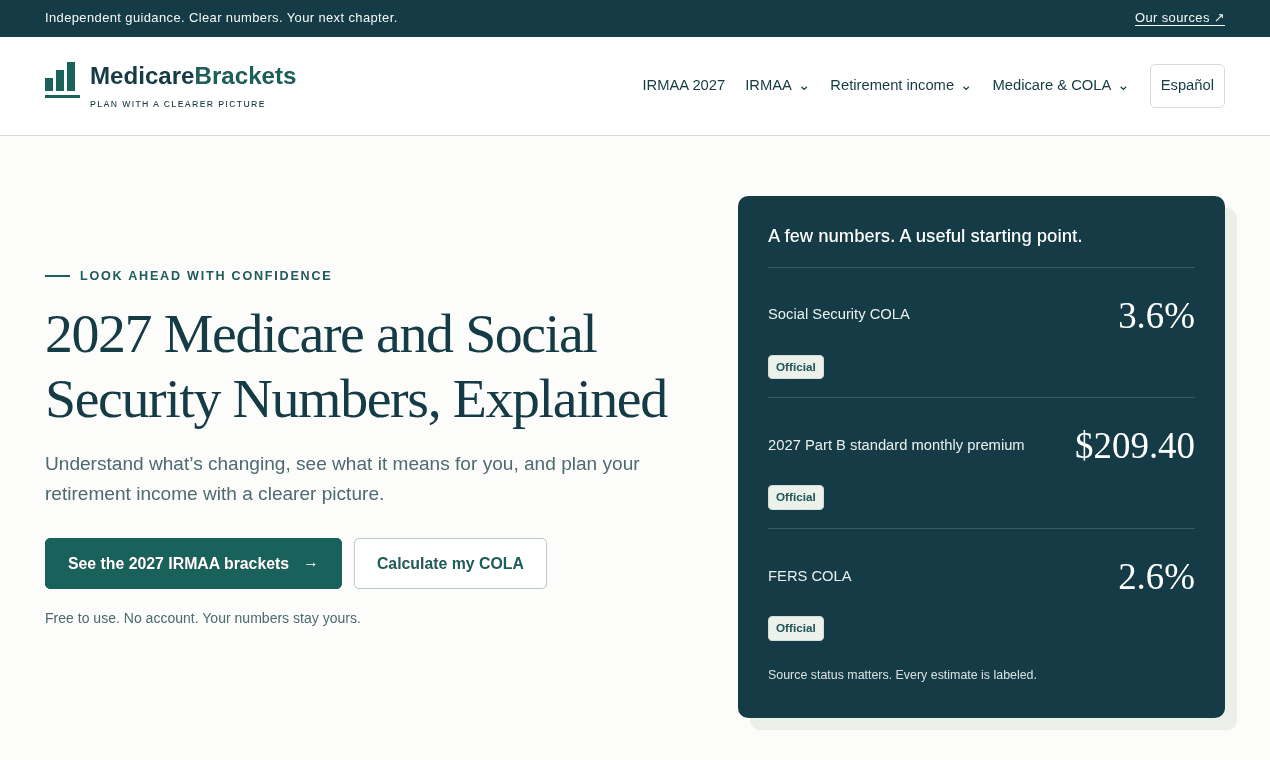
About this app
Medicare Brackets is a free, no-account educational website for Medicare, Social Security and retirement taxes, in English and Spanish. Tools include official 2027 IRMAA brackets and a MAGI calculator; official 2027 Part B premium ($209.40) and deductible ($292); a Social Security COLA calculator for the official 3.6% increase; official 2027 earnings limits and IRS tax brackets; and Roth conversion, 403(b), IRA RMD and withdrawal tools. Every figure is labeled official or estimate and cites a source. Inputs stay on the device. Not financial advice; not affiliated with the U.S. government or an insurer.
Key features
- 1Official 2027 IRMAA brackets with a MAGI calculator for individual, joint and separate filers.
- 2Social Security COLA calculator (official 3.6%) comparing your check against the Part B premium.
- 3Roth conversion, RMD, 403(b), IRA withdrawal and 'how long money lasts' retirement income tools.
- 4Every figure labeled official or estimate with cited sources; inputs stay on the device; English & Español.
Target customer profile
Drawn from the product itself, not from a survey.
Demographic
Pre-retirees aged 55–65 planning Medicare enrollment
Pain points
Confused by IRMAA thresholds and two-year lookback rules
Primary needs
Clear IRMAA brackets and premium impact calculators
Demographic
Current Medicare beneficiaries on fixed incomes
Pain points
Surprised by Part B premium hikes and IRMAA surcharges
Primary needs
Compare Part B premiums against Social Security COLA
Demographic
Federal employees and retirees (FERS/CSRS)
Pain points
Unsure how FERS vs CSRS COLA rules apply to annuities
Primary needs
Accurate COLA estimates and age-62 rule guidance
Demographic
High-income retirees and IRA holders
Pain points
Roth conversions push MAGI into higher IRMAA tiers
Primary needs
Roth conversion, RMD, and QCD planning tools
Demographic
Veterans receiving VA disability compensation
Pain points
Uncertainty over projected vs official 2027 VA COLA
Primary needs
Projected VA pay charts and disability rate calculators
Scout Review
Written by AI from measured evidence, scored out of 100.
Medicare Brackets is a free, no-account educational site for Medicare, Social Security and retirement taxes, and it's unusually well-built for something this new. The speed is excellent (100/100 Lighthouse both platforms), accessibility scores perfectly on automated checks with bilingual support, and the design has a deliberate editorial voice plus a genuinely smart official-vs-estimate labeling system. Usability is held back by a 17-card grid that buries the toolset and a collapsed FAQ. Security is the soft spot: solid basics, no HSTS/CSP/DMARC, no published audits. Growth is promising because the wedge — trustworthy, cited, no-signup calculators against government sites that aren't calculators and a paid planner that is — is real and specific. The main risk is that nobody knows it exists yet.
Measure by measure
Usability
66No account, no signup, CTA above the fold — value is one click away. But the full toolset hides behind a 17-card scroll, nav dropdowns don't reveal it, and FAQ answers are collapsed by default. Good bones, cluttered path.
Design
70Editorial serif/sans type system and restrained teal palette suit a trust-sensitive audience. Official/estimate labeling is carried through hero, table and cards. Undermined by a wide dead gutter in the key figures table and 17 near-identical tiles.
Speed
88Lighthouse 100/100 on both mobile and desktop: LCP 909ms, CLS 0, TBT 42ms. Genuinely fast, near the top of the anchor band. No lag complaints in collected evidence.
Security
52HTTPS enforced with X-Content-Type-Options, Referrer-Policy and Permissions-Policy, and tools are browser-only. But no HSTS, CSP, frame protection, SPF or DMARC — 5/12 checklist points. No published audits. Fine for a no-account static site, thin on hardening.
Accessibility
80Lighthouse accessibility 100/100 on automated checks, plus English & Español support — strong signals. No published WCAG statement or manual audit found, so it sits in the upper band rather than the ceiling.
Growth
68Real, specific pain (IRMAA lookback, Part B vs COLA) aimed at a defined 55–65 segment, with a genuine wedge: official-vs-estimate labeling, no account, browser-only. Government peers aren't consumer calculators; NewRetirement is paid and gated.
Improvement areas
- Security hardening: no HSTS, CSP, frame protection, SPF or DMARC (5/12 checklist points).
- Navigation and hierarchy: 17 near-identical cards bury the toolset; nav dropdowns don't surface it.
- Key figures table layout: Status column separated from Value by a wide empty gutter.
- No published accessibility statement or manual WCAG audit despite a perfect automated score.
Design & Usability
The design has a real point of view: serif headlines over sans body, a restrained teal palette, and — smartly — an 'Official' vs 'Estimate' labeling system carried from the hero card through the key figures table into every calculator. For an audience that has been burned by sketchy retirement numbers, that framing is the product. The problems are structural: the key figures table leaves a canyon between each value and its status, and the main grid stacks 17 near-identical numbered cards with no visual hierarchy, so tools, guides and calculators all look equally important. Usability is helped enormously by the no-account promise and an above-the-fold CTA, but the path to the other 16 tools is a long scroll, the nav dropdowns don't surface them, and the FAQ hides its answers behind collapsed triangles. Good instincts, cluttered execution.
Speed & Security
Speed is the standout: Lighthouse 100/100 on mobile and desktop, LCP 909ms, CLS 0, TBT 42ms. Whatever this is built on, it's lean, and for a page this content-heavy that's genuinely impressive. Security is the weak flank. HTTPS is enforced and there are sensible headers (X-Content-Type-Options, Referrer-Policy, Permissions-Policy), and the browser-only tool model means there's little to breach. But there's no HSTS, no CSP, no frame protection, and no SPF or DMARC on the domain — 5 of 12 checklist points. For a no-account static site that's not alarming, but 'your numbers stay yours' is a trust claim, and trust claims deserve hardening. No published audits or security page found.
Accessibility & Growth
Accessibility is strong on paper: a perfect 100/100 Lighthouse automated score plus full English and Spanish support, which matters for a Medicare audience. The caveat is that automated checks cover only part of WCAG — there's no published accessibility statement or manual audit in the evidence, so this lands high in the band rather than at the ceiling. Growth is the more interesting question. The problem is real and specific: pre-retirees aged 55–65 genuinely don't understand IRMAA thresholds or the two-year lookback, and the listed alternatives each miss the mark — Medicare.gov and SSA.gov are authoritative but not consumer calculators, IRS.gov is a document dump, and NewRetirement is paid and account-gated. The wedge here is credible: official-vs-estimate labeling with cited sources, no account, inputs that never leave the browser. That's a defensible position against all four peers. The limit is distribution — a domain registered in late 2026 has no audience yet, and the category rewards trust that takes time to build.
Conclusion
The core insight is sound: people approaching Medicare don't need another government PDF, they need a calculator that tells them which numbers are official and which are guesses. Medicare Brackets does that with discipline — every figure labeled, every source cited, nothing stored. It's fast, accessible, and bilingual, which is more than most sites in this space can claim. What it needs now is hardening (HSTS, CSP, DMARC are cheap wins) and a navigation rethink so 17 tools don't read as a sitemap. If the trust framing holds and the audience finds it, this has a real place between the government portals and the paid planners.
Suggestions for improvement
- Add HSTS, a Content-Security-Policy, frame protection, and SPF/DMARC records — cheap hardening for a trust-positioned site.
- Restructure the 17-card grid into grouped sections with visual priority so tools, guides and calculators aren't equal-weight tiles.
- Fix the key figures table so the Status column sits next to the Value column instead of across a dead gutter.
- Surface the full toolset in the nav dropdowns and open the FAQ by default so answers aren't hidden.
Alternatives comparison
Named competitors, point by point. Nobody paid to appear here or to be left out.
 Medicare Brackets | Medicare.gov | SSA.gov | IRS.gov | NewRetirement | |
|---|---|---|---|---|---|
| IRMAA bracket and MAGI calculator | Yes — official 2027 brackets plus a free MAGI calculator | No — enrollment and plan comparison only | No — benefit estimates and COLA announcements | No — tax brackets and RMD tables, no IRMAA calculator | Partial — broader modeling, requires account and subscription |
| Account required | No — free, no account, inputs stay on device | Account for some features (MyMedicare) | Account for my Social Security | No | Yes — account and paid subscription |
| Official vs. estimate labeling with cited sources | Yes — every figure labeled and sourced | Official by definition; no estimate labeling needed | Official by definition | Official by definition | Modeled projections; not a labeling system |
| Social Security COLA vs. Part B premium comparison | Yes — dedicated calculator | No integrated comparison | COLA only, no premium modeling | No | Partial within broader planning |
| Bilingual (English & Spanish) | Yes — English & Español | Yes — Spanish available | Yes — Spanish available | Yes — Spanish available | English only (not verified) |
Medicare.gov
Official government site for Medicare enrollment and plan comparison, but lacks advanced IRMAA and retirement income calculators.
SSA.gov
Official Social Security Administration portal for benefit estimates and COLA announcements, without integrated Medicare premium modeling.
IRS.gov
Official source for tax brackets, RMD tables, and Publication 915, but no consumer-friendly retirement income calculators.
NewRetirement
Paid comprehensive retirement planning platform with broader financial modeling, but requires an account and subscription.
Comparing options? See Medicare Brackets alternatives, scored side by side
More Finance apps
View all Finance
CalcFi
92A free, comprehensive financial calculator platform with ...

CreateMyCoin
92A no-code Solana token creator that deploys SPL tokens in...

Flicker: Crypto & Stock Analysis
90Flicker reads any coin or stock and gives you a verdict, its reasons, and the exit before the entry.

Olevx
89112 free client-side web tools plus a private autosaving ...

Redstone
89Portfolio optimization and risk metrics for investors.

Stellar Staff
88A top-rated virtual assistant agency that matches busines...

Receipt Bot
88Automated bookkeeping software that extracts data from re...

Prop Firm Consistency Calculator
88Check your prop firm consistency rule and best-day percen...

Critivest
88Stock analysis based on your own criteria

BringMe Money
88AI invoice follow-up that drafts reminders and tracks next steps.

ArbPlay
88Real-time sure bets scanner for Greek bookmakers, exchang...

Home Care Revenue Leakage Calculator
88See what denials and slow AR cost your home care agency


A platform dedicated to providing unbiased reviews of newly launched applications, analyzing everything from their features to their full potential.
info@scoutforge.net© 2026 Scoutforge. All rights reserved.
