Cycling through all six. Tap any point to stop.
Measured on six things
Focused MIDI piano practice feedback for real improvement
Security
52HTTPS and HSTS are in place, but CSP, frame protection, and DMARC are missing, and there's no SOC 2, ISO, or bug bounty signal. Standard early-stage posture.
Screenshots
1 / 3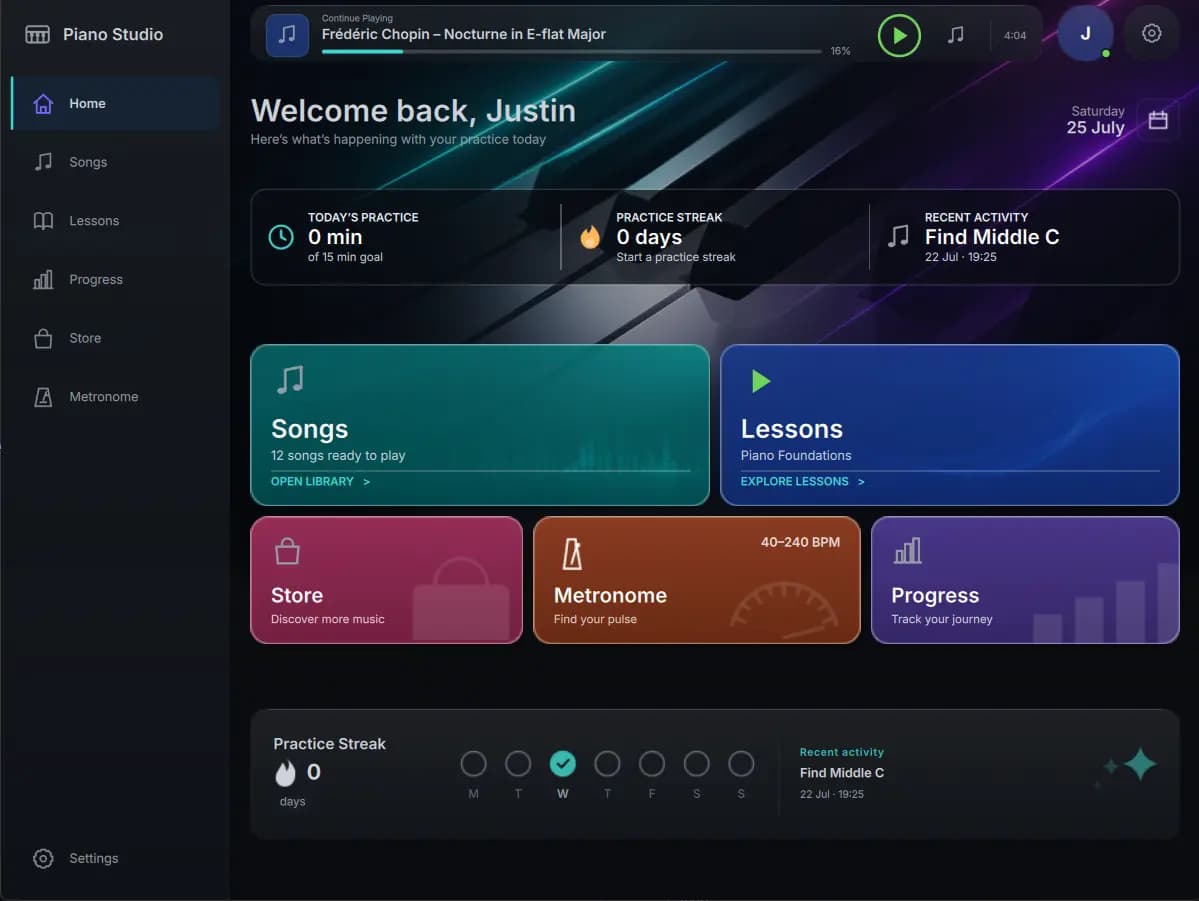
About this app
Melovance is a native practice companion for pianists who play on MIDI keyboards. It listens to your performance and analyzes notes, timing, note duration, dynamics, early releases, and hand-specific details, then distills it all into one clear recommendation between attempts—like giving bars 17–24 more space or slowing your practice tempo. Instead of burying you in every wrong note, it points to the single issue that will move the needle next. It runs natively on iPad, macOS, and Linux (Windows is coming soon), and you simply plug in a USB MIDI keyboard and play. A free plan offers 5 practice analyses per day with an interactive score and practice history, while Plus ($9.99/mo) adds detailed musical feedback and AI spoken coaching At 50 analyses/day, and Pro ($19.99/mo) unlocks 200 analyses/day plus personalized generated lessons. It's not a replacement for a teacher—think of it as the focused coach sitting beside you during the practice loop.
Key features
- 1MIDI-based performance analysis of timing, accuracy, dynamics, and hand-specific details.
- 2Single prioritized practice recommendation between attempts instead of a wall of errors.
- 3Native apps for iPad, macOS, and Linux (Windows coming soon) with USB MIDI support.
- 4Free tier with 5 daily analyses; Plus ($9.99/mo) adds AI spoken coaching; Pro ($19.99/mo) adds generated lessons.
Target customer profile
Drawn from the product itself, not from a survey.
Demographic
Adult hobbyist pianists (late beginner to intermediate) practicing at home with a digital/MIDI keyboard
Pain points
Unsure what to fix after a run-through; feedback is only 'right or wrong' notes; no teacher between weekly lessons
Primary needs
Clear, prioritized practice advice and a simple way to track progress over time
Demographic
Self-taught pianists on a budget who can't afford regular lessons
Pain points
Lack of structured guidance; vague sense of progress; can't identify weak passages or hands
Primary needs
Affordable, immediate feedback that mimics a coach and suggests what to practice next
Demographic
Piano teachers and students wanting a structured between-lesson practice aid
Pain points
Students skip the specific fixes discussed in lessons; hard to quantify home practice quality
Primary needs
Objective per-attempt analysis and focused assignments that complement lessons
Scout Review
Written by AI from measured evidence, scored out of 100.
Melovance is a focused, well-built practice companion for MIDI pianists that does one thing clearly: listens to your attempt and tells you the single thing to fix next. The app UI is polished, the free tier is generous enough to evaluate, and the positioning against song-library apps is honest. Weaknesses are early-stage: thin docs, English-only, incomplete security headers, and a mobile LCP that needs work. For adult hobbyists who already own a MIDI keyboard and want structured feedback between lessons, it's a credible, affordable option.
Measure by measure
Usability
68Sidebar with icons and labels, direct play buttons, and a persistent player bar make navigation obvious. Docs cover iPad, macOS/Linux setup and feedback interpretation, though depth is thin.
Design
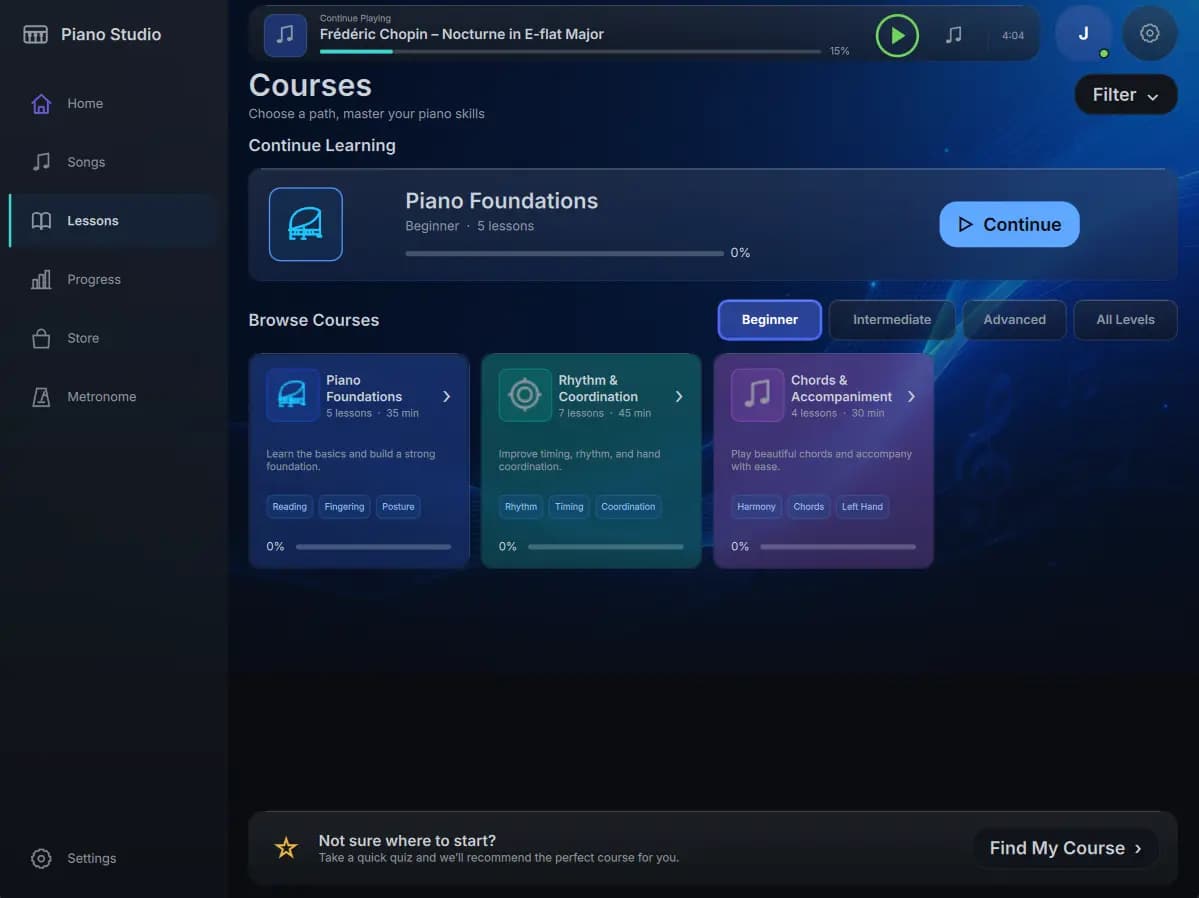
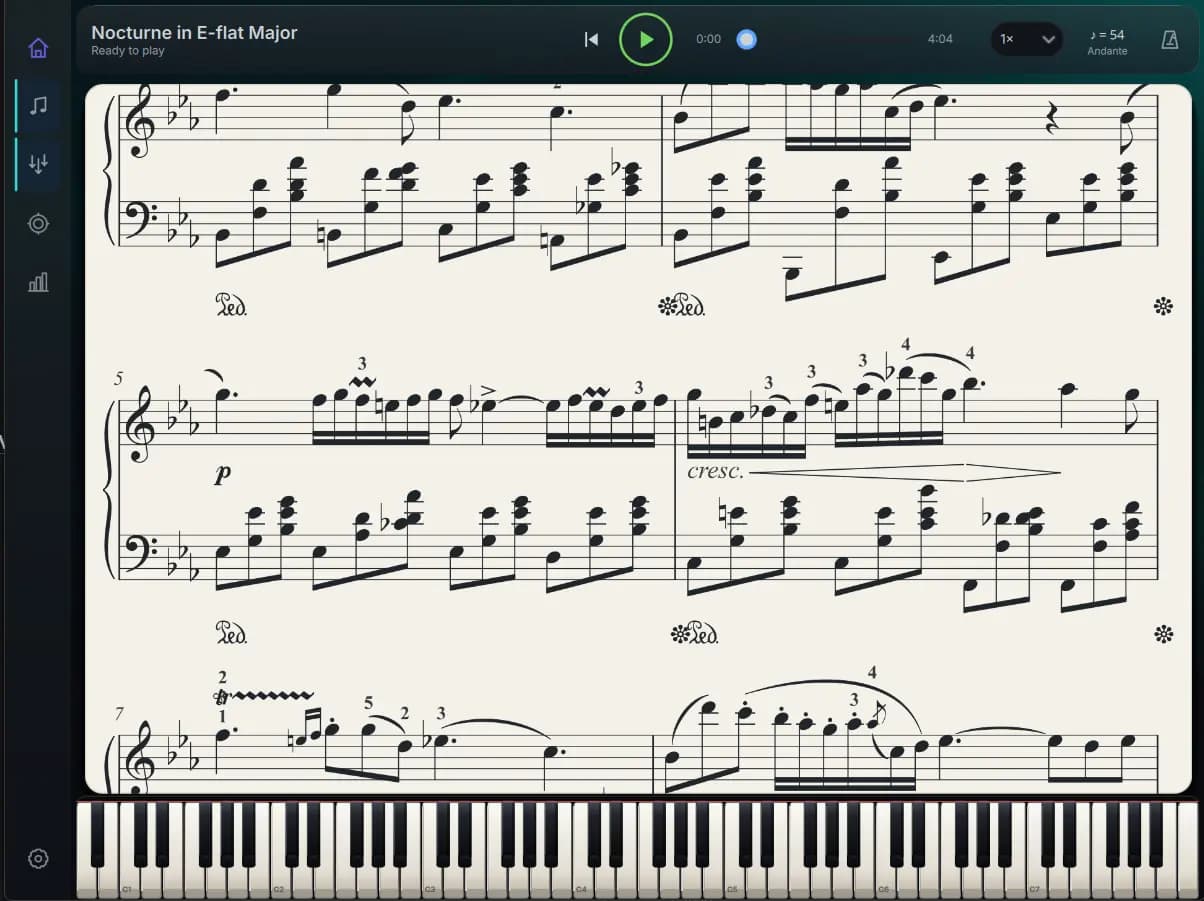
71Judging the app UI and store screenshots: cohesive dark theme, vibrant cards, persistent player bar, and clear sidebar give a polished native feel. Homepage hero is too abstract to signal piano.
Speed
74Desktop Lighthouse 97 and mobile 81 with CLS 0 and TBT 8ms show a snappy site. Mobile LCP of 4.7s is the weak spot, likely the dark hero imagery.
Security
52HTTPS and HSTS are in place, but CSP, frame protection, and DMARC are missing, and there's no SOC 2, ISO, or bug bounty signal. Standard early-stage posture.
Accessibility
80Lighthouse a11y 96/100 with only prohibited ARIA attributes failing. No a11y statement or WCAG claim, and the app is English-only, but automated checks are strong.
Growth
62A specific niche — MIDI pianists wanting one prioritized fix, not a song library — with a real differentiator against flowkey and Simply Piano. Early but well-aimed.
Improvement areas
- Homepage hero is too abstract and doesn't show the actual product or feedback UI.
- Documentation is thin — only three setup guides, no troubleshooting or help center.
- Security headers incomplete (no CSP, DMARC, frame protection) and no compliance signals.
- English-only app with no accessibility statement despite strong automated a11y score.
Design & Usability
Melovance's app UI is its strongest asset: a dark, cohesive interface with a persistent player bar, scannable sidebar, and direct play buttons that make the practice loop feel like a real desktop tool rather than a web wrapper. The homepage undersells it with an abstract near-black hero that says nothing about piano. Usability is solid — setup guides for iPad and macOS/Linux exist, navigation is obvious, and the free tier lets you try before paying. Documentation is shallow, though, and the app is English-only.
Speed & Security
Speed is a tale of two devices: desktop Lighthouse hits 97 with near-zero layout shift and 8ms blocking time, while mobile drops to 81 with a 4.7s LCP that will test your patience on a phone. Security is early-stage standard — HTTPS and HSTS are enforced, but CSP, frame protection, and DMARC are absent, and there's no SOC 2, ISO, or bug bounty signal. For a practice tool handling your performance data, that's acceptable for now but worth watching as the product grows.
Accessibility & Growth
Accessibility scores well on automated checks (96/100, one ARIA issue), but there's no a11y statement and the app ships in a single language — fine for launch, limiting for reach. Growth is the interesting question: Melovance targets a specific, underserved segment (adult MIDI pianists who want one prioritized fix, not a song library) and its 'single recommendation between attempts' wedge is genuinely different from flowkey's song-first approach and Simply Piano's guided lessons. The category is crowded, but the focus is sharp enough to carve a niche.
Conclusion
If you're a late-beginner or intermediate pianist with a MIDI keyboard and no teacher between sessions, Melovance is worth a free trial — the 'one thing to fix' approach is more useful than a wall of red notes. Just don't expect it to replace a teacher, and don't judge it by its moody homepage. The app is the product; the site is the brochure.
Suggestions for improvement
- Replace the abstract homepage hero with a real screenshot or short clip of the feedback UI in action.
- Add a proper security page and start publishing a CSP and DMARC record as the user base grows.
- Expand the guides into a real help center with troubleshooting for common MIDI keyboard issues.
- Add at least one more language and an accessibility statement to widen reach and signal intent.
Alternatives comparison
Named competitors, point by point. Nobody paid to appear here or to be left out.
 Melovance Melovance |  Piano Marvel Piano Marvel |  flowkey flowkey |  Simply Piano Simply Piano | |
|---|---|---|---|---|
| MIDI keyboard support | Yes, core requirement | Yes | Yes (acoustic or MIDI) | Yes (acoustic or MIDI) |
| Feedback style | One prioritized recommendation per attempt | Score-based assessment and sheet music | Real-time note feedback in song lessons | Guided lessons with play-along feedback |
| Free tier | 5 analyses/day | Limited free access | Limited free songs | Limited free lessons |
| Pricing (paid) | $9.99/mo Plus, $19.99/mo Pro | ~$15.99/mo or annual | ~$19.99/mo or annual | ~$13.99/mo or annual |
| Platforms | iPad, macOS, Linux (Windows soon) | Web, iOS, Android | Web, iOS, Android | iOS, Android |
Piano Marvel
Assessment-based piano learning platform with MIDI support, scoring, and a large sheet-music library.
flowkey
Interactive piano-learning app with song-based lessons and real-time feedback, popular for beginners.
Simply Piano
Mainstream mobile piano tutor with guided lessons and play-along feedback for casual learners.
Comparing options? See Melovance alternatives, scored side by side
More EdTech (Educational Technology) apps
View all EdTech (Educational Technology)
CertWorthIt
87Data-driven tool revealing which certifications actually ...

「自听」MyListen
86Turn AI articles into natural audio, locally on your iPhone

WellWired
84AI explained simply for older adults, with safety lessons...

Ciroexam
84All-in-one CIRO exam prep for CIRE and 8 other exams, wit...

Fake Receipt Maker
84Fake Receipt Maker is a free online receipt generator that lets you create realistic, fully customizable receipts in seconds.

Aptitude Test Prep
84Free timed practice for SHL, numerical, and logical tests...

AppyQ
83Turn your content into a branded mobile app with home, co...

yunit
83Browser extension that translates as you read, building v...

StepGrab
83AI-powered Mac app that captures your workflow and create...

MathIt
83MathIt turns math practice into a daily habit: a personalized plan, 29 mental-math lessons, 113 games, logic puzzles and live multiplayer.

Kiqo
82An AI-powered learning platform for K–5 that sparks curio...

Drugwars Online
82Classic 1984 drug trading game reborn in browser


A platform dedicated to providing unbiased reviews of newly launched applications, analyzing everything from their features to their full potential.
info@scoutforge.net© 2026 Scoutforge. All rights reserved.
