Cycling through all six. Tap any point to stop.
Measured on six things
Private AI medical scribe that runs on your iPhone, offline
Security
54HTTPS enforced with frame protection, X-Content-Type-Options and Referrer-Policy, but no HSTS, CSP or Permissions-Policy, and no DMARC. The privacy architecture (on-device, no account, Data Not Collected label) is a real strength; no SOC 2/ISO/pen-test evidence found.
Screenshots
1 / 1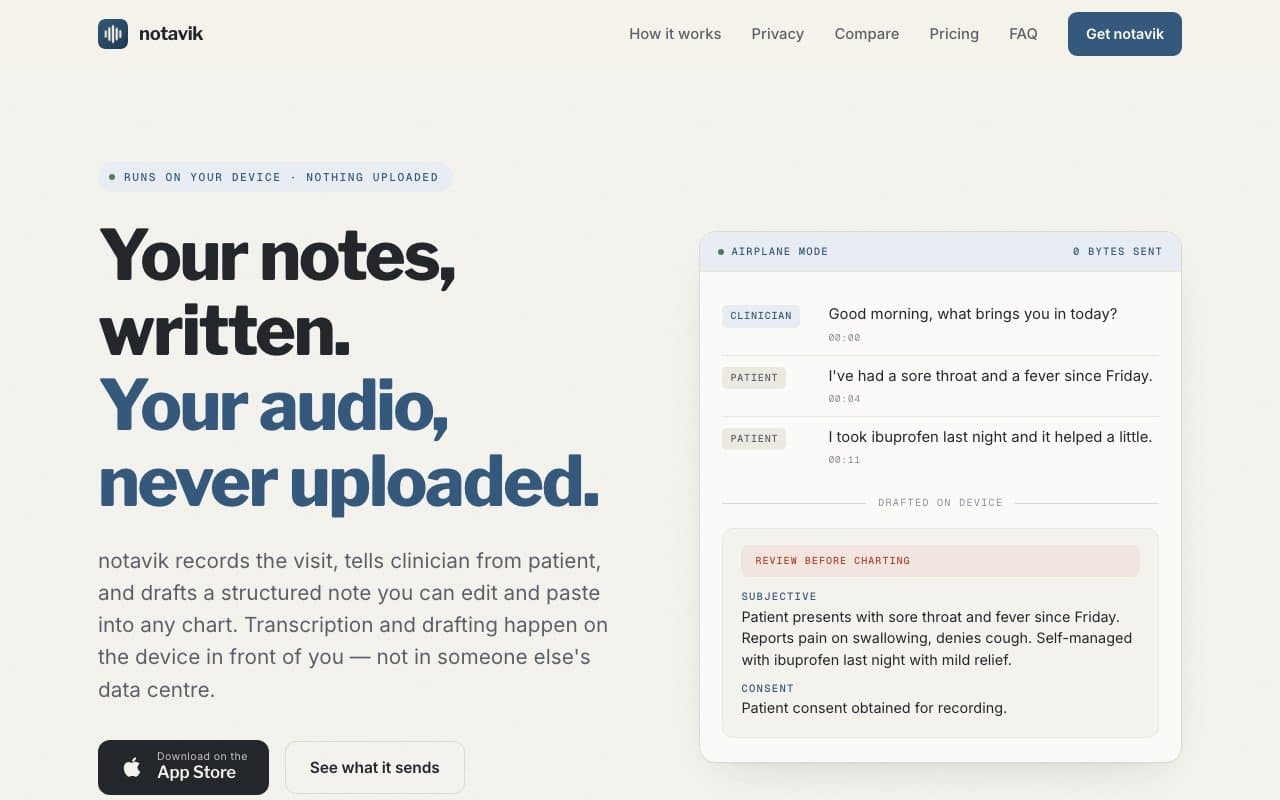
About this app
Write the note before the patient has left the building. notavik listens to the consultation on your iPhone or iPad and hands you a drafted note to check, instead of a blank page at the end of the day. The transcript arrives with clinician and patient lines separated, so it reads the way the visit went. Pick SOAP or narrative format and the draft is built from what was said, nothing invented on top. Edit it, then copy it into your chart, export a PDF or share it. Everything runs on the device's own neural engine. The audio is never uploaded, there is no account, and once the speech model is downloaded the app works offline. Notes are encrypted at rest and can be locked behind Face ID. notavik is a documentation assistant: you stay the author of every note. Try it free; a subscription or a one-time purchase unlocks regular use.
Key features
- 1On-device transcription and note drafting — audio never uploaded, works offline after model download.
- 2Clinician/patient role separation in the transcript, with SOAP or narrative note formats.
- 3No account required; free tier of 10 visits/month, with subscription or one-time purchase for regular use.
- 4Encrypted at rest with optional Face ID lock; audio auto-deletes after 30 days by default.
- 5Full transparency ledger of every destination the app contacts, plus testable privacy verification steps.
Target customer profile
Drawn from the product itself, not from a survey.
Demographic
Clinicians who write their own notes (GPs, therapists, locums, private practice)
Pain points
A blank page and an evening of charting after a full day of visits
Primary needs
A drafted note from the recorded visit, ready to edit and paste into the chart
Demographic
Clinicians who keep patient audio off third-party servers
Pain points
Not wanting the recording of a visit to leave the room
Primary needs
Transcription and note drafting that run on the iPhone or iPad itself, offline
Scout Review
Written by AI from measured evidence, scored out of 100.
notavik is a private AI medical scribe that records the visit on your iPhone or iPad, separates clinician from patient, and drafts a SOAP or narrative note entirely on-device — no account, no upload, offline once the speech model downloads. The positioning is sharp and the transparency is rare: a full ledger of every destination the app contacts, a Data Not Collected privacy label, and testable verification steps. The execution is competent across the board — a cohesive design system, a low-friction free tier, a lean site — with real gaps in the details: store screenshots that obscure the very UI they're selling, a marketing site missing HSTS/CSP/DMARC, and three accessibility audit failures. It's a credible, well-argued product in a crowded category, held back by polish and plumbing rather than by its core idea.
Measure by measure
Usability
63Free tier of 10 visits/month with no account is a low-friction start, and the three-step Record/Read/Note model is easy to grasp. The 'Check it' section gives testable steps. Onboarding flow itself not independently verified; no ratings yet.
Design
71Judging the app UI and store material: a cohesive navy/cream system with an ECG motif carries across all 5 screenshots and the homepage. Strong type hierarchy, but overlay cards obscure the lock icon and part of the drafted note.
Speed
68Lighthouse desktop 100/100 and mobile 85/100 with CLS 0 and TBT 28ms — a lean, well-built site. Mobile LCP of 3.6s sits above the 2.5s 'good' threshold and is the main drag on the mobile score.
Security
54HTTPS enforced with frame protection, X-Content-Type-Options and Referrer-Policy, but no HSTS, CSP or Permissions-Policy, and no DMARC. The privacy architecture (on-device, no account, Data Not Collected label) is a real strength; no SOC 2/ISO/pen-test evidence found.
Accessibility
70Lighthouse accessibility 93/100 with three failing audits: insufficient color contrast, non-sequential heading order, and visible-text labels without matching accessible names. App localized in 2 languages. No public a11y statement found.
Growth
68A real, specific problem (cloud scribes upload patient audio) with a structural wedge incumbents can't copy without abandoning their architecture: on-device, offline, no account, 0 bytes sent. Specific target segment. Early stage (domain 0.3 yrs, v1.0, no ratings) is context, not the score.
Improvement areas
- Store screenshots obscure the lock icon and drafted note — redesign so the core UI is fully legible.
- Marketing site lacks HSTS, CSP, Permissions-Policy and DMARC despite a privacy-first pitch.
- Three Lighthouse accessibility failures: contrast, heading order, accessible names.
- Dense marketing copy in 'The gap' and ledger footnotes hurts skimmability.
Design & Usability
The design story here is disciplined. The App Store screenshots and the homepage share one system — navy, cream, a single ECG motif — and the type hierarchy is confident: a heavy grotesk headline with the privacy claim in muted navy, body copy well below it, monospaced labels in a left rail. The 'Airplane mode / 0 bytes sent' card turns an abstract privacy claim into something you can see. The weak spots are in the store material: an overlay card covers the lock icon and status caption in the recording screenshot, and the structured-note card hides part of the draft, so the core output isn't fully legible where it matters most. Usability is solid on paper — 10 free visits a month with no account, a clear three-step Record/Read/Note model, and a 'Check it' section that gives skeptics testable steps like airplane mode and the App Privacy Report. The friction is the marketing page itself: dense paragraphs in 'The gap' and the ledger footnotes are long for a page meant to be skimmed.
Speed & Security
Speed is a tale of two devices. Desktop Lighthouse is a clean 100/100; mobile is 85/100 with a 3.6s LCP that misses the 2.5s 'good' threshold, though CLS 0 and TBT 28ms show the page is structurally lean rather than bloated. Security is where the product's story and its plumbing diverge. The app's privacy architecture is genuinely strong and unusually transparent: the site publishes a full 'everything this app sends' ledger (App Store, RevenueCat, a one-time Hugging Face model download, and nothing else), claims Apple's Data Not Collected label, and offers verifiable tests. But the website serving that pitch enforces HTTPS without HSTS, CSP or Permissions-Policy, and has no DMARC. No SOC 2, ISO or pen-test evidence was found. For a product whose entire value proposition is trust, the header hygiene is a missed layup.
Accessibility & Growth
Accessibility lands at 93/100 on Lighthouse, with three failing audits that are the usual suspects: insufficient color contrast, non-sequential heading order, and visible-text labels without matching accessible names. The visual audit independently flagged tiny low-contrast monospaced captions, which is the same contrast failure in human clothing. The app is localized in 2 languages, but no public accessibility statement was found. Growth is a judgement on the idea, and the idea is good: ambient AI scribes are built on uploading patient audio, which drags in BAAs, procurement and retention policies, and notavik's on-device, no-account, offline architecture is a wedge the cloud incumbents structurally cannot copy without abandoning their own model. The target customer is specific — GPs, therapists, locums and private practice clinicians who write their own notes. The honest limit is adoption: the site itself admits 'no cloud means no safety net,' and trading the cloud's backup for 'lose the device, lose the notes' is a real ask. Early-stage signals (domain 0.3 years old, v1.0, no ratings yet) are context, not the score.
Conclusion
The pitch is the strongest thing here: on-device processing is a genuine architectural differentiator in a category built on uploading patient audio, and the site backs the claim with a verifiable ledger instead of a badge. What holds notavik back is the layer around the product — store screenshots that hide the lock icon and the drafted note, a website that preaches privacy while skipping HSTS and DMARC, and contrast and heading-order failures that undercut the accessibility story. None of these are hard to fix, and fixing them would let the product's real strength do the talking. For a clinician who genuinely cannot let visit audio leave the room, this is worth a serious look; for everyone else, it's a promising v1.0 that needs its edges sanded.
Suggestions for improvement
- Redesign the store screenshots so the lock icon, status caption and full drafted note are legible — don't cover the UI you're selling.
- Add HSTS, CSP and DMARC to the marketing site; a privacy-first product should have privacy-first headers.
- Fix the three Lighthouse a11y failures: contrast on the monospaced captions, heading order, and accessible names on labeled elements.
- Trim the dense 'The gap' and ledger footnote paragraphs so the page can be skimmed, not studied.
Alternatives comparison
Named competitors, point by point. Nobody paid to appear here or to be left out.
 notavik - Private AI Medical Scribe |  | |
|---|---|---|
| Where audio is processed | On-device neural engine; audio never uploaded | Not specified in provided details |
| Account required | No account, no login | Not specified in provided details |
| Offline capability | Works offline once speech model downloaded | Not specified in provided details |
| Note formats | SOAP or narrative draft, editable, PDF export/share | Not specified in provided details |
| Free tier | 10 visits/month, no account | Not specified in provided details |
Comparing options? See notavik - Private AI Medical Scribe alternatives, scored side by side
More Health & Wellness apps
View all Health & Wellness
StoryPad
92Privacy-first open source journal app with a continuous t...

Pushup RPG: Fitness Quest
90Pushup RPG is a camera-based push-up counter and fitness RPG for home workouts. Real push-ups and squats become attacks as you defeat 48 foes across 8 biomes, earn XP and loot, join guilds, and battle in live 40-second duels. Free on iOS and Android.

Gryper
89Workout tracker with muscle heatmaps and volume landmarks

Sensecast
88Weather app that explains the forecast

Snapkin: Photo Calorie Counter
88Snapkin is a calorie tracker you use by photographing your plate.

Innermost
87An AI-powered emotional support app that acts as a person...

Cat Years to Human Years
86Free cat age calculator converting cat years to human years.

MyCookingCalendar
86Free meal planning calendar with 4,600+ recipes and grocery lists

Mantra Meditation Timer
85A minimalist, distraction-free meditation timer for mantr...

TDEE Calculator
84Free TDEE calculator that estimates maintenance calories, weight loss targets, muscle gain calories, and macro recommendations based on your body stats and activity level.

FitLifeBud
84AI meal plans for your week, with one aisle-sorted shopping list

WellWired
84AI explained simply for older adults, with safety lessons...


A platform dedicated to providing unbiased reviews of newly launched applications, analyzing everything from their features to their full potential.
info@scoutforge.net© 2026 Scoutforge. All rights reserved.
