Cycling through all six. Tap any point to stop.
Measured on six things
AI developer in your terminal for coding, debugging, and ...
Security
41HTTPS enforced but missing HSTS, CSP, frame protection, SPF, DMARC — only 2/12 header checks pass. No published audits.
Screenshots
1 / 1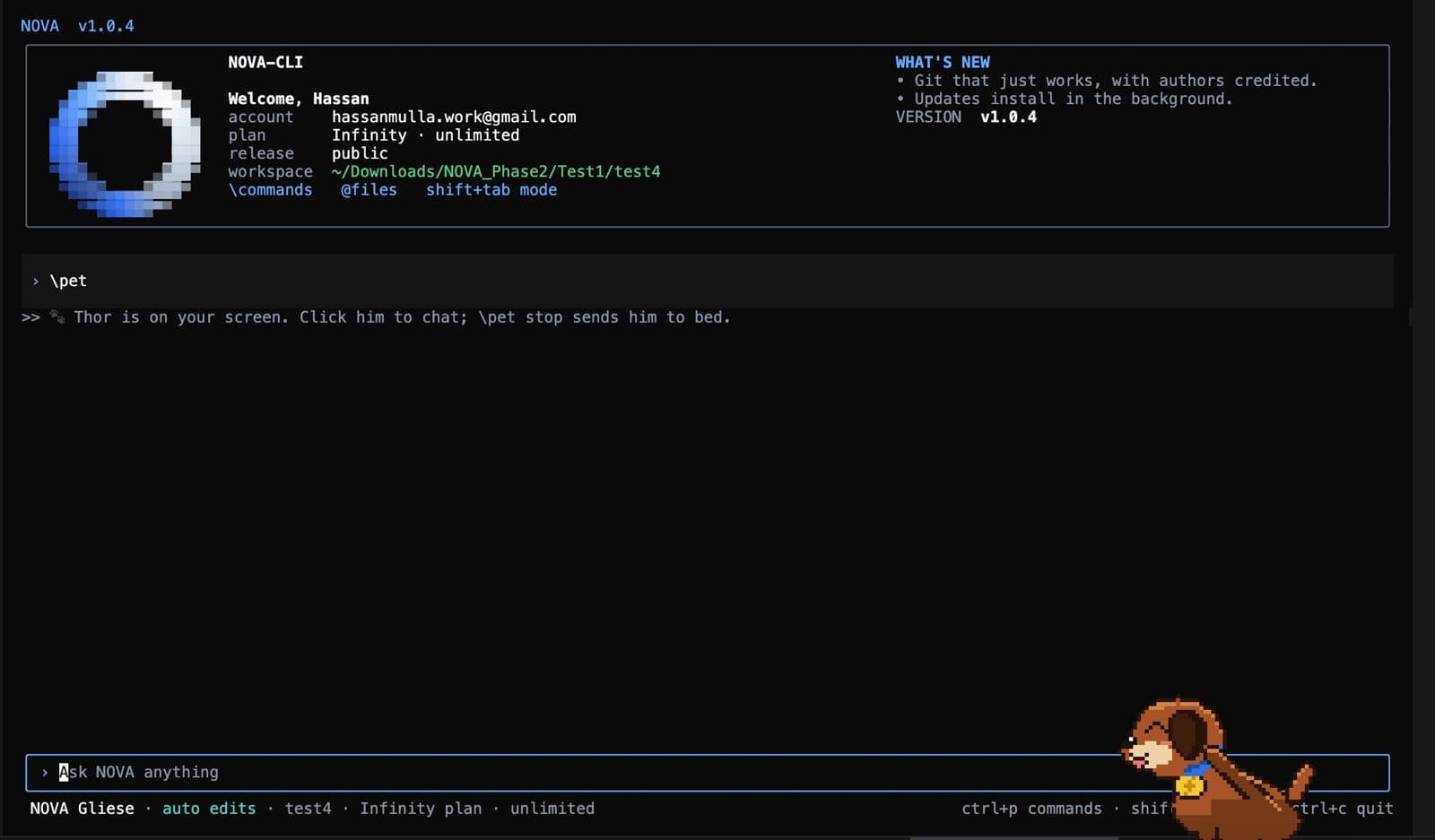
About this app
NOVA is an AI-powered developer tool that operates within your terminal, designed to streamline coding workflows. It offers a suite of features including code generation, debugging assistance, persistent context across sessions, multi-file understanding, and local execution for security. NOVA aims to reduce context switching by integrating various development tasks into one interface. It supports over 160 AI models and provides autonomous debugging, codebase-aware assistance, and deployment capabilities. The tool is built by developers for developers, emphasizing productivity and efficiency. NOVA is suitable for individual developers, teams, and organizations looking to enhance their development speed and reduce manual overhead. It is available via a simple installation script and offers various support channels including Discord and GitHub.
Key features
- 1Terminal-native AI assistant with 160+ models, persistent context, and multi-file understanding.
- 2Autonomous debugging and self-healing: analyzes stack traces, fixes bugs, runs tests, and verifies changes.
- 3Unified workflow: code generation, debugging, execution, and deployment without leaving the CLI.
Target customer profile
Drawn from the product itself, not from a survey.
Demographic
Individual Software Developers
Pain points
Frequent context switching between IDE, terminal, and browser; losing focus; repetitive coding tasks; debugging complex issues.
Primary needs
A unified terminal-based tool that provides AI assistance for coding, debugging, and deployment without leaving the command line.
Demographic
Development Teams in Startups
Pain points
Tight deadlines; need for rapid iteration; maintaining code quality; onboarding new team members; reducing technical debt.
Primary needs
A collaborative AI developer tool that enhances team productivity, automates repetitive tasks, and ensures consistent code quality.
Demographic
Enterprise Engineering Departments
Pain points
Large codebases; complex debugging; security concerns; integration with existing workflows; scaling development processes.
Primary needs
A secure, scalable AI solution that integrates into existing terminal environments, supports multi-file projects, and reduces development time.
Scout Review
Written by AI from measured evidence, scored out of 100.
NOVA is an AI-powered terminal developer tool that promises to unify coding, debugging, and deployment in one CLI. The pitch is compelling: stop context-switching, get persistent context, and let an autonomous debugger fix your code. The site is fast (Lighthouse 90 mobile, 99 desktop) and the docs are solid. But the execution has gaps. The pricing page shows '—/month' for every tier, which is either a bug or a placeholder — either way, it undermines trust. Security headers are largely missing (2/12 checks), and there is no published audit. Accessibility fails on basic issues like button names and contrast. The design is polished but the terminal mockup is a black void. Growth potential is real but unproven. NOVA is a promising beta with a strong core idea, but it needs to tighten its marketing surface, security posture, and accessibility before it can compete with established players.
Measure by measure
Usability
62Solid docs with quickstart and command reference, but pricing shows '—/month' for every tier and testimonials are duplicated, hurting trust.
Design
68Polished dark theme and clear hierarchy, but the hero terminal mockup is a flat black void and low-contrast feature cards undercut the craft.
Speed
82Lighthouse mobile 90/100, desktop 99/100, LCP 3.6s, CLS 0, TBT 31ms — genuinely fast and well-optimized.
Security
41HTTPS enforced but missing HSTS, CSP, frame protection, SPF, DMARC — only 2/12 header checks pass. No published audits.
Accessibility
70Lighthouse a11y 89/100, but failing on button names, contrast, and heading order. No WCAG statement or a11y page found.
Growth
58Real problem (context switching) and a terminal-native wedge, but the category is crowded and the differentiation is mostly marketing copy so far.
Improvement areas
- Pricing page shows '—/month' for all tiers — no actual prices displayed, undermining trust.
- Missing security headers (HSTS, CSP, DMARC, SPF) and no published security audits or compliance page.
- Accessibility failures: buttons lack accessible names, insufficient color contrast, heading order issues.
Design & Usability
NOVA's homepage is visually competent: a consistent dark theme, gradient accents, and a clear before/after comparison card that explains the value prop without scrolling. The hero headline 'The AI Developer for your terminal' is strong. But the terminal mockup is a flat black rectangle with zero syntax highlighting — for a developer tool, that's a missed opportunity to show the product. The numbered feature cards (01-03) use low-contrast gray text on dark teal, and the pixel-art dog mascot clashes with the polished photographic hero. Usability is decent: the docs page offers a quickstart, full command reference, and installation guide, and the site claims five permission modes plus \undo rollback. However, the pricing page renders '—/month' for every tier — no actual dollar amounts — which is a serious trust gap. Testimonials are duplicated (Briana Patton appears twice) and read generically. The product may be solid, but the marketing surface has rough edges that undercut confidence.
Speed & Security
Speed is NOVA's strongest measured dimension: Lighthouse mobile 90/100, desktop 99/100, LCP 3.6s, CLS 0, TBT 31ms. The site is genuinely fast and well-optimized. Security is the weak spot. The HTTP probe found HTTPS enforced but missing HSTS, CSP, frame protection, X-Content-Type-Options, Referrer-Policy, Permissions-Policy, SPF, and DMARC — only 2 of 12 checklist points. There is no security page, no SOC 2 or ISO claim, and no bug bounty mentioned. For a tool that executes code locally and claims 'local & secure', the absence of basic security headers and published audits is a gap. The docs mention permission modes and local execution, which is good, but without independent verification or even standard headers, the security story is mostly assertion. A developer tool handling source code should do better on table-stakes hardening.
Accessibility & Growth
Accessibility scores 89/100 on Lighthouse, but fails on button accessible names, color contrast, and heading order — three fixable issues that suggest a11y was not a priority. No WCAG statement or accessibility page exists. Growth is a judgment call: NOVA names a real problem (context switching between IDE, browser, terminal) and targets a specific wedge (terminal-native, autonomous debugging). The alternatives — GitHub Copilot, Tabnine, CodeWhisperer — are IDE-centric, so there is a genuine gap. But the category is crowded, and NOVA's differentiation is mostly marketing copy so far. The domain is 0.3 years old, and traction signals are minimal. The idea has room, but execution and proof will determine whether it grows beyond early adopters. The enterprise tier with BYOK and dedicated nodes shows ambition, but without published security audits, enterprise adoption will be a hard sell.
Conclusion
NOVA has the bones of a useful tool: a terminal-native AI that remembers context and can autonomously debug is a genuinely appealing proposition for developers tired of tab-hopping. The docs suggest a thoughtful permission model and rollback, which are the right primitives. But the product is in beta, and the public-facing surface — pricing, security, accessibility — feels unfinished. The '—/month' pricing is the most glaring issue; it makes the product look unserious. The missing security headers are a red flag for a tool that runs code locally. If the team fixes these basics, NOVA could carve out a real niche. For now, it is a promising work-in-progress that needs to sweat the details before asking developers to trust it with their codebase.
Suggestions for improvement
- Fix the pricing page: show actual dollar amounts for each tier instead of '—/month'.
- Add standard security headers (HSTS, CSP, X-Content-Type-Options, Referrer-Policy) and publish a security page.
- Improve accessibility: add accessible names to buttons, fix color contrast, and correct heading order.
- Replace the flat black terminal mockup with a realistic screenshot showing syntax highlighting and actual output.
Alternatives comparison
Named competitors, point by point. Nobody paid to appear here or to be left out.
 NOVA NOVA |  GitHub Copilot GitHub Copilot |  Tabnine Tabnine |  Amazon CodeWhisperer Amazon CodeWhisperer | |
|---|---|---|---|---|
| Primary interface | Terminal-native CLI | IDE extension | IDE plugin | IDE integration |
| Autonomous debugging | Yes — self-healing debugger | No | No | No |
| Persistent context across sessions | Yes — workspace awareness | Limited to session | Limited to session | Limited to session |
| Deployment capabilities | Yes — autonomous deployment | No | No | No |
| Multi-file understanding | Yes — deep contextual awareness | Partial | Partial | Partial |
| Pricing model | Free tier + paid (prices not shown) | $10/mo individual | Free + $12/mo Pro | Free tier + $19/mo Pro |
GitHub Copilot
An AI pair programmer that offers code suggestions and completions within the IDE, but lacks terminal-native execution and autonomous debugging features.
Tabnine
An AI code completion tool that integrates with various IDEs, focusing on code predictions but not offering end-to-end terminal workflow or deployment capabilities.
Amazon CodeWhisperer
An AI coding companion that provides code recommendations within the IDE, with a focus on AWS services, but does not operate within the terminal as a unified developer tool.
Comparing options? See NOVA alternatives, scored side by side
More Development & Engineering apps
View all Development & Engineering
CreateMyCoin
92A no-code Solana token creator that deploys SPL tokens in...

Vibe Coding Agent Skills
92A free, open-source platform offering 110 AI agent skills...

CC Switch
91Open-source desktop app for switching AI coding providers...

TaxID
90Fast EU VAT validation API for developers, covering 27 EU...

BeartIMAGE
88BeartIMAGE is a free, web-based image processing platform engineered for fast, bulk photo editing and conversion directly in your browser.

ButterKit
82macOS app for App Store screenshots: 3D mockups, auto-tra...

DataHabibi
88AI-powered Dubai real estate data platform with 12M+ DLD ...

Claw Messenger
88Claw Messenger is an iMessage API service that gives AI a...

PERM Processing Time: Current DOL Queue & History
88PERM Processing Time is an independent data analysis platform that helps users navigate the U.S. Department of Labor’s permanent labor certification process.

Credyt
87Real-time monetization infrastructure for AI products tha...

ProcessSpy
87A native macOS process explorer and advanced monitor that...

StockFit API
87A developer-first financial data API providing structured...


A platform dedicated to providing unbiased reviews of newly launched applications, analyzing everything from their features to their full potential.
info@scoutforge.net© 2026 Scoutforge. All rights reserved.
