Cycling through all six. Tap any point to stop.
Measured on six things
The product photo studio for serious sellers.
Design
34Hero is a black void with no product imagery despite a strong 'Messy photos. Clean catalog.' headline. Section 2 renders blurry and truncated; the cutout grid has faint, unreadable overlay text and inconsistent spacing.
Screenshots
1 / 1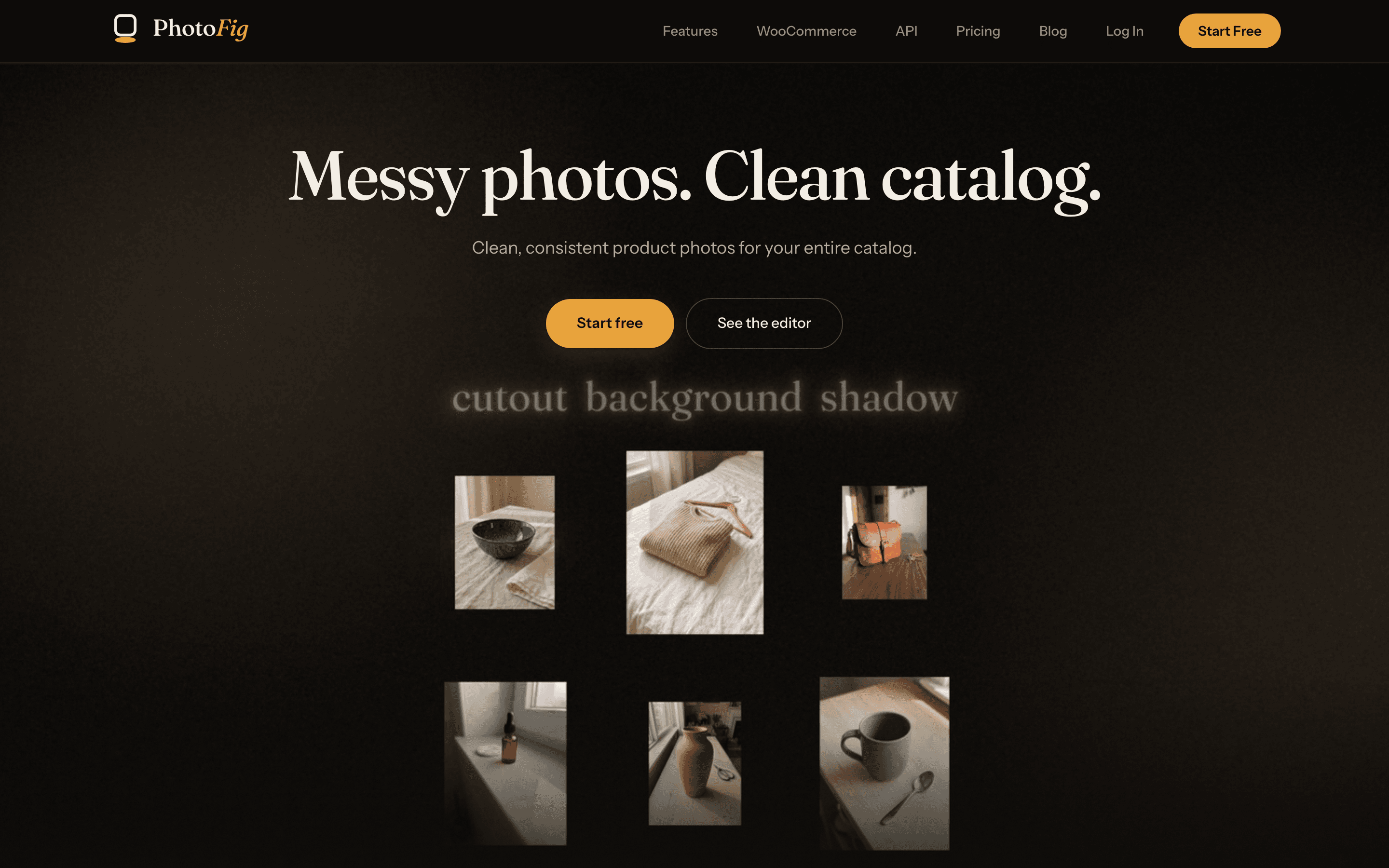
About this app
PhotoFig is an AI product photo editor for e-commerce sellers. Upload ordinary phone shots and get clean cutouts, AI-generated scenes, realistic product shadows, Magic Eraser cleanup and AI upscaling in one canvas editor. Save a look as a template and apply it to a whole catalog in one batch, then publish straight to WooCommerce. Free plan, no card needed.
Key features
- 1Batch recipe templates: save a look and apply background removal, AI scenes, shadows, and export rules across a whole catalog.
- 2WooCommerce integration: pick products by SKU, edit in bulk, review each replacement, and restore previous photos.
- 3Full canvas editor with layers, transforms, version history, and platform-size export presets (Shopify, Etsy, Amazon, eBay, and more).
- 4AI tools: background removal with manual mask refinement, AI backgrounds, light-aware product shadows, Magic Eraser, and up to 4× upscale.
- 5Free plan with 30 new photos/month, unlimited editor exports, and up to 4K export resolution — no card required.
Target customer profile
Drawn from the product itself, not from a survey.
Scout Review
Written by AI from measured evidence, scored out of 100.
PhotoFig is an AI product photo editor aimed at e-commerce sellers, and its pitch is sharper than most: not just cutouts, but a repeatable batch recipe — background removal, AI scenes, product shadow, retouch, upscale — saved as a template and applied across a catalog, then published back to WooCommerce with per-photo approval. The pricing page backs that up with concrete per-tier limits (credits, batch exports, storage, publish counts) rather than vibes. The execution is uneven. Security is the standout: a full 12/12 header checklist and Stripe checkout. Accessibility is nearly perfect on automated checks. Speed is fast on desktop and slow on mobile. Design is the weak link — the homepage hero is an empty black rectangle with no product imagery, and the demo section renders blurry and truncated, which is a bad look for a product whose entire value proposition is 'look how clean your photos can be.' Usability is competent: a no-account trial tray, a clear WooCommerce flow, and a detailed comparison table. The idea has a real wedge; the marketing page needs to show it.
Measure by measure
Usability
62Clear three-step WooCommerce flow, a no-account background-removal tray, and a fully itemized pricing comparison. The low-contrast 'See the editor' button and near-zero information density past the hero hold it back.
Design
34Hero is a black void with no product imagery despite a strong 'Messy photos. Clean catalog.' headline. Section 2 renders blurry and truncated; the cutout grid has faint, unreadable overlay text and inconsistent spacing.
Speed
58Desktop Lighthouse 97/100 is genuinely fast, but mobile scores 69/100 with a 5.2s LCP and 3.7s FCP. CLS is a clean 0 and TBT is only 125ms, so the mobile hit is load weight, not jank.
Security
74Full 12/12 header checklist: HTTPS enforced, HSTS, CSP, frame protection, Referrer-Policy, Permissions-Policy, plus SPF and DMARC. Checkout runs through Stripe. No published SOC 2, ISO, or bug bounty found.
Accessibility
80Lighthouse accessibility 99/100 with one failing audit (missing main landmark). Responsive layout and readable plan tables. No public a11y statement or keyboard/screen-reader documentation found.
Growth
63Real problem, specific wedge: batch templates plus WooCommerce publish-back, not just one-off cutouts. Clear $0–$79 ladder with API on higher tiers. Early stage (domain ~0.5 years), so traction is context, not the score.
Improvement areas
- Homepage hero is an empty black void with no product imagery — replace with a real before/after demo.
- Second homepage section renders blurry and truncated, undermining trust in the editor's output quality.
- Mobile Lighthouse performance is 69/100 with a 5.2s LCP; desktop is 97/100, so the gap is payload weight.
- No published security page, SOC 2/ISO status, or accessibility statement despite strong header hygiene.
Design & Usability
The headline does the heavy lifting: 'Messy photos. Clean catalog.' is exactly the pain an e-commerce seller feels at 11pm with 40 supplier photos. Then the page stops helping. The hero is a black void with no before/after, the second section renders blurry and truncated with ghost text, and the cutout grid has overlay labels you can't read. Usability is stronger than design: a no-account background-removal tray lowers the barrier to try, the WooCommerce flow is spelled out in three concrete steps with a restore option, and the pricing comparison table itemizes credits, batch exports, storage and publish limits per tier. The weak spots are the low-contrast 'See the editor' button and the fact that past the hero there is almost no information density — you learn what the tool does from the copy, not from the page.
Speed & Security
Speed is a split verdict. Desktop Lighthouse lands at 97/100, which is genuinely fast. Mobile is 69/100 with a 5.2s LCP and 3.7s FCP — the page is heavy on first paint for phone users, who are exactly the sellers uploading from a stockroom. CLS is a clean 0 and TBT is only 125ms, so the mobile problem is payload, not jank; compressing hero assets and lazy-loading below-the-fold media should close most of the gap. Security is the strongest dimension on the site: the HTTP probe returns a full 12/12 — HTTPS enforced, HSTS, CSP, frame protection, X-Content-Type-Options, Referrer-Policy, Permissions-Policy, plus SPF and DMARC. Checkout runs through Stripe. What's missing is the paperwork buyers ask for: no SOC 2, ISO, pen-test summary, or bug bounty page surfaced in the site content.
Accessibility & Growth
Accessibility is close to clean: Lighthouse scores 99/100 with a single failing audit — the document has no main landmark. That's a five-minute fix and it's the only thing standing between PhotoFig and a perfect automated score. What's not measured is the human side: no public accessibility statement, no keyboard-navigation notes, no screen-reader documentation. Growth is where the idea earns its keep. The category — AI product photo editing — is crowded with one-off background removers. PhotoFig's actual wedge is the batch recipe: save a look as a template, apply it across a catalog, push results back to WooCommerce with per-photo approval and restore. That's a workflow competitors keep forgetting to build, and it maps to a real seller pain (consistency across 500 SKUs). The $0–$79 ladder with API access on Pro/Studio gives a clean upsell path. The honest limit: at ~0.5 years old with no visible third-party traction, the wedge is a promise, not yet a moat.
Conclusion
If you sell on WooCommerce and you're tired of hand-editing 200 SKUs to look like they came from the same studio, PhotoFig is aimed squarely at you and the batch-recipe feature is the reason to look. The free plan is genuinely usable — 30 new photos a month, unlimited editor exports, up to 4K — so you can validate the workflow before paying. Before you commit, do two things: test the mobile experience on the connection your team actually uses, and ask support directly for their security posture (SOC 2 status, data retention, where images are processed). The product is more interesting than its homepage suggests; the homepage is the thing that needs work.
Suggestions for improvement
- Replace the black hero void with a real before/after slider — the product's entire pitch is visual, so show it above the fold.
- Fix the blurry, truncated second section; it currently reads as a broken asset and undermines trust in the editor.
- Cut mobile LCP from 5.2s by compressing hero media and lazy-loading below-the-fold sections.
- Add a <main> landmark and publish a short accessibility statement to convert the 99 into a clean 100.
Alternatives comparison
Named competitors, point by point. Nobody paid to appear here or to be left out.
 PhotoFig PhotoFig |  | |
|---|---|---|
| Batch editing across a whole catalog | Yes — save a recipe as a template and apply removal, scenes, shadows, and export rules to a whole folder | Not specified in provided details |
| WooCommerce publish-back with per-photo approval | Yes — pick by SKU, review each replacement, restore previous photo | Not specified in provided details |
| Free plan without a credit card | Yes — 30 new photos/month, unlimited editor exports, up to 4K | Not specified in provided details |
| AI background removal with manual mask refinement | Yes — one-click plus manual brush for hair, glass, mesh | Not specified in provided details |
| Starting paid price | $9.95/mo Starter (or $7.50/mo yearly); Pro $29.95/mo; Studio $79/mo | Not specified in provided details |
Comparing options? See PhotoFig alternatives, scored side by side
More E-commerce apps
View all E-commerce
Qamarero
92An all-in-one hospitality software for restaurants and ba...

Portrait Gift
88AI-powered personalized face swap art platform creating c...

Creastor
88An all-in-one platform for creators to sell digital produ...

CraftPilot
87AI tools for Etsy sellers — keyword research, listing optimization, and shop insights

Stripdo
87Stripdo is a smart invoicing tool that automatically gene...

BlueVetaUpright
86API that detects product photo rotation and tells you how...

EchoWi
83Track and optimize your brand's visibility in AI answers.

Stellar
82Lightweight A/B testing platform with no-code visual editor for fast, simple website optimization.

Avenum
82Avenum is a self-checkout app that streamlines retail shopping with QR code scanning and payments.

Cartylabs
82AI-powered Shopify app for boosting sales with smart upselling, rewards, and urgency tools.

Userlink.ai
82AI-powered customer service agents that automate support ...

Furnea
82AI-powered furniture photography tool that creates stunni...


A platform dedicated to providing unbiased reviews of newly launched applications, analyzing everything from their features to their full potential.
info@scoutforge.net© 2026 Scoutforge. All rights reserved.
