Cycling through all six. Tap any point to stop.
Measured on six things
Browser-based P&ID software for piping and instrumentation diagrams per ISA-5.1 and ISO 10628 — symbol library, auto bill of materials, no install.
Speed
56Desktop performance excellent (97/100), but mobile LCP 7.5s is poor. Site is lightweight, but app load on mobile needs work.
Screenshots
1 / 1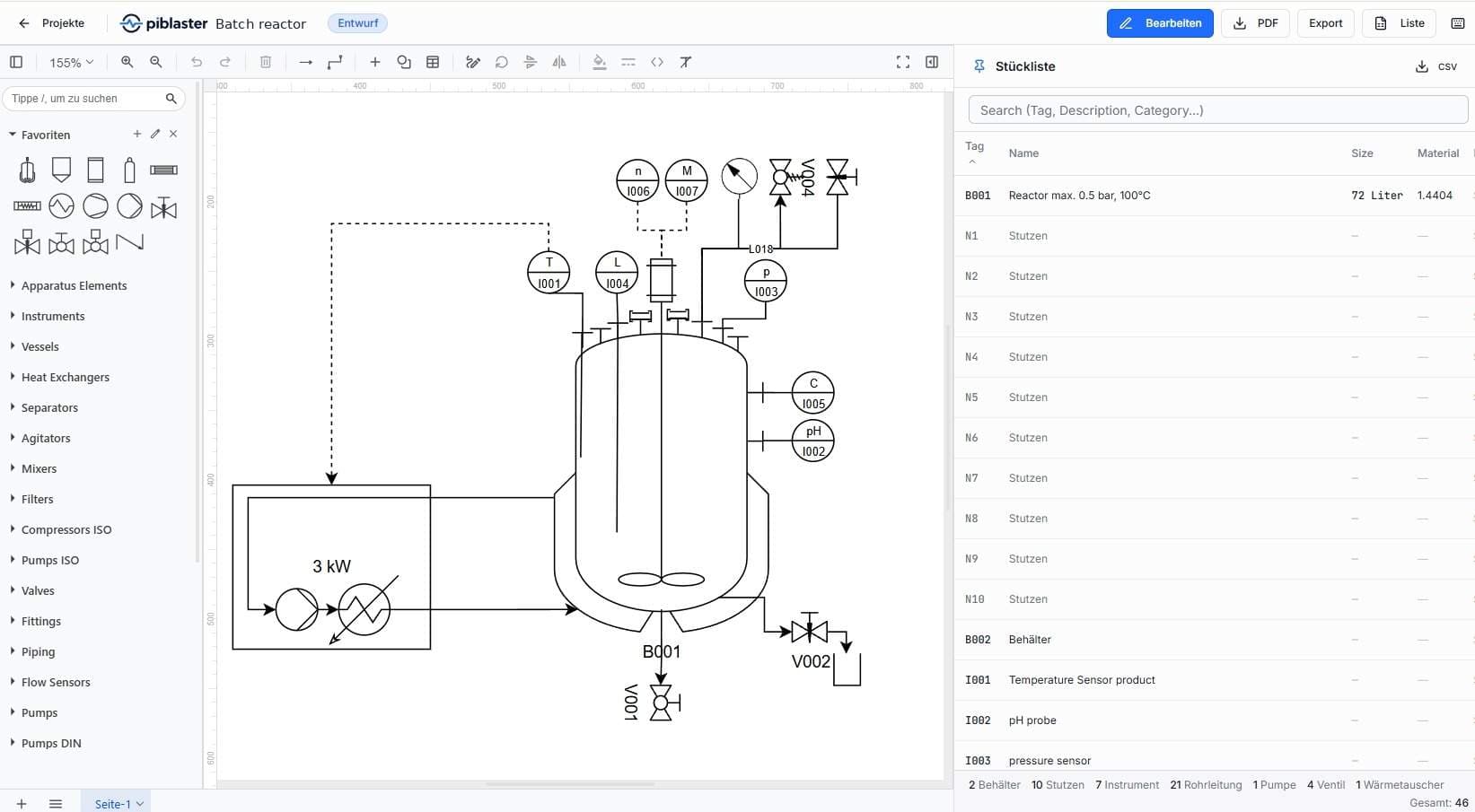
About this app
piblaster is browser-based P&ID software for creating piping and instrumentation diagrams and process flow diagrams to ISA-5.1 and DIN EN ISO 10628 — built for process engineering. Draw from a standards-compliant symbol library covering vessels, pumps, valves, heat exchangers and instrumentation. Tag numbers and bill of materials builds itself as you draw. CSV export feeds straight into costing, ERP or procurement. PDF export produces review-ready documents. Projects are versioned, and teams can work on one current revision with roles and permissions. Also included: custom shapes and libraries, pipe and insulation representation, multi-sheet projects, and a guided onboarding tour. No installer, no license server, no IT rollout: piblaster just runs on Windows, macOS, Linux straight in the browser - a genuine alternative to Visio, AutoCad, PlantEngineer, M4 PLANT or Smap3D. Free 30-day trial, no credit card required. Pro plan EUR 29 per user/month plus VAT.
Key features
- 1Live BOM generation as you draw, with automatic tag numbering and real-time updates.
- 2Standards-compliant symbol library (ISA-5.1, DIN EN ISO 10628) with vessels, pumps, valves, instruments.
- 3Browser-based, cross-platform (Windows, macOS, Linux, iPad, Android) with no installation required.
Target customer profile
Drawn from the product itself, not from a survey.
Demographic
Process engineers in plant engineering companies
Pain points
Struggle with complex P&ID software that is slow and hard to learn
Primary needs
Fast diagram creation and accurate bill of materials
Demographic
Small to medium engineering teams
Pain points
Expensive CAD tools with licensing limitations and poor collaboration
Primary needs
Affordable, browser-based solution with multi-user support
Demographic
Academic institutions and students in chemical engineering
Pain points
Lack of access to professional P&ID tools for teaching and learning
Primary needs
Free, easy-to-use platform with standard compliance
Demographic
Plant operators and maintenance professionals
Pain points
Need to update P&IDs but lack dedicated engineering software
Primary needs
Simple tool for creating and revising flow diagrams without IT hassle
Scout Review
Written by AI from measured evidence, scored out of 100.
piblaster is a promising browser-based P&ID tool that addresses a real pain point: complex, expensive, and hard-to-learn software. Its standout feature is the live BOM that updates as you draw, a genuine differentiator. The design is clean and modern, with a strong homepage demo. Usability is good with a guided tour and free trial, but documentation is lacking. Speed is excellent on desktop but poor on mobile. Security is solid but lacks advanced headers and certifications. Accessibility has minor issues. Growth potential is high given the underserved segments, but competition is entrenched. Overall, a solid early-stage product with clear value, but needs polish in mobile performance and documentation to compete effectively.
Measure by measure
Usability
68Guided onboarding, free trial, and intuitive editor layout with live BOM feedback. Docs/help center missing, but core workflow is straightforward.
Design
72Clean, modern design with consistent blue accent and strong visual demo of live BOM. Minor dated elements and icon clarity issues.
Speed
56Desktop performance excellent (97/100), but mobile LCP 7.5s is poor. Site is lightweight, but app load on mobile needs work.
Security
74Strong baseline: HTTPS, HSTS, frame protection, DMARC. Missing CSP and Permissions-Policy. DSGVO-compliant data storage in Germany claimed, but no SOC 2/audit evidence.
Accessibility
70Lighthouse 89/100, but failing contrast, heading order, user-scalable=no, and missing main landmark. German-only site, no a11y statement or multi-language support.
Growth
72Clear problem, specific segments, and a strong differentiator (live BOM) that generic tools lack. Category has headroom, but competition is entrenched.
Improvement areas
- Mobile performance: LCP 7.5s is too slow; needs optimization for tablet/phone users.
- Documentation: No help center or detailed guides; users need more than a guided tour.
- Security headers: Missing CSP and Permissions-Policy; consider adding SOC 2 for enterprise trust.
Design & Usability
piblaster presents a polished, modern interface with a clear value proposition: draw P&IDs and get a live BOM. The homepage effectively demonstrates this with a side-by-side editor preview. Usability is strong with a guided tour and free trial, but the lack of a dedicated docs/help center is a gap. The editor's single-view layout (palette, canvas, BOM) reduces context switching, a thoughtful touch. However, the symbol palette's small icons and lack of visual grouping could hinder quick identification, especially for new users. Overall, the design is above average for an early-stage tool, but usability would benefit from more comprehensive documentation and clearer iconography.
Speed & Security
Speed is a mixed bag: desktop performance is excellent (97/100 Lighthouse), but mobile suffers with a 7.5s LCP, which is unacceptable for a browser-based tool that claims to work on tablets and phones. The site itself is lightweight, but the app's initial load on mobile needs optimization. Security is solid with HTTPS, HSTS, and DMARC, but missing CSP and Permissions-Policy are notable gaps. The DSGVO compliance claim is positive, but no third-party audits or certifications are visible. For a tool handling engineering data, a SOC 2 or similar would boost confidence. Overall, security is on par with peers, but speed on mobile is a clear weakness.
Accessibility & Growth
Accessibility is decent (Lighthouse 89/100) but has specific issues: contrast ratio, heading order, user-scalable=no, and missing main landmark. The site is German-only, limiting its reach. No a11y statement or multi-language support is a missed opportunity for a tool targeting international engineering teams. Growth potential is strong: the problem (complex, expensive P&ID tools) is real, and the live BOM differentiator is compelling. Target segments (SMEs, academics, plant operators) are underserved. However, competition from established players like AutoCAD and Visio is fierce, and piblaster must prove it can scale beyond its niche. The idea has headroom, but execution and marketing will be key.
Conclusion
If you're a process engineer tired of wrestling with AutoCAD or settling for generic diagramming tools, piblaster is worth a 30-day trial. The live BOM alone could save hours per project. Just don't expect it to replace your entire CAD suite yet—it's a focused tool for P&ID creation, not a full engineering platform. With a few improvements in mobile speed and documentation, it could become a go-to for SMEs and academics. For now, it's a strong contender in a niche that's ripe for disruption.
Suggestions for improvement
- Add a comprehensive help center with tutorials, FAQs, and video guides to support the guided tour.
- Optimize mobile performance by reducing initial load time, possibly with lazy loading or a lighter editor mode.
- Implement CSP and Permissions-Policy headers to strengthen security posture.
- Add multi-language support (at least English) and an accessibility statement to broaden reach.
Alternatives comparison
Named competitors, point by point. Nobody paid to appear here or to be left out.
 piblaster (P&ID software) | AutoCAD P&ID |  SmartDraw |  Microsoft Visio |  Lucidchart | |
|---|---|---|---|---|---|
| Live BOM generation | Automatic BOM updates as symbols are placed, with tag numbering and CSV/PDF export. | BOM generation requires manual setup and is not real-time. | No automated BOM; manual table creation. | No BOM automation; requires manual data linking. | No BOM automation; manual data entry. |
| Standards compliance (ISA-5.1, DIN EN ISO 10628) | Built-in symbol library compliant with both standards. | Supports ISA-5.1, but requires manual setup of standards. | Offers P&ID templates but not full standards compliance. | Generic stencils, no built-in standards compliance. | P&ID shapes available, but standards compliance not guaranteed. |
| Browser-based, no installation | Runs entirely in browser on Windows, macOS, Linux, iPad, Android. | Requires installation and license server. | Browser-based, but requires plugin for some features. | Desktop app, requires installation. | Browser-based, no installation. |
AutoCAD P&ID
A robust but complex P&ID tool integrated with AutoCAD, requiring installation and a steep learning curve.
SmartDraw
A general-purpose diagramming tool with P&ID templates, simpler but less specialized.
Microsoft Visio
A versatile diagramming program that can be used for P&IDs with stencils, but lacks automated BOM features.
Lucidchart
A cloud-based diagramming tool with P&ID shapes, good for collaboration but not specialized for engineering.
Comparing options? See piblaster (P&ID software) alternatives, scored side by side
More Development & Engineering apps
View all Development & Engineering
CreateMyCoin
92A no-code Solana token creator that deploys SPL tokens in...

Vibe Coding Agent Skills
92A free, open-source platform offering 110 AI agent skills...

CC Switch
91Open-source desktop app for switching AI coding providers...

TaxID
90Fast EU VAT validation API for developers, covering 27 EU...

DemoVexa
90Turn your code into professional product demo videos with AI-generated scripts, animated UI, and natural voiceovers.

FontPlop
89Browser-based font viewer & tester for TTF, OTF, WOFF, WO...

Webfetch
89Web scraping API that turns any URL into HTML, text, Mark...

deed.page
89Permanent web hosting for AI agents, no human step

Denpex
89AI-powered GPU failure diagnosis for distributed ML training

Claw Messenger
88Claw Messenger is an iMessage API service that gives AI a...

DataHabibi
88AI-powered Dubai real estate data platform with 12M+ DLD ...

PERM Processing Time: Current DOL Queue & History
88PERM Processing Time is an independent data analysis platform that helps users navigate the U.S. Department of Labor’s permanent labor certification process.


A platform dedicated to providing unbiased reviews of newly launched applications, analyzing everything from their features to their full potential.
info@scoutforge.net© 2026 Scoutforge. All rights reserved.
