Cycling through all six. Tap any point to stop.
Measured on six things
A photo-based facial proportion analyzer that returns a 0...
Security
41HTTPS enforced and SPF present, but no HSTS, CSP, frame protection, X-Content-Type-Options, Referrer-Policy or DMARC — 3/12 checklist points. No published audits or security page.
Screenshots
1 / 1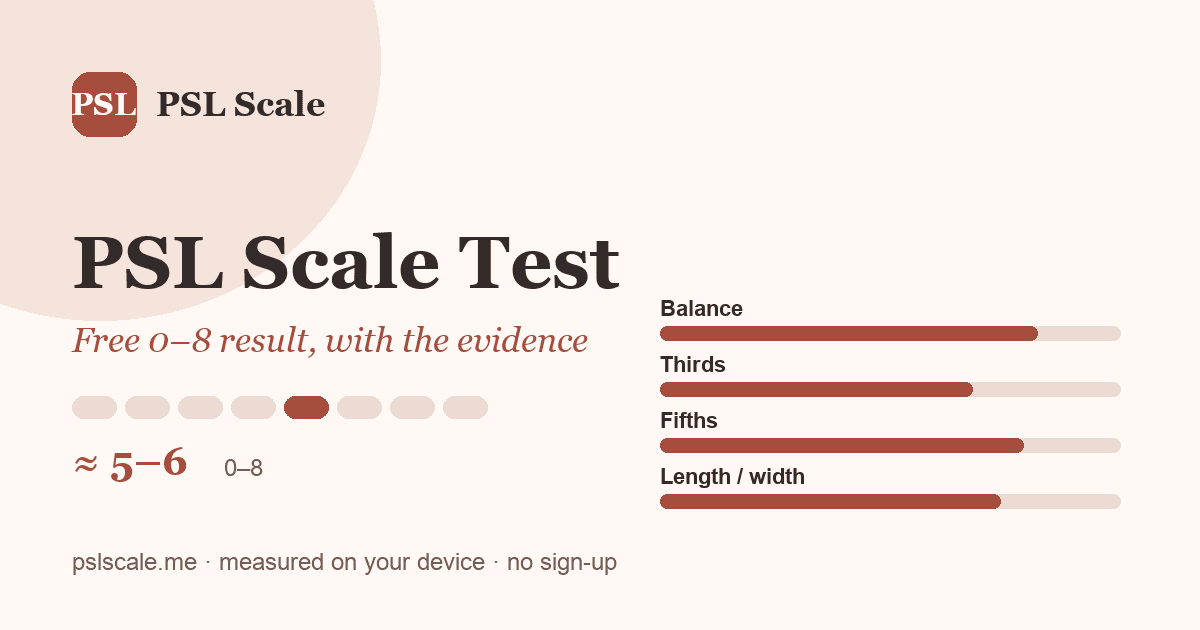
About this app
PSL Scale Test is a free, no-sign-up web tool that analyzes a single front-facing photo and produces a broad PSL Scale range (0–8) alongside four transparent measurement summaries: left-to-right balance, vertical thirds, horizontal fifths, and face length-to-width ratio. What sets it apart is its honesty. The site openly states that PSL Scale is an online community convention—not a validated scientific standard—with no official formula, and it deliberately avoids decimal scores, population percentiles, or labels presented as verdicts. Instead, you get a photo suitability check (camera angle, lighting, lens distance can all skew results), a plain-language explanation of what each measurement means and what it cannot tell you, and one practical suggestion. Privacy is straightforward: your photo is used for the current test and cleared when you reset or leave the page. There is no ranking, no publishing, no sharing—just a geometric read of one image. For anyone curious about what PSL s...
Key features
- 1Free, no-sign-up analysis of one front-facing photo with a broad 0–8 PSL range and no decimal scores.
- 2Four transparent measurement summaries: left-to-right balance, vertical thirds, horizontal fifths, and face length-to-width ratio.
- 3Photo-suitability check plus plain-language explanations of what each measurement means and cannot tell you.
- 4Privacy-first handling: photo used for the current test and cleared on reset or page leave; no ranking or sharing.
Target customer profile
Drawn from the product itself, not from a survey.
Demographic
Curious looksmaxxing community members, ages 16–30
Pain points
Confused by arbitrary PSL scores with no visible reasoning or methodology
Primary needs
Transparent breakdown of which facial proportions drive the score
Demographic
Self-improvement enthusiasts comparing photos over time
Pain points
Results shift between selfies without understanding why camera conditions matter
Primary needs
Consistent measurement under identical lighting, distance, and angle
Demographic
Stylists and grooming advisors seeking visual reference tools
Pain points
Lack of neutral, non-judgmental facial geometry references for client advice
Primary needs
Framing tools like hairstyle or glasses suggestions based on visible proportions
Scout Review
Written by AI from measured evidence, scored out of 100.
PSL Scale Test is a free, no-sign-up facial-proportion tool that reads one front-facing photo and returns a broad 0–8 range plus four measurement summaries: left-to-right balance, vertical thirds, horizontal fifths, and length-to-width ratio. Its distinguishing move is honesty — the site states plainly that PSL Scale is a community convention with no official formula, avoids decimals and percentiles, and explains what each measurement cannot tell you. It is fast (Lighthouse 100/100), visually distinctive, and easy to start. The gaps are header-level security hardening, small low-contrast captions, and a growth story built on positioning rather than a defensible capability.
Measure by measure
Usability
64No sign-up, obvious primary action, pre-upload photo checklist and a sample report preview all help. Dense copy and long scroll before the upload slow down users who just want a result.
Design
71Cohesive cream/terracotta/charcoal palette, editorial serif type and a reusable card system give the page real identity. Held back by tiny low-contrast captions and document-like text density.
Speed
88Lighthouse 100/100 on both mobile and desktop, LCP 1.2s, CLS 0, TBT 53ms. Genuinely fast, lightweight page with no measured lag or complaints.
Security
41HTTPS enforced and SPF present, but no HSTS, CSP, frame protection, X-Content-Type-Options, Referrer-Policy or DMARC — 3/12 checklist points. No published audits or security page.
Accessibility
79Lighthouse a11y 97/100 with only a contrast failure flagged, corroborated by the visual audit's small low-contrast captions. No a11y statement or multi-language support found.
Growth
54A real, specific problem — opaque PSL scores with no visible reasoning — met with a transparency-first tool. But the wedge is honesty, not capability, and the category is crowded with lookalike scorers.
Improvement areas
- Missing HTTP security headers (HSTS, CSP, frame protection, X-Content-Type-Options, Referrer-Policy, DMARC) — 3/12 checklist points.
- Small, low-contrast caption and footnote text flagged by both Lighthouse and the visual audit.
- Long explanatory scroll before the upload box; dense copy increases cognitive load for users who just want a result.
- No accessibility statement, no multi-language support, and no published security or privacy detail page.
Design & Usability
The design has a real point of view: cream, terracotta and warm charcoal, a serif display face with an italic accent, and a card-and-eyebrow system that keeps a long page coherent. The hero upload card is a clean single entry point and the seven-band reference table is a genuinely well-structured data component. The problems are legibility and density — captions and the 'Fictional demo case' tag are tiny and low-contrast, and the page reads like a document. Usability follows the same pattern: no sign-up, an obvious primary action, a photo checklist before upload and a sample report preview are all smart, but users who just want a result must scroll past a lot of philosophy first.
Speed & Security
Speed is the standout: Lighthouse 100/100 on mobile and desktop, LCP 1.2s, CLS 0, TBT 53ms, with no lag complaints in the collected evidence. Security is the weak flank. HTTPS is enforced and SPF exists, but the probe found no HSTS, no CSP, no frame protection, no X-Content-Type-Options, no Referrer-Policy and no DMARC — 3 of 12 checklist points. There is no security page, no published audit and no bug bounty. For a tool that handles a user's face photo, the privacy promise ('cleared when you reset or leave the page') is good, but the transport and header hardening around it is thin.
Accessibility & Growth
Accessibility scores 97/100 in Lighthouse with a single contrast failure, and the visual audit independently flagged the same small, low-contrast captions — so the one real a11y issue is confirmed twice. There is no accessibility statement and no multi-language support. Growth is a judgement on the idea: the problem is real (PSL scores with no visible reasoning) and the target user is specific (looksmaxxing-curious 16–30s). The differentiator is transparency — four named measurements, a photo-suitability check, ranges instead of decimals. But that is a positioning choice, not a moat, and the listed alternatives are a golden-ratio app plus two sibling tools on the same domain.
Conclusion
If you want a neutral, non-judgmental read of facial proportions in a single photo — and you value a tool that tells you what it cannot measure — this is a well-built, genuinely fast option that respects your privacy and your intelligence. Go in knowing it is a geometric read of one image, not a verdict, and that the site says so itself. The maker's next wins are cheap: tighten the header security, bump the caption contrast, and put the upload box above the essay.
Suggestions for improvement
- Add HSTS, a Content-Security-Policy, X-Content-Type-Options, Referrer-Policy and a DMARC record — the probe found none of them.
- Raise caption and footnote contrast and size; both the Lighthouse audit and the visual review flagged the same small grey text.
- Move the upload card above the long explanatory sections, or add a sticky 'Start test' so users reach the tool without scrolling an essay.
- Publish a short security/privacy page describing exactly how the photo is processed and cleared, to back the on-page promise.
Alternatives comparison
Named competitors, point by point. Nobody paid to appear here or to be left out.
 PSL Scale Test |  Golden Ratio Face | Face Symmetry Test | Facial Ratios Calculator | |
|---|---|---|---|---|
| Price / sign-up required | Free, no sign-up | App Store download; freemium with in-app purchases | Free web tool, no sign-up | Free web tool, no sign-up |
| Core output | Broad 0–8 PSL range plus four measurement summaries | Golden-ratio beauty score with proportion overlays | Facial symmetry evaluation from a photo | Computed facial proportion ratios |
| Transparency about methodology | Explicit: PSL Scale is a community convention, no official formula; shows measurement reasoning | Presents golden-ratio scoring as the method | Symmetry-focused; methodology not detailed in listing | Calculator-style; ratios shown directly |
| Photo suitability / camera-condition check | Yes — checks angle, lighting and lens distance before scoring | Not advertised | Not advertised | Not advertised |
| Privacy handling | Photo used for current test, cleared on reset or page leave; no ranking or sharing | Governed by App Store app privacy label | Same-domain sibling tool; privacy handling not detailed | Same-domain sibling tool; privacy handling not detailed |
Golden Ratio Face
A facial analysis app that measures proportions against the golden ratio for beauty assessment.
Face Symmetry Test
A simple web tool that evaluates facial symmetry from a photograph.
Facial Ratios Calculator
A calculator that computes common facial proportion ratios from photo measurements.
Comparing options? See PSL Scale Test alternatives, scored side by side
More Lifestyle & Entertainment apps
View all Lifestyle & Entertainment
Factory Direct Mattress Overland Park
92A locally-owned mattress store in Overland Park, KS offer...

RoomCreator
92An AI-powered interior and exterior design tool that tran...

SheetScroll
90> You play; SheetScroll turns the page. It listens through the microphone or a MIDI piano and holds the page until it's sure where you are.

Hireci
89Save every recipe. Plan every meal.

TUNL - Cave Flyer
89A hold-to-thrust cave flyer with a new daily level, ghost races, and a global leaderboard.

Portrait Gift
88AI-powered personalized face swap art platform creating c...

TranscriptYou
88Free YouTube transcript generator with timestamps and AI ...

Roami eSIM
88A global travel eSIM app offering instant activation, no ...

FaceSwapAI
87AI face swap for photos, videos, GIFs with free trial.

youtubetomp3.ink
87Free online YouTube to MP3 converter with no signup or so...

InviteVia
87InviteVia is a digital invitation platform for creating beautiful online invitations for weddings, birthdays, engagements, parties, and special events. Choose a template, customize your invitation, collect RSVPs, and share it instantly through WhatsApp, Instagram, SMS, or a simple link. No guest accounts or app downloads required.

Coloring Pages Pro
87A massive collection of free printable coloring pages for...


A platform dedicated to providing unbiased reviews of newly launched applications, analyzing everything from their features to their full potential.
info@scoutforge.net© 2026 Scoutforge. All rights reserved.
