Cycling through all six. Tap any point to stop.
Measured on six things
Pick what to eat instantly with a free food generator.
Design
58Warm, editorial palette and disciplined type hierarchy give the hero real polish. Undone by a header nav collision, placeholder-grade shortcut icons, and low-contrast captions.
Screenshots
1 / 1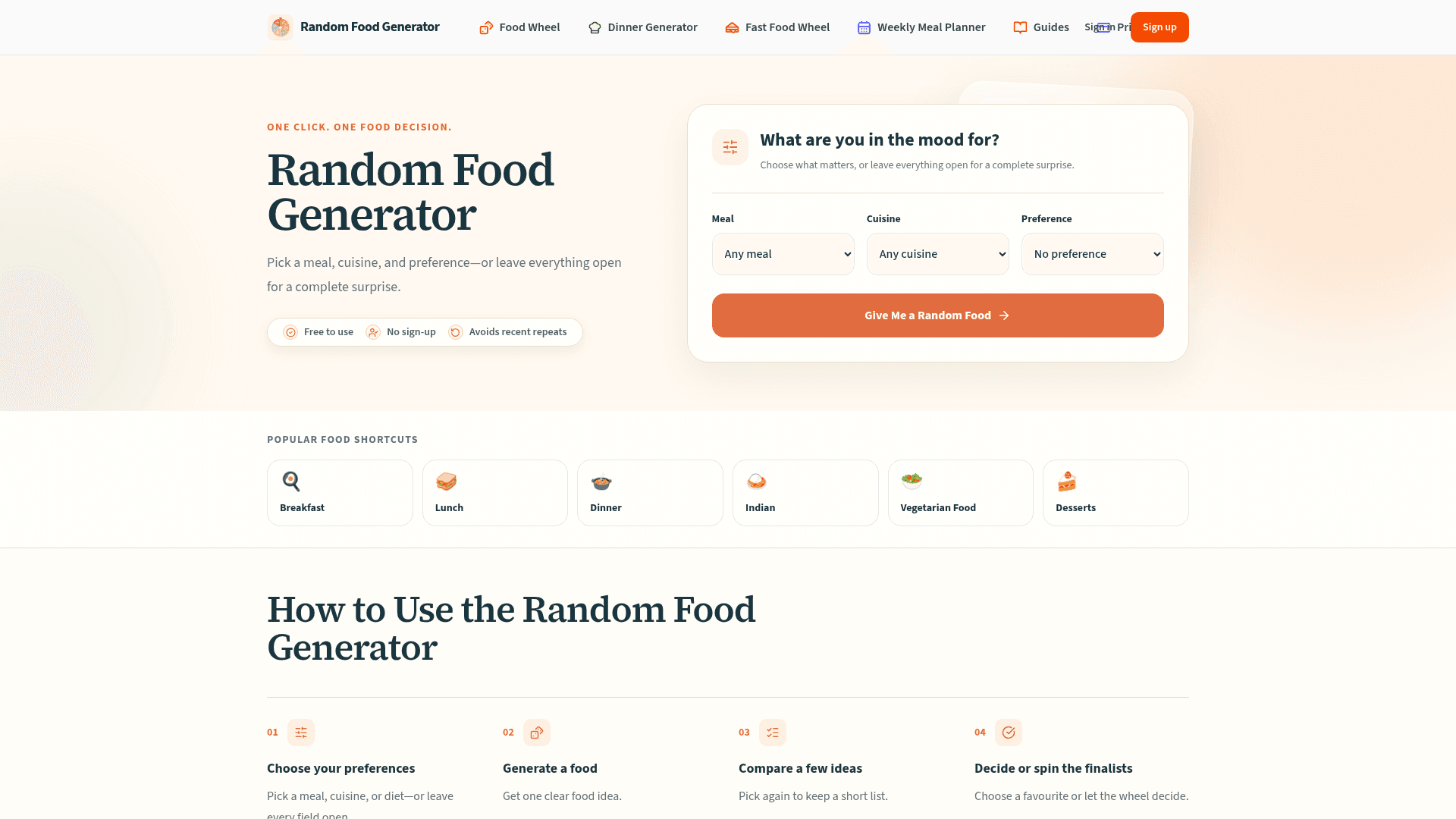
About this app
Free browser tool to decide what to eat by meal, cuisine, or diet. One idea at a time, compare recent picks, or spin a Food Wheel. No account required. Not AI. Free to use; optional Premium $29.99/yr.
Key features
- 1One-click random food generator with Meal, Cuisine and Preference filters — no account required.
- 2Food Wheel that loads recent picks automatically for group tie-breaking.
- 3Premium at $29.99/yr adds grocery lists from verified recipes, plan history and reusable templates.
Target customer profile
Drawn from the product itself, not from a survey.
Demographic
The Tired Home Cook
Pain points
Decision fatigue when planning meals daily.
Primary needs
Quick, foolproof meal suggestions to save mental energy.
Demographic
The Busy Professional/Student
Pain points
No time to browse endless recipes or menus.
Primary needs
Instant, practical food ideas for fast lifestyles.
Demographic
The Group Decider
Pain points
Disagreements among family or friends about what to eat.
Primary needs
An unbiased tool (like the Food Wheel) to settle food arguments.
Scout Review
Written by AI from measured evidence, scored out of 100.
Random Food Generator is a clean, fast, free browser tool that does exactly what its name says: pick a meal, cuisine and diet, hit one button, get a food idea. No account, no AI, no friction. The landing page is warm and editorial, the Lighthouse numbers are excellent (93 mobile / 98 desktop), and the accessibility baseline is strong at 97. The Premium tier at $29.99/yr adds grocery lists and plan history, which is a sensible upsell. Where it stumbles: a header nav collision, placeholder-grade shortcut icons, low-contrast secondary text, and a security posture that stops at the basics (no HSTS, CSP or DMARC). It's a competent, well-executed utility — not a category-definer, but a genuinely useful one.
Measure by measure
Usability
62Three dropdowns and one orange button above the fold — the promise is kept. The four-step explainer and FAQ help, but the page buries the tool under a lot of scroll-heavy copy.
Design
58Warm, editorial palette and disciplined type hierarchy give the hero real polish. Undone by a header nav collision, placeholder-grade shortcut icons, and low-contrast captions.
Speed
82Lighthouse mobile 93/100 with LCP under 1s and near-zero CLS; desktop 98/100. Genuinely snappy for a content-heavy landing page.
Security
60HTTPS enforced with frame protection, Referrer-Policy and Permissions-Policy set, but no HSTS, no CSP, and no DMARC. Standard hygiene for a small free tool; no audits claimed.
Accessibility
78Lighthouse a11y 97/100 with only a contrast failure flagged. No a11y statement or multi-language support, but the automated baseline is strong.
Growth
58Real problem (decision fatigue), specific filters, and a $29.99/yr grocery-list upsell give it a wedge. But the category is crowded and the moat is thin.
Improvement areas
- Header nav collision obscures 'Sign In'; shortcut icons look placeholder-grade.
- Low-contrast secondary text fails the one accessibility audit both instruments flag.
- Security headers incomplete: no HSTS, no CSP, no DMARC (7/12 checklist points).
Design & Usability
The landing page is genuinely well-crafted: a warm cream-and-teal palette, serif headlines over clean sans body, and a hero form with three labelled dropdowns and one unmistakable orange CTA. The 'How to Use' four-step row and FAQ do real work explaining the tool without a click. But craft errors undercut it — the header nav collides at the right edge, obscuring 'Sign In', and the 'Popular Food Shortcuts' row uses inconsistent emoji icons that read as placeholders next to the polished headline. Secondary text is small and low-contrast. Usability is solid for the core loop (no signup, one click, recent-repeat avoidance) but the page stacks a lot of explanatory copy before any tool action beyond the hero — a lot of scroll for a 'one click' promise.
Speed & Security
Speed is the standout: Lighthouse mobile 93/100 with LCP 986ms, CLS 0.006, TBT 164ms, and desktop 98/100. For a content-heavy landing page with multiple sections and guides, that's genuinely snappy and reflects a lean static build. Security is competent but unremarkable: HTTPS enforced, frame protection, X-Content-Type-Options, Referrer-Policy and Permissions-Policy all present, SPF configured — but no HSTS, no CSP, and no DMARC, landing at 7/12 on the header checklist. No SOC 2, ISO, pen-test or bug bounty claims appear anywhere on the site, which is normal for a free indie tool but caps the ceiling. No breach history or security incidents surfaced in the collected evidence.
Accessibility & Growth
Accessibility scores well on automation — Lighthouse 97/100 — with a single failing audit: insufficient color contrast, which the visual audit independently confirmed on captions and FAQ text. No accessibility statement, no multi-language support, English-only copy. On growth: the problem is real (decision fatigue is a daily tax), the target segments are named (tired home cook, busy professional, group decider), and the $29.99/yr Premium tier adds grocery lists, plan history and templates — a concrete upsell beyond the free generator. The wedge is one-click randomness plus a Food Wheel for group tie-breaking, which is genuinely different from Allrecipes' browse-and-filter model. But the category is crowded, the moat is thin, and the domain is 0.2 years old — early stage, with room to grow but no structural advantage yet.
Conclusion
If you've ever stood in front of an open fridge at 7pm with no idea what to make, this tool solves that in one click and zero signup. It won't replace your recipe app or your meal planner, and it doesn't pretend to. What it does — random, filtered, repeat-avoiding food suggestions plus a wheel for group decisions — it does quickly and cleanly. Fix the nav collision, the contrast, and the placeholder icons, and this goes from 'nice free tool' to 'genuinely polished free tool.' For now, it's a solid B+ that earns its bookmark.
Suggestions for improvement
- Fix the header nav collision at the right edge — 'Sign In' is currently overlapped by an icon and the Pricing link.
- Replace the inconsistent emoji shortcut icons with a coherent icon set; they read as placeholders next to the polished headline.
- Raise contrast on captions, FAQ answers and card descriptions — both Lighthouse and the visual audit flagged it.
- Add HSTS, a Content-Security-Policy and DMARC to close the obvious gaps in the security header checklist.
Alternatives comparison
Named competitors, point by point. Nobody paid to appear here or to be left out.
 Random Food Generator | Recipe Search Engines | Meal Planning Apps | |
|---|---|---|---|
| Core approach | One-click random food pick with filters | Searchable recipe database with manual filtering | Structured weekly meal planning |
| Account required | No — free to use without signup | Optional account for saving recipes | Account required for planning |
| Group decision tool | Food Wheel for spinning finalists | None | None |
| Pricing | Free; Premium $29.99/yr | Free with ads | Subscription-based |
| Grocery list generation | Premium only, from verified recipes | Per-recipe ingredient lists | Yes, integrated with plans |
Recipe Search Engines
Traditional recipe sites require manual filtering.
Meal Planning Apps
Dedicated planning apps can be complex.
Comparing options? See Random Food Generator alternatives, scored side by side
More Lifestyle & Entertainment apps
View all Lifestyle & Entertainment
Factory Direct Mattress Overland Park
92A locally-owned mattress store in Overland Park, KS offer...

RoomCreator
92An AI-powered interior and exterior design tool that tran...

SheetScroll
90> You play; SheetScroll turns the page. It listens through the microphone or a MIDI piano and holds the page until it's sure where you are.

Hireci
89Save every recipe. Plan every meal.

TUNL - Cave Flyer
89A hold-to-thrust cave flyer with a new daily level, ghost races, and a global leaderboard.

Portrait Gift
88AI-powered personalized face swap art platform creating c...

TranscriptYou
88Free YouTube transcript generator with timestamps and AI ...

Roami eSIM
88A global travel eSIM app offering instant activation, no ...

FaceSwapAI
87AI face swap for photos, videos, GIFs with free trial.

youtubetomp3.ink
87Free online YouTube to MP3 converter with no signup or so...

InviteVia
87InviteVia is a digital invitation platform for creating beautiful online invitations for weddings, birthdays, engagements, parties, and special events. Choose a template, customize your invitation, collect RSVPs, and share it instantly through WhatsApp, Instagram, SMS, or a simple link. No guest accounts or app downloads required.

Coloring Pages Pro
87A massive collection of free printable coloring pages for...


A platform dedicated to providing unbiased reviews of newly launched applications, analyzing everything from their features to their full potential.
info@scoutforge.net© 2026 Scoutforge. All rights reserved.
