Cycling through all six. Tap any point to stop.
Measured on six things
Safe Average shows your live average speed inside Europe's average-speed camera zones and the exact steady speed to hold to stay under the limit.
Security
52HTTPS enforced with HSTS, SPF and DMARC in place, and a clear privacy stance (GPS stays on device, no ads, no data selling). But 6/12 header checklist points and no CSP, frame protection or published audits. Solid for an indie app, unremarkable for the category.
Screenshots
1 / 1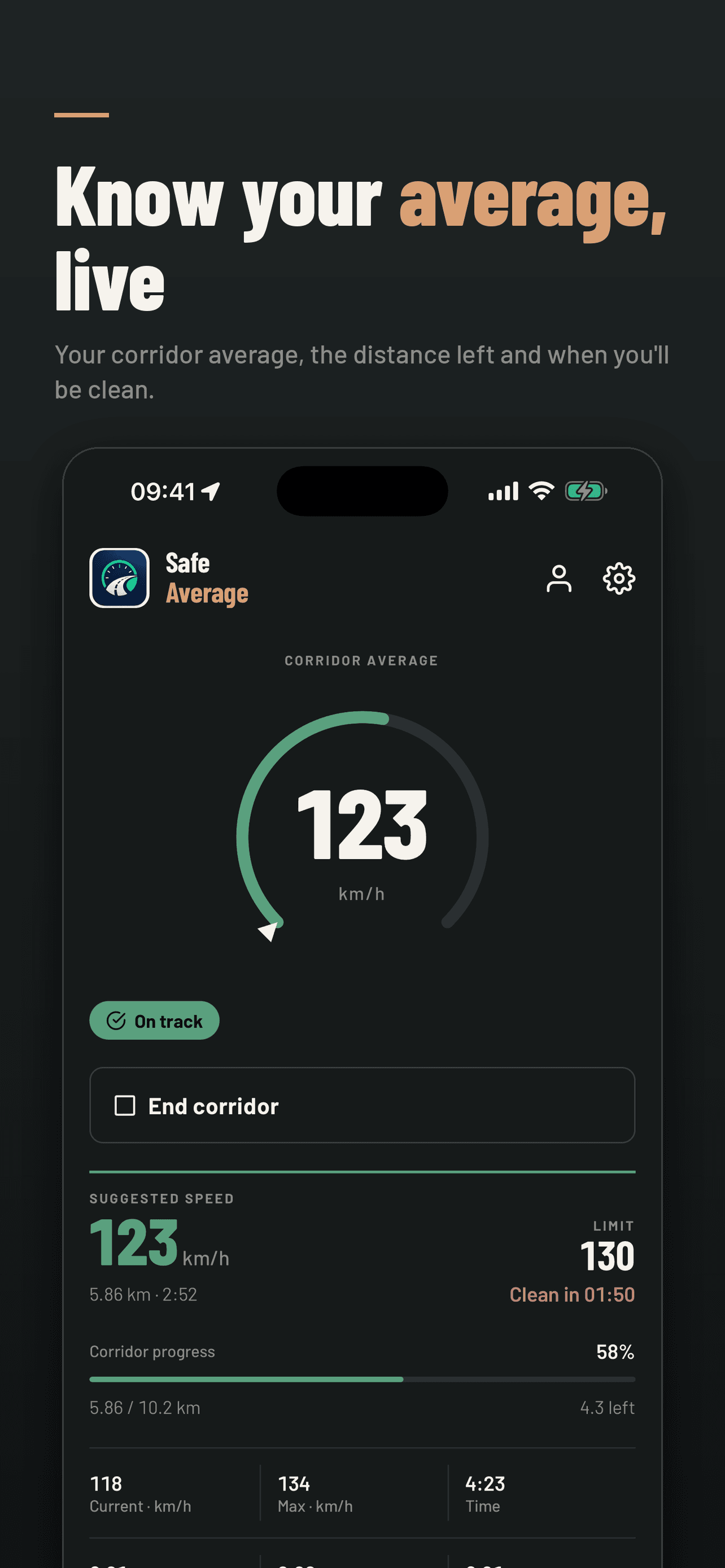
About this app
Average-speed cameras (section control, SPECS, Tutor, tramo, trajectcontrole) measure your speed over the whole corridor, not at one point. Safe Average shows your live rolling average and the exact steady speed to hold so you stay under the limit the whole way. Publicly known corridors and fixed cameras in Europe are built in, except in Germany, France and Switzerland. Free to start; Safe Average Pro adds automatic corridor start and finish, a trip planner that shows known zones on a route before you leave, and detailed trip reports. No ads; your GPS track stays on your phone. It is a compliance and safety tool, not a camera detector.
Key features
- 1Live rolling corridor average with a suggested steady speed to hold through average-speed zones.
- 2Auto-start and auto-finish of known European corridors (Pro), plus fixed-camera alerts where legal.
- 3Trip planner that previews every known corridor and camera on a route before you leave (Pro).
- 4Privacy-first design: GPS track stays on the phone, no ads, no data selling.
- 5Nine-language interface across iOS and Android, with turn-by-turn navigation and EV stops on Pro.
Target customer profile
Drawn from the product itself, not from a survey.
Demographic
Daily commuters in Europe who drive the same point-to-point speed-camera routes
Pain points
Losing track of average speed in long average-speed zones and risking fines
Primary needs
Reliable automatic zone detection and a clear suggested speed to hold
Demographic
Ride-share and delivery drivers who rack up high mileage across multiple cities
Pain points
Unfamiliar fixed cameras and evolving average-speed corridors on new routes
Primary needs
Camera alerts, trip planning with corridor previews, and drive history reports
Demographic
Privacy-conscious drivers and EV owners who want navigation without data tracking
Pain points
Planning charging stops on longer trips and keeping their GPS track private
Primary needs
GPS track stays on the phone, no ads, EV charging stops in the trip planner (Pro)
Demographic
Frequent cross-border travelers and holiday road-trippers in Europe
Pain points
Different speed rules and cameras in each country, plus toll and vignette confusion
Primary needs
Multi-country corridor data, toll/vignette info, and multilingual interface
Scout Review
Written by AI from measured evidence, scored out of 100.
Safe Average is a focused, well-built indie app for a real European driving problem: average-speed corridors that measure your whole stretch, not a single point. The app UI is disciplined and readable, the site is fast, the privacy stance is honest, and the wedge against Waze/Coyote/TomTom is genuine. The weak spots are the free/Pro split that gates the headline feature, small dim labels that won't survive daylight, thin security headers, and a coverage gap across three major European markets. It's a competent, clearly positioned product that knows exactly who it's for.
Measure by measure
Usability
66Clear top-to-bottom hierarchy on the drive screen: dial, state pill, suggested speed. Store badges sit above the fold on the homepage. But the tiny dim 'SUGGESTED SPEED' and 'LIMIT' labels will vanish in daylight, and the free/Pro split buries the useful bits behind €3.99/mo.
Design
71Judging the app UI from store screenshots: a disciplined dark interface with charcoal surfaces, off-white numerals and one amber accent. Semantic green/amber/red states read instantly while driving. Homepage copy contrast and the under-weighted 'End corridor' control are the weak spots.
Speed
88Lighthouse mobile 100/100 with LCP 780ms, CLS 0 and TBT 0ms; desktop 97/100. The marketing site is a lean static page that loads instantly. No lag complaints in collected evidence.
Security
52HTTPS enforced with HSTS, SPF and DMARC in place, and a clear privacy stance (GPS stays on device, no ads, no data selling). But 6/12 header checklist points and no CSP, frame protection or published audits. Solid for an indie app, unremarkable for the category.
Accessibility
78Lighthouse accessibility 100/100 with one failing audit on accessible-name matching. Ships in 9 languages across iOS and Android. No public WCAG statement, and the small dim labels flagged in the visual audit are a real-world legibility concern despite the automated score.
Growth
62A real, specific problem (corridor-average compliance) with a genuine wedge — live rolling average plus suggested speed — that Waze, Coyote and TomTom AmiGO don't center on. Privacy angle is a real differentiator. The Germany/France/Switzerland gap caps the addressable market.
Improvement areas
- Free/Pro split gates the headline feature (auto-start corridors) behind a subscription.
- Small dim labels ('SUGGESTED SPEED', 'LIMIT') are hard to read in daylight or at a glance.
- Security headers at 6/12 — no CSP, frame protection, Referrer-Policy or Permissions-Policy.
- No corridor coverage in Germany, France or Switzerland, three large European markets.
Design & Usability
The app UI is the product here, and it's the strongest part: a dark charcoal interface with a single amber accent, semantic green/amber/red states that read at a glance, and a dial that puts the corridor average front and centre. The homepage is clean marketing that matches the app's brand. Usability is competent but uneven — the hierarchy on the drive screen is clear, the download path is above the fold, and the app ships in nine languages. But the tiny dim 'SUGGESTED SPEED' and 'LIMIT' labels will be hard to read in daylight, the 'End corridor' control reads as a form field rather than a primary action, and the free/Pro split puts the app's headline feature (auto-start corridors) behind a subscription.
Speed & Security
Speed is the standout: Lighthouse mobile 100/100 with a 780ms LCP, zero CLS and zero TBT, and 97/100 on desktop. The marketing site is a lean static page that loads instantly, and there are no lag complaints in the collected evidence. Security is more mixed. HTTPS is enforced with HSTS, SPF and DMARC are present, and the privacy policy is unusually clear — GPS track stays on the device, no ads, no data selling. But the header checklist lands at 6/12 with no CSP, frame protection, X-Content-Type-Options, Referrer-Policy or Permissions-Policy, and there are no published audits, SOC 2 or bug bounty. Fine for an indie app; not a differentiator.
Accessibility & Growth
Accessibility scores 100/100 on Lighthouse with one failing audit on accessible-name matching, and the app ships in nine languages across iOS and Android — genuinely good coverage for a small product. The caveat is that automated checks don't catch daylight legibility, and the visual audit flags small dim labels that will be hard to read while driving. Growth is the interesting question: the problem is real and specific (average-speed corridors measure the whole stretch, not a point), and the wedge — live rolling average plus a suggested steady speed — is something Waze, Coyote and TomTom AmiGO don't center on. The privacy angle (GPS stays on phone, no ads) is a real differentiator. The cap is coverage: no corridors in Germany, France or Switzerland, three large European markets.
Conclusion
If you drive the same average-speed corridors every day and you're tired of doing mental arithmetic at 120 km/h, Safe Average is the most direct tool for that job. The free tier is enough to test the idea; Pro is where the automation lives. Just don't expect it to help in Germany, France or Switzerland, and don't expect the security headers to impress anyone. For the price of a coffee a month, it's a reasonable trade — provided you're in a covered country and you actually drive those corridors.
Suggestions for improvement
- Move auto-start corridors into the free tier or a cheaper tier — gating the feature the app is named after is a hard sell.
- Increase the size and contrast of 'SUGGESTED SPEED' and 'LIMIT' labels so they're readable in daylight and at a glance.
- Add CSP, frame protection, Referrer-Policy and Permissions-Policy headers — cheap wins that close the 6/12 gap.
- Publish a coverage roadmap for Germany, France and Switzerland, or explain the legal constraint clearly on the site.
Alternatives comparison
Named competitors, point by point. Nobody paid to appear here or to be left out.
 Safe Average |  Waze | Coyote | TomTom AmiGO | |
|---|---|---|---|---|
| Average-speed corridor tracking | Yes — live rolling average plus suggested steady speed, core feature | No — point camera alerts only | No — point camera and hazard alerts | No — point camera warnings |
| Auto-start of known zones | Yes (Pro) — corridors arm themselves on approach | No — alerts only | No — alerts only | No — alerts only |
| Trip planner with corridor preview | Yes (Pro) — route with every known corridor and camera | Route planning, no corridor preview | No corridor preview | Route planning, no corridor preview |
| Privacy — GPS track stays on device | Yes — track stays on phone, no ads, no data selling | No — community data shared with Google | No — account and location data used for service | No — TomTom account and telemetry |
| Pricing | Free tier; Pro €3.99/mo or €29.99/yr, 7-day trial | Free | Subscription for premium features | Free |
| Multi-language support | 9 languages (EN, DE, FR, IT, ES, PL, CS, NL, TR) | Many languages | Several European languages | Many languages |
Waze
Community-driven navigation app with speed camera and traffic alerts.
Coyote
Speed camera and road hazard alert app.
TomTom AmiGO
Free navigation app with speed camera warnings.
Comparing options? See Safe Average alternatives, scored side by side
More Travel & Exploration apps
View all Travel & Exploration
Peanut Tennis
89Find tennis courts & tournaments in Australia

Roami eSIM
88A global travel eSIM app offering instant activation, no ...

Sensecast
88Weather app that explains the forecast

PiSpace Sky
86Free night-sky planner for 31,842 cities that rates each night on cloud cover, darkness and moonlight, then adds planet positions, Moon times, aurora outlooks and ISS passes.

TheBean.ai
84Adaptive AI personal trainer that evolves with your progr...

EchoWi
83Track and optimize your brand's visibility in AI answers.

Stampsy App
83Find every country you've been to in your photos and collect a passport stamp for each one.

Bracket2026
82Interactive 48-team World Cup 2026 bracket predictor with...

Vote-n-Venture
79AI-powered group travel planning app that simplifies decision-making with collaborative voting and bookable itineraries.

SpeakSpots
78An AI-powered travel assistant that creates personalized itineraries via WhatsApp, perfect for quick and easy trip planning.
Remember
78An iOS app that enhances memory by capturing, tagging, and organizing items with smart contextual features.

Suitpax
78AI-powered CRM for corporate travel, streamlining workflows with AI assistants for itinerary planning and expense tracking.


A platform dedicated to providing unbiased reviews of newly launched applications, analyzing everything from their features to their full potential.
info@scoutforge.net© 2026 Scoutforge. All rights reserved.
