Cycling through all six. Tap any point to stop.
Measured on six things
Free seating chart maker for weddings and events
Growth
68Real, specific problem (seating 100+ guests by hand) with a genuine wedge — automatic seating plus household and must/must-not rules — against Canva's manual typing. Clear segments (couples, planners, teachers) and a free unlimited-guest hook.
Screenshots
1 / 1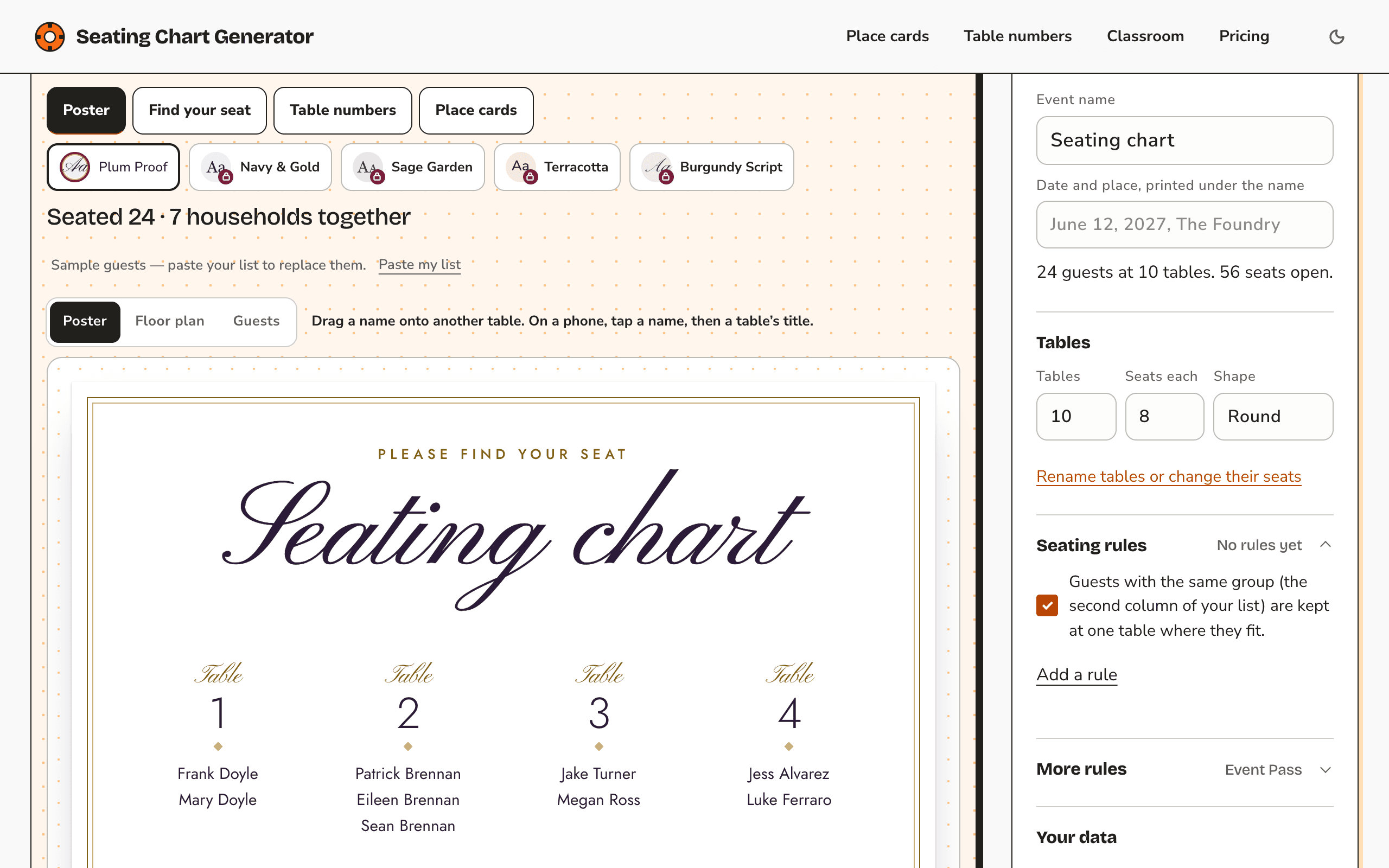
About this app
Seating Chart Generator turns a guest list into a seating chart and the print files that go with it, in your browser. Paste names from Google Sheets or Excel, or upload a CSV, choose the number of tables and seats, and press Seat guests. A household column keeps families together, and rules such as must sit together and must not sit together are applied automatically. The same chart prints as a seating poster, an A to Z find-your-seat list, table numbers and folded or flat place cards, in US Letter or A4. It is built for weddings, parties and other events with tables, and there is a page for classroom seating charts. There is no account, and your guest list stays in your browser and is never uploaded. The planner is free with no limit on guests; downloads carry a small watermark, and place cards come as a first test sheet. The Event Pass, US$14.90 once for 90 days with no renewal, removes the watermark and prints every card; Planner is US$12.90 a month or US$79 a year.
Key features
- 1Paste from Google Sheets/Excel or upload CSV; automatic seating with household grouping and must/must-not-sit-together rules.
- 2Prints seating poster, A-to-Z find-your-seat list, table numbers, and folded or flat place cards in US Letter or A4.
- 3No account required; guest list stays in the browser and is never uploaded. Free tier with unlimited guests.
Target customer profile
Drawn from the product itself, not from a survey.
Demographic
Couples planning a wedding
Pain points
Seating 100+ guests by hand in a spreadsheet
Primary needs
Seat everyone in one click, then adjust
Demographic
Party and event planners
Pain points
Keeping families together and some guests apart
Primary needs
Rules applied automatically
Demographic
Teachers
Pain points
Making a classroom seating plan
Primary needs
A printable chart from a class list
Scout Review
Written by AI from measured evidence, scored out of 100.
Seating Chart Generator is a focused, well-built browser tool that does one job properly: turn a guest list into a seating chart and the print files that go with it. The free tier is genuinely useful — unlimited guests, automatic seating, rules, and a watermark-free poster — and the paid Event Pass at US$14.90 for 90 days is a sensible one-time price for a single wedding. It is fast (95/97 Lighthouse), accessible (100/100 audit), and secure by design (no account, guest list stays in the browser, strong headers). The main weaknesses are marketing-side: a long, text-heavy homepage and trust microcopy that is too small to read. Against Canva's manual templates and AllSeated's venue platform, the automatic-seating wedge is real.
Measure by measure
Usability
74No signup, paste-or-CSV with a column preview, one-click seating, and live status feedback ('Seated 24 · 7 households together'). Free/paid print expectations are set before download. Strong onboarding-to-value path.
Design
71Cohesive cream/orange/plum palette fits weddings, and the hero shows real product states instead of stock art. Undercut by tiny low-contrast trust microcopy and a very long, text-heavy scroll after the hero.
Speed
86Lighthouse mobile 95/100 (LCP 2.0s, CLS 0, TBT 24ms) and desktop 97/100. Zero layout shift and minimal blocking time — the tool loads and responds fast on both form factors.
Security
7611/12 security headers (HSTS, CSP, frame protection, Referrer-Policy, SPF, DMARC); only Permissions-Policy missing. No-account, in-browser data model limits exposure. No SOC 2/ISO claims, but none expected at this stage.
Accessibility
80Lighthouse accessibility 100/100 with responsive, phone-friendly layout. No published WCAG statement or multi-language support, so the score sits in the upper band on automated evidence alone.
Growth
68Real, specific problem (seating 100+ guests by hand) with a genuine wedge — automatic seating plus household and must/must-not rules — against Canva's manual typing. Clear segments (couples, planners, teachers) and a free unlimited-guest hook.
Improvement areas
- Hero trust microcopy is tiny and low-contrast; the key 'free, no sign-up' message is the hardest text to read.
- Homepage is very long and text-heavy after the hero, delaying the next product action.
- No published accessibility statement or WCAG claim despite a 100/100 audit; no multi-language support.
- Missing Permissions-Policy header; no SOC 2/ISO claims (expected at this stage but worth noting).
Design & Usability
The homepage sells the actual tool, not a fantasy: the hero mockup shows real Poster/Floor plan/Guests tabs, a dragged name and a 'Saved on this device' state, so the interaction model is legible before you read a word. The cream/orange/plum palette suits the wedding category and carries through the poster previews and print-options table. The weak spot is hierarchy at the edges — the trust line ('Free. Unlimited guests. No sign-up.') is the smallest, lightest text in the hero, and the page runs long and text-heavy after the first screen. Usability is the standout: no account, paste from Sheets/Excel or upload CSV with a column preview, one click to seat, and live feedback like 'Seated 24 · 7 households together'. Free-versus-Event-Pass print expectations are set before any download, and the free poster is watermark-free.
Speed & Security
Speed is measured and strong: Lighthouse mobile 95/100 (LCP 2.0s, CLS 0, TBT 24ms) and desktop 97/100, so the tool loads and responds quickly on both phone and desktop with no layout shift. Security is solid for the stage: the HTTP probe found HTTPS enforced with HSTS, CSP, frame protection, X-Content-Type-Options, Referrer-Policy, SPF and DMARC — 11 of 12 checklist points, with only Permissions-Policy missing. The no-account, in-browser data model means the guest list never touches a server, which is a real privacy advantage for a product handling names and meal preferences. There are no SOC 2 or ISO claims, but none are expected at this scale; payments run through Waffo as merchant of record with a stated 14-day refund.
Accessibility & Growth
Accessibility scores 100/100 on the Lighthouse axe-core audit, and the site is responsive with explicit phone support ('Works on your phone', tap-a-name-then-a-table instructions). There is no published WCAG statement or multi-language support, so the score rests on automated evidence plus a clean responsive layout rather than documented conformance. Growth is the interesting one: the problem — seating 100+ guests by hand — is real and painful, and the wedge is concrete. Canva gives you templates and makes you type every name into the right table; AllSeated is a venue/planner platform with floor plans. This tool seats everyone automatically, keeps households together, and applies must-sit-together and must-not-sit-together rules, with a free unlimited-guest planner and a low one-time Event Pass. The segments (couples, planners, teachers) are specific and the category has headroom, though the domain is only months old, so discovery is the open question.
Conclusion
If you are seating a wedding, a party or a class and you have been dragging names around a spreadsheet, this is worth an afternoon. Start free, paste your list, hit Seat guests, and only pay the US$14.90 Event Pass if you need the full place-card pack and no watermark. The product earns its keep on the free tier alone; the paid tier is a fair price for the print files. The thing to watch is whether anyone finds it — the tool is better than its marketing currently lets on.
Suggestions for improvement
- Bump the hero trust microcopy ('Free. No sign-up. Nothing uploaded.') to readable size and contrast — it is the key message and currently the hardest text to read.
- Trim the post-hero scroll: collapse the explanatory sections or add a second CTA so users reach a product action sooner.
- Publish a short accessibility statement and consider a second language — the 100/100 audit deserves to be stated, not just passed.
- Add a Permissions-Policy header to complete the security checklist, and surface the no-upload privacy model more prominently as a selling point.
Alternatives comparison
Named competitors, point by point. Nobody paid to appear here or to be left out.
 Seating Chart Generator |  AllSeated |  Canva | |
|---|---|---|---|
| Automatic seating from a guest list | Yes — one click seats everyone, with rules applied | Floor-plan based; seating is manual drag-and-drop | No — you type each name into the right table yourself |
| Seating rules (must sit together / must not sit together) | Yes — plus household grouping and advanced rules on Event Pass | Limited; manual arrangement | No automated rules |
| Printable outputs (poster, place cards, find-your-seat list) | Yes — poster, A-Z list, table numbers, place cards, US Letter/A4 | Floor plans and layouts; print varies by plan | Templates you customize and export |
| Account required | No — guest list stays in the browser | Yes — account/platform login | Yes — Canva account required |
| Pricing model | Free tier; Event Pass US$14.90 one-time/90 days; Planner US$12.90/mo or US$79/yr | Subscription tiers aimed at venues/planners | Free tier; Canva Pro subscription |
AllSeated
Event planning platform with floor plans, aimed at venues and planners.
Canva
Has seating chart templates, but you type every name into the right table yourself.
Comparing options? See Seating Chart Generator alternatives, scored side by side
More Lifestyle & Entertainment apps
View all Lifestyle & Entertainment
Factory Direct Mattress Overland Park
92A locally-owned mattress store in Overland Park, KS offer...

RoomCreator
92An AI-powered interior and exterior design tool that tran...

SheetScroll
90> You play; SheetScroll turns the page. It listens through the microphone or a MIDI piano and holds the page until it's sure where you are.

Hireci
89Save every recipe. Plan every meal.

TUNL - Cave Flyer
89A hold-to-thrust cave flyer with a new daily level, ghost races, and a global leaderboard.

Roami eSIM
88A global travel eSIM app offering instant activation, no ...

Portrait Gift
88AI-powered personalized face swap art platform creating c...

TranscriptYou
88Free YouTube transcript generator with timestamps and AI ...

Random Movie Generator
88Free random movie picker from 142k+ films—no sign-up.

FaceSwapAI
87AI face swap for photos, videos, GIFs with free trial.

youtubetomp3.ink
87Free online YouTube to MP3 converter with no signup or so...

InviteVia
87InviteVia is a digital invitation platform for creating beautiful online invitations for weddings, birthdays, engagements, parties, and special events. Choose a template, customize your invitation, collect RSVPs, and share it instantly through WhatsApp, Instagram, SMS, or a simple link. No guest accounts or app downloads required.


A platform dedicated to providing unbiased reviews of newly launched applications, analyzing everything from their features to their full potential.
info@scoutforge.net© 2026 Scoutforge. All rights reserved.
