Cycling through all six. Tap any point to stop.
Measured on six things
Reverse photo identity check across public web pages
Security
26Probe scored 1/13: HTTPS not enforced, no HSTS, CSP, frame protection, or secure cookies; DMARC missing. Claims 24-hour media retention but publishes no SOC 2, pen-test, or bug bounty.
Screenshots
1 / 1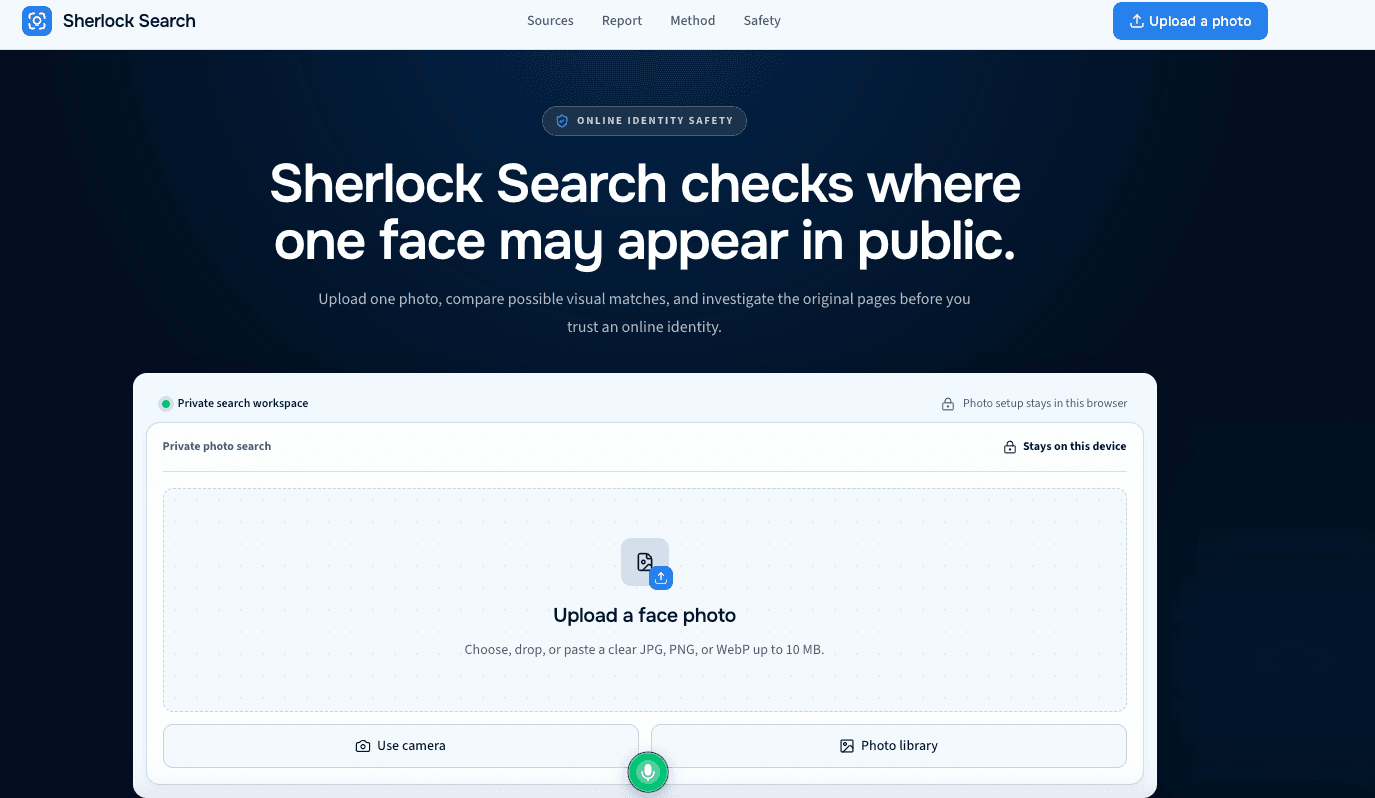
About this app
I recently stumbled upon Sherlock Search and it's quickly become one of my go-to tools for verifying online identities. In a world where a single photo can end up in a dozen places, Sherlock Search lets you upload one face photo and then checks public web indexes to find possible matches. It's not about spying on private profiles; it's about uncovering where a face might appear on publicly accessible pages. The process is straightforward: you upload a clear JPG, PNG, or WebP, adjust the crop, confirm free access (no registration needed), and then it runs a visual comparison against public sources. You get a confidence score—like 91% Strong Match or 34% Unlikely—but the real value is that every match comes with a link to the original source. You can then inspect the context yourself: names, dates, captions, and so on. It's a huge help for anyone worried about impersonation or just curious about their digital footprint. The interface is clean and the privacy policy is reassuring: medi...
Key features
- 1Upload one face photo (JPG, PNG, WebP) and search public web indexes for possible visual matches — no registration required
- 2Confidence-scored results (Strong/Likely/Unlikely Match) with a source link on every match so you can inspect the original page
- 3Privacy framing: browser-side photo setup, up to 24-hour media retention, no card or subscription during free access
Target customer profile
Drawn from the product itself, not from a survey.
Demographic
Privacy-conscious individuals
Pain points
Worried about photo misuse or impersonation online
Primary needs
Quickly find where their face appears publicly
Demographic
Online daters
Pain points
Concerned about catfishing or fake profiles using their photos
Primary needs
Verify if someone is using their image on dating apps
Demographic
Social media users
Pain points
Want to check if their profile photo is reused elsewhere
Primary needs
Detect unauthorized use of their photos across platforms
Demographic
Journalists & OSINT researchers
Pain points
Need to verify identity of subjects in public images
Primary needs
Trace image origins and corroborate identities
Scout Review
Written by AI from measured evidence, scored out of 100.
SherlockSearch is a face-search tool that checks public web indexes for possible visual matches from a single uploaded photo, returning confidence scores and source links. The pitch is responsible: no registration, currently free, 24-hour media retention, and a repeated warning that a score is a lead, not a verdict. The homepage is well-crafted, the speed numbers are strong (mobile 87, desktop 97), and the accessibility audit is clean apart from one contrast failure. The problems are structural. Security scored 1/13 on the header probe — HTTPS not enforced, no CSP, no HSTS, no secure cookies — which is hard to square with asking users to upload their face. There's no help center, no third-party reviews, and no compliance signals. The category is crowded: PimEyes for facial search, Google and TinEye for reverse image, face-check.net as a direct peer. SherlockSearch's edge is honesty and presentation, not technology. It's a promising early-stage tool with a real security gap and a differentiation problem.
Measure by measure
Usability
63No registration, currently free, and a four-stage flow spelled out on the homepage with imperative verbs. The FAQ covers six real questions, but there's no help center or docs beyond it.
Design
71Dark navy hero with a purpose-built upload card, color-coded match badges, and a tight 12-platform grid. Repeated light-blue sections flatten hierarchy and OnlyFans/Tinder logos get equal weight to mainstream apps.
Speed
72Lighthouse mobile 87/100 (LCP 3.9s, CLS 0, TBT 16ms, FCP 1.2s) and desktop 97/100. Layout is stable and low-blocking; the 3.9s mobile LCP is the one real drag.
Security
26Probe scored 1/13: HTTPS not enforced, no HSTS, CSP, frame protection, or secure cookies; DMARC missing. Claims 24-hour media retention but publishes no SOC 2, pen-test, or bug bounty.
Accessibility
79Lighthouse accessibility 96/100 with one failing audit for insufficient color contrast. Semantic headings and a responsive layout are present, but there's no WCAG statement or multi-language support.
Growth
58Real problem — photo misuse and catfishing are growing — with a specific wedge: source-linked matches and confidence bands instead of raw image dumps. But PimEyes already owns facial search.
Improvement areas
- Security headers are almost entirely absent (1/13 probe score): HTTPS not enforced, no HSTS, CSP, frame protection, or secure cookies
- No help center, docs, or third-party reviews beyond the homepage FAQ — hard to verify the flow before uploading a face
- Differentiation is presentation, not capability — PimEyes, Google, and TinEye already cover facial and reverse image search at scale
Design & Usability
SherlockSearch's homepage is genuinely well-built for an early-stage tool. The dark navy hero with a centered upload card feels purpose-built rather than templated, the 12-platform grid is tight, and the color-coded match badges (green 91%, yellow 68%, red 34%) make the report preview scannable at a glance. The four-stage process cards use imperative verbs that reduce ambiguity, and the FAQ answers six real questions about access, timing, and retention. The weak spots are visual: repeated light-blue section backgrounds flatten the hierarchy, and placing OnlyFans and Tinder logos at the same weight as LinkedIn and YouTube creates unintended emphasis. Usability is solid on the surface — no registration, currently free, clear CTAs in three places — but there's no help center, no docs, and no third-party reviews to confirm the flow holds up in practice. It's a competent, honest landing page that stops short of being memorable.
Speed & Security
Speed is the strongest measured dimension. Lighthouse mobile performance lands at 87/100 with CLS 0 and TBT 16ms, and desktop hits 97/100 — the layout is stable and the main thread stays clear. The one real drag is mobile LCP at 3.9s, which means the upload card takes a beat to arrive on a phone. Security is the opposite story. The HTTP probe scored 1/13: HTTPS is not enforced, and there's no HSTS, CSP, frame protection, X-Content-Type-Options, Referrer-Policy, Permissions-Policy, or secure cookies. SPF is present but DMARC is missing. For a tool that asks users to upload a face photo and claims 24-hour media retention, the absence of transport enforcement is a genuine problem, not just a missing badge. No SOC 2, ISO, pen-test, or bug bounty signals were found. The privacy copy is reassuring; the infrastructure behind it is not.
Accessibility & Growth
Accessibility scores well on automated checks: Lighthouse gives 96/100, with the single failing audit being insufficient background/foreground color contrast. That's a real issue because the color-coded confidence badges are the core of the report UI, so the one thing failing contrast is the thing carrying the meaning. There's no accessibility statement, no WCAG conformance claim, and no multi-language support, so the 96 is a floor, not a ceiling. On growth, the idea holds up: photo misuse, catfishing, and impersonation are real, growing problems, and the target segments — privacy-conscious individuals, online daters, OSINT researchers — are specific. The wedge is source-linked matches with confidence bands and an explicit 'score is not a verdict' charter, which is more responsible than raw reverse-image dumps. But PimEyes already owns facial search with a real index, Google and TinEye own reverse image search at scale, and face-check.net is a direct peer. SherlockSearch's differentiation is presentation and caution, not capability — a defensible niche, not a moat.
Conclusion
The honest read: SherlockSearch is a well-presented, fast, free face-search tool with a genuinely responsible framing and a security posture that doesn't match its own privacy copy. If you're curious about your digital footprint and want source links rather than a black-box score, it works and costs nothing. If you're uploading a photo you care about, the missing HTTPS enforcement and absent security headers should give you pause until they're fixed. The growth path is real but narrow — PimEyes and Google aren't going anywhere, and 'we show you the source' is a feature, not a moat. Fix the transport security, publish a real privacy/security page, and this becomes a credible niche tool. Leave it as-is and it's a nice demo with a screen door.
Suggestions for improvement
- Enforce HTTPS site-wide and add HSTS, CSP, frame protection, and secure cookies — 1/13 on the security probe is the biggest fixable gap.
- Publish a security/privacy page detailing media handling, retention, and deletion, plus a DMARC record to match the 24-hour retention claim.
- Fix the color contrast on the confidence badges — they're the core of the report UI and the one failing Lighthouse audit.
- Add a help center or docs beyond the FAQ, and seed third-party reviews so users can verify the flow before uploading a face photo.
Alternatives comparison
Named competitors, point by point. Nobody paid to appear here or to be left out.
 SherlockSearch SherlockSearch |  Google Reverse Image Search Google Reverse Image Search |  TinEye TinEye |  PimEyes PimEyes | face check | |
|---|---|---|---|---|---|
| Search method | Upload one face photo; checks public web indexes for possible visual matches | Upload image or paste URL; finds visually similar images and pages | Upload image; finds where it appears online with tracking over time | Face search across the web for your own or a public figure's face | Face-based search for public image matches |
| Confidence scoring | Yes — Strong/Likely/Unlikely Match bands (85-100, 50-84, 0-49) | No explicit confidence score; visual similarity ranking | No confidence score; exact and modified match results | Yes — returns matches with confidence scores | Not specified in collected evidence |
| Source link on every match | Yes — every match links back to the original public page | Yes — links to pages containing the image | Yes — links to pages where the image appears | Yes — links to source pages, some behind paywall | Not specified in collected evidence |
| Registration required | No — no registration, currently free | No — free without account | No for basic use; account for advanced features | Account required for full results; paid tiers | Not specified in collected evidence |
| Pricing model | Currently free; existing paid credits remain saved | Free | Free tier; paid plans for API and advanced search | Paid subscription; limited free preview | Not specified in collected evidence |
| Media retention / privacy | Up to 24-hour media retention; browser-side photo setup claimed | Google privacy policy applies; no explicit retention window stated | Privacy policy applies; no explicit retention window stated | Privacy policy applies; opt-out available for indexed faces | Not specified in collected evidence |
Google Reverse Image Search
Google's reverse image search is a free tool that lets you upload an image or paste a URL to find visually similar images and pages that contain them. It's widely used but may not focus specifically on facial recognition.
TinEye
TinEye is a reverse image search engine that allows you to upload an image and find where it appears online. It's known for its accuracy and ability to track image usage over time.
PimEyes
PimEyes is a face search engine that lets you search for your own face or a public figure's face across the web. It's more focused on facial recognition and can return matches with confidence scores.
face check
Comparing options? See SherlockSearch alternatives, scored side by side
More Development & Engineering apps
View all Development & Engineering
CreateMyCoin
92A no-code Solana token creator that deploys SPL tokens in...

Vibe Coding Agent Skills
92A free, open-source platform offering 110 AI agent skills...

CC Switch
91Open-source desktop app for switching AI coding providers...

TaxID
90Fast EU VAT validation API for developers, covering 27 EU...

BeartIMAGE
88BeartIMAGE is a free, web-based image processing platform engineered for fast, bulk photo editing and conversion directly in your browser.

ButterKit
82macOS app for App Store screenshots: 3D mockups, auto-tra...

DataHabibi
88AI-powered Dubai real estate data platform with 12M+ DLD ...

Claw Messenger
88Claw Messenger is an iMessage API service that gives AI a...

PERM Processing Time: Current DOL Queue & History
88PERM Processing Time is an independent data analysis platform that helps users navigate the U.S. Department of Labor’s permanent labor certification process.

Credyt
87Real-time monetization infrastructure for AI products tha...

ProcessSpy
87A native macOS process explorer and advanced monitor that...

StockFit API
87A developer-first financial data API providing structured...


A platform dedicated to providing unbiased reviews of newly launched applications, analyzing everything from their features to their full potential.
info@scoutforge.net© 2026 Scoutforge. All rights reserved.
