Cycling through all six. Tap any point to stop.
Measured on six things
A floating macOS sidebar for terminal-first developers, s...
Growth
32Domain only 4 months old with no reviews, no repo, and minimal mentions; early indie launch stage with founder-driven signals.
Screenshots
1 / 1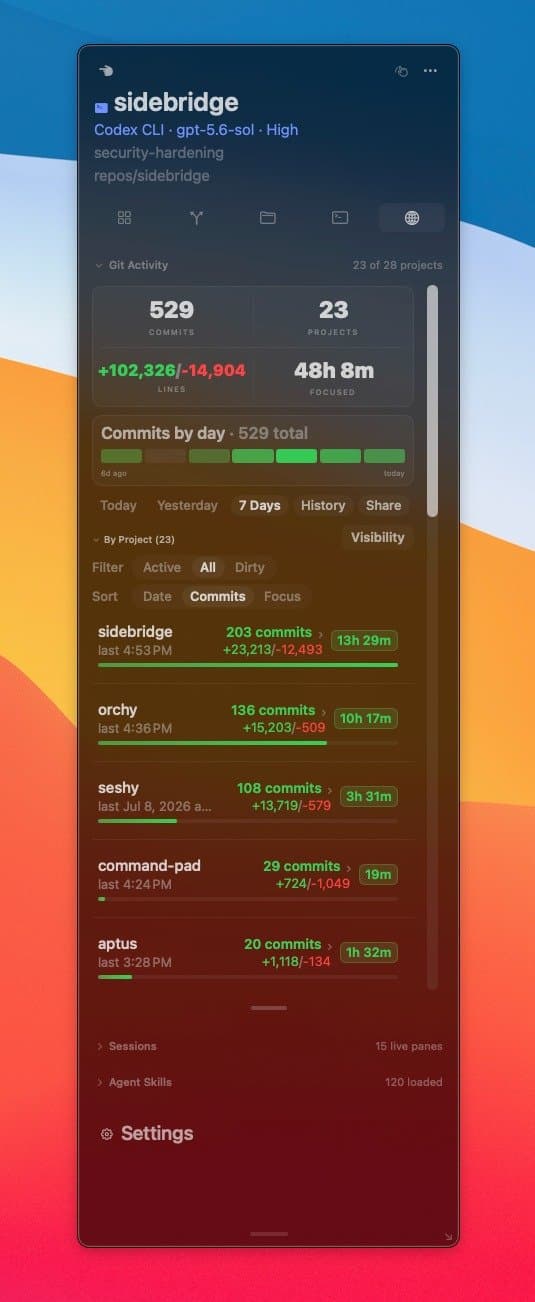
About this app
Sidebridge is a native macOS app that gives you peripheral vision for your terminal. As you switch between tmux panes, Codex, or Claude Code, Sidebridge automatically follows your focus and surfaces project context—git status, diffs, file trees, agent tool calls, and more—in a floating sidebar. No project picker, no mode switch. It's like having an IDE's awareness without the IDE. The free version covers active focus switching; the $15 Pro one-time purchase adds retained history, project search, exports, and an Agent Brief module that agents can write into. Works with Ghostty, iTerm2, Terminal, Warp, Alacritty, WezTerm, kitty, and the Codex/Claude Code desktop apps. Ships with 30+ themes like Dracula, Tokyo Night, and Solarized. Built for developers who live in the terminal and work across multiple repos and agents.
Key features
- 1Automatic pane-aware floating sidebar for git status, diffs, file trees, and agent activity
- 2Works with tmux, Ghostty, iTerm2, Warp, Alacritty, WezTerm, kitty plus Codex/Claude Code apps
- 3$15 one-time Pro unlock for retained history, exports, project search, and Agent Brief module
Target customer profile
Drawn from the product itself, not from a survey.
Demographic
Full-stack developers working with tmux and multiple repos
Pain points
Losing context when switching between terminal panes or projects; constantly checking git status, diffs, and agent output manually
Primary needs
Automatic project awareness that follows pane focus; quick access to git state, file changes, and agent activity without leaving the terminal
Demographic
AI-agent-heavy developers using Claude Code or Codex CLI daily
Pain points
Scattered agent sessions across multiple terminals; hard to track what each agent did, which files changed, and current goals without digging through chat logs
Primary needs
A unified panel showing agent tool calls, active goals, model config, and editable agent brief; history of agent activity per project
Demographic
Remote or solo developers who frequently context-switch between tasks
Pain points
Forgetting what they were working on after interruptions; spending time re-orienting to a project's state (branch, dirty files, recent commits, running processes)
Primary needs
A persistent sidebar showing "since last focus" summary, recent commits, file changes, and ongoing processes; ability to tuck or hide when not coding
Demographic
Mac power users who prefer native, minimal tools over browser-based dashboards
Pain points
Clunky, non-native project monitors that feel out of place on macOS; heavy IDE performance overhead just for project awareness
Primary needs
A lightweight, native Swift macOS app that feels at home with the system; floating sidebar that stays out of the way when not needed
Scout Review
Written by AI from measured evidence, scored out of 100.
Sidebridge is a focused, native macOS companion for terminal-centric developers who juggle tmux panes and AI coding agents. It solves a real context-switching pain point with automatic project awareness that feels like a lightweight IDE sidebar without leaving the terminal. The one-time pricing model and broad terminal compatibility are refreshing. At this early stage the product is light on documentation and external validation, but the core experience shown in screenshots and demos is already coherent and useful.
Measure by measure
Usability
62One-click download, automatic pane following, and clear free/Pro split make it simple to try; limited public docs or onboarding flow.
Design
68Clean dark UI with strong visual hierarchy, consistent green accents, and realistic product screenshots that match homepage mockups.
Speed
72Strong Lighthouse scores (desktop 97, mobile 81) and native local architecture keep it snappy with no cloud dependency.
Security
38Basic HTTPS only; missing HSTS, CSP, and any compliance claims or audits typical for a small native tool.
Accessibility
68Solid 90 Lighthouse score but several contrast and ARIA issues flagged; native macOS app should inherit system accessibility features.
Growth
32Domain only 4 months old with no reviews, no repo, and minimal mentions; early indie launch stage with founder-driven signals.
Improvement areas
- Public documentation, onboarding guides, and video demos are currently missing
- Security headers and any compliance signals are absent from the marketing site
- Zero third-party reviews or community presence after four months
Design & Usability
Sidebridge delivers a polished native macOS sidebar that visually matches its promise of peripheral vision for the terminal. The dark UI with green accents and dense but readable git/agent metrics feels purpose-built for developers already living in tmux and agent CLIs. The homepage makes the value proposition immediate with a prominent free download CTA and live demo panels showing focus switching in action. Usability benefits from zero configuration — it just follows your active pane across supported terminals and Codex/Claude apps. The free tier covers the core focus-following behavior while the $15 one-time Pro unlocks history and agent brief features without subscriptions. Minor friction comes from the lack of public documentation or onboarding guides, leaving new users to explore the floating sidebar on their own.
Speed & Security
Performance is a clear strength thanks to the native Swift implementation and local-only data handling, reflected in excellent Lighthouse desktop scores and acceptable mobile results. No cloud round-trips means the sidebar stays responsive even when switching rapidly between panes or agent sessions. Security posture is minimal but appropriate for a local desktop utility: HTTPS on the marketing site is present, yet advanced headers and any third-party audits are absent. With no user accounts or data leaving the machine, the risk surface stays small. The product prioritizes lightweight native feel over enterprise compliance theater.
Accessibility & Growth
Accessibility lands in a respectable range for a young native app, with Lighthouse flagging only a handful of contrast and ARIA issues that are common on new sites. As a macOS app it can leverage system-level screen reader and keyboard support, though explicit documentation is missing. Growth is the weakest dimension: the domain is under five months old with almost no third-party reviews, community presence, or GitHub activity. Early signals are limited to founder posts and directory listings. This is typical for a solo indie release but means buyers currently rely entirely on the landing page and word-of-mouth within terminal and agent-tooling circles.
Conclusion
For developers tired of manually checking git status and agent logs across scattered panes, Sidebridge offers a low-friction way to keep that context visible. Its youth shows in missing docs and traction, yet the native implementation and clear focus on agent-heavy workflows give it a strong foundation to grow from.
Suggestions for improvement
- Add a short getting-started video or interactive demo showing pane switching in real time
- Publish a minimal docs page covering supported terminals, Pro features, and troubleshooting
- Implement basic security headers (HSTS, CSP) on the marketing site even if the app itself is local
- Create a public changelog or roadmap to build early user confidence
Alternatives comparison
Named competitors, point by point. Nobody paid to appear here or to be left out.
 Sidebridge Sidebridge |  tmux-sidebar tmux-sidebar | Lazygit |  GitLens GitLens | |
|---|---|---|---|---|
| Agent / Codex / Claude awareness | Yes - surfaces agent tool calls, goals, model config, and brief | No - only file tree and git status | No - git only | No - VS Code git extension only |
| Works across multiple terminals without IDE | Yes - Ghostty, iTerm2, Warp, Alacritty, WezTerm, kitty, tmux | tmux only | Terminal UI only | VS Code only |
| Persistent history & exports | Pro ($15 one-time) adds retained history and exports | No persistent cross-session history | Session-based only | Git history inside VS Code |
tmux-sidebar
A tmux plugin that shows a tree view of files and git status in a split pane, but lacks agent awareness and persistent history.
Lazygit
A terminal UI for git commands with a side panel, but focused only on git and not on broader project context or agent integration.
GitLens
A popular VS Code extension for git blame, history, and annotations, but lives inside an IDE and doesn't work across terminals or agents.
Comparing options? See Sidebridge alternatives, scored side by side
Sources
What the review was written against. A verdict with no sources is an opinion.
More Development & Engineering apps
View all Development & Engineering
CreateMyCoin
92A no-code Solana token creator that deploys SPL tokens in...

Vibe Coding Agent Skills
92A free, open-source platform offering 110 AI agent skills...

CC Switch
91Open-source desktop app for switching AI coding providers...

TaxID
90Fast EU VAT validation API for developers, covering 27 EU...

BeartIMAGE
88BeartIMAGE is a free, web-based image processing platform engineered for fast, bulk photo editing and conversion directly in your browser.

Claw Messenger
88Claw Messenger is an iMessage API service that gives AI a...

DataHabibi
88AI-powered Dubai real estate data platform with 12M+ DLD ...

ButterKit
82macOS app for App Store screenshots: 3D mockups, auto-tra...

PERM Processing Time: Current DOL Queue & History
88PERM Processing Time is an independent data analysis platform that helps users navigate the U.S. Department of Labor’s permanent labor certification process.

StockFit API
87A developer-first financial data API providing structured...

ProcessSpy
87A native macOS process explorer and advanced monitor that...

Credyt
87Real-time monetization infrastructure for AI products tha...


A platform dedicated to providing unbiased reviews of newly launched applications, analyzing everything from their features to their full potential.
info@scoutforge.net© 2026 Scoutforge. All rights reserved.
