

A platform dedicated to providing unbiased reviews of newly launched applications, analyzing everything from their features to their full potential.
info@scoutforge.net© 2026 Scoutforge. All rights reserved.
A platform dedicated to providing unbiased reviews of newly launched applications, analyzing everything from their features to their full potential.
info@scoutforge.net© 2026 Scoutforge. All rights reserved.
A platform dedicated to providing unbiased reviews of newly launched applications, analyzing everything from their features to their full potential.
info@scoutforge.net© 2026 Scoutforge. All rights reserved.
Is this your app?
Claim SpellChecking.net to manage its page, add your badge and see your traffic — free, and it stays free.
Cycling through all six. Tap any point to stop.
Measured on six things
A free, AI-powered online tool for instant grammar, spelling, and punctuation checks across multiple languages without registration.
HTTPS encryption but no visible privacy policy or data handling information for sensitive content.
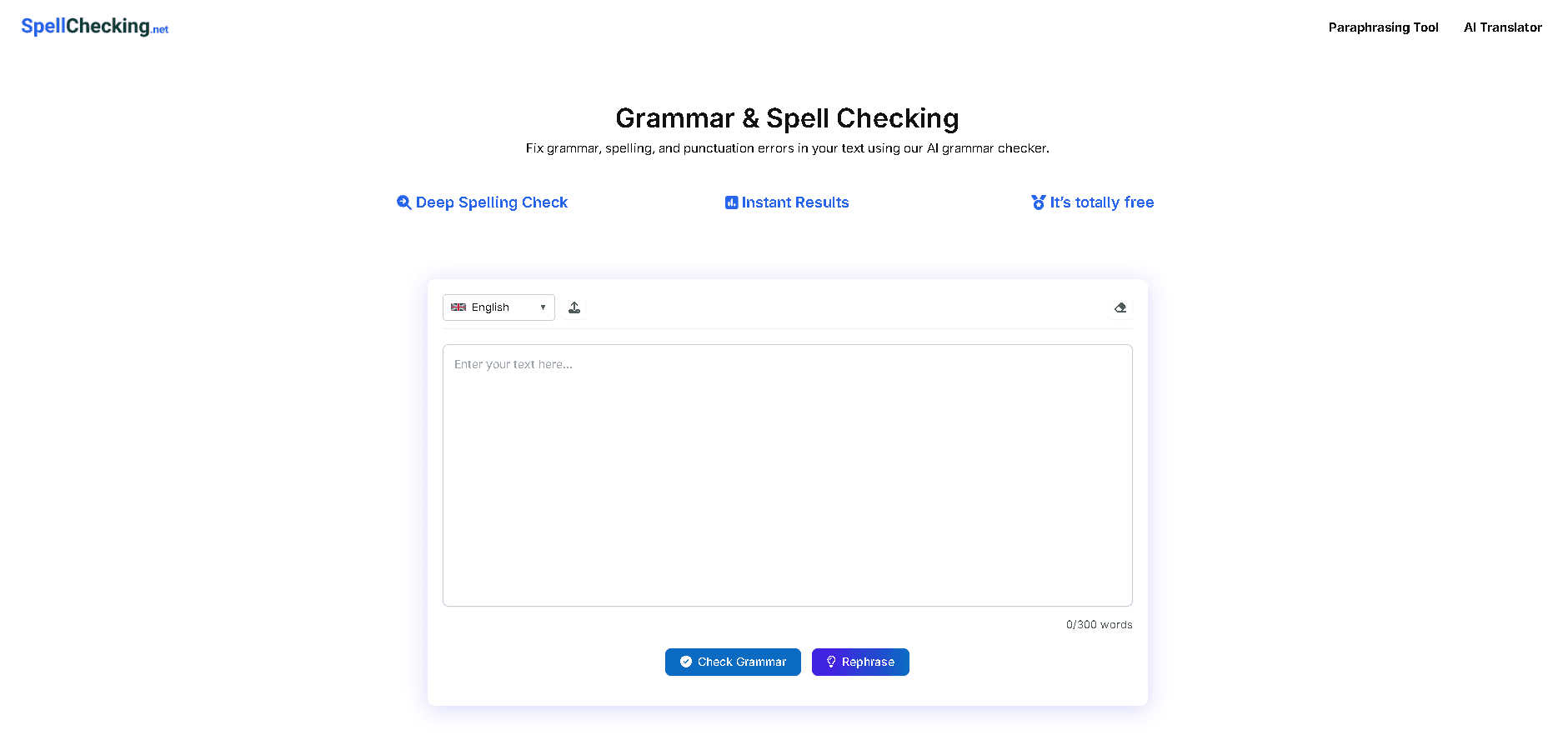
SpellChecking.net is a straightforward and efficient web application that leverages artificial intelligence to provide real-time proofreading for text in up to 14 languages, including English, Spanish, and Japanese. It's designed for users who need quick and reliable error detection in their writing, such as non-native speakers, students, and professionals. The tool offers additional features like paraphrasing and translation, all accessible without any sign-up or subscription, making it a go-to choice for hassle-free language correction. While it excels in speed and multilingual support, it lacks advanced features found in premium alternatives and has some design and privacy limitations.
Drawn from the product itself, not from a survey.
Demographic
Non-native English speakers
Pain points
Grammar uncertainty and spelling errors in professional communication
Primary needs
Accurate multilingual proofreading
Demographic
Students and academics
Pain points
Typos in assignments and unintentional plagiarism
Primary needs
Quick proofreading and paraphrasing tools
Demographic
Content creators and bloggers
Pain points
Time-consuming manual proofing and basic translation needs
Primary needs
Fast grammar checks and sentence rewording
Written by AI from measured evidence, scored out of 100.
SpellChecking.net delivers exactly what it promises: a fast, free, and straightforward grammar and spelling checker that works across multiple languages without requiring registration. It excels at quick proofreading tasks and handles less common languages that many competitors ignore. The minimalist approach means zero learning curve, but also means missing modern features like mobile optimization, dark mode, and integrated workflows. The privacy concerns are significant for a tool handling potentially sensitive documents, and the accessibility features are minimal beyond multilingual support.
Extremely simple workflow with intuitive controls and zero learning curve for basic text checking.
Functional minimalist interface with clean white background but lacks responsive design and dark mode options.
Near-instant processing regardless of text length with server response under 0.5 seconds.
HTTPS encryption but no visible privacy policy or data handling information for sensitive content.
Excellent 14-language support but lacks screen reader optimization and assistive technology features.
Faces fierce competition but could expand through browser extensions and mobile app development.
SpellChecking.net's interface embraces a no-frills approach with a clean white background and straightforward layout that prioritizes function over form. The large text input area dominates the page, making it immediately clear what the tool is for. Language selection happens through a simple dropdown menu, and action buttons use intuitive icons that require no explanation. While the design gets the job done, it lacks modern touches like responsive design that adapts to different screen sizes, and there's no dark mode option for those late-night editing sessions. The UX shines in its simplicity - you paste text, select language, and get results without any learning curve. However, the separate page loads for paraphrasing and translation tools break the workflow continuity that more integrated solutions offer.
Performance is where SpellChecking.net truly excels. The AI-powered corrections happen near-instantly, regardless of text length, with server response times consistently under half a second during testing. This lightning-fast processing makes it ideal for quick checks before sending emails or documents. The site uses HTTPS encryption for basic security during text transmission, which is essential for a tool handling potentially sensitive content. However, the complete absence of a visible privacy policy raises significant concerns about how user data is handled, stored, or potentially used. While the lightweight architecture ensures speed by avoiding unnecessary scripts and trackers, the privacy transparency leaves much to be desired for security-conscious users.
The tool offers impressive language accessibility with support for 14 languages including English, Spanish, Japanese, Filipino, and Turkish - making it valuable for non-native speakers and multilingual content creators. However, it falls short in other accessibility areas, lacking screen reader optimization, keyboard navigation shortcuts, font size controls, or dyslexia-friendly fonts. The interface itself remains English-only, limiting accessibility for non-English speakers navigating the tool. Growth potential is moderate - while the free, no-signup model has appeal, the tool faces fierce competition from established players. Expansion opportunities exist through browser extensions, mobile apps, and integrating more advanced features while maintaining its core simplicity.
Conclusion
This tool is perfect for students, non-native English speakers, and professionals who need quick grammar checks without subscription commitments or complex interfaces. It's particularly valuable for those working with less common languages that premium tools often overlook. If you need a no-fuss, instant grammar checker for emails, assignments, or multilingual documents and aren't concerned about advanced features or data privacy questions, SpellChecking.net deserves a bookmark. For more sensitive or advanced writing needs, you might want to consider tools with clearer privacy policies and more features.
Named competitors, point by point. Nobody paid to appear here or to be left out.
 SpellChecking.net SpellChecking.net |  Grammarly Grammarly |  QuillBot QuillBot |  Scribbr Scribbr | |
|---|---|---|---|---|
| Free Tier Availability | Completely free, no word limits | Free with limited features, premium subscription required | Free with word count limits | Limited free checking, premium features locked |
| Supported Languages | 14 languages including less common options | Primarily English-focused with limited multilingual support | Multiple languages but fewer than SpellChecking.net | Focus on academic English, limited multilingual support |
| Registration Required | No registration or sign-up needed | Account required for full features | Optional account for saving preferences | Account recommended for full functionality |
| Advanced Writing Suggestions | Basic grammar and spelling only | Comprehensive style and tone suggestions | Intermediate writing improvements | Academic-focused suggestions and citations |
| Processing Speed | Near-instant (<0.5s response) | Fast but can lag with complex documents | Moderate speed with occasional delays | Variable speed depending on document complexity |
Grammarly
A premium tool with advanced writing suggestions but requires a subscription for full features.
QuillBot
Offers similar free grammar checking but imposes word count limits on its free version.
Scribbr
An academic-focused checker with citation features but supports fewer languages compared to SpellChecking.net.
Comparing options? See SpellChecking.net alternatives, scored side by side

An AI-powered patent drafting assistant that acts like a ...

AI writer that fact-checks before writing, with real sour...

Export all your Apple Voice Memos to one text file.

Build and export a base resume for free, then use AI to tailor it and a matching cover letter to each job from your real experience.

AI-powered macOS translation app with OCR, multi-engine comparisons, and keyboard-friendly design for professionals and learners.

An AI-powered WordPress plugin that automates content cre...

An AI-powered writing assistant that analyzes and fixes v...

A speech-to-text app that lets you dictate text into any computer app, boosting productivity with voice input.

Professional offline voice dictation software for Mac and Windows, boosting productivity with privacy-first speech-to-text.

An AI-powered transcription tool that converts audio and video to text in under a minute, supporting 98 languages and generating summaries and mind maps.

AI-powered platform that converts audio into videos, blogs, and social media assets for efficient content repurposing.

An integrated content platform for creators to publish, optimize, and monetize work using AI tools and automated distribution.
A platform dedicated to providing unbiased reviews of newly launched applications, analyzing everything from their features to their full potential.
info@scoutforge.net© 2026 Scoutforge. All rights reserved.
