Cycling through all six. Tap any point to stop.
Measured on six things
AI virtual staging for real estate photos. 10 photos free.
Speed
55Desktop Lighthouse 90/100 is solid, but mobile scores 71 with an LCP of 10.3s — the hero image/slider is clearly dragging mobile load past the 2.5s 'good' line. TBT 105ms and CLS 0.072 are fine.
Screenshots
1 / 1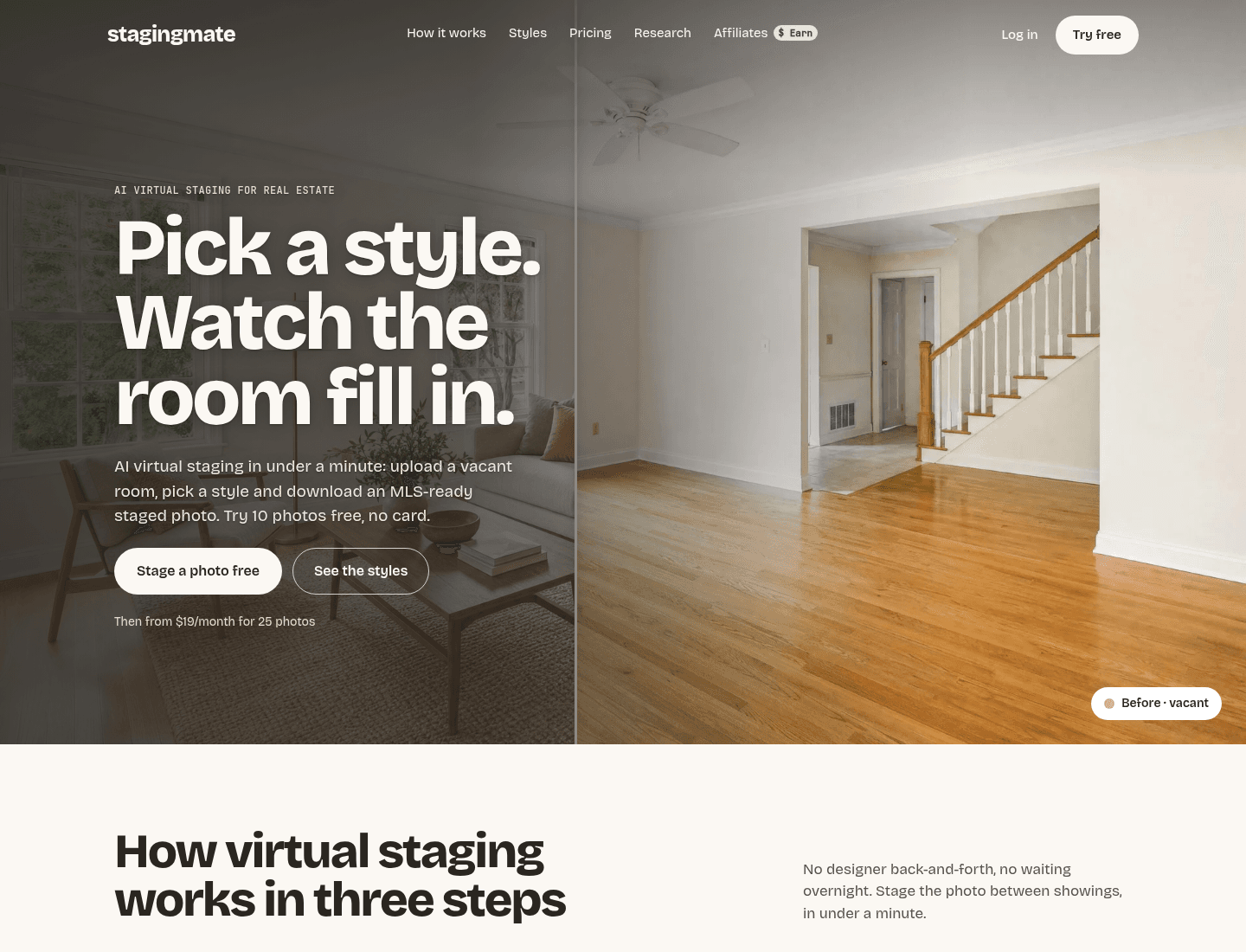
About this app
Stagingmate is virtual staging AI built for real estate photos. Upload a vacant or cluttered room, pick a style, and download a watermark-free, MLS-ready staged photo in under a minute. It keeps walls, floors, windows and fixtures as photographed and adds only furniture and decor, so the photo still shows the real property. Declutter first if needed — furniture removal is included at no extra cost. Twelve named styles, or upload a reference photo for a custom look. For realtors, photographers, property managers, builders and sellers. The first 10 photos are free, no credit card.
Key features
- 1AI virtual staging that preserves walls, floors, windows and fixtures — adds furniture only, so the photo still shows the real property.
- 213 named styles plus custom styles from an uploaded reference photo; declutter/furniture removal included at no extra cost.
- 3Watermark-free, high-res MLS-ready downloads in under a minute; 10 free photos, then $19/mo (25) or $99/mo (200) or credit packs from $9.50.
Target customer profile
Drawn from the product itself, not from a survey.
Demographic
Real estate agents and brokers
Pain points
Vacant listings look unappealing; staging costs eat into commissions; tight listing deadlines
Primary needs
Fast, affordable, MLS-compliant staged photos that help buyers visualize space
Demographic
Real estate photographers
Pain points
Clients request staging as an add-on; outsourcing is slow and inconsistent
Primary needs
Reliable white-label staging tool to upsell as a service within their existing workflow
Demographic
Property managers and landlords
Pain points
Empty rental units sit longer; repeated staging costs for each turnover
Primary needs
Cost-effective credit packs and reusable staged images for multiple listings
Demographic
Home builders and developers
Pain points
Model homes and new constructions lack furniture for marketing photos
Primary needs
Consistent branded styling across multiple units without physical staging expenses
Scout Review
Written by AI from measured evidence, scored out of 100.
Stagingmate is a young, well-positioned virtual staging tool for real estate that gets the fundamentals right. The homepage demonstrates the product instead of describing it, the pricing is transparent and aggressive, and the technical foundation is solid — desktop performance 90, accessibility 96, ten of thirteen security headers. The real weaknesses are mobile speed (LCP 10.3s is a genuine problem for agents browsing on phones between showings) and the style gallery, where thirteen thumbnails of the same empty room fail to communicate what thirteen styles actually means. The bigger open question is output quality: the entire pitch rests on 'we preserve the architecture,' and there's no public gallery, review, or case study yet to prove it. For a product this new, that's expected — but it's the thing that will decide whether realtors switch from Virtual Staging AI or BoxBrownie.
Measure by measure
Usability
63Clear path to value: 'Stage a photo free' above the fold, repeated in nav, three-step explainer before signup, documented FAQ and refund terms. Pricing context is buried in tiny text under the CTAs, easy to miss.
Design
71Editorial hero with a draggable before/after split sells the product on screen one. Restrained cream-and-charcoal palette keeps staged photos as the only color. The 13-style thumbnail row is too small and too samey to read differences.
Speed
55Desktop Lighthouse 90/100 is solid, but mobile scores 71 with an LCP of 10.3s — the hero image/slider is clearly dragging mobile load past the 2.5s 'good' line. TBT 105ms and CLS 0.072 are fine.
Security
72HTTPS enforced, HSTS, secure cookies, SPF and DMARC all present — 10/13 header checks. Missing CSP and frame protection. No SOC 2, ISO or bug-bounty signals found; privacy policy depth not independently verified.
Accessibility
80Lighthouse accessibility 96/100 with a single failing audit: insufficient color contrast. That matches the visual audit's note on light-grey caption text and headline over bright photography. No a11y statement or multi-language support found.
Growth
62Real problem (vacant listings photograph badly), specific wedge (architecture preserved, furniture only), and pricing that undercuts physical staging by thousands. Broad audience but each segment has a named pain. Early-stage, no traction signals yet.
Improvement areas
- Mobile performance: LCP of 10.3s needs to drop under 3s — compress or lazy-load the hero before/after image.
- Style gallery: enlarge thumbnails and use varied room types so the 13 styles are actually distinguishable at a glance.
- Proof: add a public sample gallery of real staged listings and third-party reviews to back the 'architecture preserved' claim.
- Accessibility polish: fix the single contrast failure on light-grey captions and the headline over bright photography.
Design & Usability
The homepage does the hardest thing right: it shows the product working. A draggable before/after split in the hero, a three-step explainer with real-looking mock states, and a restrained cream-and-charcoal palette that lets the staged photography carry the color. The weak spot is the 13-style section — a row of small thumbnails all showing the same empty room, so the style differences blur together. Usability is competent: 'Stage a photo free' sits above the fold and repeats in the nav, the FAQ answers the questions agents actually ask (MLS rules, walls changing, decluttering), and pricing/refund terms are documented. The one real miss is that the pricing line under the CTAs is set in tiny grey text, so the number most visitors want is the hardest thing on the page to read.
Speed & Security
Speed is a tale of two devices. Desktop Lighthouse lands at 90/100, which is genuinely fast. Mobile scores 71 with an LCP of 10.3 seconds — the hero image or slider is clearly too heavy for a phone connection, and 10.3s is four times past the 'good' threshold. TBT (105ms) and CLS (0.072) are healthy, so the problem is specifically the largest image, not the JavaScript. Security is a solid B: HTTPS enforced, HSTS, secure cookies, SPF and DMARC all in place, 10 of 13 header checks passed. The gaps are CSP and frame protection, both easy to add. There's no SOC 2, ISO certification, or bug bounty program published, and no security page — normal for a product this young, but worth noting for any brokerage doing vendor due diligence.
Accessibility & Growth
Accessibility is the strongest measured dimension: Lighthouse scores 96/100 with exactly one failing audit — insufficient color contrast. That failure lines up with what the visual audit saw: light-grey caption text in lower sections and a headline sitting over bright photography. Fixing contrast on those two spots would likely push the score into the high 90s. There's no accessibility statement or multi-language support, and keyboard/screen-reader behavior wasn't independently tested. On growth: the category is crowded — Virtual Staging AI, BoxBrownie, Apply Design — but Stagingmate's positioning is sharper than most. 'We keep the walls, floors and windows as photographed and add only furniture' is a real differentiator against tools that redraw the room, and the pricing ($0.50–$0.95/photo, 10 free, declutter included, custom reference-photo styles) undercuts both physical staging and most outsourced editing. The audience is broad — agents, photographers, property managers, builders — which is a strength for TAM and a weakness for focus. The honest limit: the wedge only holds if output quality is actually good, and there's no third-party review or sample gallery to verify that yet.
Conclusion
If you're an agent with a vacant listing this week, the ten free photos cost you nothing but a few minutes — upload one room, compare the output against a paid BoxBrownie edit, and decide from there. If you're a photographer considering it as a white-label add-on, wait for a public gallery or a peer recommendation before you put it in front of a client. The bones are good: sharp positioning, honest pricing, and a homepage that respects the visitor's time. What's missing is proof — mobile performance needs work, the style gallery needs bigger and more varied previews, and the product needs a visible body of real staged listings before it can credibly claim the 'architecture preserved' crown. None of that is hard. All of it is necessary.
Suggestions for improvement
- Fix mobile LCP: compress or lazy-load the hero before/after image so phones load in under 3s, not 10.
- Enlarge the 13-style thumbnails and use varied rooms (bedroom, dining, kitchen) so style differences are actually visible.
- Add a public sample gallery of real staged listings — the 'architecture preserved' claim needs visual proof.
- Bump contrast on light-grey caption text and the headline over bright photography to clear the one failing a11y audit.
Alternatives comparison
Named competitors, point by point. Nobody paid to appear here or to be left out.
 Stagingmate |  Virtual Staging AI |  BoxBrownie | Apply Design | |
|---|---|---|---|---|
| Free trial | 10 free photos, no credit card | Free trial photos offered | Paid service; sample edits on request | Free trial photos offered |
| Pricing model | $19/mo (25 photos), $99/mo (200), credit packs from $9.50 | Per-image credits / subscription tiers | Per-image pricing, human-assisted premium | Per-image credits / subscription |
| Turnaround time | Under a minute per photo | Fast AI turnaround (minutes) | Hours to overnight (human-assisted) | AI staging in minutes |
| Architecture preservation (walls/floors kept) | Core claim — adds furniture only, keeps architecture as photographed | AI staging; preservation varies by output | Human editors preserve architecture by design | Focus on realistic furniture placement |
| Declutter / furniture removal | Included at no extra cost on every plan | Offered as an add-on | Offered as a paid editing service | Offered as an add-on |
| Custom style from reference photo | Yes — upload a reference photo for a custom look | Style presets; custom varies | Yes — brief human editors with references | Style presets; custom varies |
Virtual Staging AI
AI-powered virtual staging tool for real estate with fast turnaround and multiple design styles.
BoxBrownie
Virtual staging and image editing service for real estate, offering both AI and human-assisted staging.
Apply Design
Virtual staging app for real estate agents and photographers with a focus on realistic furniture placement.
Comparing options? See Stagingmate alternatives, scored side by side
More AI Generations apps
View all AI Generations
Uni-1 by Luma AI
92Uni-1 is an advanced multimodal text-to-image AI model th...

Gerty
91Private, local AI assistant for Mac that runs offline

LTX 2.3 AI Video Generator
91Fast, open-source AI video generator with 4K support, mul...

DemoVexa
90Turn your code into professional product demo videos with AI-generated scripts, animated UI, and natural voiceovers.

All of Us
89Add deceased loved ones to photos with AI and see free pr...

AI Vocals Generator
89Add AI singers or rappers to your own beat, get two takes...

Voqusa
89Transcribe social media video and audio links into text (free signup, 5 free credits, then pay-as-you-go)

PodRescale
89Every episode becomes two weeks of posts. In your voice. Posted for you.

HeyVid AI
88HeyVid AI is a free all-in-one AI video and image generat...

IraVoice
88Private on-device dictation for Apple-silicon Macs.

Pixelimg
88A free online AI-powered tool that instantly converts ima...

Cantoro
88Custom AI songs with a name, heard free before paying $4....


A platform dedicated to providing unbiased reviews of newly launched applications, analyzing everything from their features to their full potential.
info@scoutforge.net© 2026 Scoutforge. All rights reserved.
