Cycling through all six. Tap any point to stop.
Measured on six things
Migrate Gmail emails, contacts, calendars, and more to Of...
Design
44Dated 2015-era Windows app UI and a dense, repetitive homepage with no visual hierarchy. Functional but visually behind modern migration tools.
Screenshots
1 / 1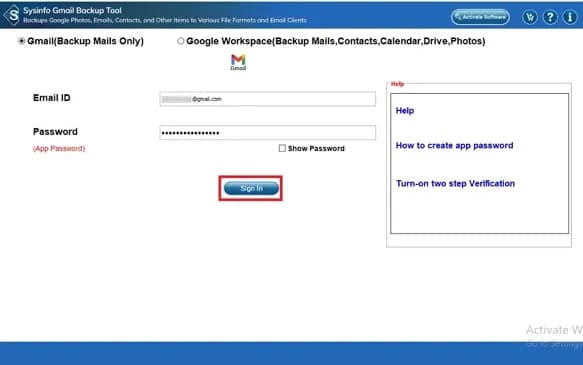
About this app
SysInfo Gmail to Office 365 Migration Tool is a specialized utility designed to simplify the process of migrating Gmail data to Microsoft Office 365. It enables users to transfer emails, contacts, calendars, and other mailbox items directly to Office 365 accounts without any data loss. The tool supports batch migration, selective migration using date filters, and offers options to remove duplicates, exclude attachments, and free up server space by deleting emails from Gmail after migration. With a user-friendly interface and compatibility with all Windows versions, it caters to both technical and non-technical users. The software also includes a free demo version that allows migration of up to 50 emails per folder, making it easy to evaluate before purchasing.
Key features
- 1Batch Gmail to Office 365 migration with no size limits, plus date-range filters for selective transfer.
- 2Duplicate removal, attachment exclusion, and a free-up-server-space option to clear Gmail after migration.
- 3Target Office 365 Public, Archive, and Online folders; migrate contacts, calendars, Drive and Photos.
- 4Free demo migrates up to 50 emails per folder; runs on all Windows versions.
Target customer profile
Drawn from the product itself, not from a survey.
Demographic
IT administrators and managed service providers
Pain points
Manual migration is time-consuming and error-prone; need to migrate multiple mailboxes quickly.
Primary needs
Bulk migration with no size limits, selective migration, and data integrity maintenance.
Demographic
Small to medium business owners
Pain points
Lack of technical expertise for complex migration; risk of data loss during transition.
Primary needs
User-friendly interface, reliable migration, and options to exclude duplicates and attachments.
Demographic
Individual users switching from Gmail to Office 365
Pain points
Difficulty in transferring emails, contacts, and calendars manually; fear of losing important data.
Primary needs
Simple, guided migration process, free demo to test, and ability to migrate specific folders or date ranges.
Scout Review
Written by AI from measured evidence, scored out of 100.
SysInfo Gmail to Office 365 Migration Tool is a competent, long-established utility with a genuinely fast marketing site and a working desktop app. The migration feature set is solid — batch transfer, date filters, dedupe, folder targeting, and a free-up-space option — and the 50-email demo lets you verify it runs before buying. The weaknesses are presentation and positioning: the app UI looks a decade old, the homepage repeats itself, and the free demo is too small to prove real-world reliability. Most importantly, it competes against Microsoft's free Migration Assistant and Google's enterprise migrator, so the value proposition rests on being easier for non-technical users. That is a real but narrow wedge. For an IT admin or SMB owner who wants a GUI and doesn't want to touch PowerShell, it is a reasonable paid option; for anyone comfortable with Microsoft's tooling, the free path is hard to beat.
Measure by measure
Usability
58Clear CTAs and a real app screenshot help, but heavy scrolling, dropdown-heavy nav, and a 50-email demo cap make evaluation clunky.
Design
44Dated 2015-era Windows app UI and a dense, repetitive homepage with no visual hierarchy. Functional but visually behind modern migration tools.
Speed
88Lighthouse 100/100 mobile and desktop, LCP 1.1s, CLS 0, TBT 43ms. The marketing site is genuinely fast despite the dense content.
Security
74HTTPS, HSTS, CSP, SPF and DMARC all present (10/12 header checks). Missing frame protection and X-Content-Type-Options; no published audit.
Accessibility
80Lighthouse a11y 98/100 with only minor landmark and label issues. No WCAG statement or a11y docs published, so ceiling is capped.
Growth
58Real, recurring migration need with concrete differentiators (date filters, dedupe, folder targeting). But Microsoft's free tool and Google's own migrator cap the ceiling.
Improvement areas
- Dated desktop app UI (2015-era Windows styling) undermines trust in a data-migration tool.
- Homepage repeats the same migration claims across multiple sections with no visual hierarchy.
- No published security page, SOC 2/ISO audit, or data-handling statement for credential-sensitive tool.
- 50-email demo cap is too small to evaluate real-world reliability on a full mailbox.
Design & Usability
The homepage does the job of explaining what the tool does, but it does it four times over. The hero is a wall of checkmarks, the 'When to Use' cards are cramped, and the core features grid repeats the same migration claims in slightly different words. The one genuinely good design decision is showing the real desktop app UI rather than a stylized mockup — except that UI looks like it was frozen in 2015, with flat buttons and title-bar chrome. Usability is better than design: CTAs are large and high-contrast, the nav is clear, and the app screenshot shows labeled fields and a show-password toggle. But the page buries the actual migration steps under heavy scrolling, the dropdown-heavy nav adds choice paralysis, and the free demo caps at 50 emails per folder — enough to prove it runs, not enough to prove it works on a real mailbox.
Speed & Security
Speed is the standout: Lighthouse 100/100 on both mobile and desktop, LCP 1.1s, CLS 0, TBT 43ms. For a page this dense with text and images, that is genuinely well-engineered — likely a CDN and lean asset pipeline doing the work. Security is solid but not exceptional: HTTPS is enforced with HSTS, CSP, Referrer-Policy and Permissions-Policy all present, and SPF/DMARC are configured, giving 10/12 on the header checklist. The two misses — X-Frame-Options and X-Content-Type-Options — are trivial to add and their absence suggests the security posture is competent but not audited. No SOC 2, ISO 27001, or security page is published, which is normal for a vendor of this size but caps the score. For a tool that handles email credentials and mailbox data, a published data-handling statement would meaningfully raise trust.
Accessibility & Growth
Accessibility scores well on automated checks — 98/100 on Lighthouse with only minor failures: a missing main landmark, some role=none/presentation conflicts, and a few visible labels without matching accessible names. Those are quick fixes, but the bigger gap is the absence of any accessibility statement or WCAG conformance claim, which means users relying on assistive tech have no documented commitment to lean on. Growth is the harder question. The problem is real and recurring — organizations do migrate from Gmail to Office 365, and doing it manually is painful. SysInfo's differentiators are concrete: batch migration, date-range filters, duplicate removal, free-up-server-space, and targeting Public/Archive/Online folders. But the competitive picture is brutal: Microsoft's own Migration Assistant is free, and Google Workspace Migrate exists for enterprise. SysInfo's wedge is the non-technical SMB user who wants a GUI and a demo — a real segment, but one that Microsoft's free tool increasingly serves. The 16-year-old domain shows staying power, not growth headroom.
Conclusion
If you are an SMB owner or a non-technical user staring down a Gmail-to-Office 365 migration and the thought of PowerShell makes you sweat, SysInfo's tool is a legitimate shortcut — the demo lets you test it, the feature set covers the real pain points, and the vendor has been around since 2010. If you are an IT admin with scripting comfort, start with Microsoft's free Migration Assistant first; only come here if it fails you. Either way, budget for the paid license after the 50-email demo, and test on a real mailbox before committing a whole tenant.
Suggestions for improvement
- Publish a security/data-handling page stating how Gmail credentials and mailbox data are processed and stored.
- Raise the free demo cap or offer a time-limited full trial so buyers can test on a real mailbox.
- Modernize the desktop app UI — the 2015-era styling undermines trust in a data-migration tool.
- Add X-Frame-Options and X-Content-Type-Options headers, and publish an accessibility statement.
Alternatives comparison
Named competitors, point by point. Nobody paid to appear here or to be left out.
 SysInfo Gmail to Office 365 Migration Tool |  Microsoft 365 Migration Assistant |  Google Workspace Migrate | |
|---|---|---|---|
| Price | Paid license; free demo limited to 50 emails per folder | Free | Included with Google Workspace enterprise plans |
| Technical skill required | GUI-based; designed for non-technical users | Requires technical knowledge / setup | Enterprise admin tooling; complex for SMBs |
| Selective migration (date filters) | Yes — date-range filters for selective transfer | Limited filtering options | Yes, via admin configuration |
| Duplicate removal / attachment exclusion | Yes — skip duplicates and exclude attachments | Not offered as a built-in option | Not a primary feature |
| Free trial / demo | Free demo, 50 emails per folder | Fully free tool | Included with Workspace subscription |
Microsoft 365 Migration Assistant
A free tool from Microsoft that helps migrate Gmail data to Office 365, but with limited features and requires technical knowledge.
Google Workspace Migrate
A tool by Google for migrating data from Gmail to Office 365, designed for enterprise use but may be complex for small businesses.
Comparing options? See SysInfo Gmail to Office 365 Migration Tool alternatives, scored side by side
More Account Management apps
View all Account Management
Opus Growth
89Opus Growth is a single MCP server for Google Ads, Meta Ads, TikTok Ads, LinkedIn Ads, Microsoft Ads and ChatGPT Ads. ChatGPT, Claude, Codex, Perplexity, Cursor and other assistants connect with the same address.

pdfpix
88pdfpix is a set of 31 free PDF tools that run in your browser. Your files are never uploaded, and every result is verified.

ArbPlay
88Real-time sure bets scanner for Greek bookmakers, exchang...

BringMe Money
88AI invoice follow-up that drafts reminders and tracks next steps.

AirLST
86Event management software for corporate events: invitations, registration, guest lists, check-in, seating and event apps in one platform.

EntreDash
860-1 Founder workspace, from idea to business

JobQuoteFlow
85Professional quoting with reusable pricing rules, polished proposals and online customer approvals.

Teamwork.com
85Project, resource, and financial management for client-fo...

zenvor.chat
84Live support chat for your website. One inbox for your team.

SysInfo OST to PST Converter
84Convert, migrate, and recover OST files to PST and 13+ fo...

EveryDial
83An AI receptionist for home services. It answers the calls you miss, books the job, and sends you the details.

Maxima
82AI-native accounting platform that automates financial cl...


A platform dedicated to providing unbiased reviews of newly launched applications, analyzing everything from their features to their full potential.
info@scoutforge.net© 2026 Scoutforge. All rights reserved.
