Cycling through all six. Tap any point to stop.
Measured on six things
Smarter Way to Merge or Combine Multiple CSV Files Into One
Growth
42Real problem, but the wedge is thin: pandas, csvkit, Excel Power Query and free online mergers all do this at zero cost. The only differentiator is a GUI for non-technical Windows/Mac users.
Screenshots
1 / 4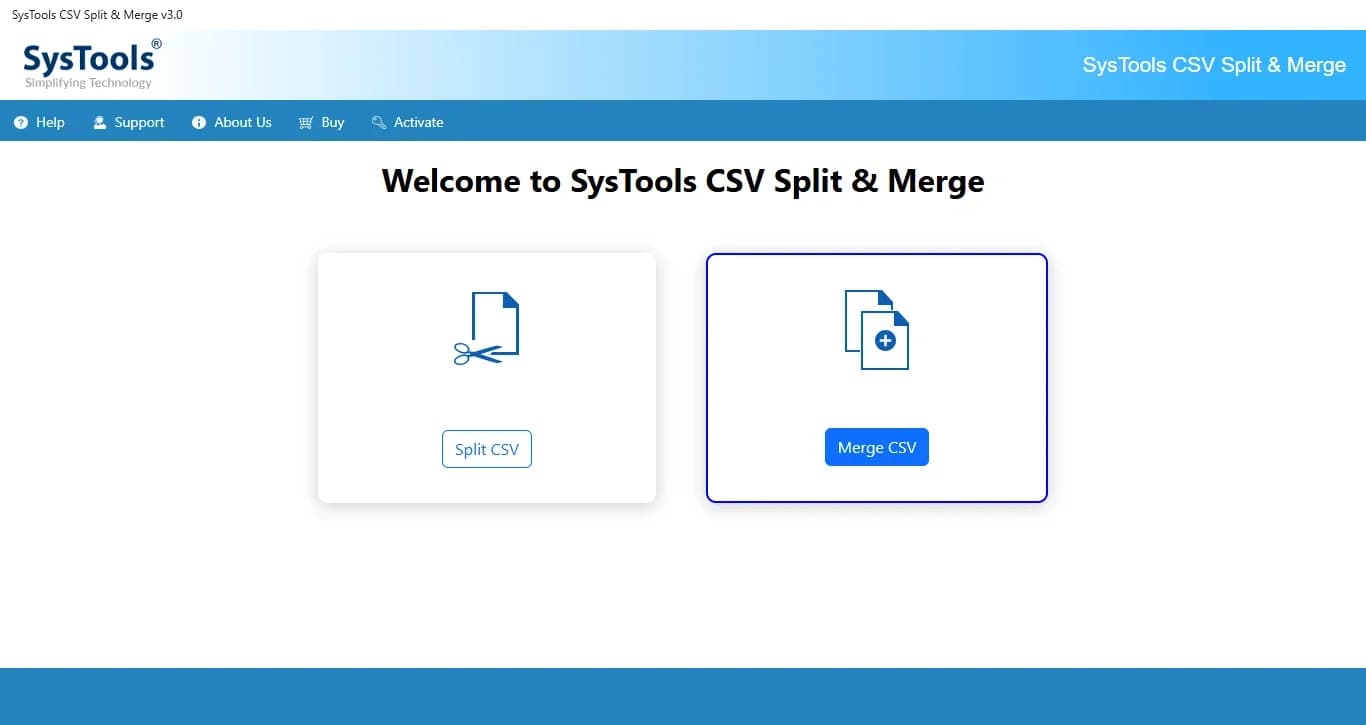
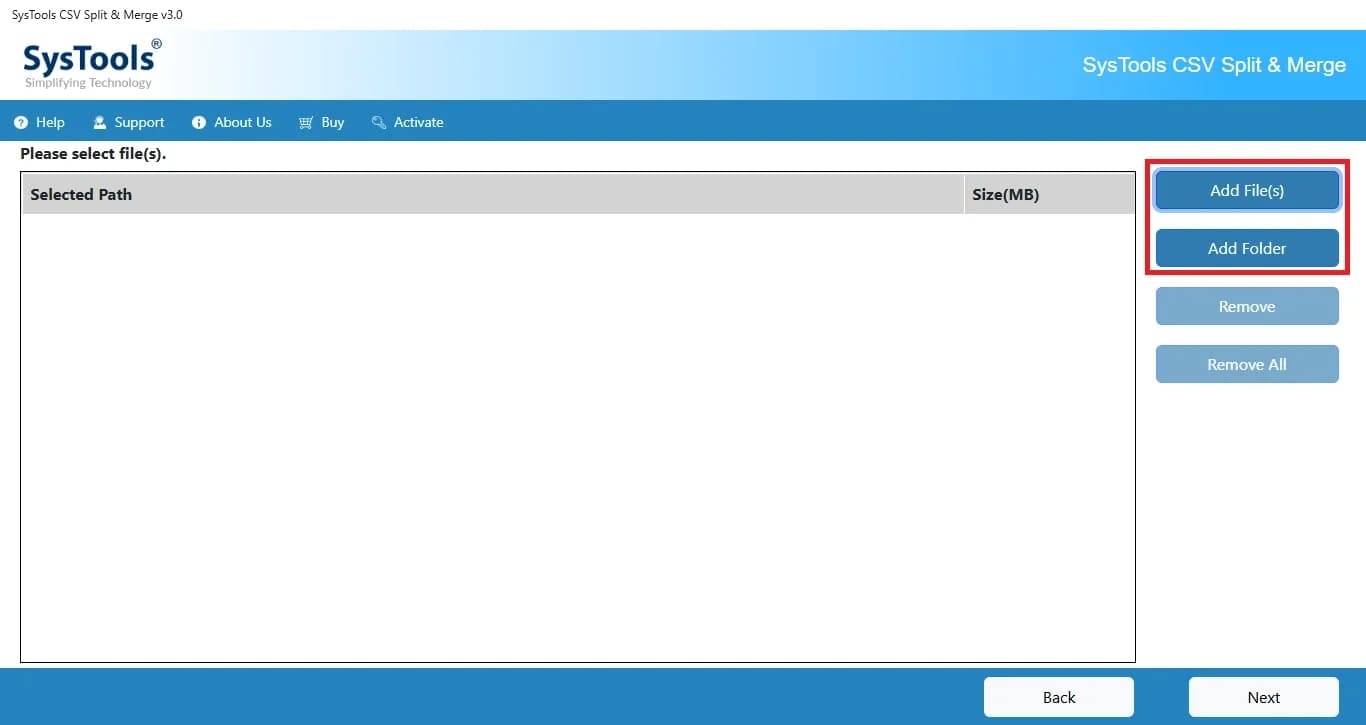
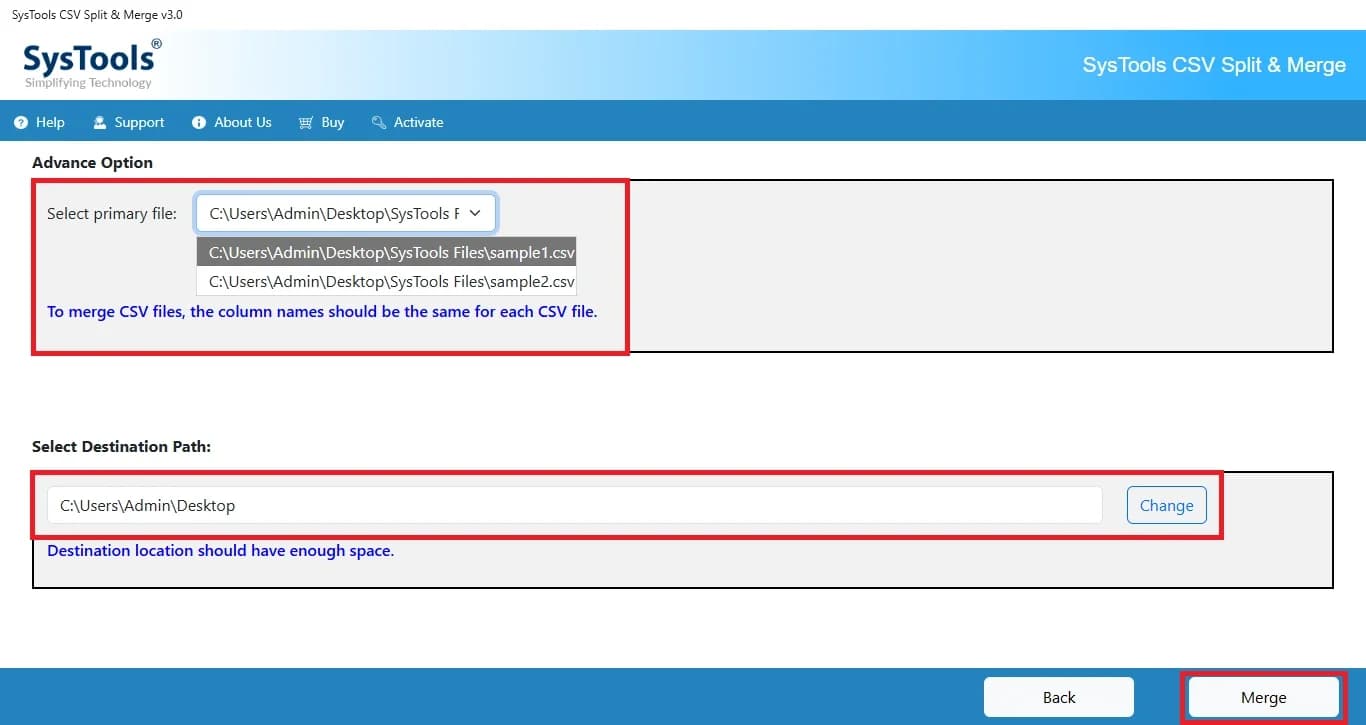
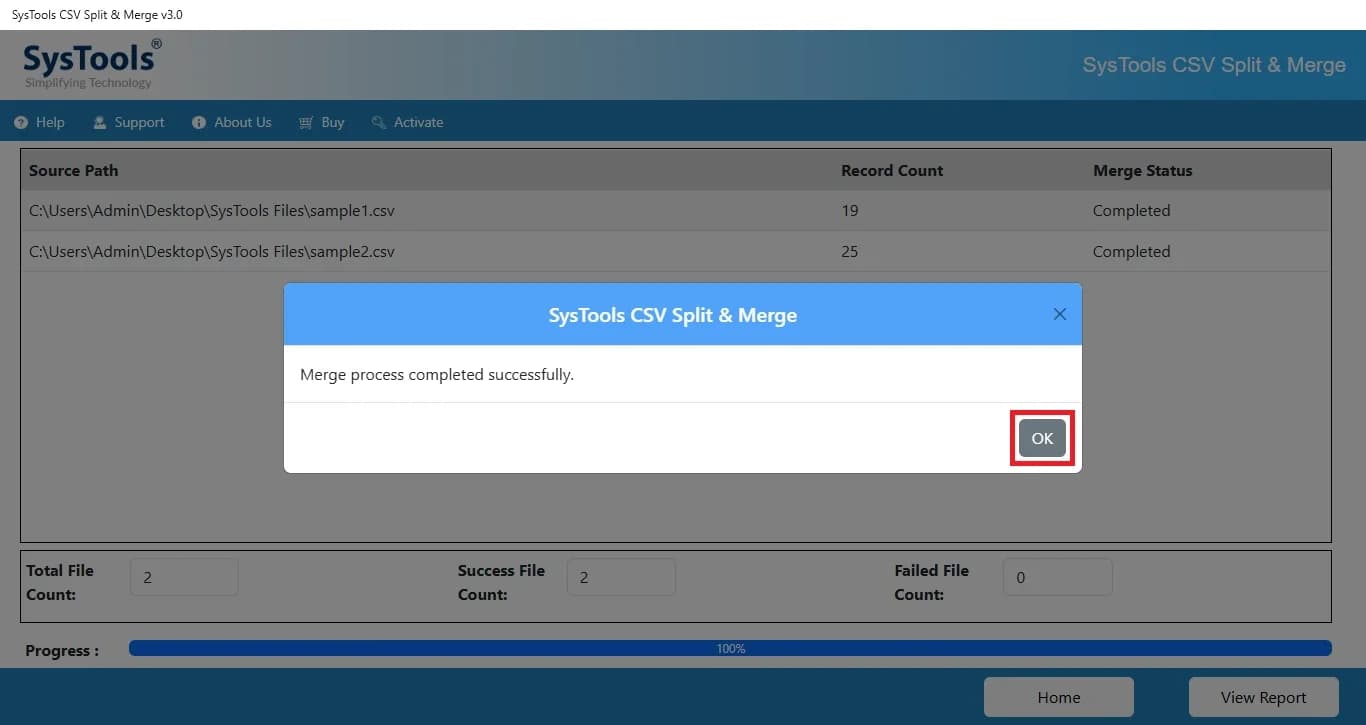
About this app
SysTools CSV Merger is a powerful and user-friendly utility designed to combine multiple CSV files into a single, organized CSV file without data loss. Whether you need to merge customer databases, sales reports, contact lists, inventory records, financial data, or any other comma-separated values (CSV) files, the software performs the merging process quickly while maintaining complete data integrity. It is an ideal solution for businesses, data analysts, marketers, researchers, and professionals who regularly work with large CSV datasets.
Key features
- 1Merge multiple CSV files up to 2GB into one, with automatic splitting when output size limits are exceeded.
- 2Offline desktop processing on Windows and Mac — CSV data never leaves the local machine.
- 3Selective merge with a primary-file setting; only combines files whose column structures match.
- 4Free live demo download plus a 30-day money-back guarantee on purchase.
Target customer profile
Drawn from the product itself, not from a survey.
Demographic
Data Analysts
Pain points
Manual merging is time-consuming and error-prone.
Primary needs
Efficient, accurate merging of large CSV files from various sources.
Demographic
IT Managers
Pain points
Coordinating data from multiple departments into a single file.
Primary needs
A reliable tool that preserves data integrity and supports large files.
Demographic
Small Business Owners
Pain points
Limited technical expertise and budget for data management tools.
Primary needs
Affordable, easy-to-use software to combine CSV files for inventory or sales reports.
Scout Review
Written by AI from measured evidence, scored out of 100.
SysTools CSV Merger is a competent, unglamorous desktop utility from a vendor that has been shipping Windows tools since 2008. The security posture is genuinely strong — a full 12/12 header checklist and offline processing that keeps CSV data on the local machine. Usability is supported by numbered guides for both platforms, a free demo and a money-back guarantee. The weaknesses are the marketing page (dated, badge-heavy, hides the actual UI behind tabs), a 1.1s Total Blocking Time on a page that should be featherweight, four real accessibility failures behind the 91/100 score, and a growth story that leans on a GUI for users who will not open a terminal. It works. It is not exciting. At its price point against free alternatives, the case rests entirely on whether the buyer values a checkbox over a command line.
Measure by measure
Usability
64Numbered step-by-step guides for both Windows and Mac, a free demo download, and a 30-day money-back guarantee. But the 'Docs' link lands on the CSV Splitter guide, not a merger-specific manual.
Design
58Dense, dated marketing page: award badges, two stock-style testimonials, and a cookie banner stacked over a Rosetta notice. The actual app UI is hidden behind 'Screens' and 'Video' tabs rather than shown on the page.
Speed
57Lighthouse mobile 71/100 with LCP 1.1s and CLS 0.045 — fast paint, but TBT of 1.1s shows a heavy main-thread JS payload on a page that is mostly text and badges.
Security
76Full 12/12 header checklist — HSTS, CSP, frame protection, Referrer-Policy, Permissions-Policy, SPF and DMARC all set. Offline desktop processing keeps CSV data local. No SOC 2, ISO or pen-test published.
Accessibility
70Lighthouse 91/100, but four real failures: low-contrast text, images without alt attributes, no main landmark, and a large table with headerless cells. No WCAG statement, English-only.
Growth
42Real problem, but the wedge is thin: pandas, csvkit, Excel Power Query and free online mergers all do this at zero cost. The only differentiator is a GUI for non-technical Windows/Mac users.
Improvement areas
- Landing page hides the actual app UI behind tabs and leads with a Rosetta warning and cookie banner.
- Docs link resolves to the CSV Splitter guide rather than a merger-specific manual.
- Lighthouse mobile TBT of 1.1s on a text-heavy page; accessibility fails on contrast, alt text, landmarks and table headers.
- No published SOC 2, ISO 27001 or pen-test artifact; no accessibility statement or WCAG conformance claim.
Design & Usability
SysTools CSV Merger is a desktop Windows/Mac utility wrapped in a marketing page that has not been redesigned since download portals were the main distribution channel. The page leads with a Rosetta compatibility warning and a cookie banner, then buries the actual product UI behind 'Screens' and 'Video' tabs. Three award badges (Software Informer, Softpedia, CNET) and two first-name testimonials do the trust-building work. Usability is the stronger half: numbered step-by-step guides for both platforms, a free demo download, and a 30-day money-back guarantee. The catch is that the 'Docs' link resolves to the CSV Splitter guide rather than a merger manual — a small but telling navigation slip on a product whose whole value is 'this is simpler than the command line.'
Speed & Security
Measured Lighthouse mobile performance lands at 71/100 with a strong LCP of 1.1s and near-zero layout shift (CLS 0.045), but a Total Blocking Time of 1.1s — the page paints fast and then stalls the main thread on a layout that is mostly text, bullet lists and award logos. That is a fixable payload problem, not a structural one. Security is the standout dimension: the HTTP probe returned a clean 12/12 on headers (HSTS, CSP, frame protection, X-Content-Type-Options, Referrer-Policy, Permissions-Policy) plus SPF and DMARC on the domain. Because the tool is offline desktop software, CSV data never leaves the user's machine, which is a genuine privacy advantage over the browser-based alternatives. What is missing is any published compliance artifact — no SOC 2, ISO 27001, pen-test summary or bug bounty — which is normal for a utility at this price point but caps the score below the excellent band.
Accessibility & Growth
Accessibility scores 91/100 on Lighthouse, but the four failing audits are the ones that matter most in practice: insufficient color contrast, images without alt attributes, no main landmark for screen-reader users to skip to content, and a large table whose cells have no headers. There is no accessibility statement or WCAG conformance claim anywhere on the site, and the product is English-only. Growth is the weakest dimension. The problem — merging CSV files without data loss — is real, but the competitive set is brutal: pandas and csvkit are free and scriptable, Excel Power Query ships with Office, and the two listed alternatives (CSVMerge.com, MergeCSVFiles.com) cover the browser and desktop niches. SysTools' differentiator is a GUI aimed at non-technical Windows/Mac users who will not touch a terminal, plus offline processing for privacy-sensitive data. That is a legitimate wedge, but a narrow one, and the 18-year-old domain and self-reported 4.6/3,104 reviews show an established vendor coasting on an old catalogue rather than a category with headroom.
Conclusion
If you are a data analyst comfortable with pandas, this product is not for you — you already have a better tool for free. If you are a small business owner or IT generalist who needs to combine a folder of CSVs once a month and refuses to learn a CLI, the offline processing, the step-by-step guides and the 30-day refund make it a defensible $29-ish purchase. Just do not expect the landing page to sell it to you; the screenshots are behind a tab and the docs link goes to the wrong product.
Suggestions for improvement
- Surface the actual app UI on the landing page instead of hiding it behind 'Screens' and 'Video' tabs — buyers want to see the merge dialog.
- Fix the 'Docs' link so it resolves to a merger-specific guide rather than the CSV Splitter documentation.
- Cut the main-thread JavaScript to bring TBT under 300ms; a page this simple should score 90+ on mobile Lighthouse.
- Add alt text, table headers, a main landmark and fix contrast — the four failing audits are all quick wins toward WCAG 2.1 AA.
Alternatives comparison
Named competitors, point by point. Nobody paid to appear here or to be left out.
 SysTools CSV Merger | CSV Merge | Merge CSV Files | |
|---|---|---|---|
| Processing model | Offline desktop app (Windows & Mac) | Browser-based online tool | Desktop tool |
| Data privacy | Files stay local; no upload | Files uploaded to a server | Files stay local |
| File size handling | Up to 2GB; auto-splits output when limit exceeded | Reported size limitations on free tier | Desktop processing, size limits vary by license |
| Pricing model | Paid license with free demo and 30-day refund | Free with possible paid tier | Paid desktop license |
| Platform support | Windows and macOS | Any modern browser | Desktop (Windows) |
| Documentation | Numbered step-by-step guides per platform | Minimal; single-page tool | Basic usage instructions |
CSV Merge
A simple online tool to merge CSV files, but may have file size limitations and privacy concerns.
Merge CSV Files
Another desktop tool for merging CSV files, but with a different pricing model and feature set.
Comparing options? See SysTools CSV Merger alternatives, scored side by side
More Analytics apps
View all Analytics
LTX 2.3 AI Video Generator
91Fast, open-source AI video generator with 4K support, mul...

QRBliss
91Branded QR codes with AI Brand Sync, 15 free dynamic code...

Flicker: Crypto & Stock Analysis
90Flicker reads any coin or stock and gives you a verdict, its reasons, and the exit before the entry.

Webfetch
89Web scraping API that turns any URL into HTML, text, Mark...

CitableReport
89CitableReport is an AI visibility audit:

Redstone
89Portfolio optimization and risk metrics for investors.

PERM Processing Time: Current DOL Queue & History
88PERM Processing Time is an independent data analysis platform that helps users navigate the U.S. Department of Labor’s permanent labor certification process.

SiftingIO - Market Data API
88Real-time & historical market data API for stocks, forex,...

ButterKit
82macOS app for App Store screenshots: 3D mockups, auto-tra...

Askray
88See who ChatGPT, Gemini & Claude recommend instead of you...

Indexaro
88AI visibility tracker for SEO, AEO, and GEO

DATA HIT Tools
87AI visibility and seasonality tools for SEOs and analysts


A platform dedicated to providing unbiased reviews of newly launched applications, analyzing everything from their features to their full potential.
info@scoutforge.net© 2026 Scoutforge. All rights reserved.
