Cycling through all six. Tap any point to stop.
Measured on six things
Blood pressure diary: log readings, print a doctor's report
Security
52HTTPS enforced with frame protection, X-Content-Type-Options and Referrer-Policy set, and a local-only no-account model that limits exposure. But no HSTS, no CSP, no DMARC, and no published audits.
Screenshots
1 / 1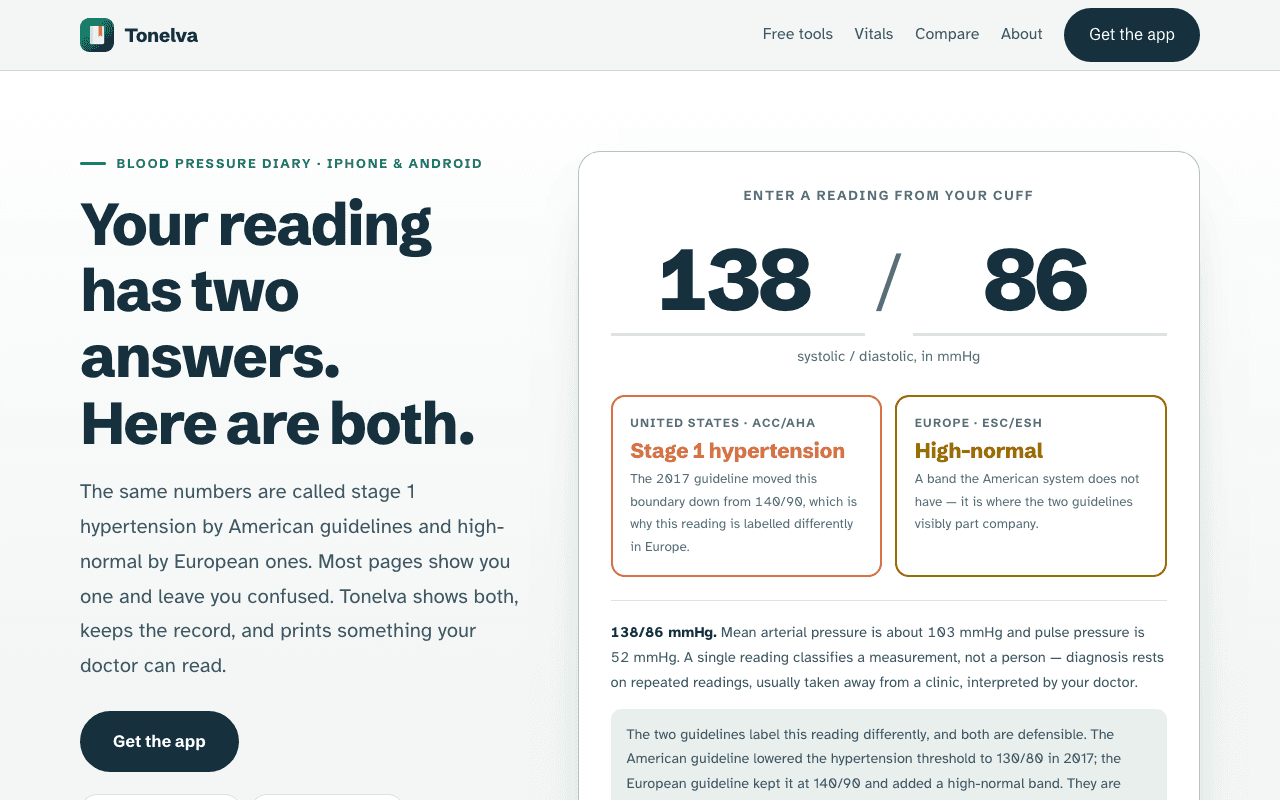
About this app
The same numbers fall into different categories under American and European guidelines. Tonelva shows your readings against ACC/AHA or ESC/ESH reference categories and lets you pick which one leads. Around that sits a simple diary: a three-tap log, separate morning and evening averages, pulse pressure and mean arterial pressure, and charts over 7, 30 or 90 days. When you need to share it, export a PDF report or a CSV. Works on iPhone, iPad and Android without an account. Tonelva does not measure blood pressure and is not a medical device: it keeps the record of readings you take yourself.
Key features
- 1Dual-guideline classification: every reading shown against both ACC/AHA and ESC/ESH categories, with a switch for which leads.
- 2Three-tap logging with separate morning and evening averages, plus pulse pressure and mean arterial pressure.
- 3PDF and CSV export for sharing with a clinician; no account, no cloud, data stays on device.
- 4Five free no-signup browser tools: category checker, 7-day average, printable log and more.
Target customer profile
Drawn from the product itself, not from a survey.
Demographic
People who measure blood pressure at home
Pain points
The hard part of home monitoring is the tenth entry, not the first.
Primary needs
A three-tap log with morning and evening reminders and separate morning and evening averages.
Demographic
Family members who help them keep track
Pain points
A folded piece of paper instead of a readable record at the appointment.
Primary needs
A clean PDF: the table of readings, a chart and the averages.
Scout Review
Written by AI from measured evidence, scored out of 100.
Tonelva is a blood pressure diary built around one genuinely good observation: the same reading gets two different labels depending on whether you read American or European guidelines, and most apps pick a side silently. Tonelva shows both, lets you choose which leads, and separates morning from evening averages because they mean different things. Around that sits a fast, calm, three-tap logging app with a PDF/CSV export, no account and no cloud. The measured evidence backs the craft: 100/100 Lighthouse on both mobile and desktop, 96/100 accessibility with one contrast failure, and a clean local-only data model. The gaps are the usual early-stage ones — thin security headers, no published audits, one language, no store ratings yet — plus a chart that needs labels and a promo card that fights the product's own tone.
Measure by measure
Usability
68Three-tap logging, morning/evening split, and five free no-signup browser tools lower the barrier well. The interactive hero card teaches the core idea instantly. Chart without scale labels and dense dark-section copy cost it.
Design
71Judging the app UI from store screenshots plus the homepage: large numerals, calm palette, clear single primary action. Homepage hero is genuinely well-set. Docked for an unlabeled chart and an off-brand promo card.
Speed
88Lighthouse 100/100 on both mobile and desktop: LCP 941ms, CLS 0.001, TBT 0ms. Essentially a static page that loads before you finish blinking. Nothing in the collected evidence suggests lag.
Security
52HTTPS enforced with frame protection, X-Content-Type-Options and Referrer-Policy set, and a local-only no-account model that limits exposure. But no HSTS, no CSP, no DMARC, and no published audits.
Accessibility
79Lighthouse a11y 96/100 with one contrast failure, and the visual audit independently flags low-contrast grey text on dark green. Large type in the app helps. Single-language localization and no a11y statement hold it back.
Growth
58A real, specific problem — the same reading classified differently by ACC/AHA and ESC/ESH — with a demonstrated wedge. But the category is crowded and the moat is a reference table anyone could copy.
Improvement areas
- Chart lacks visible scale and axis labels in the app and store screenshots.
- Security headers incomplete: no HSTS, CSP, Permissions-Policy or DMARC; no published audit.
- Single-language localization and no accessibility statement or WCAG mention.
- Store promo card's clip-art heart and pink 'Concerned' headline clash with the calm product tone.
Design & Usability
Judged on the app UI first, since this ships through the stores. The screenshots show a restrained, well-structured interface: a large two-line 126/82 numeral, a small stage pill, a full-width 'Add reading' button and a 7/30/90-day segmented control. That is the right shape for a low-anxiety logging app. The homepage matches it with a strong typographic hero and an interactive cuff card that makes the dual-scale idea legible in seconds. Where it slips: the store chart has no visible scale or labels, the promo card's clip-art heart and pink 'Concerned' headline clash with the calm product, and the lower homepage sections lean on many pale, similar cards. Usability is the stronger half — three-tap logging, separated morning/evening averages, and five free no-signup browser tools are real friction reducers.
Speed & Security
Speed is the standout measured result: Lighthouse 100/100 on both mobile and desktop, LCP 941ms, CLS 0.001, TBT 0ms. This is a light, static-feeling site that loads essentially instantly, and nothing in the collected evidence suggests lag. Security is the weaker half. HTTPS is enforced and frame protection, X-Content-Type-Options and Referrer-Policy are set, and the no-account, no-cloud, local-only data model genuinely limits exposure — that is a real architectural strength for a health diary. But HSTS, CSP, Permissions-Policy and DMARC are all absent, the header checklist lands at 6/12, and there is no published SOC 2, ISO, pen-test or bug bounty. For an app holding blood pressure history, the local-only model does a lot of the work; the transport and email hardening do not.
Accessibility & Growth
Accessibility scores well on automation — Lighthouse 96/100 — with a single failing audit for insufficient contrast, and the independent visual audit flags the same problem: small, light-grey body text on the dark green section and in card captions. Large numerals in the app help the core task, but there is no accessibility statement, no WCAG mention, and the app is localized in one language. Growth is a judgement on the idea. The problem is real and sharply named: the same numbers are stage 1 under ACC/AHA and high-normal under ESC/ESH, and most pages show one and leave you confused. The wedge — show both, let the user pick which leads, keep morning and evening separate — is concrete and demonstrated on the site. The limit is that the differentiator is a reference table, not a data advantage or a network effect, in a category full of free cuff-companion apps and general health trackers.
Conclusion
What makes Tonelva worth a look is that it resists the temptation to be a medical device. It says plainly that no phone can measure blood pressure, that only a validated cuff gives you a reading, and that its job is to make the record fast enough to keep and clear enough to hand to a clinician. That honesty is rare in this category and it is matched by real execution: the site is fast, the app UI is calm, and the free browser tools lower the barrier to trying the core idea. It is early — no ratings, one language, headers half-configured — but the foundation is sound and the positioning is sharper than most of its peers. If you already own a cuff and keep a folded piece of paper, this is a reasonable upgrade.
Suggestions for improvement
- Add scale and axis labels to the chart in the app and store screenshots — an unlabeled chart is decoration, not data.
- Replace the clip-art heart and pink 'Concerned' promo card with the calm palette the product UI already uses.
- Enable HSTS, CSP, Permissions-Policy and DMARC; publish a short security page explaining the local-only model.
- Fix the contrast failure Lighthouse and the visual audit both caught, and add an accessibility statement.
Alternatives comparison
Named competitors, point by point. Nobody paid to appear here or to be left out.
 Tonelva - Blood Pressure Log |  | |
|---|---|---|
| Dual US/EU guideline classification | Yes — both ACC/AHA and ESC/ESH shown, user picks which leads | Not specified in provided details |
| Separate morning and evening averages | Yes — kept separate in chart and report | Not specified in provided details |
| Account and cloud requirement | No account, no cloud; data stays on device | Not specified in provided details |
| Export for clinician sharing | PDF report and CSV export | Not specified in provided details |
| Free browser tools without signup | Yes — category checker, 7-day average, printable log and more | Not specified in provided details |
Comparing options? See Tonelva - Blood Pressure Log alternatives, scored side by side
More Health & Wellness apps
View all Health & Wellness
StoryPad
92Privacy-first open source journal app with a continuous t...

Pushup RPG: Fitness Quest
90Pushup RPG is a camera-based push-up counter and fitness RPG for home workouts. Real push-ups and squats become attacks as you defeat 48 foes across 8 biomes, earn XP and loot, join guilds, and battle in live 40-second duels. Free on iOS and Android.

Gryper
89Workout tracker with muscle heatmaps and volume landmarks

Sensecast
88Weather app that explains the forecast

Snapkin: Photo Calorie Counter
88Snapkin is a calorie tracker you use by photographing your plate.

Innermost
87An AI-powered emotional support app that acts as a person...

Cat Years to Human Years
86Free cat age calculator converting cat years to human years.

MyCookingCalendar
86Free meal planning calendar with 4,600+ recipes and grocery lists

Mantra Meditation Timer
85A minimalist, distraction-free meditation timer for mantr...

TDEE Calculator
84Free TDEE calculator that estimates maintenance calories, weight loss targets, muscle gain calories, and macro recommendations based on your body stats and activity level.

FitLifeBud
84AI meal plans for your week, with one aisle-sorted shopping list

WellWired
84AI explained simply for older adults, with safety lessons...


A platform dedicated to providing unbiased reviews of newly launched applications, analyzing everything from their features to their full potential.
info@scoutforge.net© 2026 Scoutforge. All rights reserved.
