Cycling through all six. Tap any point to stop.
Measured on six things
Free offline AI image & video enhancer for Mac, Windows, ...
Security
38HTTP probe shows no HTTPS enforcement, HSTS, CSP, or frame protection; only SPF and DMARC present. No SOC 2 or ISO reports. Privacy policy exists but security headers are weak.
Screenshots
1 / 1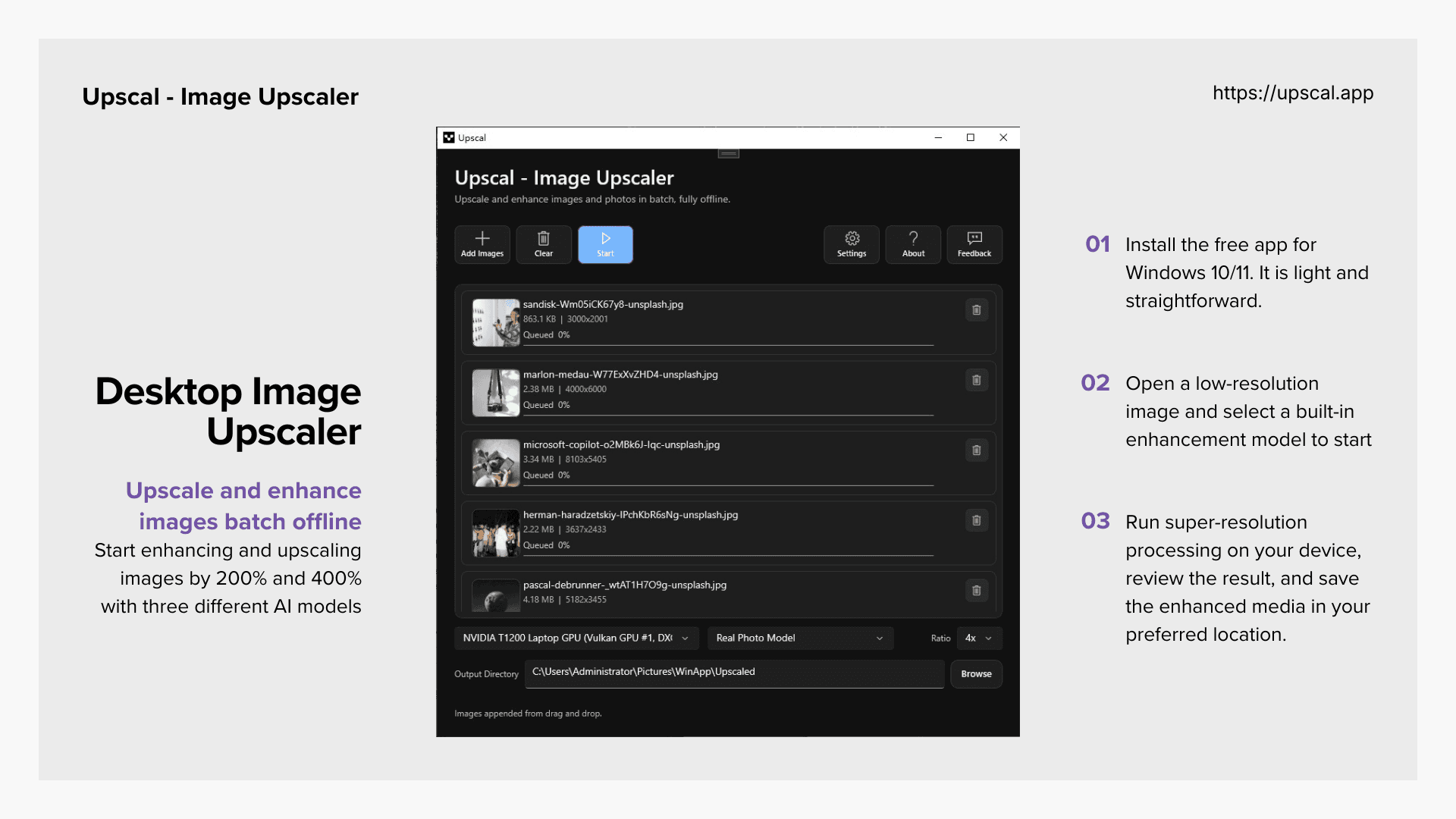
About this app
Overview Upscal is a free offline AI enhancer that upscales low-resolution images and videos on your device. It uses built-in super-resolution models to recover sharper edges, cleaner textures, and more natural detail. No cloud upload, no subscription, and no account required. Differentiator Upscal stands out by offering completely free, offline AI enhancement with no account or subscription, ensuring media never leaves the device. Features 1. AI Image Enhancement: Improves low-resolution, blurry, or compressed photos with models that recover detail and sharpness. 2. AI Video Enhancement: Enhances low-resolution videos frame by frame for clearer personal archives, creator footage, and social clips. 3. Super-Resolution Upscaling: Enlarges images and videos while preserving detail for screens, prints, and presentations. 4. Cross-Platform Apps: Available on macOS, Windows, iPhone, and iPad for flexible
Key features
- 1Free offline AI image and video enhancement with no cloud upload.
- 2Super-resolution upscaling for images and videos across macOS, Windows, iOS.
- 3Privacy-first design: no account, no remote history, files stay on device.
Target customer profile
Drawn from the product itself, not from a survey.
Demographic
Casual users with old photo collections
Pain points
Old photos are low-res, blurry, or have compression artifacts
Primary needs
Easy, private enhancement; no technical skills; free solution
Demographic
Content creators and social media managers
Pain points
Source footage or images are too small for high-res displays or publication
Primary needs
Upscale without hurting quality; fast workflow; offline for sensitive materials
Demographic
Small business owners handling product images
Pain points
Product photos lack resolution for professional marketing
Primary needs
Simple, private tool to enhance images without cloud risks; cost-effective
Demographic
Anime/illustration fans and digital artists
Pain points
Artwork upscaling often leaves jagged edges or lost detail
Primary needs
Preserve sharp lines; batch processing; offline for large files
Scout Review
Written by AI from measured evidence, scored out of 100.
Upscal is a free, offline AI image and video upscaler with a modern app UI and excellent website performance. The privacy-first approach (no cloud upload, no account) is a strong differentiator. However, security headers are weak, and the app has seen limited adoption despite being on the App Store since 2019. The three-step workflow is simple, but the lack of interface screenshots in store material may hinder user confidence. Overall, a competent tool with a clear value proposition, but it needs to address security and build traction to compete with established alternatives.
Measure by measure
Usability
68Three-step workflow is clear, CTA is prominent, and app is free with no account. Store listing shows 13 screenshots and 7 languages. Slight learning curve for model selection.
Design
70App UI is dark-mode, cohesive, and modern; before/after comparisons are prominent. Website is clean but some maker media feels disconnected. Judging app UI primarily.
Speed
85Lighthouse mobile performance 98/100, LCP 2.4s, CLS 0.001, TBT 8ms. Desktop 100/100. Site is exceptionally fast and lightweight.
Security
38HTTP probe shows no HTTPS enforcement, HSTS, CSP, or frame protection; only SPF and DMARC present. No SOC 2 or ISO reports. Privacy policy exists but security headers are weak.
Accessibility
68Lighthouse accessibility 94/100 with minor aria and label issues. Site is keyboard-navigable and responsive, but no dedicated a11y statement. App localized in 7 languages.
Growth
62Free offline AI upscaler with clear differentiator; targets multiple segments. But crowded market with free web tools and premium incumbents; limited traction signals.
Improvement areas
- Enforce HTTPS and add security headers (HSTS, CSP, frame protection).
- Publish security certifications or audits to build trust.
- Improve App Store listing with actual interface screenshots and more user reviews.
Design & Usability
Upscal's app UI is modern and cohesive, with dark mode and clear before/after comparisons. The website is clean but some maker media feels like a slide deck. Usability is straightforward: three-step workflow, prominent CTA, and no account required. However, the app has been on the App Store since 2019 with only 22 ratings, suggesting limited adoption. The free, offline approach is a strong selling point, but the small numbered workflow circles and lack of interface screenshots in store material could hinder first-time users.
Speed & Security
Performance is stellar—Lighthouse mobile 98/100, desktop 100/100, with LCP 2.4s and CLS 0.001. The site is lightweight and fast. Security, however, is a weak point: no HTTPS enforcement, HSTS, CSP, or frame protection. Only SPF and DMARC are present. While the app processes media offline, the website's security headers are inadequate for a modern product. No SOC 2 or ISO reports are published, which is expected for an indie tool but still a gap for privacy-conscious users.
Accessibility & Growth
Accessibility is decent with a 94 Lighthouse score, though minor aria and label issues remain. The site is keyboard-navigable and responsive, but no dedicated a11y statement exists. Growth potential is moderate: the free, offline, no-account differentiator is compelling, targeting casual users, creators, and small businesses. However, the market is crowded with free web tools like Waifu2x and premium options like Topaz. With only 22 App Store ratings, traction is minimal, but the idea has room if execution and marketing improve.
Conclusion
If you value privacy and want a free, offline upscaler, Upscal is worth trying. But don't expect it to replace Topaz for professional work. The website is fast, the app is clean, but the security headers need work. With only 22 ratings, it's a niche tool with potential—if it can overcome its anonymity and tighten up its web presence.
Suggestions for improvement
- Add HTTPS enforcement and security headers (HSTS, CSP) to the website.
- Publish a SOC 2 or ISO 27001 report to build trust with privacy-conscious users.
- Include more interface screenshots in App Store listing to show actual app controls.
- Consider a freemium model with advanced models to attract more users and generate revenue.
Alternatives comparison
Named competitors, point by point. Nobody paid to appear here or to be left out.
 Upscal | Waifu2x |  Topaz Gigapixel AI |  Adobe Photoshop (Super Resolution) | |
|---|---|---|---|---|
| Pricing | Free, no subscription | Paid, premium | Free, web-based | Subscription required |
| Offline Processing | Yes, fully offline | Yes, desktop app | No, requires upload | Yes, desktop app |
| Target Users | Casual users, creators, small businesses, anime fans | Professionals, photographers | Anime and illustration fans | Designers, photographers, professionals |
| Platform Support | macOS, Windows, iOS, iPadOS | Windows, macOS | Web browser | Windows, macOS |
Waifu2x
Free web-based upscaler for anime and illustrations, but not for general photos and requires upload.
Topaz Gigapixel AI
Premium AI upscaler with advanced models, but paid and runs on desktop only.
Adobe Photoshop (Super Resolution)
Built-in feature in Photoshop for AI upscaling, but requires a subscription and not standalone.
Comparing options? See Upscal alternatives, scored side by side
More AI Generations apps
View all AI Generations
Uni-1 by Luma AI
92Uni-1 is an advanced multimodal text-to-image AI model th...

Gerty
91Private, local AI assistant for Mac that runs offline

LTX 2.3 AI Video Generator
91Fast, open-source AI video generator with 4K support, mul...

DemoVexa
90Turn your code into professional product demo videos with AI-generated scripts, animated UI, and natural voiceovers.

All of Us
89Add deceased loved ones to photos with AI and see free pr...

AI Vocals Generator
89Add AI singers or rappers to your own beat, get two takes...

Voqusa
89Transcribe social media video and audio links into text (free signup, 5 free credits, then pay-as-you-go)

PodRescale
89Every episode becomes two weeks of posts. In your voice. Posted for you.

HeyVid AI
88HeyVid AI is a free all-in-one AI video and image generat...

IraVoice
88Private on-device dictation for Apple-silicon Macs.

Pixelimg
88A free online AI-powered tool that instantly converts ima...

Cantoro
88Custom AI songs with a name, heard free before paying $4....


A platform dedicated to providing unbiased reviews of newly launched applications, analyzing everything from their features to their full potential.
info@scoutforge.net© 2026 Scoutforge. All rights reserved.
