

A platform dedicated to providing unbiased reviews of newly launched applications, analyzing everything from their features to their full potential.
info@scoutforge.net© 2026 Scoutforge. All rights reserved.
A platform dedicated to providing unbiased reviews of newly launched applications, analyzing everything from their features to their full potential.
info@scoutforge.net© 2026 Scoutforge. All rights reserved.
A platform dedicated to providing unbiased reviews of newly launched applications, analyzing everything from their features to their full potential.
info@scoutforge.net© 2026 Scoutforge. All rights reserved.
Cycling through all six. Tap any point to stop.
Measured on six things
Password manager with no email, no account, no tracking. ...
Real, specific wedge: no email, zero-knowledge, on-chain identity, IPFS sync, open source. Differentiated from Bitwarden/1Password/Proton Pass, but the no-account audience is a slice, not the market.

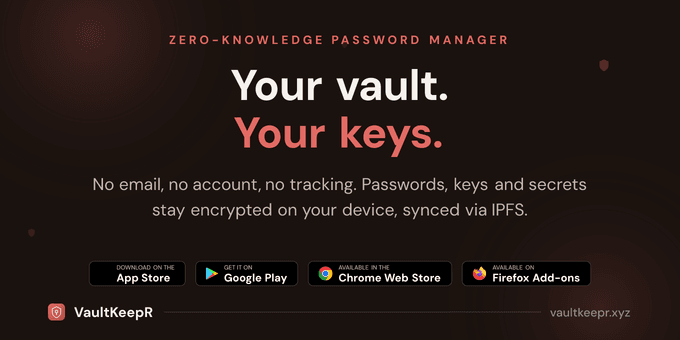
VaultKeepR is a privacy-first password manager that stands out by eliminating the need for an email or account. It uses a zero-knowledge architecture where your data is encrypted and decrypted only on your device. With support for biometrics, master password, or NFC keys, and modern encryption like Argon2id and XChaCha20-Poly1305, it ensures top-notch security. You can store passwords, documents, and more, with IPFS-based backup and optional encrypted cloud storage. The app is open source and free forever, with premium features like fragmented recovery and email aliases. Available as a browser extension and mobile apps, it also includes a password health checker and TOS analysis for added security. VaultKeepR is ideal for anyone who values privacy and wants a password manager that doesn't track them or require personal information.
Drawn from the product itself, not from a survey.
Demographic
Privacy advocates and security-conscious individuals
Pain points
Tired of password managers that require email and collect data; concerned about data breaches and tracking
Primary needs
Zero-knowledge encryption, no account required, open source, no tracking
Demographic
Tech-savvy users and early adopters
Pain points
Traditional password managers are cumbersome or not truly private; want advanced features like biometrics and IPFS sync
Primary needs
Modern encryption, biometric unlock, IPFS backup, cross-platform support
Demographic
Crypto and Web3 enthusiasts
Pain points
Want to manage credentials and secrets on-chain; dislike centralized identity and servers
Primary needs
Sovereign identity via smart account, on-chain architecture, integration with Web3
Demographic
Businesses and professionals handling sensitive data
Pain points
Need secure password and document storage without compromising privacy; require compliance and auditability
Primary needs
End-to-end encryption, secure document storage, auditability, disaster recovery
Written by AI from measured evidence, scored out of 100.
VaultKeepR is a privacy-first password manager built around a genuinely unusual premise: no email, no account, no registration. Identity is a Smart Account on-chain, the vault is encrypted client-side with Argon2id and XChaCha20-Poly1305, and backups go to IPFS. It ships as a Chrome/Firefox extension plus iOS and Android apps, is open source, and is free forever with paid tiers for cloud storage, TOTP, Shamir recovery and email aliases. The measured evidence backs several of the claims: the site scores 100/100 on desktop Lighthouse and 89/100 on mobile, the HTTP/DNS probe passes all 12 security checks, and the accessibility audit lands at 91/100. The app UI, judged from store screenshots, is clean and consistent with the marketing site. The gaps are equally concrete: no published third-party audit or bug bounty despite a verify-don't-trust pitch, three real accessibility failures (contrast, skip links, touch targets), a 3.5s mobile LCP, and no independent user reviews yet to confirm the onboarding and documentation experience. It is a well-executed, sharply positioned product with an audience narrower than the category leaders — and it knows exactly who it is for.
No-email, 2-minute setup is a real onboarding advantage, and the pricing page lays out five tiers plus a full feature matrix. Docs depth and third-party onboarding feedback are unverified.
Judging the app UI and store material: consistent dark palette with red accents, scannable smart tags, spacious mobile screens. Homepage is denser and the dark-on-dark entry rows cost contrast.
Lighthouse desktop 100/100 and mobile 89/100 with TBT 16ms and CLS 0.062. The 3.5s mobile LCP is the one metric holding it back from the top of the band.
12/12 header/DNS checks pass, HTTPS+HSTS+CSP enforced, Argon2id and XChaCha20-Poly1305 claimed, SLM moved on-device in v1.8.3. No public audit, SOC 2 or bug bounty found.
Lighthouse a11y 91/100 with EN/FR localization and hreflang. Failing contrast, non-focusable skip links and undersized touch targets are real, fixable gaps; no WCAG statement published.
Real, specific wedge: no email, zero-knowledge, on-chain identity, IPFS sync, open source. Differentiated from Bitwarden/1Password/Proton Pass, but the no-account audience is a slice, not the market.
Judged on the app UI and store material, not just the landing page: the mobile vault screens are clean, spacious and consistent with the site's dark palette and red accents, and the colored smart tags make entries scannable at a glance. The weak spots are the very dark cards on dark backgrounds, which flatten contrast on the entry rows, and a homepage that stacks feature claims and logos below the fold until it reads like a checklist. On usability, the no-email, no-registration flow is a genuine onboarding advantage — the site promises a 2-minute setup and the store screenshots back the zero-account claim with visible pills and secondary sync options. The pricing page is unusually transparent, with five tiers and a full feature-by-feature matrix, and the changelog shows real iteration (on-device auto-tagging, a backup-password recovery flow for PRF-only vaults). What I could not verify is documentation depth or third-party onboarding feedback — no independent reviews of the setup experience surfaced in the collected evidence, so the learning-curve picture stays incomplete.
Speed is a strength. Lighthouse gives the site 100/100 on desktop and 89/100 on mobile, with a 16ms total blocking time and 0.062 CLS — the page is light and stable. The one soft metric is a 3.5s mobile LCP, which is what keeps this out of the top of the band rather than any structural problem. No user complaints about lag or published benchmarks were found. Security is where the product makes its loudest claims and, on the surface, backs them: the HTTP/DNS probe passes 12/12 checks with HTTPS enforced, HSTS, CSP, frame protection, X-Content-Type-Options, Referrer-Policy, Permissions-Policy, SPF and DMARC all present. The site claims Argon2id key derivation, XChaCha20-Poly1305 encryption, WebAuthn PRF biometrics and Shamir 3-of-5 recovery, and the v1.8.3 changelog documents moving the SLM engine fully on-device so vault URLs and usernames no longer leave the device. What is missing is external validation: no published SOC 2 or ISO report, no named third-party audit and no bug bounty were found in the collected evidence. For a product whose entire pitch is 'don't trust us, verify us', the absence of an independent audit is the gap that matters most.
Accessibility lands at a solid-but-imperfect 91/100 on Lighthouse, with three concrete failures: insufficient background/foreground contrast, skip links that are not focusable, and touch targets that are too small or too close together. Those are real, fixable issues rather than structural ones, and they sit against genuine strengths — the app is localized in English and French, and the changelog shows hreflang (en/fr/x-default) wired through the sitemap. No accessibility statement or WCAG conformance claim was found, so keyboard and screen-reader behavior beyond the automated audit is unverified. On growth, the idea itself is the interesting part. The category is crowded — Bitwarden, 1Password, KeePass and Proton Pass are the named alternatives — and every one of them requires an account or email, or lacks decentralized sync. VaultKeepR's wedge is precise: no email, no registration, zero-knowledge, an on-chain Smart Account as identity, IPFS backup, open source and free forever, with paid tiers (€17.99–€69.99/yr) plus a €299 crypto-only lifetime plan aimed squarely at privacy and crypto buyers. That is a real differentiator, not a slogan, and it targets a segment the incumbents structurally cannot copy without abandoning their account-based models. The honest limit is audience size: the no-account, Web3-native crowd is a slice of the password-manager market, not the market, and enterprise/SSO is contact-only. Traction is early — domain registered March 2026, iOS listing first released April 2026, no store ratings yet — which is context, not a verdict on the idea.
Conclusion
The pitch is coherent and the execution mostly matches it. If you are the person who has wanted a password manager but refused to hand over an email address, VaultKeepR is one of the few products actually built for that, and the free tier is not a demo — it is the product. The decision point is trust: the architecture claims are strong and the transport security is verified, but the audit trail a security-conscious buyer would want is not published yet. Watch for a third-party audit, a bug bounty and a WCAG statement; those three additions would move this from promising to recommended without hesitation. Until then, it is a credible choice for the privacy-first crowd and a harder sell for anyone who needs compliance paperwork.
Named competitors, point by point. Nobody paid to appear here or to be left out.
| Account requirement | No email or account; on-chain Smart Account identity | Email account required for cloud sync | Account and email required | No account; local database file only | Proton account and email required |
|---|---|---|---|---|---|
| Open source | Yes — public repo with core packages and contracts | Yes — fully open source clients and server | No — proprietary, closed source | Yes — open source, community-maintained | Yes — open source clients |
| Encryption | Argon2id KDF + XChaCha20-Poly1305, zero-knowledge | PBKDF2/Argon2id + AES-256-CBC, zero-knowledge | PBKDF2 + AES-256-GCM with secret key, zero-knowledge | AES-256/ChaCha20 + Argon2, local database | Argon2 + AES-256-GCM, zero-knowledge |
| Biometric unlock | Yes — WebAuthn PRF passkeys, plus NFC backup keys | Yes — biometric unlock on mobile and desktop | Yes — biometric unlock across platforms | Limited — via plugins/derivatives, not native | Yes — biometric unlock on mobile |
| Decentralized / IPFS sync | Yes — encrypted vault on IPFS with smart-contract registry | No — centralized cloud or self-hosted server | No — centralized 1Password cloud | No — manual file sync (Dropbox, etc.) | No — centralized Proton cloud |
| Free tier | Free forever, unlimited items, no ads or tracking | Free tier with unlimited items and sync | No free tier — 14-day trial only | Completely free and open source | Free tier with limited aliases and items |
| Published third-party audit | None found in collected evidence | Yes — multiple third-party security audits | Yes — regular third-party audits and bug bounty | No formal audit; long public code review history | Yes — Proton publishes audits and runs a bounty |
Bitwarden
A popular open-source password manager that offers cloud sync and a free tier, but requires an account and email.
1Password
A well-known password manager with strong security and features, but it is not open source and requires an account.
KeePass
A free, open-source password manager that stores passwords locally, but lacks easy sync and biometric authentication.
Proton Pass
A privacy-focused password manager from Proton, but it requires an email for account creation and is not fully decentralized.
Comparing options? See VaultKeepR alternatives, scored side by side
A native macOS process explorer and advanced monitor that...
Sidenty is a professional digital identity protection ser...
Real-device browser automation for AI agents
Native macOS SSH, SFTP & RDP client with a Keychain-backe...
Reveal No Caller ID, unknown numbers, and private callers...
CyberSafe Pro is a completely offline password manager that stores your credentials securely on your device using military-grade encryption.
A zero-config AI-powered vulnerability scanner automating...
AuditReady è una piattaforma per gestire conformità, controlli, responsabilità ed evidenze in un unico ambiente, con supporto per GDPR, NIS2, DORA, ISO 27001, AI Act e Modello 231.
Advanced parental control software for Windows & Android
An encrypted digital legacy service that securely deliver...
A security solution that integrates VPN access with identity platforms to reduce network vulnerabilities and protect against zero-day exploits.
A specialized tool that monitors security.txt file expiration dates to prevent missed vulnerability disclosures with simple email or calendar reminders.
A platform dedicated to providing unbiased reviews of newly launched applications, analyzing everything from their features to their full potential.
info@scoutforge.net© 2026 Scoutforge. All rights reserved.
