Cycling through all six. Tap any point to stop.
Measured on six things
Turn your phone into a real VHS camcorder with live analo...
Growth
62Real wedge: the analog pipeline runs on the live preview, not as a post-filter, and the on-device Tape Library plus no-upload privacy stance is a genuine differentiator against filter apps. Early traction (5 ratings, v1.0) is context, not the score.
Screenshots
1 / 1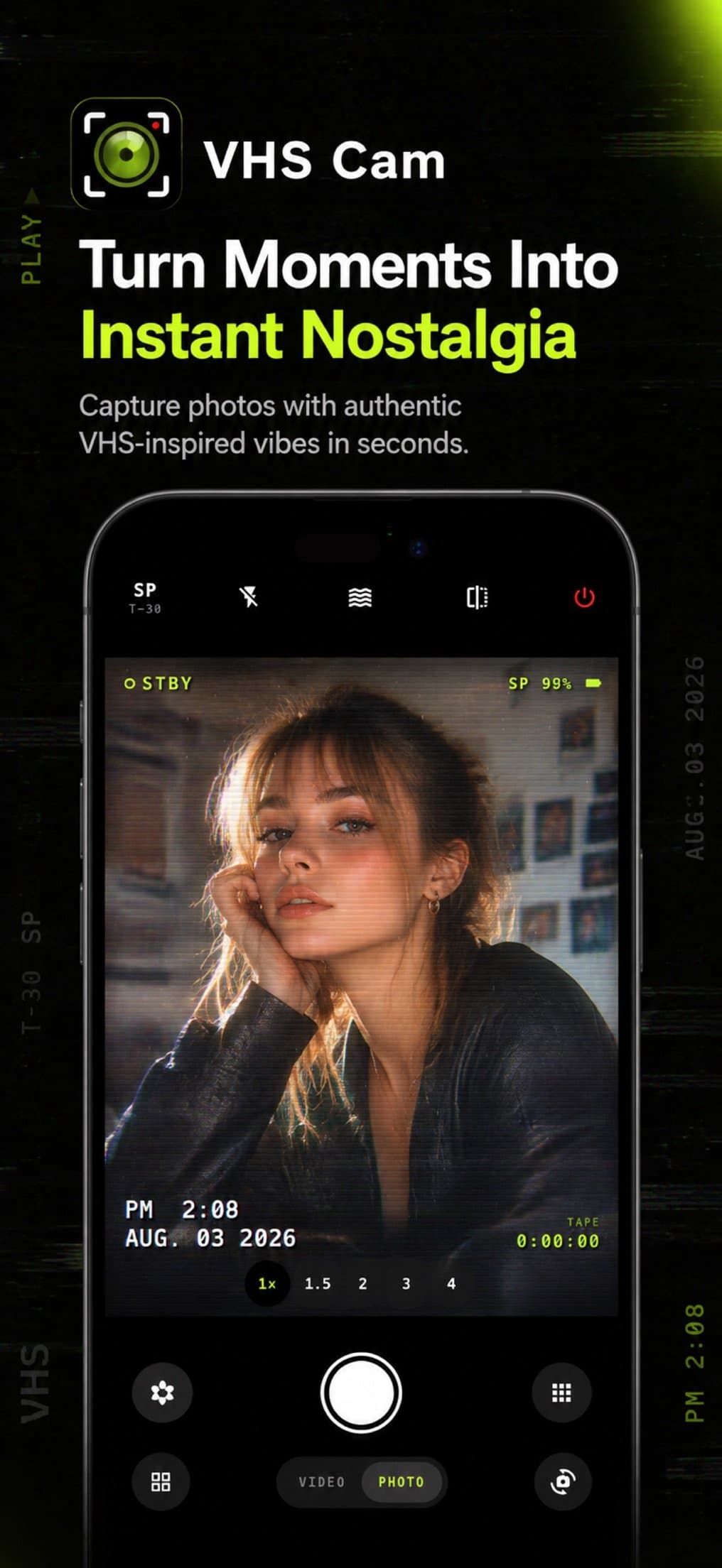
About this app
VHS Camera is a mobile app that transforms your phone's live camera feed into a worn-in analog tape, complete with scanlines, chroma bleed, tracking glitches, and dropouts. Unlike simple filters, it runs a real analog pipeline on the preview itself, so you frame the shot, press record, and the take is already finished. You can capture photos and video with audio, and everything lands in an on-device Tape Library with tape labels, playback, and erase controls. The app offers fourteen distinct tape stocks—from Classic VHS to Broadcast—each with its own color, noise, and tracking trouble. Pro features include manual tracking for glitch effects, all fourteen stocks, no watermark, and video recordings up to 30 minutes. Privacy is a priority: no accounts, no uploads, no ads, and no cross-app tracking. Photos and videos stay on your device unless you choose to save or share them. The free version includes the core camera, three tape stocks, and recordings up to 60 seconds with a watermark....
Key features
- 1Real-time analog pipeline on the live preview: scanlines, chroma bleed, tracking glitches and dropouts applied as you frame.
- 2Fourteen tape stocks from Classic VHS to Broadcast, each with its own color, noise and tracking character.
- 3On-device Tape Library with tape labels, playback, photo viewing and erase controls; no accounts, no uploads.
Target customer profile
Drawn from the product itself, not from a survey.
Demographic
Nostalgic millennials and Gen X (ages 30-50)
Pain points
Modern phone videos look too clean and lack the charm of old home movies.
Primary needs
Easy way to recreate authentic VHS aesthetics for personal memories and social sharing.
Demographic
Content creators and filmmakers (ages 18-35)
Pain points
Expensive gear and complex software needed for retro effects; want quick, in-camera results.
Primary needs
Real-time analog effects with manual glitch control for music videos, skits, and creative projects.
Demographic
Partygoers and event attendees (ages 21-40)
Pain points
Standard phone videos feel impersonal; want a fun, vintage vibe for parties and gatherings.
Primary needs
Instant retro-style photos and videos with audio to share on social media or keep as mementos.
Scout Review
Written by AI from measured evidence, scored out of 100.
VHS Camera is a well-executed nostalgia play with a real technical claim behind it: the analog pipeline runs on the live preview, so framing and recording happen in the same pass, and captures land in an on-device Tape Library rather than a camera roll. The app UI, judged from store screenshots, is the strongest part — the viewfinder with scanlines, timestamp, tape counter and SP badge is convincingly rendered, and the dark toolbar with a white shutter reads instantly. The marketing site matches the brand without overdoing it. Security is genuinely above average for the category: 10/12 headers, HSTS, and an architecture with no accounts and no uploads that makes the privacy claim structural rather than aspirational. The flaws are specific and fixable: a 5.7s mobile LCP, a contrast failure on the signature neon green, small body text on feature cards, and Pro pricing that's described only as 'varies by storefront.' None of these are structural. The bigger question is ceiling — VHS aesthetics are a niche, and the Pro tier gates exactly the features (fourteen stocks, manual tracking) that make the app interesting.
Measure by measure
Usability
68No signup, no account, free tier with three stocks and 60s clips — time-to-first-tape is basically the download. The four-step how-to is clear but sits below the fold, and Pro pricing is 'varies by storefront,' which tells you nothing before you install.
Design
71Judging the app UI from store screenshots: the VHS viewfinder with scanlines, timestamp, tape counter and SP badge is convincingly rendered. Homepage is clean black-and-neon, though feature-card body text runs small and two screenshots are near-duplicates.
Speed
68Desktop Lighthouse is a clean 100/100. Mobile lands at 77 with a 5.7s LCP dragging it down, but CLS 0 and TBT 0ms mean the page doesn't jump or block — it's a heavy hero image, not a broken build.
Security
76HTTPS enforced with HSTS, frame protection, nosniff, Referrer-Policy and Permissions-Policy all set — 10/12 on the header checklist. The one gap is a missing CSP. Privacy posture is genuinely strong: no accounts, no uploads, no ads, no cross-app tracking.
Accessibility
80Lighthouse a11y at 96/100 with one failing audit: insufficient color contrast. The app ships localized in 71 languages, which is unusually broad. No published accessibility statement or documented screen-reader support, so the automated score is most of what we have.
Growth
62Real wedge: the analog pipeline runs on the live preview, not as a post-filter, and the on-device Tape Library plus no-upload privacy stance is a genuine differentiator against filter apps. Early traction (5 ratings, v1.0) is context, not the score.
Improvement areas
- Mobile LCP of 5.7s — compress and responsively size the hero image to approach the 2.5s threshold.
- Failing contrast audit on the neon-green accent; lighten it or add a text shadow to clear WCAG AA.
- Pro pricing described only as 'varies by storefront' — publish actual numbers so users can decide before installing.
Design & Usability
The product is the app, and the app looks the part: store screenshots show a live viewfinder with scanlines, timestamp, tape counter, SP badge and battery icon all rendered sharply, with a dark rounded toolbar and a prominent white shutter. The marketing site matches — pure black, neon-green accent, fourteen tape-stock pills laid out cleanly. Where it slips is craft detail: feature-card body text is small enough to squint at, two screenshots are near-duplicates when the Tape Library or settings screen would have shown more, and the FAQ answers are dense paragraphs with no visual breaks. Usability is the stronger half: no account, no signup, free tier with three stocks and 60-second clips means time-to-first-tape is roughly the download time. The four-step how-to is clear but sits below the fold, and Pro pricing is described only as 'varies by storefront,' which is honest and useless in equal measure.
Speed & Security
Speed splits cleanly by platform. Desktop Lighthouse is a perfect 100/100; mobile lands at 77 with a 5.7-second LCP as the sole drag, offset by CLS 0 and TBT 0ms — meaning the page is heavy on first paint but never jumps or blocks. That's a hero-image problem, not an architecture problem, and it's fixable with compression and responsive sizing. Security is the quiet strength: HTTPS enforced with HSTS, frame protection, nosniff, Referrer-Policy and Permissions-Policy all present for 10/12 on the header checklist, with a missing Content-Security-Policy as the one real gap. The architecture backs up the marketing — no accounts, no uploads, no ads, no cross-app tracking means the attack surface for user data is genuinely small. A privacy policy is linked from the homepage. For an indie photo app, this is a better security posture than most.
Accessibility & Growth
Accessibility scores 96/100 on Lighthouse with a single failing audit: insufficient color contrast, almost certainly the neon-green-on-black accent that defines the brand. That's a real, fixable flaw — a slightly lighter green or a text shadow would clear it. The app is localized in 71 languages, which is unusually broad for a v1.0 indie release and suggests real international intent. What's missing is documentation: no accessibility statement, no notes on screen-reader support or keyboard navigation. Growth is a judgement on the idea, and the idea holds up. The wedge is concrete — the analog pipeline runs on the live preview rather than being applied after the fact, so what you frame is what you get, and the on-device Tape Library with labels and erase controls treats captures as tapes rather than a camera roll. The privacy stance is a real differentiator against filter apps that want accounts and cloud sync. Against VHS Camcorder and Rarevision VHS, the differentiators are the live pipeline, the fourteen stocks and the no-upload architecture. The limit is category ceiling: VHS aesthetics are a novelty niche, the Pro tier gates the interesting stocks and manual tracking, and there's no network effect or data advantage to compound. It can win its niche; it can't grow past it easily.
Conclusion
If you're the target user — someone who wants their phone video to look like a 1994 home movie without opening an editor — this does the job with less friction than the alternatives and a privacy posture you don't have to take on faith. The free tier is genuinely usable: three stocks, 60-second clips, watermark. Pro is where the app actually lives, and the pricing opacity is the one thing that would make me hesitate before installing. Fix the mobile LCP, fix the contrast, put a number on the Pro tier, and this is a solid niche app with a clear reason to exist.
Suggestions for improvement
- Compress and responsively size the mobile hero image to pull LCP down from 5.7s toward the 2.5s threshold.
- Lighten the neon-green accent or add a text shadow to clear the failing contrast audit without losing the brand.
- Publish actual Pro pricing on the site instead of 'varies by storefront' — users decide before installing, not after.
- Swap one of the two near-duplicate screenshots for the Tape Library or Camera Setup screen to show the full product.
Alternatives comparison
Named competitors, point by point. Nobody paid to appear here or to be left out.
 VHS Camera — Retro Camcorder VHS Camera — Retro Camcorder |  VHS Camcorder VHS Camcorder | Rarevision VHS | |
|---|---|---|---|
| Real-time analog pipeline on live preview (vs. post-applied filter) | Yes — pipeline runs on the preview itself | Filters/effects applied, not a live analog pipeline | Filter-based effects, not a live pipeline |
| Number of tape stocks / effect presets | 14 stocks (3 free, 14 with Pro) | Various effects and filters | Limited tape stocks |
| Privacy: no accounts, no uploads, no tracking | Yes — on-device only, no accounts | Not a stated focus | Not a stated focus |
| On-device Tape Library with labels and erase | Yes — labeled tapes, playback, erase | Standard camera roll | Standard camera roll |
| Manual tracking / glitch control | Yes — Pro feature | Not documented | Not documented |
| Free tier with no watermark requirement to try | Free with 3 stocks, 60s clips, watermark | Free download, effects included | Free with in-app purchases |
VHS Camcorder
A popular app that simulates VHS recording with various effects and filters, but may lack real analog pipeline and privacy focus.
Rarevision VHS
An iOS app that brings back the 80s camcorder look with filters and effects, but offers limited tape stocks and requires in-app purchases.
Comparing options? See VHS Camera — Retro Camcorder alternatives, scored side by side
More Entertainment & Fun apps
View all Entertainment & Fun
Pushup RPG: Fitness Quest
90Pushup RPG is a camera-based push-up counter and fitness RPG for home workouts. Real push-ups and squats become attacks as you defeat 48 foes across 8 biomes, earn XP and loot, join guilds, and battle in live 40-second duels. Free on iOS and Android.

TUNL - Cave Flyer
89A hold-to-thrust cave flyer with a new daily level, ghost races, and a global leaderboard.

i Word Unscrambler
88Free Word Unscramble for scrabble and words games.

How Long Timer
88HowLongHowManyDays.com is a free online countdown timer that lets you track the time remaining until specific times, dates, holidays, and special even

FaceSwapAI
87AI face swap for photos, videos, GIFs with free trial.

manga translator AI
87Manga Translator AI translates manga and comics into the languages readers choose.

DeepSwapAI
87AI face swap online with no subscription, pay per use.

VibeBot
86AI-powered no-code Discord bot maker

「自听」MyListen
86Turn AI articles into natural audio, locally on your iPhone

67ez
86Free viral 67 (Six Seven) browser games, world counter & ...

TheBean.ai
84Adaptive AI personal trainer that evolves with your progr...

unscene
84A movie-night planner for friends choosing what to watch together.


A platform dedicated to providing unbiased reviews of newly launched applications, analyzing everything from their features to their full potential.
info@scoutforge.net© 2026 Scoutforge. All rights reserved.
