Cycling through all six. Tap any point to stop.
Measured on six things
VidCella is a web-based AI image and video generator. Pick from models like Seedream, Seedance, Wan, Kling and Nano Banana to create images, edit photos and turn text or images into video.
Security
40HTTPS is enforced and SPF is set, but there's no HSTS, CSP, frame protection, Referrer-Policy or Permissions-Policy, and DMARC is missing. Checklist lands at 3/12.
Screenshots
1 / 1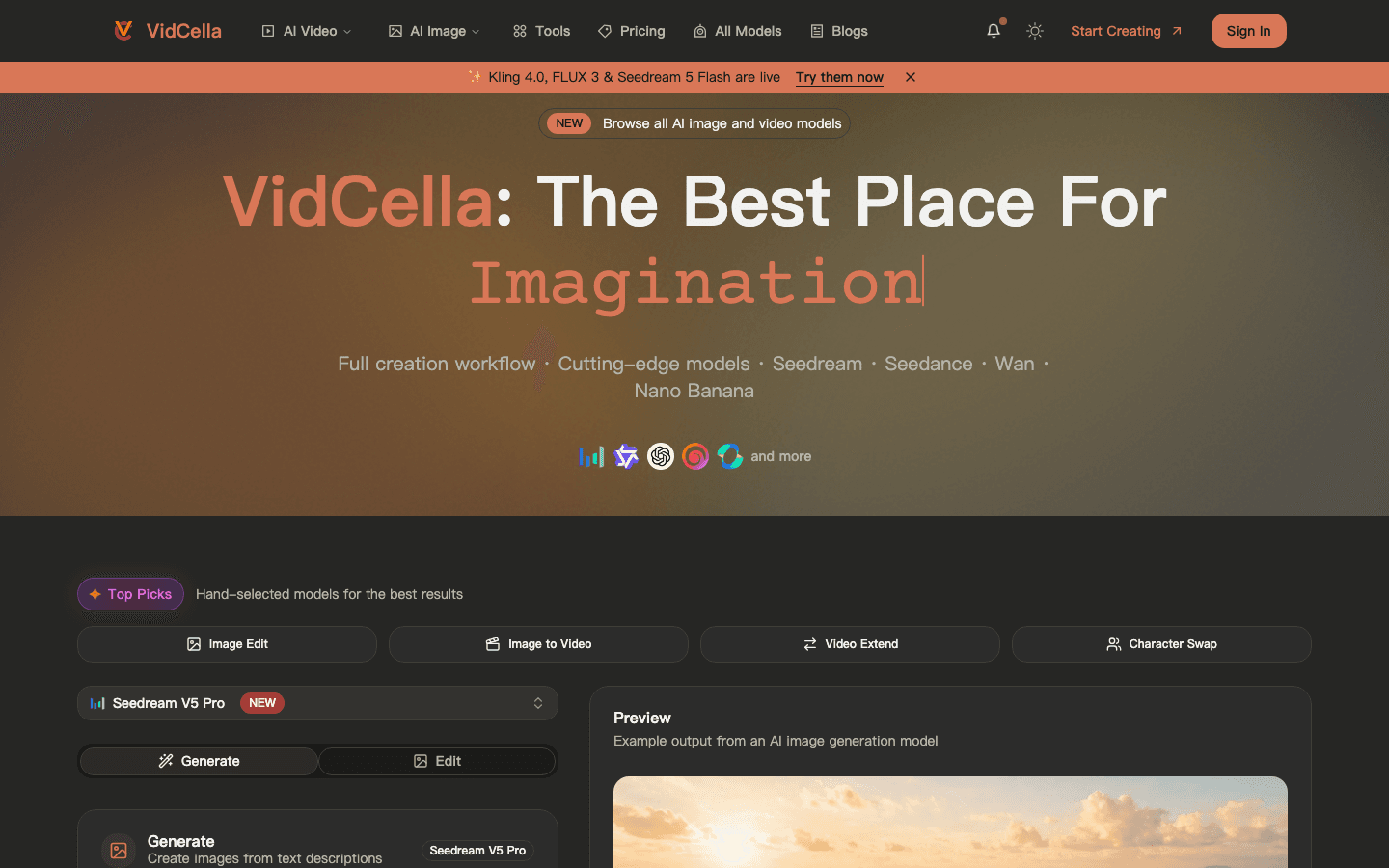
About this app
VidCella is an all-in-one AI generation platform for creators, marketers and small teams who need both still images and short videos. It puts a broad catalog of current image and video models behind one account and one credit balance, so you can compare outputs and pick the model that suits each task rather than guessing. For images, VidCella supports text-to-image and image editing with models such as Seedream 5, FLUX 3, GPT Image, Qwen Image and Nano Banana. For video, it offers text-to-video and image-to-video with Seedance, Wan, Kling, MiniMax and Grok Imagine, including clips with native audio on supported models. Reference images can guide composition, character and style. VidCella also includes one-click photo tools: AI clothes changer, pose transfer, AI cosplay generator, anime to real life and AI photo dump. Pricing is pay-as-you-go: free credits on signup, then one-time credit packs from $10. Paid packs include watermark-free downloads and commercial use.
Key features
- 130+ image and video models (Seedream, FLUX, GPT Image, Qwen, Nano Banana, Seedance, Wan, Kling, MiniMax, Grok Imagine) behind one credit balance.
- 2Text-to-image, image editing, text-to-video and image-to-video in a single workspace with reference-image guidance.
- 3One-click photo tools: AI clothes changer, pose transfer, cosplay generator, anime-to-real, and AI photo dump.
- 4Pay-as-you-go credit packs from $10 with free signup credits and watermark-free commercial downloads on paid packs.
Target customer profile
Drawn from the product itself, not from a survey.
Scout Review
Written by AI from measured evidence, scored out of 100.
VidCella is a multi-model AI image and video platform with a genuinely good structural idea: one account, one credit balance, 30+ models, and a generator embedded right in the hero. The design is disciplined and the first paint is fast. The problems are in the plumbing — CLS 0.36 makes the page jump, the security headers are largely absent (3/12 on the probe), and the accessibility failures are the ones that block real users. Model selection is spread across three overlapping UI paths with no onboarding to explain them. It's a competent early-stage product with a clear pitch and a short list of fixable technical debts.
Measure by measure
Usability
58Credit cost on the button and a clear Generate/Edit tab are genuinely helpful. But three overlapping model-selection paths and no real onboarding leave first-timers guessing.
Design
70Disciplined dark palette with a single coral accent, generator above the fold, and clear type hierarchy. Held back by tiny low-contrast guideline text and stock-looking sample imagery.
Speed
58LCP and FCP both at 1.1s are genuinely quick, but CLS 0.36 is a big layout shift and TBT 178ms shows real main-thread work. Desktop scores lower than mobile at 66.
Security
40HTTPS is enforced and SPF is set, but there's no HSTS, CSP, frame protection, Referrer-Policy or Permissions-Policy, and DMARC is missing. Checklist lands at 3/12.
Accessibility
58Lighthouse a11y at 80/100, but six failing audit groups: unnamed buttons and links, invalid ARIA values, insufficient contrast, and out-of-order headings. No WCAG statement published.
Growth
62Multi-model aggregator with 30+ models on one credit balance plus casual one-click photo tools. Real differentiator, but the aggregator wedge is easy for rivals to copy.
Improvement areas
- Security headers are largely absent (3/12 checklist) — no HSTS, CSP, frame protection, Referrer-Policy or DMARC.
- CLS 0.36 causes a severe layout shift on load; desktop Lighthouse performance (66) trails mobile (74).
- Accessibility failures: unnamed buttons/links, invalid ARIA values, insufficient contrast, out-of-order headings.
- Three overlapping model-selection paths (dropdown, Top Picks chips, Guidelines card) with no onboarding to explain them.
Design & Usability
VidCella's homepage does the thing most AI tool sites refuse to do: it puts the generator above the fold, with prompt field, aspect-ratio grid, resolution control and a credit cost printed right on the button. The dark palette with a single coral accent is disciplined and consistent across nav, CTAs and banner. Where it slips is the details — the Guidelines card renders as tiny gray text on near-black, and the capability imagery reads as generic stock rather than output from the models being sold. Usability is a mixed bag: the credit cost on the button and the clear Generate/Edit tabs are thoughtful, but model selection is split across a dropdown, Top Picks chips and a Guidelines card with no explanation of how they relate, and there's no onboarding beyond that card.
Speed & Security
Speed is a tale of two metrics. Lighthouse mobile scores 74/100 with LCP and FCP both at 1.1s — genuinely snappy first paint. But CLS 0.36 is a severe layout shift, more than three times the 0.1 'good' threshold, and TBT of 178ms shows real main-thread work. Desktop actually scores lower at 66. Security is the weakest dimension: HTTPS is enforced and SPF is configured, but the probe found no HSTS, no CSP, no frame protection, no X-Content-Type-Options, no Referrer-Policy, no Permissions-Policy, and no DMARC. That's 3 of 12 checklist points. No SOC 2, ISO, pen-test or bug-bounty claim appears anywhere in the site content.
Accessibility & Growth
Accessibility lands at 80/100 on Lighthouse, but the failing audits are the ones that actually hurt: buttons and links with no accessible name, ARIA input fields without names, invalid aria-* values, insufficient color contrast, and headings out of sequential order. No WCAG conformance statement is published. Growth is the more interesting question. VidCella's pitch — 30+ image and video models behind one credit balance, framed as 'compare models instead of guessing' — is a real differentiator against single-model tools, and the one-click photo tools (clothes changer, pose transfer, cosplay, anime-to-real, photo dump) reach casual creators that pro-grade tools ignore. The honest limit: model aggregation is a wedge competitors can copy quickly, and the casual tools that would actually differentiate are buried below the fold.
Conclusion
VidCella is worth trying if you're already paying for two or three separate image and video subscriptions and want to consolidate. The pay-as-you-go credit model with free signup credits means low commitment to test. But if you're handling client data or need compliance paperwork, the missing security headers and absent DMARC are a real conversation to have before you commit. Fix the layout shift, ship the security headers, and give first-timers a two-minute onboarding — those three changes would move this from 'interesting' to 'recommended'.
Suggestions for improvement
- Ship the missing security headers: HSTS, CSP, X-Frame-Options, X-Content-Type-Options, Referrer-Policy, Permissions-Policy, and DMARC.
- Fix the CLS 0.36 layout shift — reserve space for the generator panel and model logos so the page stops jumping on load.
- Add accessible names to every button and link, fix the invalid aria-* values, and raise the Guidelines card contrast to WCAG AA.
- Collapse the three model-selection paths into one clear flow, or add a short onboarding that explains when to use chips vs. dropdown.
Alternatives comparison
Named competitors, point by point. Nobody paid to appear here or to be left out.
 VidCella | ||
|---|---|---|
| Model catalog breadth | 30+ image and video models in one workspace | Not specified in provided details |
| Unified credit balance across image and video | Yes — one credit balance for both image and video generation | Not specified in provided details |
| Pay-as-you-go pricing | Yes — one-time credit packs from $10, free signup credits | Not specified in provided details |
| One-click photo tools (clothes changer, pose transfer, cosplay) | Yes — five one-click photo tools included | Not specified in provided details |
| Commercial use and watermark-free downloads | Included on paid credit packs | Not specified in provided details |
Comparing options? See VidCella alternatives, scored side by side
More AI Generations apps
View all AI Generations
Uni-1 by Luma AI
92Uni-1 is an advanced multimodal text-to-image AI model th...

Gerty
91Private, local AI assistant for Mac that runs offline

LTX 2.3 AI Video Generator
91Fast, open-source AI video generator with 4K support, mul...

DemoVexa
90Turn your code into professional product demo videos with AI-generated scripts, animated UI, and natural voiceovers.

All of Us
89Add deceased loved ones to photos with AI and see free pr...

AI Vocals Generator
89Add AI singers or rappers to your own beat, get two takes...

Voqusa
89Transcribe social media video and audio links into text (free signup, 5 free credits, then pay-as-you-go)

PodRescale
89Every episode becomes two weeks of posts. In your voice. Posted for you.

HeyVid AI
88HeyVid AI is a free all-in-one AI video and image generat...

IraVoice
88Private on-device dictation for Apple-silicon Macs.

Pixelimg
88A free online AI-powered tool that instantly converts ima...

Cantoro
88Custom AI songs with a name, heard free before paying $4....


A platform dedicated to providing unbiased reviews of newly launched applications, analyzing everything from their features to their full potential.
info@scoutforge.net© 2026 Scoutforge. All rights reserved.
