

A platform dedicated to providing unbiased reviews of newly launched applications, analyzing everything from their features to their full potential.
info@scoutforge.net© 2026 Scoutforge. All rights reserved.
A platform dedicated to providing unbiased reviews of newly launched applications, analyzing everything from their features to their full potential.
info@scoutforge.net© 2026 Scoutforge. All rights reserved.
A platform dedicated to providing unbiased reviews of newly launched applications, analyzing everything from their features to their full potential.
info@scoutforge.net© 2026 Scoutforge. All rights reserved.
Cycling through all six. Tap any point to stop.
Measured on six things
AI video upscaler & enhancer to enlarge MP4s up to 4x wit...
HTTPS enforced but no HSTS, CSP, or other security headers. No SOC 2 or audit claims. Privacy policy exists but lacks depth on data retention.
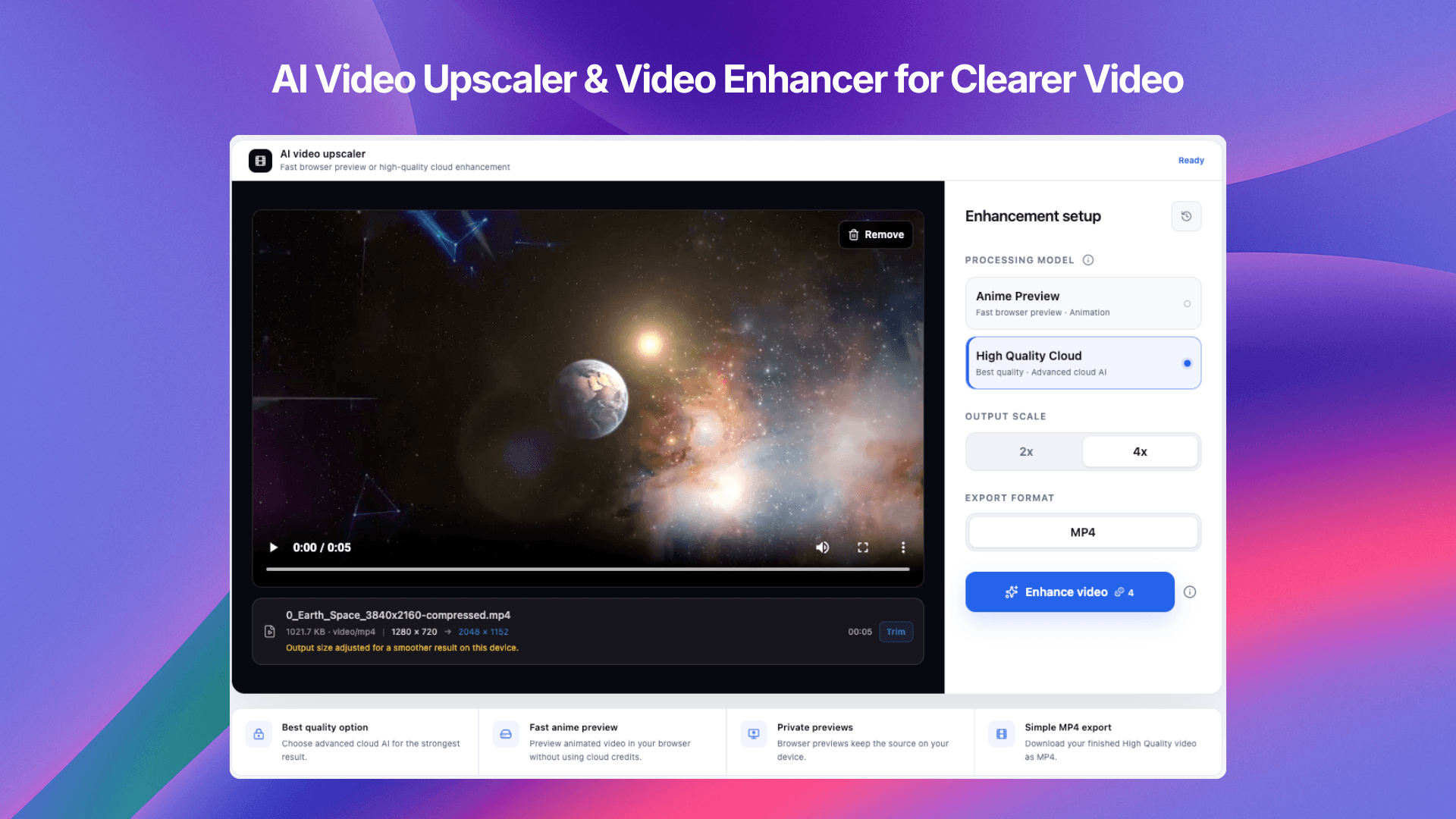
VideoUpscaler is a dedicated AI-powered tool designed to breathe new life into your videos. Whether you're dealing with grainy old footage, low-res clips, or fast-moving sports scenes, this video upscaler and enhancer automatically improves clarity and detail while scaling your MP4 up to 4x its original size. You can choose between a fast browser preview for a quick test or the High Quality Cloud AI for the most advanced enhancement, which delivers superior results though it takes longer and uses credits. The tool keeps your source private during previews (since they run on your device), ensures secure uploads for cloud processing, and lets you export your final video as MP4. It's straightforward: upload, pick your quality level, and download the result – all in a few simple steps. Ideal for content creators, archivists, and hobbyists who want to modernize their video library without diving into complex editing software.
Drawn from the product itself, not from a survey.
Demographic
Content creators & YouTubers
Pain points
Need higher resolution for professional quality; struggling with low-res stock clips or footage.
Primary needs
Quick upscaling to 4K, easy export, and reliable cloud processing.
Demographic
Film enthusiasts & archivists
Pain points
Old family videos and historical footage appear blurry on modern screens.
Primary needs
A simple way to enhance and upscale nostalgic clips while preserving their essence.
Demographic
Marketing professionals & small business owners
Pain points
Videos for ads or social media need to be sharp and engaging; time constraints limit manual editing.
Primary needs
Fast, automated enhancement to improve visual appeal without extensive skills.
Written by AI from measured evidence, scored out of 100.
VideoUpscaler is a competent, well-designed tool for AI video upscaling with a clear value proposition: fast browser previews and high-quality cloud enhancement. The landing page is polished and the workflow is simple, making it accessible to non-technical users. Performance is excellent, and accessibility is solid. However, security headers are lacking, and the before/after examples are empty black panels that fail to showcase the product's core benefit. Growth potential is limited by a crowded market and no visible traction. Overall, it's a solid tool that could benefit from more transparency and proof of its capabilities.
Intuitive flow: upload, choose quality, download. Clear navigation and helpful FAQ. Minor CTA redundancy and lack of a live demo without signup.
Clean, modern landing page with a strong hero demo card and consistent styling. However, black placeholder panels and sparse sections below the fold reduce polish.
Excellent performance scores (94 mobile, 98 desktop) with fast LCP and zero layout shift. The site feels snappy and lightweight.
HTTPS enforced but no HSTS, CSP, or other security headers. No SOC 2 or audit claims. Privacy policy exists but lacks depth on data retention.
Strong automated score (96/100) with only two contrast/label issues. Site is keyboard-navigable and responsive, but no dedicated a11y statement or multi-language support.
Real problem with a clear differentiator (private browser previews) and simple pricing. But no visible traction signals and a crowded market limit upside.
VideoUpscaler presents a clean, modern landing page with a hero that immediately showcases the core workflow: upload, choose quality, enhance. The design is consistent and professional, though the before/after panels and category cards are empty black boxes that miss an opportunity to demonstrate the product's value. Usability is strong — the three-step process is clear, navigation is intuitive, and the FAQ covers common questions. The main friction is the lack of a live demo without signup and the redundant CTAs that compete for attention. Overall, it's a solid, user-friendly experience that could be elevated with more visual proof of the AI's capabilities.
Performance is a standout: Lighthouse scores of 94 mobile and 98 desktop with a 3.1s LCP and zero layout shift indicate a fast, lightweight site. This is a clear strength. Security, however, is a weak spot — HTTPS is enforced, but the absence of HSTS, CSP, and other security headers leaves the site vulnerable to common attacks. The privacy policy is present but lacks depth on data handling. While no incidents were found, the security posture is below what I'd expect for a tool that handles user uploads. Improving security headers and publishing a more detailed policy would build trust.
Accessibility is above average with a 96/100 Lighthouse score, though two contrast and label issues remain. The site is keyboard-navigable and responsive, but there's no dedicated accessibility statement or multi-language support. Growth potential is moderate: the problem is real and the differentiator (private browser previews) is compelling, but the market is crowded with established players like Topaz and Filmora. The pricing is competitive, and the target audience is clear. However, without visible traction or community, it's hard to see how it stands out long-term. The wedge is narrow but could work if they focus on the privacy angle.
Conclusion
VideoUpscaler is a promising tool for anyone looking to upscale old or low-res videos without diving into complex software. Its strengths lie in its simplicity, speed, and privacy-focused previews. To reach its full potential, it needs to address security headers, provide real before/after examples, and build a community around its unique selling point. If you're a content creator or archivist who values privacy and ease of use, it's worth a try — especially with the free tier. Just don't expect it to dethrone the desktop giants just yet.
Named competitors, point by point. Nobody paid to appear here or to be left out.
 VideoUpscaler VideoUpscaler |  Topaz Video AI Topaz Video AI |  Wondershare Filmora Wondershare Filmora |  Upscayl Upscayl | |
|---|---|---|---|---|
| Pricing model | Free tier with 30 credits/month; Premium $8.33/mo (yearly) for 1400 credits; Business $16.67/mo for 2800 credits. | One-time purchase, typically $299 for the full version; no subscription. | Subscription-based, starting around $49.99/year for the basic plan. | Free and open-source; no cost, but requires technical setup. |
| Platform | Web-based, works in browser with cloud processing. | Desktop application (Windows/Mac). | Desktop application (Windows/Mac) with some mobile apps. | Desktop application (Windows/Mac/Linux) via CLI or GUI. |
| Privacy of source videos | Browser previews keep source on device; cloud uploads are secure. | All processing is local on the user's machine. | Local processing; cloud features may upload data. | All processing is local; no cloud uploads. |
| Ease of use | Very simple three-step web workflow, no installation. | Steep learning curve; requires understanding of AI models and settings. | Moderate learning curve; full video editor with many features. | Requires technical setup; not beginner-friendly. |
| Batch processing | Not mentioned; likely single video at a time. | Supports batch processing of multiple videos. | No dedicated batch upscaling; manual per-video. | Supports batch processing via CLI. |
Topaz Video AI
A professional-grade video upscaling software with advanced AI models, offering batch processing and more control, but it's desktop-only and pricey.
Wondershare Filmora
A popular video editor with built-in AI enhancement tools, ideal for editing and upscaling, but it's more complex for simple upscaling tasks.
Upscayl
A free open-source AI image upscaler that also supports video upscaling, but it requires technical setup and offers limited cloud processing.
Comparing options? See VideoUpscaler alternatives, scored side by side

Uni-1 is an advanced multimodal text-to-image AI model th...

Fast, open-source AI video generator with 4K support, mul...

macOS app for App Store screenshots: 3D mockups, auto-tra...

HeyVid AI is a free all-in-one AI video and image generat...

AI face swap online with no subscription, pay per use.

Generate unique AI-powered visuals for creative, personal, and commercial projects.

AI-powered platform that transforms text or images into h...

AI video generator: prompts, photos, clips into 1080p vid...

Lyric Video Studio transforms lyric video creation with DAW-inspired editing, AI integrations, and unique hardware flexibility at an affordable price.
macOS app for App Store screenshots: 3D mockups, auto-tra...

AI video generator with audio sync, multilingual support,...

Create 4K AI images with perfectly rendered, readable text.
A platform dedicated to providing unbiased reviews of newly launched applications, analyzing everything from their features to their full potential.
info@scoutforge.net© 2026 Scoutforge. All rights reserved.
