Cycling through all six. Tap any point to stop.
Measured on six things
Estimate what a website redesign and three months of SEO could cost.
Security
52HTTPS enforced with HSTS and SPF present, but no CSP, frame protection, Referrer-Policy or DMARC, and no published compliance or audit signals. Fine for a no-login calculator, thin on hardening.
Screenshots
1 / 1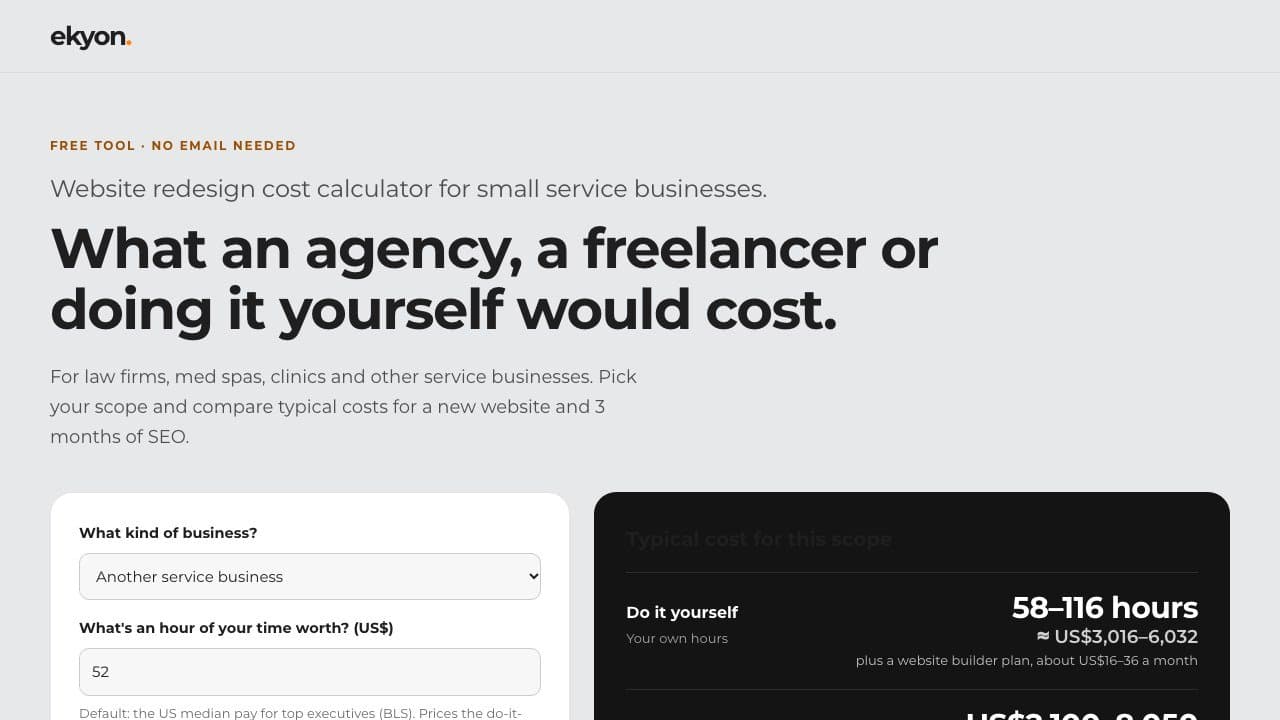
About this app
Ekyon built this free calculator for small service businesses preparing to update their website. Choose the work you need, then compare the estimated cost of hiring an agency, working with a freelancer or building it yourself. Each estimate shows its assumptions, so owners can adjust the scope and use the resulting brief to compare quotes. The tool covers a new website and three months of SEO. It works in a browser without an account or email address.
Key features
- 1Scope-based cost estimates comparing agency, freelancer and DIY routes for a new site plus 3 months of SEO.
- 2Every rate and hour assumption listed with a named public source (Upwork, Clutch, Ahrefs, Clio, BLS).
- 3Downloadable project brief to compare vendor quotes on equal scope; no account or email required.
Target customer profile
Drawn from the product itself, not from a survey.
Demographic
Owners and managing partners at small law firms
Pain points
Hard to compare quotes with different scopes
Primary needs
Estimate the likely website and SEO budget before requesting quotes
Demographic
Med spa and clinic owners
Pain points
Website and SEO costs are often quoted separately
Primary needs
Compare ways to budget for a new site and three months of search work
Demographic
Small service business owners
Pain points
Unsure how much of the redesign to handle internally
Primary needs
Compare agency, freelancer and DIY routes using one scope
Scout Review
Written by AI from measured evidence, scored out of 100.
The Website Redesign Cost Calculator is a focused, well-made free tool from Ekyon. It does one job — estimate what an agency, freelancer or DIY route costs for a new site plus three months of SEO — and does it with unusual transparency: every rate and hour is listed with a named public source, and the output is a downloadable brief for comparing quotes. It loads instantly (Lighthouse 100/100), needs no account or email, and pre-fills sensible defaults. The flaws are real but fixable: a near-invisible results-panel heading, low-contrast helper and table text, and a thin security-header profile. It is a credible lead magnet for a narrow, well-defined audience rather than a category-defining product.
Measure by measure
Usability
74Defaults are pre-filled so results appear before you touch anything, no email or account required, and one obvious orange CTA. Dense methodology sits below the fold but is reachable by scroll.
Design
70Clean two-column calculator with a strong headline hierarchy and a credible sourced-assumptions table. Held back by a near-invisible results-panel heading and small, low-contrast helper/table text.
Speed
88Lighthouse 100/100 on both mobile and desktop: LCP 1.1s, CLS 0, TBT 0ms. A genuinely snappy, lightweight tool page with no measurable performance drag.
Security
52HTTPS enforced with HSTS and SPF present, but no CSP, frame protection, Referrer-Policy or DMARC, and no published compliance or audit signals. Fine for a no-login calculator, thin on hardening.
Accessibility
80Lighthouse accessibility 97/100 with one failing audit: insufficient contrast. Helper text and table body copy are small and light grey, corroborating the contrast issue. No a11y statement or multi-language support.
Growth
62A real, specific problem for a named segment (law firms, med spas) with a genuine wedge: sourced assumptions and a downloadable brief. Headroom is capped by the narrow niche and free-tool ceiling.
Improvement areas
- Results-panel heading and helper/table text fail contrast — darken them.
- Security headers incomplete: no CSP, frame protection, Referrer-Policy or DMARC.
- No accessibility statement or multi-language support on the tool page.
Design & Usability
The tool looks and behaves like something a careful person built. The hero stacks an orange eyebrow, a grey subhead and a heavy geometric headline that dominates the fold, then hands you a two-column calculator: six white-card inputs on the left, a near-black results panel on the right, so the input-to-output relationship reads instantly. Defaults are pre-filled, so numbers appear before you touch a field, and 'FREE TOOL · NO EMAIL NEEDED' removes the usual friction. The one real design flaw is contrast: the results-panel heading is dark grey on near-black and nearly disappears, and helper text plus the assumptions table are small and light grey. Usability is strong — one solid orange CTA, two quiet text links as alternatives, methodology and FAQ below the fold.
Speed & Security
Speed is the standout: Lighthouse scores 100/100 on both mobile and desktop, with LCP 1.1s, CLS 0 and TBT 0ms. It is a lightweight page that loads instantly, which matters for a tool people reach from a search result. Security is the weak flank. HTTPS is enforced with HSTS and SPF is present, but the probe found no CSP, no frame protection, no X-Content-Type-Options, no Referrer-Policy, no Permissions-Policy and no DMARC — 5 of 12 checklist points. For a no-login calculator that stores nothing, the exposure is limited, and there are no published SOC 2, ISO or pen-test signals. That is normal for a small tool, but it is not hardened, and the missing headers are cheap to add.
Accessibility & Growth
Accessibility lands at 97/100 on Lighthouse with a single failing audit: insufficient contrast. That matches what a human sees — the helper text and assumptions-table body copy are small and light grey, and the results-panel heading is nearly invisible. There is no accessibility statement and no multi-language support, but the page is responsive and keyboard-reachable. Growth is a judgement on the idea: the calculator names a real, specific problem for a specific segment — small law firms, med spas and clinics budgeting a redesign — and its wedge is transparency. Every rate and hour is sourced (Upwork, Clutch, Ahrefs, Clio, BLS) and the output is a downloadable brief you can take to vendors. That is more than a number generator. The ceiling is the niche: a free tool feeding a US$2,200 fixed-price offer is a sensible funnel, but the addressable audience is small and the tool is easily copied.
Conclusion
If you run a small law firm, med spa or clinic and you are about to ask for redesign quotes, this is a genuinely useful ten minutes: pick your scope, read the assumptions, download the brief, and use it to force vendors onto the same page. Just do not treat the ranges as a quote — the page says as much, repeatedly. For Ekyon, the next step is unglamorous: darken the grey text, fix the results-panel heading, and add the missing security headers. The tool is good enough that the polish gaps are the only thing standing between it and a clean recommendation.
Suggestions for improvement
- Fix the results-panel heading contrast — dark grey on near-black is effectively invisible.
- Darken helper text and assumptions-table body copy to pass contrast and stay readable.
- Add CSP, X-Content-Type-Options, Referrer-Policy and DMARC; they are cheap hardening wins.
- Publish a short accessibility statement and confirm keyboard/screen-reader behavior.
Alternatives comparison
Named competitors, point by point. Nobody paid to appear here or to be left out.
 Website Redesign Cost Calculator |  | |
|---|---|---|
| Cost estimate for a website redesign | Yes — agency, freelancer and DIY ranges from sourced rates | Not specified |
| Shows assumptions and sources behind each estimate | Yes — full table citing Upwork, Clutch, Ahrefs, Clio, BLS | Not specified |
| Requires account or email | No — works in browser with no signup | Not specified |
| Downloadable brief to compare quotes | Yes — .txt project brief generated from your scope | Not specified |
Comparing options? See Website Redesign Cost Calculator alternatives, scored side by side
More Development & Engineering apps
View all Development & Engineering
Vibe Coding Agent Skills
92A free, open-source platform offering 110 AI agent skills...

CreateMyCoin
92A no-code Solana token creator that deploys SPL tokens in...

CC Switch
91Open-source desktop app for switching AI coding providers...

DemoVexa
90Turn your code into professional product demo videos with AI-generated scripts, animated UI, and natural voiceovers.

TaxID
90Fast EU VAT validation API for developers, covering 27 EU...

FontPlop
89Browser-based font viewer & tester for TTF, OTF, WOFF, WO...

Denpex
89AI-powered GPU failure diagnosis for distributed ML training

deed.page
89Permanent web hosting for AI agents, no human step

Webfetch
89Web scraping API that turns any URL into HTML, text, Mark...

Claw Messenger
88Claw Messenger is an iMessage API service that gives AI a...

PERM Processing Time: Current DOL Queue & History
88PERM Processing Time is an independent data analysis platform that helps users navigate the U.S. Department of Labor’s permanent labor certification process.

DataHabibi
88AI-powered Dubai real estate data platform with 12M+ DLD ...


A platform dedicated to providing unbiased reviews of newly launched applications, analyzing everything from their features to their full potential.
info@scoutforge.net© 2026 Scoutforge. All rights reserved.
